
ASUS NUC 13 Pro
Published on

The ASUS NUC 13 Pro is the Tall chassis edition of the Arena Canyon family, originally launched by Intel in early 2023 and now produced and supported by ASUS after the September 2023 transfer of the NUC business. It keeps the 4-inch-square footprint that made the original Intel NUC a hit with home lab builders shopping for small desktops, slots in a 12-core hybrid Raptor Lake-P processor (the Core i5-1340P in the base version, the faster Core i7-1360P in the step-up), and surrounds it with dual Thunderbolt 4, twin HDMI outputs, and 2.5-gigabit Ethernet. The “ANH” in the model number (NUC13ANHi5 for the i5, NUC13ANHi7 for the i7) denotes the Tall chassis with its 2.5-inch SATA bay, so there is a place to mount a high-capacity SSD or spinning drive alongside the M.2 NVMe. The Slim variant, NUC13ANK, carries the same processors without that bay in a 1.46-inch profile; everything else on this page applies to both chassis.
Pros and cons
| Pros | Cons |
|---|---|
| Strong single-thread performance from both the i5-1340P and i7-1360P (12C/16T, up to 4.6/5.0GHz boost) | Stuck on DDR4-3200 instead of DDR5, dated for a 2026 purchase |
| Dual Thunderbolt 4 ports (40Gbps) suitable for eGPU enclosures | Iris Xe iGPU lags behind AMD Ryzen 6000/7000 series for gaming |
| 2.5-inch SATA bay in the Tall chassis for cheap bulk storage | Fan ramps audibly under sustained load (43-45 dBA observed) |
| WiFi 6E + Bluetooth 5.3 + Intel I226-V 2.5GbE on the same board | Plastic top panel feels less premium than older aluminum NUC lids |
| Three-year manufacturer warranty with continuing BIOS updates | Robtech saw the i7 variant throttle at 99C under heavy load |
| User-serviceable: socketed DDR4 SODIMMs, two M.2 slots, replaceable AX211 WiFi card | 120W power brick is bulky relative to the device itself |
Related Videos
ASUS NUC 13 Pro Comparison Chart
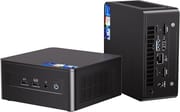 ASUS NUC 13 Pro | ASUS NUC 13 Pro | |
| Price | List Price: $749 Amazon Prices: Loading prices... | List Price: Amazon Prices: |
| Version | 16GB/512GB/i5-1340P | 32GB/1TB/i7-1360P |
| Performance Rating | 4.7 | 5.0 |
| Operating System | Windows 11 Pro | Windows 11 Pro |
| Processor | Twelve-core 3.40 Ghz (max 4.60 Ghz) Intel Core i5-1340P | Twelve-core 2.20 Ghz (max 5.00 Ghz) Intel Core i7-1360P |
| GPU | Integrated Intel Iris Xe Graphics | Integrated Intel Iris Xe Graphics |
| RAM | 16 GB DDR4 SO-DIMM, 2-channel (DDR4-3200 SODIMM, dual-channel) | 32 GB DDR4 SO-DIMM, 2-channel (DDR4-3200 SODIMM, dual-channel) |
| Internal Storage | 512 GB NVMe PCIe 4.0 SSD | 1 TB NVMe PCIe 4.0 SSD |
| Dimensions width x length x thickness | 4.61 x 4.41 x 2.13 inches (117.09 x 112.01 x 54.1 mm) | 4.61 x 4.41 x 2.13 inches (117.09 x 112.01 x 54.1 mm) |
| Weight | 1.34 lbs (0.61 kg) | 1.34 lbs (0.61 kg) |
| WiFi | Wi-Fi 6E (802.11ax) | Wi-Fi 6E (802.11ax) |
| Bluetooth | Bluetooth 5.3 | Bluetooth 5.3 |
| Ethernet | 1 Ethernet port at 2.5 Gbps | 1 Ethernet port at 2.5 Gbps |
| HDMI | 2 Full-Size HDMI Ports | 2 Full-Size HDMI Ports |
| DisplayPort | DisplayPort 1.4 via Thunderbolt 4 (up to 4 displays total) | DisplayPort 1.4 via Thunderbolt 4 (up to 4 displays total) |
| VGA | No VGA Ports | No VGA Ports |
| USB Ports | 1 USB 2.0, 3 USB 3, 2 USB-C Front: 2x USB-A 3.2 Gen 2. Rear: 1x USB-A 3.2 Gen 2, 1x USB-A 2.0, 2x Thunderbolt 4 (USB-C, 40Gbps) | 1 USB 2.0, 3 USB 3, 2 USB-C Front: 2x USB-A 3.2 Gen 2. Rear: 1x USB-A 3.2 Gen 2, 1x USB-A 2.0, 2x Thunderbolt 4 (USB-C, 40Gbps) |
| Thunderbolt Ports | 2 | 2 |
| OCuLink | No | No |
| Internal SATA Ports | No SATA ports | No SATA ports |
| Card Reader | No Card Reader | No Card Reader |
| Headphone Jack | combo | combo |
| Fanless | No | No |
| VESA Mount | Yes | Yes |
| In the Box | Mini PC, 120W power adapter, AC cord, VESA bracket and screws, cable clip, warranty card | Mini PC, 120W power adapter, AC cord, VESA bracket and screws, cable clip, warranty card |
| Expandability | 2x DDR4-3200 SODIMM (max 64GB). 1x M.2 2280 PCIe 4.0 NVMe + 1x M.2 2242 PCIe 3.0/SATA. 2.5-inch SATA bay in Tall ANH chassis. eGPU via Thunderbolt 4 | 2x DDR4-3200 SODIMM (max 64GB). 1x M.2 2280 PCIe 4.0 NVMe + 1x M.2 2242 PCIe 3.0/SATA. 2.5-inch SATA bay in Tall ANH chassis. eGPU via Thunderbolt 4 |
Related Mini PCs
-
 ASUS NUC 14 ProThe ASUS NUC 14 Pro pairs Intel Core Ultra processors with a toolless chassis, two DDR5 SODIMM…
 -
 ASUS NUC 15 Pro+The ASUS NUC 15 Pro+ is a 0.7-liter toolless mini PC with Intel Arrow Lake Core Ultra processors,…
 -
 Beelink SER6 MAXThe Beelink SER6 MAX pairs a Ryzen 7 7735HS or Ryzen 9 6900HX with Radeon 680M graphics and up to…
 -
 Dell OptiPlex 7010 MicroDell's OptiPlex 7010 Micro is a 1-liter, 13th-Gen Intel business desktop built for enterprise…
 -
 Dell Pro Micro QCM1250Dell rebrands the long-running OptiPlex Micro line as the Pro Micro and ships the QCM1250 with the…
 -
 GEEKOM A7 (2026 Edition)The GEEKOM A7 2026 Edition keeps the original A7's half-liter aluminum case and ports but swaps the…
Serviceable inside, with 2.5GbE and dual Thunderbolt 4 outside

The Arena Canyon chassis keeps the classic 4.61 by 4.41 inch footprint that has defined the NUC line since the original Next Unit of Computing concept, with the Tall ANH variant adding just enough height (2.13 inches) to fit a 2.5-inch drive bay below the motherboard. At roughly 1.34 pounds, the unit is light enough to disappear behind a monitor on its included VESA bracket. Unlike the newer NUC 14 Pro, the 13 Pro chassis still uses captive Phillips screws on the bottom rather than a toolless latch, but ServeTheHome highlighted that ASUS labels each USB port with its actual speed rating on the rear panel.
Inside is a 12-core (4P + 8E) Raptor Lake-P processor with 16 threads: the Core i5-1340P with a 4.6GHz max boost in the base version, or the Core i7-1360P with a 5.0GHz max boost and 18MB of cache in the step-up version. The 13th generation is a refinement of a known-good platform: it improves on the equivalent 12th Gen NUC by only five to six percent in most multi-threaded benchmarks. Sustained workloads are where it pulls ahead. PhilsComputerLab demonstrated that Intel’s more aggressive power and thermal management lets the chip hold higher boost states longer than competing AMD-based mini PCs, which translates to noticeably better performance for emulation, compilation, and other tasks that prize single-thread speed. The integrated Iris Xe graphics (80 EUs on the i5-1340P, 96 EUs on the i7-1360P) handle 4K video playback and casual gaming, and ETA PRIME said that for AAA gaming, an eGPU connected through one of the Thunderbolt 4 ports is the only way to get there.
The rear panel carries two HDMI 2.0b outputs (good for 4K at 60Hz each), two Thunderbolt 4 USB-C ports (each capable of 40Gbps and a DisplayPort 1.4 alt mode), a single USB-A 3.2 Gen 2 port, a single USB-A 2.0 port, and the 2.5GbE jack served by an Intel I226-V controller. Two more USB-A 3.2 Gen 2 ports and a combo 3.5mm audio jack live on the front face along with the power button and a Kensington lock slot. Together that is enough I/O to drive four displays simultaneously and still leave ports free for a webcam, mass storage, and a wired keyboard and mouse. WiFi 6E and Bluetooth 5.3 are both supplied by the user-replaceable Intel AX211 card living in an M.2 2230 slot inside the chassis, so a Wi-Fi 7 card can go in later.
Reviewer Insights

MobileTechReview: fan noise close to an ultrabook’s
Lisa Gade at MobileTechReview framed the NUC 13 Pro as a “tiny form factor PC” that nonetheless brings the full power of Intel’s 13th Gen P-series processors to the desk, calling out the dual Thunderbolt 4 and dual HDMI 2.1 ports as “more than you could ever hope to see on an ultrabook-style laptop.” She noted that the fan does make some noise but rated it “no louder than your average 13 or 14 inch ultrabook,” a useful frame of reference if you have been weighing this against a Mac Mini or another small desktop. She put generation-over-generation gains versus the Intel 12th Gen at only five to six percent, so 12th Gen owners don’t need to upgrade.
PhilsComputerLab on the Tall chassis storage slots
Phil at PhilsComputerLab declared the NUC 13 Pro “the fastest mini PC that I have tested on the channel so far” after putting the i7-1360P variant through a battery of CPU, gaming, and emulation benchmarks. He was particularly impressed by the Tall chassis expansion options. A 2.5-inch SATA bay, an M.2 2242 secondary slot, and the primary M.2 2280 PCIe Gen 4 NVMe slot give three places to add storage without ever opening the case after the first build. He flagged that the BIOS is conservative (no overclocking) and that legacy DirectX titles can hit driver issues on Intel graphics, but the 2.5GbE networking and Wi-Fi 6E were called “high quality” and “no complaints.”
A copper M.2 heatsink keeps drives cooler, per ServeTheHome
ServeTheHome’s Patrick Kennedy compared the Intel NUC 13 Pro against the ASRock NUCs Box 1360P D4 and concluded that “if you have something that needs more consistent performance, you probably want the Intel NUC.” He measured idle draw at five to nine watts, with peaks above 90W under load, and noted the NUC’s copper M.2 heatsink keeps NVMe drives running 10 degrees cooler than the bare ASRock equivalent. Under heavy load the NUC measures 43-45 dBA, audibly louder than the ASRock unit it was tested against. For home lab nodes that sit under a desk, the consistency and refinement (labeled ports, captive screws, copper SSD cooling) make the upcharge worth it.
ETA PRIME hit 95C only under synthetic stress
ETA PRIME described the NUC 13 Pro as putting out “some amazing performance” for the form factor and confirmed it could drive four displays, but called the iGPU the weak point: “it’s falling far behind the RDNA 2 iGPUs that we’re seeing coming out of AMD right now.” Under everyday use he saw no thermal throttling, but synthetic stress tests pushed the package temperature to 95C. After months with the device, his take was that the dual Thunderbolt 4 ports save the gaming story. Pair this with an external GPU enclosure and you have a respectable compact gaming workstation, but expect integrated graphics to disappoint if you’re hoping to skip the eGPU.
Robtech calls the plastic shell a step back from aluminum NUCs
Robtech’s review opens with “the NUC 13 still uses DDR4, which is inexcusable; DDR5 kits have greatly fallen in price and plenty of AMD minis have made the switch.” He observed the i7 variant thermal throttling under heavy load (reaching 99C) and called the plastic outer shell a downgrade from older aluminum NUCs. He summed up with “the phrase ‘if it ain’t broken don’t fix it’ only applies to products with no competition.” For buyers who value Intel’s three-year warranty, vPro support on select SKUs, and long-term BIOS updates, the trade-offs are worth it; for those just chasing performance per dollar, AMD’s mini PC alternatives are increasingly hard to ignore.
Customer Reviews
Across 26 ratings on Amazon, the ASUS NUC 13 Pro averages 4.5 stars, with 82 percent landing at five stars and 11 percent at one star, so the spread is mostly enthusiastic with a small unhappy tail. Aron Chubb, a verified buyer, wrote that “the footprint on my desk is no bigger than my coffee coaster” and that “so many ports for different peripheral devices that I was able to get rid of my docking station.” A verified buyer named W. Mayberry bought it specifically because the listing “calls out Linux spec in the spec and promised domestic support,” and reported that “the Linux Mint 22.3 install was flawless.” Gerry, another verified buyer, summed it up as “the size is amazing for the power it has.”
Brian W., a verified buyer, left one star reporting a regional-warranty problem: “The product I received was zoned for China. As a result of an issue I had with it 8 months after I bought it I can’t get warranty support because it is not zoned for US.” That is a small share of the ratings, but it is the kind of issue worth checking the seller and warranty terms on before you buy. Read more owner reviews on Amazon.
A well-supported fleet box that still ships DDR4
The Core i5-1340P delivers strong single-thread performance and competent multi-thread output, and the Core i7-1360P version adds higher clocks and more cache for buyers who want a little more headroom. Dual Thunderbolt 4 ports keep the door open for an eGPU later, and the Tall chassis 2.5-inch SATA bay, combined with two M.2 slots, covers every storage configuration short of a small NAS. The three-year ASUS warranty backed by Intel-platform BIOS updates makes this a defensible long-term purchase for home labs and small business deployments where downtime matters.
The case against it is that this is 2023 hardware sold in 2026: DDR4-3200 instead of DDR5, HDMI 2.0b instead of 2.1, and an Iris Xe iGPU that AMD’s integrated Radeon graphics already lap for everything except video acceleration. If you don’t need the Thunderbolt 4 ports, the vPro options, or the three-year warranty, a cheaper AMD-based mini PC will give you more performance per dollar. If you do need those things, and especially if you are replacing other NUCs in a fleet, this remains a clean, well-supported choice. The Mini PC Comparison Chart lays this unit alongside competing models so you can put the price-versus-features tradeoff in context.
Upgrades
Accessories that fit the ASUS NUC 13 Pro's USB4 or Thunderbolt ports.

Core X V2
A Thunderbolt 5 enclosure that Razer lists as working with Thunderbolt 4 and USB4 hosts; it fits a four-slot card and needs an ATX power supply.

DEG2 eGPU Dock
Connects over USB4 or Thunderbolt 5, with an OCuLink input behind a switch, and adds an M.2 slot; it needs an ATX or SFX power supply.

Breakaway Box 850 T5
Has an 850W power supply built in, so only the graphics card is extra, and works with Thunderbolt 4 and USB4 Windows PCs.

TS4 Thunderbolt 4 Dock
An 18-port dock that CalDigit lists for Thunderbolt 4 and USB4 hosts, with 2.5GbE and a DisplayPort 1.4 output.

TBT4-UD5 Thunderbolt 4 Dock
Two HDMI ports drive two 4K60 monitors from one Thunderbolt 4 or USB4 port on a Windows PC.

Revodok Max 208 Thunderbolt 4 Dock
Adds three Thunderbolt 4 ports for dual 4K60 displays plus gigabit Ethernet; it has no HDMI port, so monitors connect over USB-C or an adapter.
Frequently Asked Questions
What do the “NUC13ANHi5” and “NUC13ANHi7” model numbers mean?
NUC13 is the 13th-generation NUC family (Arena Canyon). ANH denotes the Arena Canyon Tall chassis (the H stands for “tall” and provides a 2.5-inch SATA drive bay). The trailing i5 or i7 indicates the processor: NUC13ANHi5 ships the Intel Core i5-1340P, and NUC13ANHi7 ships the faster Core i7-1360P. The Slim version of the same chassis is called NUC13ANK and lacks the 2.5-inch bay.
Is this the same as the Intel NUC 13 Pro?
Yes. Intel designed and launched the NUC 13 Pro in early 2023, then transferred the entire NUC business to ASUS in September 2023. The hardware is unchanged; ASUS now handles manufacturing, warranty, and BIOS updates. Listings sometimes appear under either brand name, but it is the same product.
How many displays can the NUC 13 Pro drive?
Up to four simultaneous displays. The rear panel provides two HDMI 2.0b outputs and two Thunderbolt 4 USB-C ports that each support DisplayPort 1.4 alt mode. ServeTheHome and ETA PRIME both confirmed four-display configurations in their hands-on reviews.
Can I install Linux on the ASUS NUC 13 Pro?
Yes. W. Mayberry, a verified Amazon buyer, bought it on the strength of the listing’s Linux claim and reported that the Linux Mint 22.3 install was flawless. The listing itself calls out Linux support, and the Intel AX211 WiFi card sits in a standard M.2 2230 slot if a swap is ever needed.
Why does it use DDR4 instead of DDR5?
The Arena Canyon design uses DDR4-3200 SODIMMs in two socketed slots, up to 64GB. Robtech called that choice inexcusable in 2026 and pointed at AMD mini PCs that have moved to DDR5. The ASUS NUC 14 Pro is the newer model on DDR5-5600.
Does it work as a home lab or virtualization host?
It has the parts for one: up to 64GB of DDR4, two M.2 slots, a 2.5-inch SATA bay in the Tall chassis, and 2.5GbE networking on an Intel I226-V controller. ServeTheHome measured idle draw at five to nine watts, which keeps the cost down on a machine left running around the clock, and the two Thunderbolt 4 ports take external storage.
Is the fan loud?
Idle and light productivity use are quiet. Under heavy sustained load, ServeTheHome measured 43-45 dBA, audibly louder than the ASRock unit it was tested against. Lisa Gade of MobileTechReview rated the noise no worse than an average 13 or 14 inch ultrabook.