
GMKtec M8
Updated on

AMD’s Ryzen 5 PRO 6650H gives the GMKtec M8 6 cores and 12 threads, enough for office applications, multimedia playback, and light content creation. It also carries an OCuLink port for external graphics, alongside dual 2.5GbE, USB4, and WiFi 6E. All of that sits in a case small enough to share a desk with a monitor, at around $360. That points it at a home office or a small business trading a tower for desk space.
Wide connectivity and a fixed 16GB ceiling
| Pros | Cons |
|---|---|
| OCuLink port enables external GPU expansion | RAM is soldered at 16GB (not upgradeable) |
| Dual 2.5GbE networking for NAS and file servers | Integrated graphics limited for demanding creative work |
| USB4 40Gbps with DisplayPort and Power Delivery | Fan noise noticeable under heavy loads |
| Compact metal construction with good thermals | No VESA bracket included (sold separately) |
| Two M.2 2280 slots for up to 16TB storage | One USB-C port, doing USB4 and DisplayPort duty |
| WiFi 6E exceeds gigabit speeds in testing | Older Zen 3+ architecture lacks NPU |
Related Videos
GMKtec M8 Comparison Chart
 GMKtec M8 | GMKtec M8 | |
| Price | List Price: $359.99 Amazon Prices: Loading prices... | List Price: $389.99 Amazon Prices: Loading prices... |
| Version | 16GB/512GB | 16GB/1TB |
| Performance Rating | 4.3 | 4.3 |
| Operating System | Windows 11 Pro | Windows 11 Pro |
| Processor | Hexa-core 3.30 Ghz (max 4.50 Ghz) AMD Ryzen 5 PRO 6650H | Hexa-core 3.30 Ghz (max 4.50 Ghz) AMD Ryzen 5 PRO 6650H |
| GPU | Integrated AMD Radeon 660M | Integrated AMD Radeon 660M |
| RAM | 16 GB | 16 GB |
| Internal Storage | 512 GB | 1 TB |
| Dimensions width x length x thickness | 4.37 x 4.21 x 2.48 inches (111 x 106.93 x 62.99 mm) | 4.37 x 4.21 x 2.48 inches (111 x 106.93 x 62.99 mm) |
| Weight | 1.09 lbs (0.5 kg) | 1.09 lbs (0.5 kg) |
| WiFi | Wi-Fi 6E (802.11ax) | Wi-Fi 6E (802.11ax) |
| Bluetooth | Bluetooth 5.2 | Bluetooth 5.2 |
| Ethernet | 2 Ethernet ports at 2.5 Gbps | 2 Ethernet ports at 2.5 Gbps |
| HDMI | 1 HDMI Port | 1 HDMI Port |
| DisplayPort | 1 DisplayPort | 1 DisplayPort |
| VGA | No VGA Ports | No VGA Ports |
| USB Ports | 1 USB 2.0, 3 USB 3, 1 USB-C (1 USB4) | 1 USB 2.0, 3 USB 3, 1 USB-C (1 USB4) |
| Thunderbolt Ports | No | No |
| OCuLink | PCIe 4.0 x4 for eGPU | PCIe 4.0 x4 for eGPU |
| Internal SATA Ports | No SATA ports | No SATA ports |
| Card Reader | No Card Reader | No Card Reader |
| Headphone Jack | combo | combo |
| Fanless | No | No |
| VESA Mount | Yes | Yes |
| In the Box | Mini PC, power adapter (100W), HDMI cable, user manual | Mini PC, power adapter (100W), HDMI cable, user manual |
| Expandability | RAM is soldered LPDDR5-6400 (NOT upgradeable). Storage: 2x M.2 2280 slots (1x PCIe 3.0, 1x PCIe 4.0). Removable WLAN module. | RAM is soldered LPDDR5-6400 (NOT upgradeable). Storage: 2x M.2 2280 slots (1x PCIe 3.0, 1x PCIe 4.0). Removable WLAN module. |
Related Mini PCs
-
 GMKtec NucBox M6The GMKtec NucBox M6 pairs an AMD Ryzen 5 6600H with Radeon 660M graphics, up to 32GB of DDR5, two…
 -
 GMKtec NucBox M2The GMKtec NucBox M2 pairs an Intel Core i7-11390H with Iris Xe graphics, 1TB of NVMe storage,…
 -
 Beelink SER3The Beelink SER3 pairs an AMD Ryzen 7 3750H (Radeon Vega 10) with dual 4K HDMI output and extensive…
 -
 Beelink SER5 (5500U)The Beelink SER5 (5500U) is a Ryzen 5 5500U mini PC with 16GB of DDR4 in two slots (64GB max), a…
 -
 Blackview MP100 (Ryzen 5 7430U)A 5-inch-square Ryzen 5 7430U mini PC with 16GB of DDR4, a 512GB SSD, room for two more drives, and…
 -
 Bmax MaxMini B11 ProA palm-sized office mini PC with an Intel Core Ultra 5 115U, 16GB of soldered LPDDR5, a 512GB SSD…
The ports outrun the graphics

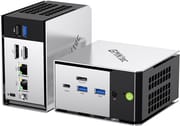
The chassis borrows design cues from GMKtec’s EVO-X1 series, with a metal shell in place of plastic. At roughly 4.4 by 4.2 by 2.5 inches and just over a pound, it takes up little desk space and keeps every port within reach. The front panel houses USB4, two USB 3.2 Gen2 ports, the OCuLink connector, and a 3.5mm audio jack; the rear carries HDMI 2.0, DisplayPort 1.4, another USB 3.2 port, a USB 2.0 port, and dual 2.5GbE LAN ports.
The Ryzen 5 PRO 6650H scores around 18,000 on PassMark’s CPU Mark, with Cinebench R23 multi-thread results around 9,500 and Geekbench 6 multi-core near 7,800. That covers Microsoft Office, web browsing, 4K video playback, and basic video editing in a tool like CapCut. The Radeon 660M integrated graphics run older titles and emulation up to PS2 and some Wii U games at playable framerates, while modern AAA titles struggle above low settings.
The OCuLink connector is a PCIe 4.0 x4 interface wired for an external GPU enclosure, so a desktop card can pick up the work the Radeon 660M cannot. The dual 2.5GbE ports delivered their rated speeds in testing, which puts NAS duty and network-heavy workflows in reach. WiFi 6E ran past gigabit speeds in range testing, Bluetooth 5.2 handles peripherals, and the USB4 port carries 40Gbps with DisplayPort alt mode and power delivery, though some reviewers noted compatibility quirks with certain USB-C monitors.
Reviewer Insights

NotebookCheck’s Perspective
NotebookCheck awarded the GMKtec M8 a 71% score, positioning it as an “average” but well-balanced option. Their review praised the relatively cool operating temperatures and easy serviceability for storage upgrades. They noted that “the NucBox M8 isn’t trying to be the fastest mini PC” but rather targets accessibility through competitive pricing while maintaining adequate capability for standard business applications. The OCuLink support was highlighted as uncommon in this price bracket. Their main criticisms focused on the fan’s pulsing behavior under load and the lack of an integrated NPU for AI workloads.
TechRadar’s Perspective
TechRadar awarded 4.5 out of 5 stars and declared themselves “really surprised by just how powerful the GMKtec NucBox M8 is.” The reviewer found it “fast and capable for all Microsoft applications, such as Word, Excel, and PowerPoint” and praised the ultra-compact form factor. For light multimedia editing, the reviewer noted it handled “mobile phone video editing in CapCut without issue,” though Premiere Pro work with mirrorless camera footage struggled due to limited GPU power. They emphasized the OCuLink option and substantial storage upgrade potential as key differentiators.
Lon Seidman’s Perspective
Lon Seidman concluded that “you give up upgradeable memory, but for a reasonable price you get unusually fast I/O for the class.” His testing confirmed smooth 4K/60 web browsing with only occasional, barely perceptible dropped frames in YouTube playback. Ubuntu detected all of its hardware. He noted the fan becomes audible in performance mode but remained “not among the loudest tested.” Gaming tests showed Cyberpunk 2077 managed around 30 fps at 1080p low settings, while PS2 emulation ran at full speed.
Customer Reviews
Across 245 ratings on Amazon, the GMKtec M8 averages 4.1 stars. About two thirds of buyers leave five stars and 13 percent leave one. David M., a verified buyer running it as his main machine for six months, wrote that it handles a 36 inch monitor “without any hiccups” and praised tech support as “super responsive,” while Julie M. (also a verified purchase) reported it arrived with an activated Windows 11 Pro and ran solid for her, with no blue screens and clean 4K OBS streaming.
Heat and reliability drive the lower ratings. Fuzzy nuts, a verified buyer who gave it three stars, noted that “if you put it into performance mode it runs uncomfortably Hot for me. 90° + c is a little too hot for my comfort and then the nvme starts throttling,” and recommended staying in balanced mode. Verified buyer Kevin Paul docked a star because the unit “became inoperable within a week” after a Windows update, though he recovered it with GMKtec’s help, and a one-star verified reviewer, selective 2011, wrote: “This piece of crap lasted six months and died with no warning.”
Read more owner reviews on Amazon.
Choose it for office work and add an eGPU for anything more
The two configurations differ only in storage, 512GB at $359.99 and 1TB at $389.99, and both ship with the same 16GB of memory. Two M.2 2280 slots sit inside either one, so the cheaper unit can reach the larger capacity later with a drive of your choosing. At around $360 for the entry build, this is a compact desktop for documents and browsers that keeps a graphics upgrade path open.
Shoppers who want memory they can swap, or more graphics power without an enclosure, will do better with the GMKtec G3 Plus or the Beelink SER5 Pro. Starry Hope’s Mini PC Comparison Chart lines up the specs across the catalog.
Frequently Asked Questions
Can I upgrade the RAM in the GMKtec M8?
No. The LPDDR5-6400 memory is soldered to the board, and 16GB is the only configuration offered.
What is OCuLink and why does the M8 include it?
OCuLink is a PCIe 4.0 x4 socket that connects an external GPU enclosure with more bandwidth than a USB link provides.
How many displays can the M8 support?
Three displays run at once, through HDMI 2.0, DisplayPort 1.4, and USB4 with DisplayPort alt mode. All three outputs carry 4K, and the HDMI and DisplayPort connections also handle 8K.
Is the M8 compatible with Linux?
Yes. Lon Seidman’s Ubuntu install detected every piece of hardware, WiFi, Bluetooth, and Ethernet included, and the AMD Ryzen platform has strong open-source driver support.
How loud is the M8 during operation?
The dual-fan cooling system produces between 33 and 41 dB depending on workload. The BIOS offers quiet and balanced modes for lower noise.
Does the GMKtec M8 include a VESA mounting bracket?
No. The case is VESA-compatible, but the bracket must be purchased separately. The package holds the mini PC, power adapter, HDMI cable, and user manual.
What storage expansion options does the M8 offer?
Two M.2 2280 slots, one running at PCIe 3.0 speeds and one at PCIe 4.0 speeds, take up to 16TB of NVMe storage between them with currently available drives. There is no 2.5-inch SATA bay, so every upgrade goes through M.2.