
GMKtec NucBox M6
Updated on

The GMKtec NucBox M6 is a budget-friendly mini PC that packs impressive performance into a small form factor. Powered by an AMD Ryzen 5 6600H processor and Radeon 660M integrated graphics, this compact device offers a balance of power and affordability. With options for up to 32GB of DDR5 RAM and 1TB of NVMe storage, the NucBox M6 aims to provide value for users seeking a capable desktop replacement or home theater PC.
Pros and Cons
| Pros | Cons |
|---|---|
| Affordable price point | Limited to 6 cores in an era of 8-core processors |
| AMD Ryzen 5 6600H with Zen 3+ architecture | Fan noise can be noticeable under heavy load |
| Extensive port selection including USB 4 | Struggles with 4K gaming and video editing |
| Dual 2.5Gb Ethernet ports | Higher power consumption compared to some competitors |
| Wi-Fi 6E and Bluetooth 5.2 support | Included NVMe drive lacks thermal sensor |
| Two M.2 NVMe slots (PCIe Gen 4) | eGPU compatibility issues reported |
Related Videos
GMKtec NucBox M6 Comparison Chart
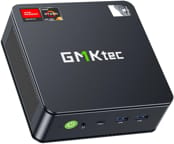 GMKtec NucBox M6 | GMKtec NucBox M6 | |
| Price | List Price: $399.99 Amazon Prices: | List Price: $469.98 Amazon Prices: |
| Version | 16GB/1TB/AMD Ryzen 5 6600H | 32GB/1TB/AMD Ryzen 5 6600H |
| Performance Rating | 7.1 | 7.7 |
| Operating System | Windows 11 Pro | Windows 11 Pro |
| Processor | Hexa-core 3.30 Ghz (max 4.50 Ghz) AMD Ryzen 5 6600H | Hexa-core 3.30 Ghz (max 4.50 Ghz) AMD Ryzen 5 6600H |
| GPU | Integrated AMD Radeon 660M | Integrated AMD Radeon 660M |
| RAM | 16 GB | 32 GB |
| Internal Storage | 1 TB | 1 TB |
| Dimensions width x length x thickness | 4.5 x 4.5 x 2 inches (114.3 x 114.3 x 50.8 mm) | 4.5 x 4.5 x 2 inches (114.3 x 114.3 x 50.8 mm) |
| Weight | unknown | unknown |
| WiFi | Wi-Fi 6E (802.11ax) | Wi-Fi 6E (802.11ax) |
| Bluetooth | Bluetooth 5.2 | Bluetooth 5.2 |
| Ethernet | 2 Ethernet ports at 2.5 Gbps | 2 Ethernet ports at 2.5 Gbps |
| HDMI | 1 Full-Size HDMI Port | 1 Full-Size HDMI Port |
| DisplayPort | 1 DisplayPort | 1 DisplayPort |
| VGA | No VGA Ports | No VGA Ports |
| USB Ports | 1 USB 2.0, 3 USB 3, 1 USB 4, 1 USB-C (USB-C port supports USB 4.0, PD, DisplayPort, and data transfer) | 1 USB 2.0, 3 USB 3, 1 USB 4, 1 USB-C (USB-C port supports USB 4.0, PD, DisplayPort, and data transfer) |
| Thunderbolt Ports | No | No |
| OCuLink | No | No |
| Internal SATA Ports | No SATA ports | No SATA ports |
| Card Reader | No Card Reader | No Card Reader |
| Headphone Jack | combo | combo |
| Fanless | No | No |
| VESA Mount | Yes | Yes |
| In the Box | Nucbox M6 Mini PC, Power Supply & Cable, User Manual, HDMI Cable, VESA Mount with Screws, Warranty Card | Nucbox M6 Mini PC, Power Supply & Cable, User Manual, HDMI Cable, VESA Mount with Screws, Warranty Card |
| Expandability | Barebones option available for adding your own memory, storage, and OS. Supports PCIe 4.0 SSD. | Barebones option available for adding your own memory, storage, and OS. Supports PCIe 4.0 SSD. |
Related Mini PCs
-
 GMKtec M8The GMKtec M8 is a compact mini PC featuring AMD's Ryzen 5 PRO 6650H processor with OCuLink support…
 -
 GMKtec NucBox M2Harness the power of the GMKtec NucBox M2 Mini PC with its Intel Core i7-11390H processor, zippy…
 -
 ACEMAGICIAN AM06 Pro Mini PCThe ACEMAGICIAN AM06 Pro is a compact AMD Ryzen mini PC (Ryzen 7 5700U, 5800U, or Ryzen 5 7430U)…
 -
 Beelink SER3The Beelink SER3 pairs an AMD Ryzen 7 3750H (Radeon Vega 10) with dual 4K HDMI output and extensive…
 -
 Beelink SER5 (5500U)The Beelink SER5 (5500U) is a budget-friendly mini PC powered by the AMD Ryzen 5 5500U processor.…
 -
 BOSGAME P4 UltraA compact Ryzen 7 7730U mini PC with dual 2.5GbE LAN, Wi-Fi 6E, two PCIe 3.0 M.2 slots, and a…
Detailed Overview
The GMKtec NucBox M6 stands out in the mini PC market with its modern features and competitive pricing. The AMD Ryzen 5 6600H core processor offers six cores and 12 threads, with base and boost clocks of 3.3GHz and 4.5GHz, respectively. This CPU is paired with AMD’s Radeon 660M integrated graphics, significantly upgrading over previous generations of integrated GPUs.
Connectivity is a strong suit for the NucBox M6. It includes a USB 4 port, which supports DisplayPort and Power Delivery, alongside three USB 3.2 Type-A ports and one USB 2.0 port. The dual 2.5Gb Ethernet ports, a rarity at this price point, offer high-speed networking options. Display outputs include HDMI 2.0 and DisplayPort 1.4, enabling support for multiple 4K displays. Note that the USB4 port does not include OCuLink, so buyers interested in attaching an external GPU should review the eGPU connector options before assuming the upgrade path is straightforward.
Internally, the NucBox M6 offers flexibility with two M.2 NVMe slots supporting PCIe Gen 4 speeds. This allows for significant storage expansion, supporting up to 4TB of storage. DDR5 RAM, upgradeable to 64GB, ensures the system is future-proofed for memory-intensive tasks. Despite its compact size (4.5” x 4.5” x 2”), the M6 manages to include a secondary fan for improved cooling, though this can lead to increased noise levels under heavy loads.
Reviewer Insights on the GMKtec M6
Two hands-on video reviews drive most of what is known about this machine, and both reach the same verdict: the Ryzen 5 6600H is a 2022-era Zen 3+ part (PassMark multi-thread around 18,866) that sits in budget territory by 2026, yet the M6 wraps it in a port-and-expansion package that punches above its price. The detail worth reading for is in the numbers each reviewer measured, because the 6600H’s efficiency and thermals are where the opinions split.
Robtech
In his YouTube review, Robtech tested the M6 (priced at the time around $290 for the 16GB/512GB configuration, or $230 barebones from GMKtec) against his existing mini PC charts. He was surprised a sub-$300 machine shipped with a USB 4 port: “I did not expect a mini PC under $300 to come with a USB 4 port and I was able to power and get display from the mini using my USB-C monitor.” In his benchmarks the 6600H landed in the middle of the stack for multi-core, even matching a GMKtec K3 Pro running a 12th-gen Core i7, while single-core sat near the bottom of his chart.
His thermal and power testing is the part to weigh. Idle power draw was, in his words, “on the higher side,” and the maximum was “around what the top CPUs come back with,” so he concluded that efficiency “is certainly not its strong point.” The BIOS performance mode raised the power limit but, on the AMD side, only lifted multi-core scores; his take was that “the extra fan noise and temps are not worth a trade-off for the slight performance increase,” and he saw the chip thermal throttle under a four-core load. The bundled Gen 4 NVMe drive topped out at 58C under load, which he called “a decent result” given its heatsink and fan. He measured Bluetooth range at roughly 11 feet (about 3.5 meters) through a wall.
For gaming he stuck to the integrated Radeon 660M. Esports titles held up: Counter-Strike 2 stayed “nicely above 100 FPS,” Dota 2 ran “easily over 100 FPS,” and League of Legends held above 200. Heavier games needed help, with Hellblade 2 requiring FSR 3 Performance mode just to approach a console-like frame rate. Emulation was strong for the tier, with Breath of the Wild on Wii U “hitting almost 40 FPS.” The ceiling showed in creative work: scrubbing a 4K timeline produced “stutters and frame drops” as the CPU spiked to 100%, and he noted an Intel i7-1255U “handles 4K video editing much better at much lower power” thanks to Quick Sync. He also could not get an external GPU running over USB 4, with his Razer Core X throwing a code 10 error before he gave up after an hour. He summed the M6 up as living “up to its promise as the best value Mini PC out there.”
Team Pandory
Team Pandory reviewed the 32GB/1TB model (then $340, with the 16GB/512GB at $299 and barebones at $230), confirming the 120W power brick (19V, 6.32A) and DDR5 running at 4,800 MT/s. They framed the 6-core chip directly against the 8-core norm: “Even with 6 cores, it can compete against the 5800H, besting its score in multiple situations.”
Their wall-meter readings are the most useful contribution. At idle the system pulled 10 watts and ran “around 42 degrees,” which they called “very quiet.” Under the Grid Auto Sport benchmark at 1080p medium it drew around 80 watts and maxed “around 86 degrees C without any thermal throttling,” getting “a bit louder.” Switching to the BIOS performance mode made little difference: a few more watts, a faster fan, and a slightly cooler 84 degrees. Wi-Fi held a 75 percent signal with no connection drops. On storage they flagged the bundled “Airdisk” NVMe as a weak point, saying they would have preferred a Lexar or MSI drive.
They leaned into gaming and emulation. The 6600H’s gaming ceiling is real: “We still need to remember that this is a budget mini-PC, so in 4K resolution we don’t get full speed in Dave the Diver.” Emulation fared better, with Tekken Tag 2 on Wii U holding “stable 60 FPS,” though PlayStation 3 showed slight frame drops under OpenGL after Vulkan crashed the emulator. Batocera Linux booted from a USB SSD with no Wi-Fi or Bluetooth issues. Their verdict: “The GMK Tech M6 is a feature-packed Ryzen solution at a budget price, and while you may need to lower graphic options in games, it can play many, including Counter-Strike 2.”
Both reviewers land in the same place. The M6’s value is in its ports, dual Gen 4 NVMe slots, and expandability rather than raw speed; the 6600H is a capable everyday and esports chip that shows its age and its appetite for power under sustained load. Robtech’s idle-power and throttling notes and Team Pandory’s 86C load reading point to the same trade-off: you accept higher power draw and audible fan noise in exchange for the feature set, and demanding 4K gaming and video work stay off the menu.
Customer Reviews of the GMKtec NucBox M6
Across 143 ratings on Amazon, the GMKtec NucBox M6 averages 4.4 stars, with 70 percent of reviewers leaving five stars and roughly 9 percent landing at one or two. Most owners use it as a small, low-power second machine: a kitchen-table PC, a living-room emulation and light-gaming box, or a basic office-and-browsing computer. Several mention the included VESA mount for hanging it behind a monitor or TV, the pre-installed and activated Windows 11 Pro, and a fan that is quiet at idle but audible under load (Boheeber, a verified buyer, noted the fan noise “is noticeable, but there’s no whining or unusual sounds”). Julie M., a verified buyer who runs it for video work and streaming, measured the power consumption herself: “Power draw is 8w idle, 21 at load streaming 2 OBS streams.”
The lower ratings are worth taking seriously rather than glossing over. Two verified buyers reported hardware failures: scsnails found the unit would no longer connect to the internet after months unused, and Ashley wrote that it “Worked well for a few months and then it won’t load!” Both were working through GMKtec’s one-year warranty for a fix or replacement at the time of their reviews, so the failures came with support follow-up rather than a dead end, but they are a real signal alongside the otherwise strong feedback.
Read more owner reviews on Amazon.
Conclusion: Is the GMKtec NucBox M6 Right for You?
The GMKtec NucBox M6 offers an impressive balance of performance and affordability, making it an attractive option for specific user groups. This mini PC is particularly well-suited for:
- Budget-conscious consumers seeking a capable desktop replacement
- Casual gamers interested in esports titles and less demanding games
- Users who need a compact PC for home office or light productivity tasks
- Those who appreciate expandability and a wide range of connectivity options
However, the NucBox M6 may not be the best choice for:
- Professional video editors working with 4K content
- Gamers looking to play the latest AAA titles at high settings
- Users who require absolute silence in their computing environment
If you fall into the latter categories, you should explore more powerful alternatives like the GMKtec M6 Ultra. To comprehensively compare various mini PCs and their capabilities, check out Starry Hope’s Mini PC Comparison Tool. This resource can help you find the perfect mini PC that meets your needs and budget.