
Beelink SER3
Updated on

The Beelink SER3 is a Windows mini PC measuring 4.45 by 4.96 by 1.57 inches. The main configuration runs an AMD Ryzen 7 3750H, a four-core, eight-thread Zen+ chip with integrated Radeon RX Vega 10 graphics, and Beelink also sells a lower-cost build around the dual-core Ryzen 3 3200U with Vega 3. Both cover everyday productivity, web browsing, and 4K media playback. The chassis is metal, and the VESA bracket in the box mounts the machine behind a monitor. Two SO-DIMM slots sit alongside an M.2 NVMe slot and a 2.5-inch SATA bay, so memory and storage stay open to expansion after purchase.
Pros and Cons
| Pros | Cons |
|---|---|
| Metal chassis small enough to mount out of sight | Zen+ silicon dating to 2019 |
| Two HDMI ports drive a pair of 4K60 displays | Wireless stops at WiFi 5 and Bluetooth 4.2 |
| Two SO-DIMM slots take memory up to 64GB | No memory card reader |
| SATA bay adds a second drive without pulling the NVMe | Ships single-channel, holding GPU clocks near 700MHz in games |
| VESA bracket ships in the box | Modern games stay out of reach on Vega 10 |
| Windows 11 Pro pre-installed | USB-C display output less dependable than the HDMI pair |
Related Videos
Beelink SER3 Comparison Chart
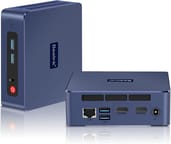 Beelink SER3 | Beelink SER3 | Beelink SER3 | |
| Price | List Price: Amazon Prices: | List Price: $229 Amazon Prices: Loading prices... | List Price: $199.00 Amazon Prices: Loading prices... |
| Version | Ryzen 7 3750H / 16GB / 512GB | Ryzen 3 3200U / 16GB / 500GB | Ryzen 3 3200U / 8GB / 256GB |
| Performance Rating | 3.4 | 2.9 | 2.5 |
| Operating System | Windows 11 Pro | Windows 11 Pro | Windows 11 Pro |
| Processor | Quad-core 2.30 Ghz (max 4.00 Ghz) AMD Ryzen 7 3750H | Dual-core 2.60 Ghz (max 3.50 Ghz) AMD Ryzen 3 3200U | Dual-core 2.60 Ghz (max 3.50 Ghz) AMD Ryzen 3 3200U |
| GPU | Integrated Radeon RX Vega 10 Graphics | Integrated Radeon RX Vega 3 Graphics | Integrated Radeon RX Vega 3 Graphics |
| RAM | 16 GB DDR4 SO-DIMM | 16 GB DDR4 SO-DIMM | 8 GB DDR4 SO-DIMM |
| Internal Storage | 512 GB | 500 GB | 256 GB |
| Dimensions width x length x thickness | 4.45 x 4.96 x 1.57 inches (113.03 x 125.98 x 39.88 mm) | 4.45 x 4.96 x 1.57 inches (113.03 x 125.98 x 39.88 mm) | 4.45 x 4.96 x 1.57 inches (113.03 x 125.98 x 39.88 mm) |
| Weight | 1.08 lbs (0.49 kg) | 1.08 lbs (0.49 kg) | 1.08 lbs (0.49 kg) |
| WiFi | Wi-Fi 5 (802.11ac) | Wi-Fi 5 (802.11ac) | Wi-Fi 5 (802.11ac) |
| Bluetooth | Bluetooth 4.2 | Bluetooth 4.2 | Bluetooth 4.2 |
| Ethernet | 1 Ethernet port at 1 Gbps | 1 Ethernet port at 1 Gbps | 1 Ethernet port at 1 Gbps |
| HDMI | 2 Full-Size HDMI Ports | 2 Full-Size HDMI Ports | 2 Full-Size HDMI Ports |
| DisplayPort | No DisplayPort | No DisplayPort | No DisplayPort |
| VGA | No VGA Ports | No VGA Ports | No VGA Ports |
| USB Ports | 4 USB 3, 1 USB-C USB-C port supports DisplayPort output | 4 USB 3, 1 USB-C USB-C port supports DisplayPort output | 4 USB 3, 1 USB-C USB-C port supports DisplayPort output |
| Thunderbolt Ports | No | No | No |
| OCuLink | No | No | No |
| Internal SATA Ports | 1 SATA port, includes 2.5" drive bay (2.5-inch SATA bay via ZIF connector) | 1 SATA port, includes 2.5" drive bay (2.5-inch SATA bay via ZIF connector) | 1 SATA port, includes 2.5" drive bay (2.5-inch SATA bay via ZIF connector) |
| Card Reader | No Card Reader | No Card Reader | No Card Reader |
| Headphone Jack | 3.5mm combo audio | 3.5mm combo audio | 3.5mm combo audio |
| Fanless | No | No | No |
| VESA Mount | Yes | Yes | Yes |
| In the Box | Power adapter, VESA mount bracket, HDMI cable, user manual | Power adapter, VESA mount bracket, HDMI cable, user manual | Power adapter, VESA mount bracket, HDMI cable, user manual |
| Expandability | 2x SO-DIMM DDR4 slots (max 64GB), 1x M.2 2280 PCIe 3.0, 1x 2.5-inch SATA bay | 2x SO-DIMM DDR4 slots (max 64GB), 1x M.2 2280 PCIe 3.0, 1x 2.5-inch SATA bay | 2x SO-DIMM DDR4 slots (max 64GB), 1x M.2 2280 PCIe 3.0, 1x 2.5-inch SATA bay |
Related Mini PCs
-
 Beelink SER5 (5500U)The Beelink SER5 (5500U) is a Ryzen 5 5500U mini PC with 16GB of DDR4 in two slots (64GB max), a…
 -
 Beelink SER5 Pro Mini PCThe Beelink SER5 Pro Mini PC packs a powerful AMD Ryzen 7 punch with 16GB RAM and a 1TB SSD. Ideal…
 -
 ACEMAGICIAN AM06 Pro Mini PCThe ACEMAGICIAN AM06 Pro is a compact AMD Ryzen mini PC (Ryzen 7 5700U or 5800U) with Radeon Vega…
 -
 BOSGAME E7The BOSGAME E7 pairs a 6-core Intel Core 3 100U with two Gigabit Ethernet ports and triple 4K@60Hz…
 -
 BOSGAME P4 UltraA compact Ryzen 7 7730U mini PC with dual 2.5GbE LAN, Wi-Fi 6E, two PCIe 3.0 M.2 slots, and a…
 -
 Getorli GT103The Getorli GT103 is a Ryzen 5 7430U mini PC with two 2.5 Gigabit Ethernet ports, three display…
Two RAM slots, an M.2 slot, and a SATA bay in a metal shell

The enclosure measures just over four and a half inches square and about an inch and a half thick, so it hides behind a monitor or slips into a tight entertainment center. A mesh ventilation pattern runs across the top and sides, drawing air over the internal components without an aggressive fan profile. The body is solid aluminum rather than plastic, and the VESA bracket in the box lets it live behind the display instead of on the desk. The front panel carries a power button, a 3.5mm audio jack, and two of the four USB 3.0 ports, keeping a thumb drive or headset within reach.
The main AMD Ryzen 7 3750H provides four cores and eight threads with a boost clock up to 4.0GHz, paired with integrated Radeon RX Vega 10 graphics; the budget variant drops to the dual-core Ryzen 3 3200U with Vega 3. Either combination handles office productivity, web browsing, video conferencing, and 4K video playback, though video editing or 3D rendering will expose the limits of these Zen+ chips. The integrated graphics cover retro gaming and older titles, and modern games stay out of reach even at reduced settings. Both PhilsComputerLab and CNX Software trace weak graphics results to the single-channel memory the system ships with; adding a second matching stick enables dual-channel mode and lifts GPU performance.
Two HDMI 2.0 ports drive 4K output at 60Hz on both displays at once. The USB-C port offers DisplayPort alternate mode for a potential third 4K display, though that output is less dependable than the HDMI pair. Four USB 3.0 Type-A ports take keyboards, mice, external drives, and other peripherals. Gigabit Ethernet covers wired networking, and the Intel Wireless-AC 7265 card supplies WiFi 5 and Bluetooth 4.2.
Reviewer Insights

Every hands-on review of the SER3 covers the Ryzen 7 3750H configuration, the version that shipped first. The budget Ryzen 3 3200U build uses the same chassis and runs slower across the board.
TechTablets on the unlocked BIOS and the power limit
TechTablets tested the Ryzen 7 3750H SER3 and found it delivered solid build quality with user-upgradeable internals. The fully unlocked BIOS drew the most attention, with the note that “it’s a completely unlocked BIOS, this is great.” On size, the review adds that “it can literally fit in the palm of my hand.” He also pointed out that the conservative power limit in the default configuration holds the chip back from its full performance.
Chigz Tech Reviews on triple 4K output and light gaming
Chigz Tech Reviews praised the SER3’s premium metal construction and versatile connectivity, calling it “basically a full PC experience in a mini compact size.” That review treats the triple 4K display capability as the standout for productivity users and points to upgradeable RAM and storage as the reason the machine stays useful. Light gaming tests showed acceptable 1080p performance in older titles like GTA V at 30 FPS, though more demanding emulation tasks like Nintendo Switch games struggled to run smoothly.
PhilsComputerLab on single-channel memory and GPU clocks
PhilsComputerLab noted that the single-channel memory configuration from the factory significantly hampers integrated GPU performance. The reviewer observed GPU clock speeds dropping to around 700MHz during gaming instead of the rated 1400MHz, and concluded that “gaming performance unfortunately was disappointing.” He framed the buying decision as “there’s no such thing as a bad mini PC, only a bad price,” suggesting the SER3 makes sense at the right discount but benefits greatly from a memory upgrade to dual-channel configuration.
NotebookCheck on size, weight, and intended use
NotebookCheck casts the SER3 as an option targeting HTPC applications and basic productivity tasks. That review confirmed dimensions of 126 x 113 x 40mm and a unit weight of just 492 grams, making it highly portable, and points the machine at web browsing and 4K video streaming rather than demanding workloads.
CNX Software on BIOS tweaks and dual-channel gains
CNX Software concluded that “the SER3’s full potential can only be reached with a couple of BIOS tweaks.” Raising power limits via software tools and moving to dual-channel memory pushed 3DMark Fire Strike from 1893 to 3165 points in that testing. The same review verified Linux compatibility and measured idle power consumption of just 5.7 watts under Windows.
A cheap, upgradeable Windows box for light work
The metal chassis and the expansion slots are the reasons to buy, and the Zen+ silicon sets the ceiling. The AMD Ryzen 7 3750H covers office productivity, media playback, and web browsing, and the budget Ryzen 3 3200U build handles those same lighter tasks for less. Anyone who buys one should budget for a second SO-DIMM: dual-channel memory moved 3DMark Fire Strike from 1893 to 3165 points in CNX Software’s testing, and the slot is already there.
That makes it a fit for a home office, an HTPC, digital signage, or any spot where a tower will not fit and the VESA bracket will. Video editing, 3D modeling, and modern gaming belong on something else, such as the Beelink SER5 or a machine built on Ryzen 5000 or 7000 series silicon.
The budget Ryzen 3 3200U build, listed around $229 with 16GB of RAM and a 500GB SSD, is a ready-to-use Windows 11 Pro system for light needs. Starry Hope’s Mini PC Comparison Chart lines its specifications up against the rest of the catalog.
Frequently Asked Questions
What processor does the Beelink SER3 use?
The main configuration uses an AMD Ryzen 7 3750H, a four-core, eight-thread Zen+ processor with a boost clock up to 4.0GHz and integrated Radeon RX Vega 10 graphics. A budget build swaps in the dual-core Ryzen 3 3200U with Vega 3 graphics. Both suit everyday productivity, web browsing, and 4K media playback rather than demanding workloads.
Can I upgrade the RAM in the Beelink SER3?
Yes. Two SO-DIMM DDR4 slots support up to 64GB of RAM total. The stock configuration ships 16GB in a single module, so adding a second matching stick enables dual-channel mode and improves integrated GPU performance.
How many monitors can the Beelink SER3 support?
Up to three, using the two HDMI 2.0 ports plus the USB-C port with DisplayPort output. Both HDMI ports run 4K at 60Hz. The USB-C display path is the less dependable of the two, so plan on the HDMI pair for the monitors you rely on.
Can I add additional storage to the Beelink SER3?
Yes. A 2.5-inch SATA bay sits alongside the M.2 2280 NVMe slot that holds the primary SSD, so a SATA SSD or hard drive goes in as a second drive and the original stays put.
Is the Beelink SER3 good for gaming?
Older and retro titles run fine; modern ones do not. The integrated Vega graphics (Vega 10 on the Ryzen 7 build, Vega 3 on the budget model) are limited, and PhilsComputerLab measured GPU clocks near 700MHz on the factory single-channel memory instead of the rated 1400MHz. For anything beyond casual or classic gaming, pick a more powerful mini PC.
Does the Beelink SER3 come with a VESA mount?
Yes. A VESA mounting bracket ships in the box, along with the power adapter, an HDMI cable, and the user manual. The bracket attaches the machine to the back of a VESA-compatible monitor and clears the desk.
What operating system does the Beelink SER3 come with?
Windows 11 Pro is pre-installed, which brings BitLocker encryption, Remote Desktop hosting, and Group Policy management.