
Bmax B4 Plus
Updated on

The BMAX B4 Plus Mini PC represents a thoughtful approach to budget computing, combining the efficient Intel N100 processor with a feature that sets it apart from the competition: a dedicated 2.5-inch SATA expansion bay. While many ultra-compact N100 mini PCs sacrifice storage flexibility for the smallest possible footprint, the B4 Plus prioritizes expandability without dramatically increasing its size. This makes it an attractive option for users who need more than cloud storage or a single drive can provide, whether for home servers, media libraries, or workstations requiring local data redundancy. With 16GB of DDR4 RAM and a 512GB NVMe SSD included out of the box, the B4 Plus arrives ready to handle everyday computing tasks while offering a clear upgrade path for storage-hungry users.
Pros and Cons of the BMAX B4 Plus
| Pros | Cons |
|---|---|
| Dedicated 2.5-inch SATA expansion bay | WiFi 5 instead of WiFi 6 |
| 16GB RAM and 512GB SSD included | Single RAM slot limits upgrade options |
| Dual HDMI for multi-monitor setups | Bluetooth 4.2 is dated |
| Easy internal access for upgrades | No 2.5GbE networking |
| Competitive pricing for configuration | Limited availability on Amazon |
| VESA mount included in box | Integrated graphics not suited for gaming |
Related Videos
Bmax B4 Plus Comparison Chart
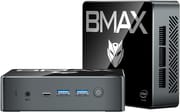 Bmax B4 Plus | |
| Price | List Price: $159.99 Amazon Prices: |
| Version | 16GB/512GB/Intel N100 |
| Performance Rating | 4.9 |
| Operating System | Windows 11 Pro |
| Processor | Quad-core 3.40 Ghz (max 3.40 Ghz) Intel Processor N100 |
| GPU | Integrated Intel UHD Graphics |
| RAM | 16 GB |
| Internal Storage | 512 GB |
| Dimensions width x length x thickness | 4.4 x 4.92 x 1.85 inches (111.76 x 124.97 x 46.99 mm) |
| Weight | 0.7 lbs (0.32 kg) |
| WiFi | Wi-Fi 5 (802.11ac) |
| Bluetooth | Bluetooth 4.2 |
| Ethernet | 1 Ethernet port at 1 Gbps |
| HDMI | 2 Full-Size HDMI Ports |
| DisplayPort | DisplayPort over USB-C |
| VGA | No VGA Ports |
| USB Ports | 2 USB 2.0, 2 USB 3, 1 USB-C |
| Thunderbolt Ports | No |
| OCuLink | No |
| Internal SATA Ports | 1 SATA port, includes 2.5" drive bay (Dedicated 2.5-inch SATA bay for additional storage expansion) |
| Card Reader | No Card Reader |
| Headphone Jack | combo |
| Fanless | No |
| VESA Mount | Yes |
| In the Box | Mini PC, Power Adapter, HDMI Cable, VESA Mount Kit, Manual |
| Expandability | Single RAM slot (16GB max), M.2 2280 slot, dedicated 2.5-inch SATA bay for secondary drive |
Related Mini PCs
-
 Bmax B4 UltraThe Bmax B4 Ultra is an ultra-compact mini PC featuring Intel's N150 processor, 12GB LPDDR5 RAM,…
 -
 Bmax B2 PowerThe Bmax B2 Power delivers budget-friendly computing in an ultra-compact package. With its Intel…
 -
 BOSGAME B100The BOSGAME B100 is a budget Intel N100 mini PC with 16GB of DDR4, a 512GB NVMe SSD, dual HDMI plus…
 -
 BOSGAME B95The BOSGAME B95 is a low-cost Intel N95 mini PC with 16GB of DDR4, a 512GB M.2 SSD, 2.5Gb Ethernet,…
 -
 CyberGeek Nano A1The CyberGeek Nano A1 packs impressive power in a compact form with its Windows 11 Pro OS, Wi-Fi 6,…
 -
 DreamQuest Pro Mini PCThe DreamQuest Pro Mini PC is a budget Intel N95 box (16GB or 32GB RAM, 512GB or 1TB SSD) with dual…
Detailed Information on the BMAX B4 Plus

The BMAX B4 Plus builds on the Intel N100 platform that has become the standard for budget mini PCs, but adds meaningful storage expansion capabilities that justify its slightly larger footprint. The Intel Processor N100 brings four efficient cores running at up to 3.4GHz, delivering reliable performance for office productivity, web browsing, and media playback. The 16GB of DDR4 RAM in a single-channel configuration handles multitasking adequately for most workloads, though the single RAM slot means this is the maximum memory capacity. For everyday computing tasks like document editing, email, and video streaming, the N100 provides responsive performance without the power consumption or heat output of more powerful processors.
What distinguishes the B4 Plus from compact competitors is its internal layout prioritizing expandability. The dedicated 2.5-inch SATA bay accepts standard laptop hard drives or SSDs up to several terabytes, transforming the mini PC from a simple desktop replacement into a capable storage solution. Users building home servers, NAS systems, or local backup solutions will appreciate this feature, as it allows combining the speed of the included NVMe drive for the operating system with high-capacity mechanical storage for data. The M.2 2280 slot housing the included 512GB SSD can also be upgraded to larger NVMe drives, providing multiple paths for storage expansion. Living Linux’s teardown reveals that accessing internal components requires only standard Phillips screwdrivers, with well-positioned screws that suggest BMAX designed the system with upgradeability in mind.
Connectivity on the B4 Plus covers essential needs without reaching premium territory. The dual HDMI ports support up to 4K 60Hz output, enabling dual-monitor productivity setups or a single high-resolution display. The front panel offers two USB 3.0 ports and a USB Type-C port for fast peripheral connections, while two USB 2.0 ports on the rear handle keyboards, mice, and other legacy devices. Gigabit Ethernet provides reliable wired networking, though the absence of 2.5GbE may disappoint users planning network-intensive applications. The WiFi 5 and Bluetooth 4.2 wireless capabilities are functional but dated compared to competitors offering WiFi 6 and Bluetooth 5.x. A combo audio jack rounds out the physical connectivity.
The thermal design employs active cooling with visible ventilation on the chassis. While not fanless, the B4 Plus maintains reasonable noise levels during typical operation. The plastic construction keeps weight under a pound and cost down, though it may feel less premium than metal-bodied alternatives. The included VESA mount bracket enables clean installation behind monitors, transforming any display into an all-in-one workstation. At approximately 4.4 x 4.92 x 1.85 inches, the B4 Plus is noticeably larger than ultra-compact N100 systems but remains far smaller than traditional desktop towers while offering capabilities they lack.
Reviewer Insights on the BMAX B4 Plus
Living Linux’s Teardown Perspective

Living Linux provides an excellent hands-on unboxing and teardown that reveals the B4 Plus’s internal design philosophy. The reviewer immediately identifies the 2.5-inch SATA bay as the key differentiator, noting “This one also has a slot for a 2.5 inch drive,” which sets it apart from ultra-compact competitors. The teardown shows accessible screw placement and straightforward disassembly, with the reviewer observing that “The screws are accessible, probably to make it easier to install the 2.5 inch drive.” This practical design consideration suggests BMAX anticipated users wanting to expand storage post-purchase.
Living Linux compares the B4 Plus favorably against smaller N100 systems for users prioritizing storage flexibility. The reviewer’s recommendation is clear: “If you really want to have a lot of storage but you still want a small computer, then this is an interesting option.” The video documents the internal layout showing the single RAM slot with 16GB module, the M.2 2280 SSD position, and the dedicated SATA connector and bay. For viewers considering the B4 Plus for Linux installations or home server applications, this teardown provides valuable insight into the hardware’s accessibility and upgrade potential. The slightly larger footprint compared to pocket-sized competitors is presented as a worthwhile trade-off for genuine storage expandability.
Customer Reviews of the Bmax B4 Plus
Across 60 ratings on Amazon, the Bmax B4 Plus averages 4.1 stars, with most owners (65 percent) leaving five stars and a smaller but real 13 percent leaving one star. Buyers using it for ordinary desktop work and media tend to be the happiest. A verified buyer, “Almost Satisfied,” replaced an aging tower with it and reported it “works perfectly” for email and web browsing, though they added a minor gripe: “My only complaint is that the audio jack is on the front.” Another verified owner, LR, gave it four stars and a narrower use case: “I use this for my PLEX server,” along with Netflix, YouTube, and casual browsing.
The lower ratings are worth taking at face value. The most pointed one-star review, from verified buyer michael lumley, is about the listing not matching the hardware: he expected Linux and got Windows instead, writing “Description says Pro Ubuntu. I specifically needed a Linux device that is not a VM.” A three-star review from Jason C. Coleman, who owns several N100 mini PCs, said it “runs as expected” once set up but that he hit trouble with his first unit out of the box. If you specifically need a Linux machine, confirm the OS before buying; for basic Windows desktop and media use, the reviews skew positive.
Read more owner reviews on Amazon.
Conclusion
The BMAX B4 Plus occupies a thoughtful niche in the budget mini PC market by prioritizing storage expandability over absolute minimalism. The dedicated 2.5-inch SATA bay genuinely differentiates it from competitors chasing the smallest possible footprint, making it the right choice for users who need local storage capacity beyond what a single drive provides. Home server builders, media library curators, and anyone requiring data redundancy in a compact system will find the B4 Plus addresses their needs where ultra-compact alternatives fall short.
The Intel N100 processor delivers the expected performance for productivity tasks and media consumption, though users should calibrate expectations accordingly. This is not a gaming machine or professional workstation, but rather a capable everyday computer that handles office work, web browsing, video streaming, and light multitasking with ease. The combination of 16GB RAM and 512GB NVMe storage provides a solid foundation, with the SATA bay offering a clear upgrade path as needs grow. The dated WiFi 5 and Bluetooth 4.2 wireless standards and single gigabit Ethernet represent compromises compared to premium options, but reflect the device’s budget positioning.
For users interested in comparing the BMAX B4 Plus with other mini PCs in its class, Starry Hope’s Mini PC Comparison Tool provides detailed specification comparisons to help identify the best match for specific requirements.
Frequently Asked Questions
What operating system does the BMAX B4 Plus come with?
The BMAX B4 Plus comes pre-installed with Windows 11 Professional, providing immediate out-of-box functionality with a genuine license.
Can I add a second hard drive to the BMAX B4 Plus?
Yes, the BMAX B4 Plus features a dedicated 2.5-inch SATA bay specifically designed for adding a secondary drive. This can accommodate standard 2.5-inch hard drives or SSDs, enabling significant storage expansion beyond the included 512GB NVMe drive.
Can I upgrade the RAM in the BMAX B4 Plus?
The BMAX B4 Plus has a single RAM slot that comes populated with 16GB DDR4, which represents the maximum supported configuration. Unlike some mini PCs with dual RAM slots, this model does not support RAM upgrades beyond the included 16GB.
How many displays can the BMAX B4 Plus support?
The BMAX B4 Plus supports up to three displays simultaneously through its dual HDMI ports and USB Type-C port with DisplayPort alternate mode. Each output supports up to 4K resolution at 60Hz, enabling flexible multi-monitor configurations.
Is the BMAX B4 Plus suitable for gaming?
The BMAX B4 Plus relies on Intel UHD integrated graphics, which limits gaming capability to older titles and less demanding games at reduced settings. For casual gaming, retro emulation, or lightweight indie games it performs adequately, but modern AAA titles are not suitable for this hardware.
Does the BMAX B4 Plus include a VESA mount?
Yes, the BMAX B4 Plus includes a VESA mounting bracket and screws in the box, allowing you to mount the mini PC behind any VESA-compatible monitor for a clean, space-saving setup.
What is the power consumption of the BMAX B4 Plus?
The BMAX B4 Plus draws very little power, in line with the low-power Intel N100 platform it is built on (typically well under 20 watts in normal use). This makes it highly energy-efficient compared to traditional desktop computers and well suited to 24/7 operation as a home server or network appliance.
Can I install Linux on the BMAX B4 Plus?
Yes, the BMAX B4 Plus is compatible with popular Linux distributions. Reviewers have successfully run various Linux flavors on this hardware, making it suitable for Linux-based home server projects, development environments, or desktop use.