
Bmax B4 Turbo
Published on

The Bmax B4 Turbo is a small Windows 11 box for a TV, a print server, or a basic office desk. Its Intel N150 is a four-core Twin Lake chip from 2025, built for low power rather than speed. A 2.5-inch SATA bay sits inside next to the SSD, so a second drive goes in without an enclosure. Bmax’s older B4 Plus has a similar port layout and the same kind of bay with an Intel N100.
Pros and cons
| Pros | Cons |
|---|---|
| 2.5-inch SATA bay for a second drive | Single memory slot, so RAM runs single-channel |
| Three display outputs: two HDMI 2.0 and USB-C | Installed SSD is SATA, about 500 MB/s |
| Bottom panel opens with one Phillips screwdriver | Fan runs all the time and ramps up quickly |
| VESA bracket and HDMI cable in the box | WiFi 5 and Bluetooth 5.0 only |
| About 7.5W at idle, with cool outer surfaces | Glossy top shows fingerprints |
Bmax B4 Turbo Comparison Chart
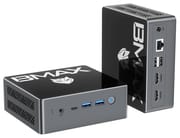 Bmax B4 Turbo | |
| Price | List Price: $300.00 Amazon Prices: Loading prices... |
| Version | 16GB/512GB/Intel N150 |
| Performance Rating | 3.1 |
| Operating System | Windows 11 |
| Processor | Quad-core 3.60 Ghz Intel Processor N150 |
| GPU | Integrated Intel UHD Graphics |
| RAM | 16 GB DDR4 SO-DIMM, single-channel |
| Internal Storage | 512 GB SATA SSD |
| Dimensions width x length x thickness | 4.41 x 4.92 x 1.73 inches (112.01 x 124.97 x 43.94 mm) |
| Weight | 0.69 lbs (0.31 kg) |
| WiFi | Wi-Fi 5 (802.11ac) |
| Bluetooth | Bluetooth 5.0 |
| Ethernet | 1 Ethernet port at 1 Gbps |
| HDMI | 2 Full-Size HDMI Ports |
| DisplayPort | DP Alt Mode via front USB-C |
| VGA | No VGA Ports |
| USB Ports | 2 USB 2.0, 2 USB 3, 1 USB-C Front USB-C with DP and power input |
| Thunderbolt Ports | No |
| OCuLink | No |
| Internal SATA Ports | 1 SATA port, includes 2.5" drive bay (2.5-inch SATA bay, drive not included) |
| Card Reader | No Card Reader |
| Headphone Jack | combo |
| Fanless | No |
| VESA Mount | Yes |
| In the Box | Mini PC, power adapter, HDMI cable, VESA mount with screws, manual |
| Expandability | One DDR4 SO-DIMM slot (16GB installed). M.2 2280 SATA slot plus a 2.5-inch SATA bay. |
Related Mini PCs
-
 Bmax B4 Plus 2025 (Intel N95)The 2025 Bmax B4 Plus is a palm-sized Windows 11 Pro desktop with an Intel N95, 12GB of soldered…
 -
 Bmax B4 PlusThe BMAX B4 Plus is an Intel N100 mini PC with a 2.5-inch SATA drive bay next to its M.2 slot, so a…
 -
 BOSGAME B100The BOSGAME B100 is a budget Intel N100 mini PC with 16GB of DDR4, a 512GB NVMe SSD, dual HDMI plus…
 -
 BOSGAME B95The BOSGAME B95 is a low-cost Intel N95 mini PC with 16GB of DDR4, a 512GB M.2 SSD, 2.5Gb Ethernet,…
 -
 CyberGeek Nano A1The CyberGeek Nano A1 is a compact Intel N100 mini PC with Windows 11 Pro, Wi-Fi 6, dual HDMI 4K…
 -
 DreamQuest Pro Mini PCThe DreamQuest Pro Mini PC is a budget Intel N95 box (16GB or 32GB RAM, 512GB or 1TB SSD) with dual…
One memory slot and a spare SATA bay

The case measures about 4.9 by 4.4 by 1.7 inches and weighs about 0.7 pounds. The front carries the power button, two USB-A 3.0 ports, a USB-C port, and a 3.5mm headset jack. The back holds two HDMI 2.0 ports, two USB-A 2.0 ports, a gigabit Ethernet jack, and the 12V barrel input. The USB-C port carries DisplayPort video, so the B4 Turbo can run three 4K screens at once. Wireless comes from a Realtek 8821CE card with WiFi 5 and Bluetooth 5.0.
Memory is one 16GB DDR4 SO-DIMM. Bmax rates it at 2666MHz. With one slot, the N150 runs in single-channel mode, which limits graphics and memory-heavy work. The SSD is an M.2 2280 SATA drive, not NVMe. The 2.5-inch bay takes a SATA SSD or a laptop hard drive, which suits a media library or a backup volume.
Reviewer Insights

NotebookCheck
Allen Ngo at NotebookCheck tested a 16GB/512GB unit that Bmax supplied and scored it 58 percent. He wrote that the N150 “still doesn’t come close to older Core i3 options like the Core i3-1115G4.” Against the older N100, the review measured the N150 at 15 percent faster in single-threaded work and 25 percent faster in multi-threaded work. Graphics ran 15 to 20 percent ahead of the average system with the same UHD Graphics in NotebookCheck’s database.
In a one-minute 4K60 video test, the B4 Turbo dropped 7 frames, where the ideal is zero. The SATA SSD topped out at about 500 MB/s, against more than 2000 MB/s on most PCIe drives. Wi-Fi averaged about 251 Mbit/s sending and 266 Mbit/s receiving against a test router.
Under a Prime95 stress test, the CPU spiked to 2.6GHz and 20W, then settled at 2GHz and 15W after about 30 seconds, with the core in the low 50s Celsius. The whole system drew about 7.5W at idle and peaked a little under 30W, above the 26W rating of the small adapter. Ngo found the fan “always active but quiet when idling,” but it ramps up quickly when a browser opens or several apps run. The top panel is smooth glossy plastic, and he noted: “Unsightly fingerprints readily accumulate on the top of the system as a result.”
In the verdict, he wrote, “It’s designed more for streaming or budget server applications rather than a full-fledged primary PC or multimedia system.” He also wrote that the fan and wireless limits “shouldn’t be an issue in a 1080p living room setup.”
Who it’s for
The B4 Turbo fits 1080p streaming on a TV and always-on jobs such as printing or file sharing, along with web browsing and documents. Its N150 has a PassMark CPU score of about 5,300, in the same class as the Intel N100 and N97, which is enough for that work. Photo work and many browser tabs will feel slow, and modern games are out of reach.
Buyers who want more memory bandwidth should look at the B4 Ultra, which uses the same N150 with 12GB of soldered LPDDR5 and a second M.2 slot. The Beelink EQ14 is another N150 box to compare. The Mini PC Comparison Chart lists the rest.
Frequently Asked Questions
Can I add more RAM to the Bmax B4 Turbo?
Not in a useful way. The board has one SO-DIMM slot, and it already holds 16GB. Intel rates the N150 for a maximum of 16GB, so a larger stick is outside the chip’s official limit.
Can the Bmax B4 Turbo run on USB-C power?
Yes. NotebookCheck notes that the front USB-C port accepts power, so a USB-C charger can stand in if the barrel adapter is lost. The supplied adapter is a 12V barrel plug on a cord about 4 feet long.
Does the Bmax B4 Turbo support Wake-on-LAN?
Bmax lists Wake-on-LAN, PXE boot, and automatic power-on after a power cut. Those three settings help when the box runs headless as a print or file server.
Can I install Linux on the Bmax B4 Turbo?
Bmax says the B4 Turbo supports Ubuntu and dual booting Windows and Linux. A Linux install can go on the 2.5-inch drive and leave Windows on the M.2 SSD. If a dual-boot install goes wrong, the one-key recovery tool that Bmax includes restores the factory Windows image.
How is the B4 Turbo different from the B4 Plus?
The B4 Plus uses the older Intel N100 and Bluetooth 4.2. The B4 Turbo moves to the N150, which boosts to 3.6GHz instead of 3.4GHz, and to Bluetooth 5.0. Both keep the SO-DIMM slot and the 2.5-inch bay.