
Bmax B4 Ultra
Updated on

The Bmax B4 Ultra is an ultra-compact mini PC that trades computing power for portability. It weighs just over half a pound and measures roughly 4 inches on each side, small enough to sit behind a monitor or tuck into a drawer. The Intel N150 Twin Lake processor is a modest upgrade over the popular N100, providing approximately 15-25% better performance in single and multi-threaded workloads respectively. For web browsing, document editing, and media consumption at an under-$200 price, that is enough machine.
Pros and cons
| Pros | Cons |
|---|---|
| Ultra-compact form factor (4.25 x 4.13 x 1.38 inches) | USB-C port lacks video output capability |
| Lightweight at just 0.57 lbs | Single-channel RAM limits performance potential |
| Smooth 4K playback, and 8K clips will run | WiFi 5 instead of WiFi 6 |
| Includes Windows 11 Pro with recovery partition | Fan runs constantly (though quietly) |
| Dual HDMI outputs for 4K displays | Entry-level CPU not suited for demanding tasks |
| VESA mount and 2.5” SATA expansion included | LPDDR5 RAM is soldered and not upgradeable |
Related Videos
Bmax B4 Ultra Comparison Chart
 Bmax B4 Ultra | |
| Price | List Price: $199.99 Amazon Prices: |
| Version | --- |
| Performance Rating | 2.8 |
| Operating System | Windows 11 Pro |
| Processor | Quad-core 3.60 Ghz Intel Processor N150 |
| GPU | Integrated Intel UHD Graphics |
| RAM | 12 GB LPDDR5 |
| Internal Storage | 512 GB |
| Dimensions width x length x thickness | 4.25 x 4.13 x 1.38 inches (107.95 x 104.9 x 35.05 mm) |
| Weight | 0.57 lbs (0.26 kg) |
| WiFi | Wi-Fi 5 (802.11ac) |
| Bluetooth | Bluetooth 5.0 |
| Ethernet | 1 Ethernet port at 1 Gbps |
| HDMI | 2 Full-Size HDMI Ports |
| DisplayPort | No DisplayPort |
| VGA | No VGA Ports |
| USB Ports | 2 USB 2.0, 2 USB 3, 1 USB-C USB-C is data only, no video output capability |
| Thunderbolt Ports | No |
| OCuLink | No |
| Internal SATA Ports | 1 SATA port, includes 2.5" drive bay |
| Card Reader | No Card Reader |
| Headphone Jack | 3.5mm combo |
| Fanless | No |
| VESA Mount | Yes |
| In the Box | -- |
| Expandability | RAM: Soldered LPDDR5 (not upgradeable for this variant), Storage: Dual M.2 slots + 2.5-inch SATA bay |
Related Mini PCs
-
 Bmax B4 PlusThe BMAX B4 Plus is an Intel N100 mini PC with a 2.5-inch SATA drive bay next to its M.2 slot, so a…
 -
 Bmax B2 PowerThe Bmax B2 Power is a palm-sized mini PC with an Intel Celeron 5205U, 8GB of DDR4, a 256GB NVMe…
 -
 BOSGAME B100The BOSGAME B100 is a budget Intel N100 mini PC with 16GB of DDR4, a 512GB NVMe SSD, dual HDMI plus…
 -
 BOSGAME B95The BOSGAME B95 is a low-cost Intel N95 mini PC with 16GB of DDR4, a 512GB M.2 SSD, 2.5Gb Ethernet,…
 -
 CyberGeek Nano A1The CyberGeek Nano A1 is a compact Intel N100 mini PC with Windows 11 Pro, Wi-Fi 6, dual HDMI 4K…
 -
 DreamQuest Pro Mini PCThe DreamQuest Pro Mini PC is a budget Intel N95 box (16GB or 32GB RAM, 512GB or 1TB SSD) with dual…
A 4-inch chassis with dual M.2 slots and a SATA bay

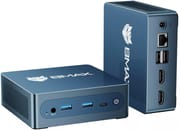
The chassis of the Bmax B4 Ultra measures 4.25 by 4.13 by 1.38 inches and weighs 0.57 lbs. A VESA mounting bracket comes in the box, so the unit can hang directly behind a monitor and turn the display into an all-in-one setup. Connections are spread across the front, rear, and sides, though the short power adapter cord noted by reviewers may require careful placement or an extension.
The Intel N150 is a 6W TDP chip, enough for office applications, web browsing, and HTPC duty on a living-room display. Green Apple Online found 4K YouTube playback smooth and got an 8K clip to run as well. Casual and online games are playable; graphics-heavy AAA titles are beyond what the N150 can drive. Against the N100, the N150 runs approximately 15% faster in single-threaded and 25% faster in multi-threaded tasks.
Two HDMI 2.1 ports drive a pair of 4K displays at once. The rest of the port set is two USB 2.0 ports, two USB 3.0 ports, one USB-C port for data only with no video output, and Gigabit Ethernet. Wireless is WiFi 5 (802.11ac) and Bluetooth 5.0. Storage expands through dual M.2 slots and a 2.5-inch SATA bay, up to 4TB in total, while the soldered LPDDR5 memory keeps RAM fixed at 12GB.
Reviewer Insights

Green Apple Online’s Perspective
Green Apple Online posted a Thai-language hands-on review of this machine (the descriptions below are translated from the Thai narration, not verbatim English quotes) covering the unboxing and initial setup. The reviewer emphasizes the compact form factor, holding the whole unit in one palm and noting it weighs a little over 200 grams, only slightly heavier than a mobile phone. A significant portion of the review walks through Windows 11 Pro setup and the F9 BMAX Smart Recovery partition.
On media playback he found 4K YouTube smooth and was surprised that even an 8K clip technically played, though with some lag at the start and his own internet bandwidth as the real bottleneck. He also put the USB-C port to the test: noting the spec lists no video over it, he connected it to a monitor, saw nothing appear on screen, and concluded the port is data-only with no display output. For light gaming he ran Roblox at full graphics without trouble and called Genshin Impact a pleasant surprise on a machine this small, while heavier titles stay out of reach. He pegs the B4 Ultra as a sensible secondary PC for office work, students, or media consumption.
NotebookCheck’s Analysis
According to NotebookCheck’s review of the similar B4 Turbo, the N150-equipped Bmax models work well as basic HTPC solutions but shouldn’t be expected to handle demanding workloads. The technical review awarded a 58% score, noting that the 6W processor means users shouldn’t “expect to get a lot done on the Twin Lake processor” but that it’s “sufficient for the most part” for its intended use cases. The review highlighted the easy serviceability and VESA mount support as positives, while pointing out concerns about single-channel RAM configuration and the always-active cooling fan.
Customer Reviews
Alexander Rodriguez, a verified buyer, wrote that it “boots up instantly and handles all my daily office work, web browsing, and 4K video streaming without a hiccup,” and praised the “dual 4K monitor support.” Rahul K., also verified, called the N150 processor “fast and responsive, handling web browsing, office applications, media streaming, and multitasking with ease.” Several reviewers, including Chris C., frame it as worth the money provided you already have a monitor, keyboard, and operating system, since none are included.
Skylar, a verified buyer who left 1 star, reported that the unit “is advertised to come with a m.2 512GB NVMe SSD, but has a much slower M.2 SATA SSD,” and concluded “this is false advertisement.” They noted the machine still worked fine for their needs, but flagged the mismatch between the listed storage and what shipped. If SSD speed matters to you, confirm the drive type on arrival.
Best as a second machine for office work and streaming
The Bmax B4 Ultra suits people who want a working Windows computer in the smallest possible package at the lowest reasonable price: a secondary workstation, an HTPC, a digital signage player, or a basic office machine where desk space is tight. The Intel N150 improves on the N100 inside the same 6W power envelope, and the price stays under $200.
The soldered LPDDR5 RAM closes off memory upgrades, though the dual M.2 slots and the 2.5-inch SATA bay leave plenty of room for drives. The missing USB-C video output matters if you planned to run a display off that port, since both monitors have to go through HDMI. Starry Hope’s Mini PC Comparison Chart lays out the alternatives side by side.
Frequently Asked Questions
Can the Bmax B4 Ultra run two monitors simultaneously?
Yes, the B4 Ultra features dual HDMI 2.1 ports that support two 4K displays at 60Hz simultaneously. Note that the USB-C port does not support video output, so all display connections must use the HDMI ports.
Is the RAM upgradeable on the Bmax B4 Ultra?
No, the 12GB LPDDR5 RAM in the B4 Ultra variant sold on Amazon is soldered directly to the motherboard and cannot be upgraded. If RAM upgradability is important to you, note that Bmax offers a different B4 Ultra variant with SO-DIMM DDR4 slots, though availability varies by region.
What storage expansion options does the B4 Ultra offer?
Dual M.2 slots (one NVMe, one SATA) plus a 2.5-inch SATA drive bay, which together take up to 4TB beyond the included 512GB NVMe SSD. That is room enough for media server duty.
How does the Intel N150 compare to the Intel N100?
The Intel N150 offers approximately 15% better single-threaded performance and 25% better multi-threaded performance compared to the N100. Both are 6W TDP processors, so power consumption and thermal characteristics are similar. The N150 provides a noticeable but not dramatic improvement for everyday tasks. If the N100’s performance is sufficient for your needs, the BMAX B4 Plus offers similar features with upgradeable RAM.
Can the Bmax B4 Ultra play 4K video smoothly?
Yes, for most streaming services and local files. Green Apple Online played both 4K and 8K clips from YouTube on this machine. At 4K 60fps, playback can stutter depending on the codec and the source.
Is the Bmax B4 Ultra fanless?
No. It has an active cooling fan that runs continuously rather than cycling on and off with temperature, and it is quiet in use.
Does the B4 Ultra support VESA mounting?
Yes. A VESA mounting bracket is included in the box, so the unit attaches to the back of a compatible monitor and turns the display into an all-in-one setup.