
Beelink MINI S12 Pro
Updated on

The Beelink MINI S12 Pro is a compact, low-power mini PC built on Intel’s quad-core N100 (up to 3.4GHz). It runs Windows 11 Pro and ships in 8GB or 16GB DDR4 configurations with an M.2 NVMe SSD, plus room for a 2.5-inch SATA drive. Wi-Fi 6, Bluetooth 5.2, dual HDMI, and a bundled VESA mount make it an easy behind-the-monitor box for everyday work, media, and light home-server use.
Pros and Cons
| Pros | Cons |
|---|---|
| Compact and lightweight design | No USB-C or Thunderbolt support |
| Efficient Intel N100 processor | Settles to 2.6 GHz under sustained load |
| Comes with Windows 11 Pro pre-installed | Fan is always on, 26 dB(A) at idle to 37 dB(A) under load |
| 16GB of DDR4 RAM and 512GB M.2 NVMe SSD | Not suited to heavy workloads |
| Wi-Fi 6 and Bluetooth 5.2 connectivity | |
| VESA mount included for easy setup |
Related Videos
Beelink MINI S12 Pro Comparison Chart
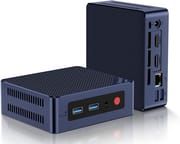 Beelink MINI S12 Pro | Beelink MINI S12 Pro | Beelink MINI S12 Pro | |
| Price | List Price: $229.00 Amazon Prices: Loading prices... | List Price: $179.00 Amazon Prices: | List Price: $249.00 Amazon Prices: |
| Version | 16GB/500GB/Intel N100 | 8GB/256GB/Intel N100 | 16GB/1TB/Intel N100 |
| Performance Rating | 3.1 | 2.7 | 3.1 |
| Operating System | Windows 11 Pro | Windows 11 Pro | Windows 11 Pro |
| Processor | Quad-core 3.40 Ghz (max 3.40 Ghz) Intel Processor N100 | Quad-core 3.40 Ghz (max 3.40 Ghz) Intel Processor N100 | Quad-core 3.40 Ghz (max 3.40 Ghz) Intel Processor N100 |
| GPU | Integrated Intel UHD Graphics | Integrated Intel UHD Graphics | Integrated Intel UHD Graphics |
| RAM | 16 GB | 8 GB | 16 GB |
| Internal Storage | 512 GB | 256 GB | 1 TB |
| Dimensions width x length x thickness | 4.52 x 4.01 x 1.54 inches (114.81 x 101.85 x 39.12 mm) | 4.52 x 4.01 x 1.54 inches (114.81 x 101.85 x 39.12 mm) | 4.52 x 4.01 x 1.54 inches (114.81 x 101.85 x 39.12 mm) |
| Weight | unknown | unknown | unknown |
| WiFi | Wi-Fi 6 (802.11ax) | Wi-Fi 6 (802.11ax) | Wi-Fi 6 (802.11ax) |
| Bluetooth | Bluetooth 5.2 | Bluetooth 5.2 | Bluetooth 5.2 |
| Ethernet | 1 Ethernet port at 1 Gbps | 1 Ethernet port at 1 Gbps | 1 Ethernet port at 1 Gbps |
| HDMI | 2 Full-Size HDMI Ports | 2 Full-Size HDMI Ports | 2 Full-Size HDMI Ports |
| DisplayPort | No DisplayPort | No DisplayPort | No DisplayPort |
| VGA | No VGA Ports | No VGA Ports | No VGA Ports |
| USB Ports | 4 USB 3 (USB3.2 Gen2 ports run at up to 10 Gbps speeds) | 4 USB 3 (USB3.2 Gen2 ports run at up to 10 Gbps speeds) | 4 USB 3 (USB3.2 Gen2 ports run at up to 10 Gbps speeds) |
| Thunderbolt Ports | No | No | No |
| OCuLink | No | No | No |
| Internal SATA Ports | 1 SATA port, includes 2.5" drive bay | 1 SATA port, includes 2.5" drive bay | 1 SATA port, includes 2.5" drive bay |
| Card Reader | No Card Reader | No Card Reader | No Card Reader |
| Headphone Jack | combo | combo | combo |
| Fanless | No | No | No |
| VESA Mount | Yes | Yes | Yes |
| In the Box | 1 x Beelink Mini S12 Pro Mini PC, 1 x VESA mount, 2 x HDMI cables (100CM & 20CM), 1 x Power adapter, 1 x User Manual | 1 x Beelink Mini S12 Pro Mini PC, 1 x VESA mount, 2 x HDMI cables (100CM & 20CM), 1 x Power adapter, 1 x User Manual | 1 x Beelink Mini S12 Pro Mini PC, 1 x VESA mount, 2 x HDMI cables (100CM & 20CM), 1 x Power adapter, 1 x User Manual |
| Expandability | Supports SSD replacement up to 2TB, addition of a 2.5-inch SATA SSD or HDD | Supports SSD replacement up to 2TB, addition of a 2.5-inch SATA SSD or HDD | Supports SSD replacement up to 2TB, addition of a 2.5-inch SATA SSD or HDD |
Related Mini PCs
-
 Beelink EQ12 Mini PCThe Beelink EQ12 is a budget Intel N100 mini PC with dual 2.5GbE LAN, up to 16GB DDR5, an M.2 NVMe…
 -
 Beelink MINI S12The Beelink MINI S12 is a compact, low-power Intel N95 mini PC with dual 4K HDMI, four USB 3.2…
 -
 ACEMAGIC Vista V1The ACEMAGIC Vista V1 is an ultra-budget mini PC sold in several Intel configs (N95, N97, and…
 -
 ACEMAGICIAN T8 PlusThe ACEMAGICIAN T8 Plus is a compact mini PC for multi-display setups, with triple 4K HDMI output,…
 -
 Blackview MP60 Mini PCThe Blackview MP60 is a compact budget mini PC sold in Intel N5095, N95, and N150 configurations,…
 -
 Blackview MP80 (N95)The Blackview MP80 is a 3.45-inch mini PC with an Intel N95 quad-core CPU, 12GB or 16GB of DDR5,…
Size, Ports, and Expansion
At 4.52 x 4.01 x 1.54 inches the S12 Pro is small enough to tuck anywhere, and for its size the port set is generous: four USB 3.2 Gen 2 ports (10Gbps), dual HDMI for a two-monitor setup, and a single Gigabit Ethernet jack. There is no USB-C.
The N100’s Intel UHD graphics handle everyday tasks, media playback, and light older-title gaming. You can swap the M.2 NVMe SSD for up to a 2TB drive and add a 2.5-inch SATA SSD or HDD alongside it.
It is not fanless, but it idles at roughly 7 to 10 watts. The bundled VESA mount and two HDMI cables make setup quick out of the box.
Reviewer Insights
The Intel N100 inside the MINI S12 Pro is a 2023 Alder Lake-N chip (PassMark multi-thread around 5,643), so by 2026 it sits firmly at the entry level. Two reviewers measured what that means in daily use, and they agree on the shape of the machine: very low power draw, modest sustained performance, and value that runs ahead of the spec sheet.
Tech Dregs bought his own unit because so many N100 reviews are sponsored, and his power readings are the highlight. Sitting headless with nothing attached, his kill-a-watt meter settled at about 7.4 watts; with the monitor disconnected it hovered around 9 to 10 watts. During a Cinebench R23 multi-core run the processor touched 3.4 GHz briefly but held closer to 2.9 GHz, with core temperatures climbing to 90 and peaking at 92 degrees Celsius while the package pulled 20 to 21 watts. He read the BIOS power limits as 20 watts sustained and 25 watts short-burst, and watched Geekbench 6 spike to 33 or 34 watts, right up against the bundled 36-watt adapter. His Cinebench R23 scores landed at 2,556 multi-core and 941 single-core, with Geekbench 6 at 2,986 multi and 1,145 single. He flagged the single heat-pipe-and-blower cooler as thin, the AZW-branded RAM and SSD as generic budget parts, and the roughly 15-to-20-second boot as quick. His takeaway: “you get what you pay for and it’s probably a good deal,” with enough headroom to do the work of three or four Raspberry Pis at a fraction of the fuss. Watch the full review on YouTube.
Allen Ngo’s written review at Notebookcheck supplies the lab-grade figures, alongside the connectivity changes from its predecessor. He measured idle draw at 8 to 9 watts and heavy load around 20 watts (21.5 watts in a Witcher 3 stress run), with brief peaks near 33 watts; the included 36-watt adapter, he wrote, is “just barely enough to power the mini PC at 100 percent CPU utilization.” The always-on fan sits near 26 dB(A) at idle and rises to between 33 and 37 dB(A) under load, quieter than the 40-plus dB(A) of pricier machines. Under sustained Prime95 load the chip settles to 2.6 GHz and 20 watts to hold a 74-degree core temperature, so “High Turbo Boost clock rates are therefore unsustainable for long periods.” His benchmarks measured Cinebench R23 at 2,916 multi and 931 single, PCMark 10 at 3,164, and 3DMark Fire Strike at 1,206. Ngo found the N100 only “5 to 10 percent faster than the N95,” and his verdict is blunt: “Don’t be fooled by the ‘Pro’ naming as the Mini S12 Pro isn’t fast at all when compared to PCs with entry-level Core i3 or Ryzen 3 CPUs,” though he calls the value “extraordinary” for the price. Read the full review on Notebookcheck.
This is a 7-to-20-watt machine that idles at about 26 dB(A), holds about 2.6 to 2.9 GHz under sustained all-core load, and posts entry-level benchmark scores that have not moved since the N100 launched in early 2023.
Customer Reviews
Amazon buyer reviews of the Beelink MINI S12 Pro are mixed, with reliability concerns prominent in the written feedback. The written reviews skew toward the low end, and the recurring theme in them is hardware reliability rather than performance. Several owners report units failing after months of light use. A verified buyer named TW gave it two stars and wrote that it “stopped working after the last Windows 11 update Sept 2025. Blue screen of death. Unable to restore, restart, or reload windows, error says hard drive malfunction.” Another verified buyer, posting as Amazon Customer, said “My unit lasted 9 months” before tracing the problem to a bad power supply, which a replacement fixed.
The most pointed account comes from reviewer Joseph Driskell, who bought four for a machine shop running “very light duty mostly web based stuff” and reported that “in the past month 2 of 4 have crapped out, stopped coming on, power lights up but no video,” concluding the fault was on the board after swapping known-good memory and drives into a working unit. These are a small number of reviews and not every buyer hit trouble, but the negative ones all concern longevity. If you are considering this mini PC, weigh those reliability reports and check the warranty terms before buying.
A low-power budget pick for home theater and light server work
It handles everyday computing tasks and light server work, and it doubles as a home theater PC. Anyone cross-shopping a Raspberry Pi for that light server role will find our list of the mini PCs that replace the delayed Pi 6 a useful comparison. The low power draw and the included Windows 11 Pro make the Beelink MINI S12 Pro a budget pick for anyone who cares about energy use.
Video editing and high-end gaming are out of reach, and those needs point to more powerful options. The minimal cooling, the missing USB-C and Thunderbolt, and the fan noise are the limits to weigh. Beelink owners curious about the brand’s AI direction can read about the first OpenClaw mini PCs it ships pre-installed.
The Starry Hope Mini PC Comparison Tool sets its specs side by side with other mini PCs.
Frequently Asked Questions
What operating system does the Beelink MINI S12 Pro come with?
Windows 11 Pro is pre-installed, so it is ready to use at first boot.
Can the RAM and storage be upgraded on the Beelink MINI S12 Pro?
Yes. RAM tops out at 16GB. The M.2 NVMe SSD can be swapped for a drive up to 2TB, and there is room for a 2.5-inch SATA SSD or HDD alongside it.
Does the Beelink MINI S12 Pro have Wi-Fi and Bluetooth capabilities?
Wi-Fi 6 and Bluetooth 5.2 are both built in.
What are the dimensions and weight of the Beelink MINI S12 Pro?
It measures 4.52 inches wide, 4.01 inches long, and 1.54 inches thick. The weight is not specified.
Does the Beelink MINI S12 Pro support 4K displays?
Yes. Both HDMI ports output 4K to compatible monitors or TVs.
Is the Beelink MINI S12 Pro fanless?
No. An internal fan handles cooling.
What ports are available on the Beelink MINI S12 Pro?
Four USB 3.2 Gen2 ports, two HDMI ports, a combo headphone jack, and a gigabit Ethernet port. There is no USB-C or Thunderbolt.
Can the Beelink MINI S12 Pro be mounted behind a monitor?
Yes. A VESA mount is in the box, so it attaches to the back of a monitor.
What is included in the box with the Beelink MINI S12 Pro?
The mini PC itself, a VESA mount, two HDMI cables (100CM and 20CM), a power adapter, and a user manual.
Is the Beelink MINI S12 Pro suitable for gaming?
Light and retro titles run on the Intel UHD Graphics. Modern games need more graphics power than this has.