
Beelink Mini S
Updated on

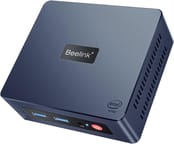
The Beelink Mini S is a compact Windows 11 Pro machine built around the Intel Celeron N5095, a quad-core chip that reaches 2.9GHz. It ships with 8GB of DDR4 SO-DIMM memory in a single slot that accepts up to 16GB, and a 256GB M.2 SATA SSD next to an empty 2.5-inch bay. Integrated Intel UHD Graphics drives two HDMI outputs for a dual 4K desktop. Wireless is Wi-Fi 5 and Bluetooth 4.0, wired networking is Gigabit Ethernet, and there is no USB Type-C anywhere on the chassis. A fan keeps the chip cool under sustained load.
| Pros | Cons |
|---|---|
| Affordable price point | Single-channel RAM limits performance |
| Compact and lightweight design | No USB Type-C port |
| Upgradeable RAM and storage options | Not suitable for demanding tasks like AAA gaming |
| Dual HDMI ports support 4K displays | Wi-Fi is not the latest standard (Wi-Fi 5) |
| Runs Windows 11 Pro out of the box | N5095 trails the N100 chips in newer minis |
| Fan stays quiet even under load | Struggles with 4K 60fps video playback |
Related Videos
Beelink Mini S Comparison Chart
 Beelink Mini S | Beelink Mini S | |
| Price | List Price: $169.00 Amazon Prices: | List Price: $159.00 Amazon Prices: |
| Version | 8GB/256GB/Intel N5095 | 8GB/128GB/Intel N5095 |
| Performance Rating | 4.1 | 4.1 |
| Operating System | Windows 11 Pro | Windows 11 Pro |
| Processor | Quad-core 2.00 Ghz (max 2.90 Ghz) Intel Celeron Processor N5095 | Quad-core 2.00 Ghz (max 2.90 Ghz) Intel Celeron Processor N5095 |
| GPU | Integrated Intel UHD Graphics | Integrated Intel UHD Graphics |
| RAM | 8 GB | 8 GB |
| Internal Storage | 256 GB | 128 GB |
| Dimensions width x length x thickness | 4.5 x 4 x 1.6 inches (114.3 x 101.6 x 40.64 mm) | 4.5 x 4 x 1.6 inches (114.3 x 101.6 x 40.64 mm) |
| Weight | 0.6 lbs (0.27 kg) | 0.6 lbs (0.27 kg) |
| WiFi | Wi-Fi 5 (802.11ac) | Wi-Fi 5 (802.11ac) |
| Bluetooth | Bluetooth 4.0 | Bluetooth 4.0 |
| Ethernet | 1 Ethernet port at 1 Gbps | 1 Ethernet port at 1 Gbps |
| HDMI | 2 Full-Size HDMI Ports | 2 Full-Size HDMI Ports |
| DisplayPort | No DisplayPort | No DisplayPort |
| VGA | No VGA Ports | No VGA Ports |
| USB Ports | 4 USB 3 | 4 USB 3 |
| Thunderbolt Ports | No | No |
| OCuLink | No | No |
| Internal SATA Ports | 1 SATA port, includes 2.5" drive bay (Supports a 2.5 inch internal drive) | 1 SATA port, includes 2.5" drive bay (Supports a 2.5 inch internal drive) |
| Card Reader | No Card Reader | No Card Reader |
| Headphone Jack | combo | combo |
| Fanless | No | No |
| VESA Mount | Yes | Yes |
| In the Box | Beelink MINI S Mini PC, 2 HDMI Cables (25cm & 100cm), Power adapter (12V/3A), Mounting bracket, User Manual, 6 foot HDMI cable, 12 volt 24 watt power supply, mounting hardware | Beelink MINI S Mini PC, 2 HDMI Cables (25cm & 100cm), Power adapter (12V/3A), Mounting bracket, User Manual, 6 foot HDMI cable, 12 volt 24 watt power supply, mounting hardware |
| Expandability | Supports addition of a 2.5 inch drive, RAM upgradable to 16GB. SSD can be swapped out, and you can add a 2.5 inch drive | Supports addition of a 2.5 inch drive, RAM upgradable to 16GB. SSD can be swapped out, and you can add a 2.5 inch drive |
Related Mini PCs
-
 Beelink EQ12 Mini PCThe Beelink EQ12 is a budget Intel N100 mini PC with dual 2.5GbE LAN, up to 16GB DDR5, an M.2 NVMe…
 -
 Beelink MINI S12 ProThe Beelink MINI S12 Pro is a budget Intel N100 mini PC with up to 16GB of DDR4, a 512GB NVMe SSD,…
 -
 AWOW AK10The AWOW AK10 is an Intel N100 mini PC with 8GB of soldered DDR5, a 256GB SSD in an M.2 slot that…
 -
 Bmax B1 PlusThe Bmax B1 Plus is an ultra-budget mini PC on Intel's 2016 Celeron J3355, with 6GB of soldered…
 -
 Bmax B3The Bmax B3 is a small Intel Celeron N5095 mini PC with two HDMI outputs, two gigabit Ethernet…
 -
 CHUWI HeroBox (2023)The CHUWI HeroBox (2023) is an Intel N100 mini PC with 8GB of LPDDR5, a 256GB M.2 drive, a 2.5-inch…
A VESA-mount box with room for a second drive
At 4.5 x 4 x 1.6 inches and about 0.6 pounds, it hides behind a monitor or TV on the bundled VESA bracket. The Celeron N5095 covers everyday tasks such as web browsing, document editing, and media playback, and the Intel UHD graphics handle casual or older games at low settings rather than anything demanding. Windows 11 Pro is preinstalled.
Ports run to four USB 3.0, two HDMI for a dual 4K setup, Gigabit Ethernet, and a combo audio jack, with Wi-Fi 5 and Bluetooth 4.0 handling wireless. Storage is a 256GB M.2 SATA SSD, and the 2.5-inch bay takes a second drive. The single RAM slot holds up to 16GB of DDR4. It is a practical pick when small size and low cost matter more than speed.
Reviewer Insights
Beelink reused this name, so the model matters. The unit covered here is the original Mini S built on the Intel Celeron N5095 (Jasper Lake, four cores, four threads, launched in early 2021), not the later MINI S12 (Intel N95) or MINI S12 Pro (Intel N100), which have their own pages. Read in 2026, the N5095 carries a PassMark multi-thread score of roughly 4,106. The N100 and N150 powering most current sub-$200 mini PCs land near 5,643 and 5,478 respectively, so the N5095 sits below today’s budget baseline.
ETA PRIME’s Perspective
ETA PRIME’s review frames the Mini S as an “affordable yet versatile tiny Windows 11 PC” and treats it largely as a Raspberry Pi alternative for light gaming and emulation. He confirmed the N5095 with Intel UHD Graphics running 16 execution units, and noted that Beelink set a relatively generous power limit: a CPU-Z run pushed the package to “15 to 16 watts,” and he measured the whole unit pulling “no more than 18 watts from the wall.” His synthetic numbers were modest: Geekbench 5 returned 595 single-core and 1825 multi-core, the 3DMark Wild Life Vulkan test scored 1414, and Night Raid landed at 2642. Gaming told the same story. Skyrim at 720p low settings averaged 42fps, which he attributed to the single-channel memory, estimating dual-channel could add “up to 40 percent” in these integrated-graphics systems; Dirt 3 at 720p medium held a smooth 60fps with V-Sync. Emulation was where he was most impressed for the price: PSP titles ran at 4x to 5x internal resolution drawing only around 12 watts, GameCube and Wii games ran at full speed in Dolphin, but PS2 was a step too far for the GPU. “Web browsing is actually pretty snappy on this,” he remarked, and 1080p and 4K video playback held up. His verdict was that the Mini S is not a high-end PC and “wasn’t meant to be,” but it is a capable budget option.
TechTablets’ Analysis
TechTablets’ review describes the N5095 Mini S as “a Jasper Lake mini PC that’s aimed at just basic computing,” and the testing backs that framing. The reviewer read the chip as a 15-watt part with a 30-watt PL2 ceiling, powered by a 36-watt adapter, and flagged that the single SO-DIMM runs in single channel at 2667MHz, which chiefly hurts the integrated graphics. On thermals, the unit peaked at 87 degrees Celsius under load without thermal throttling, and the fan stayed “quite hard to hear most of the time.” He confirmed the wireless is an Intel 3165 AC card rather than the faster AX standard, and that the SATA SSD ran close to its interface ceiling near 550MB/s reads with about 206GB free out of the box. For workloads, Chrome handled roughly 10 to 15 tabs before the quad-core hit 100 percent, Counter-Strike at 720p lowest hovered around 30fps and dipped below it during action, and 4K 30fps video played acceptably while 4K 60fps “was choppy.” He ran Geekbench 5 on camera but did not read out the scores, summarizing only that they confirmed a “very low end” chip; he stressed plainly that this is “not for AAA titles” or 4K video editing “because you will be extremely disappointed.” His bottom line was that it is a good buy for basic computing, helped by the 2.5-inch storage bay. “It does have a good price point, of course, for those that don’t want to spend a lot of money.”
Lon.TV’s Evaluation
Lon Seidman’s review positions the Mini S as an entry-level Windows 11 Pro machine that is also Linux friendly, and his testing leans on power and benchmark measurements. With a 4K display attached he measured idle draw at “about 10 or 11 watts” and full load at “about 22 to 23 watts,” calling it efficient. On benchmarks, the Browserbench Speedometer test returned 85.4, “pretty much in line with other chips from the Jasper Lake generation,” and 3DMark Cloud Gate scored 4578, slightly behind an N5105 machine he had tested because the N5105 has marginally stronger graphics. The 3DMark stress test came back at 95.6 percent against a 97 percent passing threshold, so he warned of “a little thermal throttling” under sustained load, though he repeatedly praised the fan as “barely audible.” Gaming results matched the other reviewers: Rocket League at 720p low ran in the “high 30s” and occasionally up to 50fps, while older titles like Half-Life 2 held “a mostly solid 60 frames per second” at 1080p. He singled out the single-channel RAM as the main limiter and the AC (not Wi-Fi 6) wireless as a step behind pricier rivals, and for anyone focused on gaming or emulation he recommended stepping up to an AMD Ryzen-based mini PC instead. For basic office work, web, and word processing, he found it a nicely performing, well-built machine for the price.
The measurements line up across all three: a roughly 15-to-16-watt processor that idles near 10 watts and tops out in the low 20s under load, quiet to near-silent fan noise, gaming in the 30 to 60fps range only on older or lighter titles at 720p to 1080p, and a single-channel memory layout that holds back the integrated GPU. Light desktop work, streaming, and retro and PSP-class emulation run comfortably. 4K 60fps video and anything demanding do not. In 2026 those numbers sit a tier below the N100 and N150 minis that now sell for similar money, which makes this box a cheap secondary desktop, a signage or kiosk machine, or a used-market find rather than a current first choice.
Customer Reviews
Amazon buyers split between praise for light-duty roles and complaints about reliability. Mike J, a verified buyer who repurposed it as a home domain controller running ProxMox, wrote “It took no time at all to get this thing up and running, and I was really pleasantly surprised with performance.” Mac, another verified buyer, set the right expectation for the N5095 chip, calling it “A moderately priced computer to do moderately simple tasks” and noting it struggled with high-quality game-console streaming. Others used it successfully for general office use, remote telescope control, and basic virtualization.
The one-star reviews describe hardware failures, not slow performance. Steven M., a verified buyer who titled his review “Dead after 6 months,” described the unit cycling its power endlessly and said as a retired computing engineer he had tried resetting CMOS and swapping power supplies before tracing the fault to the rubber power-button cover. Jonathan, a verified buyer who gave it four stars as a hobbyist test box, reported repeated black-screen crashes and CMOS-battery trouble and cautioned that “Definitely not a PC you want to Leave on for Super long periods of Time.”
Cheap and quiet, but a chip generation behind
The Mini S is a cheap, compact Windows 11 Pro box for web browsing, document work, and media, with a 2.5-inch bay and a 16GB-capable slot to stretch it a little.
The N5095 is older and slower than the N100 and N150 chips in minis selling for similar money now, so AAA gaming, heavy multitasking, and 4K video editing are out. Single-channel RAM, Wi-Fi 5, and the missing USB-C port cap it further. If you want more speed for the money, a newer N100/N150 box (or, for gaming, an AMD Ryzen mini PC) is the better buy.
Anyone cross-shopping a Raspberry Pi for a low-power desktop may find the list of mini PCs that replace the delayed Pi 6 useful, and Beelink owners curious about the brand’s AI direction can read about the first OpenClaw mini PCs it ships pre-installed. The Mini PC Comparison Chart puts its specs beside every other model on the site.
Frequently Asked Questions
Does it come with Windows 11 Pro installed?
Yes. Windows 11 Pro is preinstalled.
What processor is inside?
An Intel Celeron N5095: four cores, a 2.00 GHz base clock, and a 2.90 GHz boost. More about the processor here.
Is the RAM upgradable?
Yes. A single SO-DIMM slot supports up to 16GB of DDR4, so the stock module comes out and a larger one goes in.
Can I add a second drive?
Yes. A 2.5-inch bay sits alongside the 256GB M.2 SATA SSD.
What graphics does it have?
Integrated Intel UHD Graphics, enough for basic tasks and light gaming.
Is it fanless?
No. A fan cools the chip, and reviewers described it as quiet to barely audible.
Can I mount it behind a monitor?
Yes. A VESA bracket is in the box, so it attaches to the back of a monitor or TV.
What ports and wireless does it have?
Four USB 3.0 ports, two HDMI outputs, Gigabit Ethernet, a combo audio jack, Wi-Fi 5, and Bluetooth 4.0. There is no USB Type-C.
Is it any good for gaming?
Lighter indie games and older titles run, but AAA games do not. A machine with a stronger GPU and dual-channel RAM is the better choice for that.
Does it run Linux?
Yes. It is compatible with Linux if you would rather not stay on Windows.