
Blackview MP60 Mini PC
Updated on

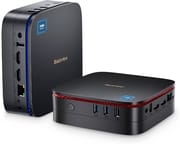
The Blackview MP60 is a budget mini PC that has been sold in several Intel configurations: the original Celeron N5095, plus newer Intel N95 and N150 versions, all with 16GB of DDR4 and a 512GB M.2 SATA SSD. The machine covers everyday productivity and media streaming, with dual 4K HDMI for a two-monitor setup, Wi-Fi 5, Bluetooth 4.2, Gigabit Ethernet, and Windows 11 Pro. In its 5-inch-square, 2.1-inch-tall chassis there is also an internal 2.5-inch SATA bay for a second drive up to 2TB.
Cheap dual-4K output on a chip that throttles
| Pros | Cons |
|---|---|
| 5-inch-square chassis that VESA-mounts behind a monitor | 16GB of DDR4 soldered to the board |
| Two HDMI outputs drive two displays at 4K 60Hz | Integrated Intel graphics rule out 3D gaming |
| Internal 2.5-inch bay takes a second drive up to 2TB | Thermal throttling under sustained load, per Robtech |
| Windows 11 Pro pre-installed | No dedicated audio out, only the combo jack |
| Quiet fan in everyday use, per ZDNet | No USB-C or Thunderbolt ports |
Related Videos
Blackview MP60 Mini PC Comparison Chart
4 configurations
| Configuration | Processor | Storage | Performance | List price | Amazon price | Compare |
|---|---|---|---|---|---|---|
| 16GB/512GB/Intel N95 | N95 | 512 GB | 3.1 | $309.99 | Details
| |
| 16GB/1TB/Intel N5095 | Celeron N5095 | 1 TB | 3.0 | $399.99 | Details
| |
| 16GB/512GB/Intel N5095 | Celeron N5095 | 512 GB | 3.0 | $259.99 | Loading... | Details
|
| 16GB/512GB/Intel N150 | N150 | 512 GB | 3.1 | $209 | Loading... | Details
|
Specs shared by every configuration
| Operating System | Windows 11 Pro |
|---|---|
| GPU | Integrated Intel UHD Graphics |
| RAM | 16 GB |
| Dimensions width x length x thickness | 5 x 5 x 2.1 inches (127 x 127 x 53.34 mm) |
| Weight | 0.86 lbs (0.39 kg) |
| WiFi | Wi-Fi 5 (802.11ac) |
| Bluetooth | Bluetooth 4.2 |
| Ethernet | 1 Ethernet port at 1 Gbps |
| HDMI | 2 Full-Size HDMI Ports |
| DisplayPort | No DisplayPort |
| VGA | No VGA Ports |
| USB Ports | 2 USB 2.0, 2 USB 3 |
| Thunderbolt Ports | No |
| OCuLink | No |
| Internal SATA Ports | 1 SATA port, includes 2.5" drive bay (Internal 2.5-inch SATA bay for a DIY SSD/HDD up to 2TB.) |
| Card Reader | No Card Reader |
| Headphone Jack | combo |
| Fanless | No |
| VESA Mount | Yes |
| In the Box | Mini PC, VESA Mount, Power Supply, HDMI Cable |
| Expandability | Supports up to 2TB of expandable storage via an internal 2.5-inch SATA SSD/HDD bay. |
Related Mini PCs
-
 Blackview MP20 (Ryzen 3 3300U)A palm-sized Windows 11 Pro mini PC for office work or a Kodi or Plex media center. It runs a 2019…
 -
 Blackview MP50 (Ryzen 5 3500U)A 3.9-inch square office box from Blackview built on AMD's 2019 Ryzen 5 3500U, sold on Amazon with…
 -
 ACEMAGIC Vista V1The ACEMAGIC Vista V1 is an ultra-budget mini PC sold in several Intel configs (N95, N97, and…
 -
 ACEMAGICIAN T8 PlusThe ACEMAGICIAN T8 Plus is a compact mini PC for multi-display setups, with triple 4K HDMI output,…
 -
 Beelink MINI S12 ProThe Beelink MINI S12 Pro is a budget Intel N100 mini PC with up to 16GB of DDR4, a 512GB NVMe SSD,…
 -
 Beelink MINI S12The Beelink MINI S12 is a compact, low-power Intel N95 mini PC with dual 4K HDMI, four USB 3.2…
An M.2 SSD and a swappable 2.5-inch bay
The quad-core Intel chip (the N5095, N95, or N150 depending on the version, each a low-power 15W-class part) handles everyday desktop work. The 16GB of DDR4 is soldered and non-upgradeable.
Storage starts with a 512GB M.2 2280 SSD, and there is an internal 2.5-inch SATA bay for a second SSD or HDD up to 2TB. Windows 11 Pro is pre-installed.
For ports it has two USB 3.0, two USB 2.0, two HDMI for a dual 4K-at-60Hz setup, a Gigabit Ethernet jack, and a combo audio jack; there is no USB-C. Wireless is Wi-Fi 5 and Bluetooth 4.2. The chassis VESA-mounts behind a monitor and cools the chip with an active fan rather than a passive heatsink.
Reviewers split on the cooling
Both reviews below cover the N5095 version. The newer N95 and N150 configurations perform differently, though the chassis, ports, and cooling are the same.
Robtech’s Take
Robtech’s review calls the MP60 a “decent looking budget mini pc” and likes the “cool and different” stackable design and easy disassembly. His main concern is cooling: he says the “tiny heatsink and fan is not good enough” for the chip, which leads to high temperatures and thermal throttling under load. He notes the soldered memory and weak integrated graphics limit gaming and emulation, credits the M.2 SATA drive and the quiet operation, and ultimately steers buyers toward better-cooled alternatives.
Adrian Kingsley-Hughes (ZDNet)
Adrian Kingsley-Hughes’ ZDNet review of the 16GB/512GB N5095 variant is more positive on the cooling. He describes the unit as “cooled by a big fan and six heat pipes” and, despite worrying it “might be noisy,” found the sound “very unobtrusive.” He highlights the port selection for media-PC duties and photo and video editing, and after a few weeks of use he was “happy to recommend it” as a small, discreet computer.
Customer Reviews
Amazon buyer feedback leans positive. RJKJ, a verified buyer, wrote “I couldn’t believe how fast this pc is” and noted setup “was literally 10 minutes including updates,” while flagging one limitation: “there’s no dedicated audio out, just mic in.” David wolstenholm, a verified buyer who does graphic design, wrote “I can run Illustrator, Photo Shop, and premier Rush all at the same time with no lag,” and Hypercussion, also verified, called the speed “incredible” while noting the only critique is that the power button has no backlight.
Jacob, a verified buyer, reported a unit that arrived with a physical defect and would not boot: he described “a gap/hole in the side of the plastic” and a screen “completely stuck on ‘Aptio Setup,’” suspecting he “received a refurbished computer.” D. Michael Sanford suggests buying “the next size up” for anyone who needs more speed.
Suited to browsing and 4K media playback
The MP60 is a reasonable budget pick for web browsing, office work, and 4K media in a small box. Whichever version you get (N5095, N95, or N150), this is entry-level performance, and the 16GB of DDR4 is soldered. The internal 2.5-inch bay is the one part that opens up later, taking a second drive of up to 2TB.
If you need more speed, an AMD Ryzen mini PC for gaming is the safer buy. To compare options, use Starry Hope’s Mini PC Comparison Chart.
Frequently Asked Questions
What operating system comes pre-installed on the Blackview MP60 Mini PC?
Windows 11 Pro comes pre-installed on every configuration, on the built-in 512GB M.2 SSD.
Is it possible to upgrade the RAM?
No. The 16GB of DDR4 is soldered to the board, so pick the configuration you need before you buy.
Can it run a dual-monitor setup?
The two HDMI ports drive two displays at once, both at 4K 60Hz.
How can I expand the storage on the MP60 Mini PC?
Add a 2.5-inch SSD or HDD of up to 2TB in the internal SATA bay, alongside the built-in 512GB M.2 SSD.
Is it suitable for gaming purposes?
The integrated Intel UHD Graphics handles less demanding games that do not need a dedicated card. Intense 3D titles are out of reach.
How does the cooling system perform?
The MP60 uses an active fan. Robtech found the cooling struggles under sustained load and can thermal-throttle, while ZDNet’s reviewer found the fan quiet in everyday use.
What types of ports are available?
Two USB 3.0 ports, two USB 2.0 ports, two HDMI outputs, Gigabit Ethernet, and a combo audio jack. There is no USB-C.
Can I use it as a media server?
The compact size and port selection suit media-server duty, along with photo and video editing.
Is the Blackview MP60 a fanless design?
No. An internal fan cools the chip, and ZDNet’s Adrian Kingsley-Hughes found the sound “very unobtrusive.”
Does a VESA mount come in the box?
A VESA mount is included, so the box can hang behind a monitor instead of taking up desk space.