
Blackview MP50 (Ryzen 5 3500U)
Published on

The Blackview MP50 is an entry-level office desktop for documents, browsing, streaming, and a two-monitor desk, sold on Amazon as a kit with a Bluetooth keyboard and mouse. It runs AMD’s Ryzen 5 3500U, a four-core Zen+ laptop chip from 2019 that scores about half of a Ryzen 5 7430U on PassMark’s CPU Mark, and it has no USB-C port.
Pros and Cons
| Pros | Cons |
|---|---|
| Two 4K@60Hz screens over HDMI 2.0 and DisplayPort 1.4 | 2019 Ryzen 5 3500U, about half the PassMark score of current budget Ryzen chips |
| Bluetooth keyboard, mouse, and VESA mount in the box | No USB-C port of any kind |
| Quiet in daily office use per PC Games Hardware | The SSD is M.2 SATA, not NVMe, and there is only one drive slot |
| 3.9-inch square case with tool-free side latches | Wi-Fi 5 and Bluetooth 4.2 |
| Gigabit Ethernet and four USB-A ports | Two of the four USB-A ports run at USB 2.0 speed |
| Blackview covers it for three years | Bundled keyboard and mouse cannot pair until Windows setup is finished |
Blackview MP50 (Ryzen 5 3500U) Comparison Chart
 Blackview MP50 (Ryzen 5 3500U) | |
| Price | List Price: $539.99 Amazon Prices: Loading prices... |
| Version | 16GB/512GB/Ryzen 5 3500U |
| Performance Rating | 3.3 |
| Operating System | Windows 11 Pro |
| Processor | Quad-core 2.10 Ghz (max 3.70 Ghz) AMD Ryzen 5 3500U |
| GPU | Integrated Radeon RX Vega8 Graphics |
| RAM | 16 GB DDR4 SO-DIMM (DDR4-2666 module runs at 2400) |
| Internal Storage | 512 GB M.2 SATA SSD |
| Dimensions width x length x thickness | 3.94 x 3.94 x 1.3 inches (100.08 x 100.08 x 33.02 mm) |
| Weight | 0.62 lbs (0.28 kg) |
| WiFi | Wi-Fi 5 (802.11ac) |
| Bluetooth | Bluetooth 4.2 |
| Ethernet | 1 Ethernet port at 1 Gbps |
| HDMI | 1 Full-Size HDMI Port |
| DisplayPort | 1 DisplayPort (DP 1.4 (4K@60Hz)) |
| VGA | No VGA Ports |
| USB Ports | 2 USB 2.0, 2 USB 3 Front: 2x USB-A 5Gbps. Rear: 2x USB-A 2.0 |
| Thunderbolt Ports | No |
| OCuLink | No |
| Internal SATA Ports | No SATA ports |
| Card Reader | No Card Reader |
| Headphone Jack | front |
| Fanless | No |
| VESA Mount | Yes |
| In the Box | Mini PC, Bluetooth keyboard and mouse, power adapter, HDMI cable, VESA mount with screws, manual |
| Expandability | 16GB DDR4 SO-DIMM (16GB max per Blackview). One M.2 2280 SATA SSD, up to 2TB, behind tool-free side latches. |
Related Mini PCs
-
 Blackview MP20 (Ryzen 3 3300U)A palm-sized Windows 11 Pro mini PC for office work or a Kodi or Plex media center. It runs a 2019…
 -
 Blackview MP60 Mini PCThe Blackview MP60 is a compact budget mini PC sold in Intel N5095, N95, and N150 configurations,…
 -
 ACEMAGIC Vista V1The ACEMAGIC Vista V1 is an ultra-budget mini PC sold in several Intel configs (N95, N97, and…
 -
 ACEMAGICIAN T8 PlusThe ACEMAGICIAN T8 Plus is a compact mini PC for multi-display setups, with triple 4K HDMI output,…
 -
 Beelink MINI S12 ProThe Beelink MINI S12 Pro is a budget Intel N100 mini PC with up to 16GB of DDR4, a 512GB NVMe SSD,…
 -
 Beelink MINI S12The Beelink MINI S12 is a compact, low-power Intel N95 mini PC with dual 4K HDMI, four USB 3.2…
Processor, memory, and storage

The Ryzen 5 3500U has four cores and eight threads, a 2.1GHz base clock, and a 3.7GHz boost, with Radeon Vega 8 integrated graphics. AMD builds it on a 12nm process. It scores about 6,800 on PassMark’s CPU Mark, roughly half of what a Ryzen 5 5500U or Ryzen 5 7430U scores and about a quarter above an Intel N150. That is enough for Office, a browser with many tabs, and video streaming.
Blackview fits 16GB of DDR4 on a SO-DIMM module. The module is rated for 2666MHz, but the 3500U supports DDR4-2400 at most, so it runs at 2400. The 512GB drive is an M.2 2280 SSD with a SATA interface, which reads and writes far more slowly than an NVMe drive. Windows 11 Pro comes preinstalled.
Blackview rates the power draw at 15W and the fan at under 30dB. Air enters through the bottom of the case and leaves through slots on both sides.
Ports and the bundled keyboard

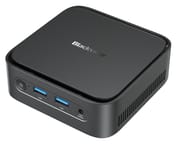
The case measures about 3.9 x 3.9 x 1.3 inches and weighs about 0.6 pounds. The front holds the power button, two USB-A 5Gbps ports, and a 3.5mm audio jack. The rear holds Gigabit Ethernet, HDMI 2.0, DisplayPort 1.4, two USB-A 2.0 ports, and the barrel power input. HDMI and DisplayPort each drive a 4K display at 60Hz, so two monitors can run at once. There is no card reader and no third display output.
Two latches on the sides release the lid without tools, and the SSD can be swapped for a drive of up to 2TB. There is one M.2 slot and no 2.5-inch bay. Wireless is dual-band Wi-Fi 5 with Bluetooth 4.2.
The Amazon kit adds a compact Bluetooth keyboard with an English layout, a Bluetooth mouse, an HDMI cable, and a VESA mount with screws. Neither the keyboard nor the mouse comes with a USB receiver, so they cannot pair with the PC until Windows setup is finished.
PC Games Hardware’s daily test
PC Games Hardware used an MP50 that Blackview supplied for several weeks and published its German-language test in June 2026. Office apps, many browser tabs, YouTube, and simple multitasking caused no trouble, and programs opened quickly. The reviewer confirmed the 16GB of DDR4-2666 running at 2400MHz and opened the case to find an M.2 SSD with a SATA interface, model G537N3.
The SSD arrived split into two partitions of about 200GB and 275GB, which the reviewer merged with a free partition tool. Windows 11 Pro came without bloatware, but setup installed no updates, so they had to be run by hand afterward. Google Chrome was preinstalled in English and showed a notice that the browser was managed by an organization, which had no effect the reviewer noticed in use. The language could be switched without trouble.
Horizon Zero Dawn started but ran like a slideshow even at the lowest settings. Persona 5 Royal ran at about 20fps on low settings and about 30fps with the render scale cut to 75 percent, with a blurry image. The 2D games Animal Well and Nine Sols ran smoothly. The machine was nearly silent in daily use, and the fan became audible but not disturbing with many apps open or during photo editing. The case got noticeably warm but never uncomfortably hot. The conclusion faults the 2019 CPU and the missing USB-C port, and notes that Amazon sells many comparable mini PCs, some for less.
Who it’s for
The MP50 suits a home or small-office desk that runs Office, a browser with many tabs, and video streaming across two 4K screens. PC Games Hardware found it nearly silent in daily use, and Blackview covers it for three years. The Bluetooth keyboard, mouse, and VESA mount in the box make it a complete desktop for someone starting without peripherals, as long as a wired keyboard is on hand for Windows setup.
Skip it for games beyond 2D titles, for NVMe storage, or for anything that needs USB-C. The GMKtec G10 runs the same Ryzen 5 3500U and adds two USB-C ports, one of which carries DisplayPort for a USB-C monitor or a third display, plus a second M.2 slot; its box holds a USB-C power adapter, an HDMI cable, and a VESA kit, but no keyboard or mouse. For about twice the CPU score, look at a Ryzen 5 5500U machine such as the Beelink SER5 (5500U). The mini PC comparison chart lists more options.
Frequently Asked Questions
Can I add more RAM to the Blackview MP50?
Blackview lists 16GB as the maximum, and the MP50 ships with 16GB, so there is no supported upgrade. The Ryzen 5 3500U itself can address up to 32GB of DDR4-2400.
Can I use the Blackview MP50 with a USB-C monitor or dock?
A USB-C monitor works if it also has an HDMI or DisplayPort input. A monitor that takes video only over USB-C can connect through a DisplayPort-to-USB-C cable. A USB-C dock will not work, because the MP50 has no USB-C port to plug it into.
How do I set up the MP50 if the keyboard is Bluetooth?
Connect a wired USB keyboard and mouse for the first boot and finish the Windows setup with them. After that, open Settings, go to Bluetooth & devices, choose Add device, and put the keyboard and then the mouse into pairing mode.
Is the Blackview MP50 the same as the MP20 or MP100?
No. The MP20 is sold with a Ryzen 3 3300U (Radeon Vega 6) or an Intel N150, and the MP100 sold alongside it on Amazon uses a six-core Ryzen 5 7430U with an NVMe SSD, Wi-Fi 6, and a USB-C port.