
GMKtec G10
Updated on

The GMKtec G10 pairs an AMD Ryzen 5 3500U with 16GB of dual-channel DDR4 memory, a 512GB NVMe SSD, 2.5 Gigabit Ethernet, and triple 4K display output for around $200. Windows 11 Pro arrives pre-installed and activated. The machine also ships with its BIOS in a balanced power mode that holds the processor well below its rated power, and several reviewers had to change that setting before the hardware performed the way the spec sheet suggests.
Pros and Cons
| Pros | Cons |
|---|---|
| Dual M.2 slots and a 64GB RAM ceiling leave room to grow | Requires BIOS tweaking for acceptable performance out of the box |
| 2.5 Gigabit Ethernet for fast network transfers | Older Ryzen 3500U CPU shows its age in 4K video playback |
| Drives three 4K displays without a dock, over HDMI, DisplayPort, and USB-C | WiFi 5 feels dated compared to WiFi 6 competitors |
| Runs from a USB-C Power Delivery charger instead of a dedicated brick | Fan noise rises from 29 dBA idle to 40 dBA under load |
| Windows 11 Pro included and activated | The second M.2 slot sits under the RAM, so that upgrade is fiddly |
| Compact footprint fits behind most monitors via VESA mount | No USB 4.0 or Thunderbolt support |
Related Videos
GMKtec G10 Comparison Chart
 GMKtec G10 | GMKtec G10 | GMKtec G10 | |
| Price | List Price: $329.99 Amazon Prices: Loading prices... | List Price: $359.99 Amazon Prices: Loading prices... | List Price: $224.99 Amazon Prices: Loading prices... |
| Version | 16GB/512GB | 16GB/1TB | 16GB/256GB |
| Performance Rating | 3.3 | 3.3 | 3.3 |
| Operating System | Windows 11 Pro | Windows 11 Pro | Windows 11 Pro |
| Processor | Quad-core 2.10 Ghz (max 3.70 Ghz) AMD Ryzen 5 3500U | Quad-core 2.10 Ghz (max 3.70 Ghz) AMD Ryzen 5 3500U | Quad-core 2.10 Ghz (max 3.70 Ghz) AMD Ryzen 5 3500U |
| GPU | Integrated Radeon RX Vega8 Graphics | Integrated Radeon RX Vega8 Graphics | Integrated Radeon RX Vega8 Graphics |
| RAM | 16 GB DDR4 SO-DIMM, 2-channel (DDR4-2400, expandable to 64GB) | 16 GB DDR4 SO-DIMM, 2-channel (DDR4-2400, expandable to 64GB) | 16 GB DDR4 SO-DIMM, 2-channel (DDR4-2400, expandable to 64GB) |
| Internal Storage | 512 GB | 1 TB | 256 GB |
| Dimensions width x length x thickness | 3.86 x 4.06 x 1.65 inches (98.04 x 103.12 x 41.91 mm) | 3.86 x 4.06 x 1.65 inches (98.04 x 103.12 x 41.91 mm) | 3.86 x 4.06 x 1.65 inches (98.04 x 103.12 x 41.91 mm) |
| Weight | 0.52 lbs (0.24 kg) | 0.52 lbs (0.24 kg) | 0.52 lbs (0.24 kg) |
| WiFi | Wi-Fi 5 (802.11ac) | Wi-Fi 5 (802.11ac) | Wi-Fi 5 (802.11ac) |
| Bluetooth | Bluetooth 5.0 | Bluetooth 5.0 | Bluetooth 5.0 |
| Ethernet | 1 Ethernet port at 2.5 Gbps | 1 Ethernet port at 2.5 Gbps | 1 Ethernet port at 2.5 Gbps |
| HDMI | 1 Full-Size HDMI Port | 1 Full-Size HDMI Port | 1 Full-Size HDMI Port |
| DisplayPort | 1 DisplayPort (DisplayPort 1.4) | 1 DisplayPort (DisplayPort 1.4) | 1 DisplayPort (DisplayPort 1.4) |
| VGA | No VGA Ports | No VGA Ports | No VGA Ports |
| USB Ports | 1 USB 2.0, 2 USB 3, 2 USB-C 2x USB-C with DisplayPort Alt Mode and Power Delivery, front USB 3.0 ports are 5Gbps | 1 USB 2.0, 2 USB 3, 2 USB-C 2x USB-C with DisplayPort Alt Mode and Power Delivery, front USB 3.0 ports are 5Gbps | 1 USB 2.0, 2 USB 3, 2 USB-C 2x USB-C with DisplayPort Alt Mode and Power Delivery, front USB 3.0 ports are 5Gbps |
| Thunderbolt Ports | No | No | No |
| OCuLink | No | No | No |
| Internal SATA Ports | No SATA ports | No SATA ports | No SATA ports |
| Card Reader | No Card Reader | No Card Reader | No Card Reader |
| Headphone Jack | 3.5mm combo jack | 3.5mm combo jack | 3.5mm combo jack |
| Fanless | No | No | No |
| VESA Mount | Yes | Yes | Yes |
| In the Box | -- | -- | -- |
| Expandability | Up to 64GB DDR4 RAM (2x SO-DIMM), dual M.2 2280 NVMe slots supporting up to 8TB each | Up to 64GB DDR4 RAM (2x SO-DIMM), dual M.2 2280 NVMe slots supporting up to 8TB each | Up to 64GB DDR4 RAM (2x SO-DIMM), dual M.2 2280 NVMe slots supporting up to 8TB each |
Related Mini PCs
-
 GMKtec G11Budget AMD Ryzen Embedded mini PC built for 24/7 duty, with dual 2.5GbE, WiFi 6E, dual M.2 slots,…
 -
 GMKtec Nucbox G2 Mini PCThe GMKtec Nucbox G2 is a tiny Intel N100 mini PC with 12GB of soldered DDR5, an M.2 2242 SATA SSD,…
 -
 Bmax B4 PlusThe BMAX B4 Plus is an Intel N100 mini PC with a 2.5-inch SATA drive bay next to its M.2 slot, so a…
 -
 Bmax B4 UltraThe Bmax B4 Ultra is an ultra-compact mini PC featuring Intel's N150 processor, 12GB LPDDR5 RAM,…
 -
 BOSGAME B100The BOSGAME B100 is a budget Intel N100 mini PC with 16GB of DDR4, a 512GB NVMe SSD, dual HDMI plus…
 -
 BOSGAME B95The BOSGAME B95 is a low-cost Intel N95 mini PC with 16GB of DDR4, a 512GB M.2 SSD, 2.5Gb Ethernet,…
Two M.2 Slots, 2.5GbE, and a BIOS That Ships Throttled
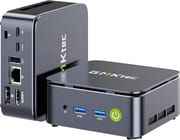
The chassis measures 3.86 by 4.06 inches and stands 1.65 inches tall, light enough at just over half a pound to hang off the back of a monitor on the included VESA mount. Plastic top and bottom panels sit between metal sides, which keeps the weight down on a machine that spends its life on a desk. The top panel comes away for access to both SO-DIMM sockets and both M.2 slots, though one of those slots sits under the memory modules, so fitting a second drive can mean pulling a stick of RAM first.
The AMD Ryzen 5 3500U brings four cores and eight threads on the Zen+ architecture, fabricated on a 12nm process. This 2019-era chip runs a base clock of 2.1 GHz with boost speeds up to 3.7 GHz, paired with integrated Radeon Vega 8 graphics capable of driving three 4K displays simultaneously. In balanced mode the BIOS holds the processor to a 15W TDP, which caps what the silicon can do until you switch to the 35W performance profile. Lon Seidman noted that “switching to the high-performance mode bumps that up to 35W, which improves performance, but thermal issues start cropping up.”
The rear panel hosts one HDMI 2.1 port, a DisplayPort 1.4 connection, dual USB-C ports with both DisplayPort Alt Mode and Power Delivery support, a USB 2.0 port, and a 2.5 Gigabit Ethernet jack for fast local network transfers. The front panel adds two USB 3.0 ports at 5 Gbps along with a 3.5mm combo audio jack for headphones or a headset. WiFi 5 and Bluetooth 5.0 handle wireless duties, and there is no WiFi 6 radio in any configuration of this machine.
Reviewer Insights
Easy internal access, with a nudge toward the N150 boxes
The balanced power mode the machine ships in hamstrings the Ryzen processor, Lon Seidman of Lon.TV found while testing Linux compatibility and gaming performance. He praised the dual M.2 slots and upgrade-friendly design, noting that “it’s very easy to upgrade partly because the case is very easy to pull apart.” He still said that “I’d probably still recommend the Intel N150-based mini PCs for most people looking for a quieter and more polished experience,” while acknowledging its potential for budget home server applications.
Time Spy nearly doubles in performance mode
Benchmarks from Robtech put Time Spy at 394 in balanced mode and 756 with performance settings enabled. He measured fan noise from 29 dBA at idle to 40 dBA under load in performance mode, which he characterized as noticeable but acceptable. His review emphasized the dual M.2 Gen3 x4 slots as a rare feature at this price point, though he noted the CPU’s weak single-core performance as a limitation.
4K YouTube needed troubleshooting first
Team Pandory came away with mixed feelings, initially disappointed that the system “couldn’t even play 4K YouTube videos smoothly” out of the box. Their troubleshooting journey documented driver issues, BIOS tweaks, and cooling experiments before reaching acceptable performance. They praised the value and small size but cautioned that buyers should expect to invest time in configuration.
A 4 out of 5 score, with the 2019 CPU as the main drawback
TechRadar rated it 4 out of 5 with the verdict that “at the asking price, this is a terrific little system that can easily be upgraded to handle larger tasks with more memory and storage.” The publication highlighted the dual PCIe 3.0 M.2 slots and 2.5GbE networking as standout features while noting the older 2019-era CPU and lack of WiFi 6 as the primary drawbacks.
A 65W USB-C adapter and screws under the feet
Laptop Retrospective tested the 16GB/512GB model and listed GMKtec’s pricing at $229 to $329 across the barebone, 16GB/512GB, and 16GB/1TB builds, with frequent sales below that. The box includes a 65W USB-C power adapter with a short cable, an HDMI cable, and the VESA kit. He found the four case screws hidden under the adhesive feet on the bottom, with no opening instructions in the manual.
HDMI 2.1 and 2.5GbE on the rear panel
Ghost Keyboard reviewed the same configuration at a $189 price and listed the rear ports as HDMI 2.1, DisplayPort 1.4, and 2.5GbE Ethernet. He credited the plastic panels with keeping Wi-Fi and Bluetooth signal strength up, since a metal box would act as a Faraday cage.
Customer Reviews
Across 245 ratings on Amazon, the GMKtec G10 averages 4.1 stars, with 66% of raters giving it five stars and 13% giving it one, the second-largest group. The positive reviews return to easy internal access for upgrades, quiet operation, and value. A verified buyer named stan, who replaced an old desktop with it, wrote that “All my apps open fast without any issues” and that “for a small unit, it is very quiet.” Reviewer Baikseok Seo, also a verified purchaser, liked how serviceable it is, noting it is “easy to install a new ssd or ram by popping up the title cover,” and several owners mention the unit arrived with Windows 11 preinstalled and an HDMI cable in the box.
A verified buyer posting as “selective 2011” reported a hard failure: “This piece of crap lasted six months and died with no warning.” Another owner, Kevin Paul, dropped to four stars because his unit “became inoperable within a week,” which he traced to a Windows update removing hardware definition files; he recovered it with a GMKtec rescue utility and a bootable USB. A separate three-star reviewer flagged thermals, saying that in performance mode it “runs uncomfortably Hot” and the NVMe starts throttling, while staying usable in balanced mode.
Read more owner reviews on Amazon.
A Cheap Upgrade Platform That Asks for BIOS Time
Buyers who want room to grow get the most out of the GMKtec G10. Both M.2 slots and both SO-DIMM sockets are reachable by the owner, the 64GB memory ceiling leaves a long runway for heavier workloads, the Windows 11 Pro license is already activated, and the VESA mount keeps the box out of sight behind a display.
The cost of that flexibility is setup time. You will need to enter the BIOS and switch to performance mode, and you may need to adjust fan curves to balance noise and thermals. The older Ryzen 3500U struggles with 4K video playback compared to newer Intel N-series chips, and the WiFi 5 wireless is a generation behind current radios. Someone who wants to plug a machine in and start working should buy something else.
A home server or a living room PC suits it well, provided the owner is comfortable spending half an hour in a BIOS menu first. For those looking to compare options, Starry Hope’s Mini PC Comparison Chart lists the alternatives side by side.
Frequently Asked Questions
Does the GMKtec G10 support triple monitor setups?
Yes. Three independent 4K displays run at once from any combination of the HDMI 2.1, DisplayPort 1.4, and USB-C outputs, because both USB-C ports carry DisplayPort Alt Mode.
What is the maximum RAM upgrade for the GMKtec G10?
Two SO-DIMM slots take up to 64GB of DDR4 in total. The machine ships with 16GB (2x8GB) in dual-channel configuration running at DDR4-2400 speeds, which is the maximum the Ryzen 5 3500U processor officially supports.
Can I power the GMKtec G10 with USB-C?
Yes, any standard 65-70W USB-C Power Delivery charger rated at 19-20V and 3.42A will run it. A laptop charger you already own can do the job, which cuts one power brick out of the desk.
Why does the GMKtec G10 perform poorly out of the box?
It ships with the BIOS in balanced mode, which limits the processor to just 15W TDP. Enter the BIOS and switch to performance mode (35W) to get the full capability of the Ryzen 5 3500U. Several reviewers documented the difference in benchmark scores.
Is the GMKtec G10 good for gaming?
Light gaming and older titles run reasonably well on the Radeon Vega 8 integrated graphics. Reviewers achieved 45-50 FPS in GTA V at 720p with minimum settings. Modern AAA games at high settings are beyond its capabilities, but it works well for indie games, older titles, and emulation of older consoles.
Does the GMKtec G10 work with Linux?
Yes. Lon Seidman specifically tested Ubuntu 24.04 and found all hardware working properly including WiFi, Bluetooth, and display outputs. The AMD CPU and GPU have strong open-source driver support.
How many storage drives can I install in the GMKtec G10?
Two M.2 2280 PCIe 3.0 x4 slots take drives of up to 8TB each, for a maximum of 16TB total storage. One M.2 slot overlaps with the RAM modules, so you may need to remove RAM to access it during installation.
What is the 2.5GbE Ethernet useful for?
The 2.5 Gigabit Ethernet provides network speeds up to 2500 Mbps, which is 2.5 times faster than standard Gigabit connections. That pays off for NAS access, large file transfers, local streaming, or home server duty. You will need a compatible switch or router to take advantage of these speeds.