
GMKtec G11
Published on

The GMKtec G11 is a budget mini PC built around the AMD Ryzen Embedded R2514, a quad-core, eight-thread chip that GMKtec positions for continuous 24/7 operation in office, home-server, and light industrial roles. Two 2.5 Gigabit Ethernet ports feed straight into router, firewall, or NAS workloads, and WiFi 6E with Bluetooth 5.2 covers wireless duty. It ships with Windows 11 Pro, drives up to three independent 4K displays through dual HDMI and a USB-C port, and keeps its internals open with two DDR4 SO-DIMM slots and two M.2 2280 NVMe bays. The R2514 is 2019-generation Zen+ silicon, which keeps power draw low and puts a firm ceiling on speed.
Connectivity comes at the cost of CPU speed
| Pros | Cons |
|---|---|
| Dual 2.5GbE LAN ports suit router, firewall, or NAS duty | Zen+ R2514 is 2019-class silicon, benchmarked near Intel N150 to N300 |
| WiFi 6E and Bluetooth 5.2 for current-generation wireless | Dropped frames during 4K 60fps YouTube playback |
| Triple 4K output via two HDMI 2.0 ports and USB-C | USB-C port carries display and data but no Power Delivery input |
| Dual M.2 2280 PCIe 3.0 slots, up to 16TB total storage | Pre-installed Chinese AI and system utilities on Windows |
| User-upgradable DDR4 via two SO-DIMM slots, up to 32GB | RAM ceiling is 32GB and the M.2 slots are PCIe 3.0, not 4.0 |
| Low idle draw near 11 to 12 watts and a quiet fan | No USB4 or Thunderbolt, and no discrete-GPU option |
Related Videos
GMKtec G11 Comparison Chart
 GMKtec G11 | GMKtec G11 | |
| Price | List Price: $309.99 Amazon Prices: Loading prices... | List Price: $339.98 Amazon Prices: Loading prices... |
| Version | 16GB/256GB | 16GB/512GB |
| Performance Rating | 3.3 | 3.3 |
| Operating System | Windows 11 Pro | Windows 11 Pro |
| Processor | Quad-core 2.10 Ghz (max 3.70 Ghz) AMD Ryzen Embedded R2514 | Quad-core 2.10 Ghz (max 3.70 Ghz) AMD Ryzen Embedded R2514 |
| GPU | Integrated Radeon RX Vega8 Graphics | Integrated Radeon RX Vega8 Graphics |
| RAM | 16 GB DDR4 SO-DIMM, 2-channel (DDR4-2666, expandable to 32GB) | 16 GB DDR4 SO-DIMM, 2-channel (DDR4-2666, expandable to 32GB) |
| Internal Storage | 256 GB M.2 NVMe SSD | 512 GB M.2 NVMe SSD |
| Dimensions width x length x thickness | 5.06 x 5 x 2.01 inches (128.52 x 127 x 51.05 mm) | 5.06 x 5 x 2.01 inches (128.52 x 127 x 51.05 mm) |
| Weight | 1.1 lbs (0.5 kg) | 1.1 lbs (0.5 kg) |
| WiFi | Wi-Fi 6E (802.11ax) | Wi-Fi 6E (802.11ax) |
| Bluetooth | Bluetooth 5.2 | Bluetooth 5.2 |
| Ethernet | 2 Ethernet ports at 2.5 Gbps | 2 Ethernet ports at 2.5 Gbps |
| HDMI | 2 Full-Size HDMI Ports | 2 Full-Size HDMI Ports |
| DisplayPort | No DisplayPort | No DisplayPort |
| VGA | No VGA Ports | No VGA Ports |
| USB Ports | 4 USB 3, 1 USB-C Front 2x USB-A 10Gbps + USB-C (10Gbps, DP, no PD). Rear 2x USB-A 5Gbps | 4 USB 3, 1 USB-C Front 2x USB-A 10Gbps + USB-C (10Gbps, DP, no PD). Rear 2x USB-A 5Gbps |
| Thunderbolt Ports | No | No |
| OCuLink | No | No |
| Internal SATA Ports | No SATA ports | No SATA ports |
| Card Reader | No Card Reader | No Card Reader |
| Headphone Jack | 3.5mm combo jack (front) | 3.5mm combo jack (front) |
| Fanless | No | No |
| VESA Mount | Yes | Yes |
| In the Box | Mini PC, power adapter, HDMI cable, VESA bracket, manual | Mini PC, power adapter, HDMI cable, VESA bracket, manual |
| Expandability | Up to 32GB DDR4 (2x SO-DIMM), dual M.2 2280 PCIe 3.0 slots up to 16TB total. RAM and SSDs user-upgradable. | Up to 32GB DDR4 (2x SO-DIMM), dual M.2 2280 PCIe 3.0 slots up to 16TB total. RAM and SSDs user-upgradable. |
Related Mini PCs
-
 GMKtec G10The GMKtec G10 is a budget mini PC with an AMD Ryzen 5 3500U, two M.2 slots, 2.5G Ethernet, three…
 -
 GMKtec Nucbox G2 Mini PCThe GMKtec Nucbox G2 is a tiny Intel N100 mini PC with 12GB of soldered DDR5, an M.2 2242 SATA SSD,…
 -
 Bmax B4 PlusThe BMAX B4 Plus is an Intel N100 mini PC with a 2.5-inch SATA drive bay next to its M.2 slot, so a…
 -
 Bmax B4 UltraThe Bmax B4 Ultra is an ultra-compact mini PC featuring Intel's N150 processor, 12GB LPDDR5 RAM,…
 -
 BOSGAME B100The BOSGAME B100 is a budget Intel N100 mini PC with 16GB of DDR4, a 512GB NVMe SSD, dual HDMI plus…
 -
 BOSGAME B95The BOSGAME B95 is a low-cost Intel N95 mini PC with 16GB of DDR4, a 512GB M.2 SSD, 2.5Gb Ethernet,…
Open memory bays and dual LAN around a 2019 chip
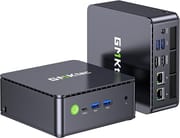
The G11 measures roughly 5 by 5 inches with a height near 2 inches (128.5 by 127 by 51 mm) and weighs about 1.1 pounds, small enough to hide behind a monitor with the bundled VESA bracket. The front panel carries a power button, a USB-C port, two USB 3.2 Gen 2 Type-A ports at 10Gbps, and a 3.5mm combo audio jack. The rear adds two more USB 3.2 Gen 1 Type-A ports at 5Gbps, two HDMI 2.0 outputs, the two 2.5GbE RJ45 jacks, and the DC-in barrel connector. Cooling is active rather than fanless, using a heatpipe and a single fan, and the chassis exposes both memory and storage for easy servicing.
The AMD Ryzen Embedded R2514 is a four-core, eight-thread part with a 2.1 GHz base and 3.7 GHz boost, paired with an eight-core Radeon (Vega 8) integrated GPU clocked at 1200 MHz. This is the same Zen+ Picasso silicon family as the Ryzen 5 3500U, validated by AMD for embedded, always-on deployment. Lon Seidman benchmarked its CPU at roughly the level of the budget Intel N150 and N300 parts common in mini PCs at this price, with slightly stronger graphics. He found it “performs well for the price point” for browsing and office work, and said “It’s definitely not going to be a gaming powerhouse” and that “this is not something that’s going to run any current games very well.”
WiFi 6E through a MediaTek RZ616 module and Bluetooth 5.2 handle wireless, while the two 2.5 Gigabit Ethernet ports make the machine a fit for pfSense or OPNsense routing, a home NAS, or a small virtualization host. Storage expansion runs through two M.2 2280 PCIe 3.0 slots supporting up to 16TB combined, and memory sits in two DDR4-2666 SO-DIMM slots that top out at 32GB. The USB-C connector does data and DisplayPort output only; it will not power the unit over Power Delivery, so you are tied to the barrel adapter.
Reviewer Insights
Lon Seidman (Lon.TV)
Lon Seidman reviewed the G11 in both a video and a companion written post, framing it as a rare affordable option in a market where budget mini PCs have crept upward in price. His hardware walkthrough covered the dual NVMe slots, the DDR4 SO-DIMM upgrade path, and the swappable WiFi card, and his testing confirmed the dual 2.5GbE ports and strong WiFi 6E throughput. On power and thermals he measured that the system “draws about 11 to 12 watts at idle and peaks at 48 watts under heavy load,” staying quiet in its default modes.
He saw dropped frames during 4K 60fps YouTube playback and rated its graphics too weak for modern gaming or heavy emulation, but he praised its behavior under Linux, saying “Linux seems to run a little more efficiently than Windows does these days, and it was a very good experience.” He flagged the pre-installed Chinese AI and system utilities and advised that “Given the low-level system access these types of AI tools often require, I would suggest that users consider a fresh installation of Windows or a move to a Linux distribution upon receiving the device.” On value he said “it’s good to see something affordable in the current state of the market.”
Best as an always-on router or NAS box
The dual 2.5GbE ports, WiFi 6E, dual M.2 slots, and triple 4K output are the reasons to buy, and the embedded R2514 draws little power while running quietly around the clock. It suits a home-lab router or a small NAS, and it handles 1080p media alongside web and document work on a desk.
The R2514 is old, low-clocked silicon that struggles with 4K video playback, modern gaming, and 4K HDR transcoding, the USB-C port cannot power the unit, and the pre-installed software is worth wiping before you trust the machine with anything. Anyone who needs a faster CPU, more than 32GB of RAM, PCIe 4.0 storage, or USB4 should step up to a newer Ryzen or Intel box. For those comparing options, Starry Hope’s Mini PC Comparison Chart helps line the G11 up against its peers.
Frequently Asked Questions
What processor does the GMKtec G11 use?
The chip is the AMD Ryzen Embedded R2514, a quad-core, eight-thread part with a 2.1 GHz base clock and up to 3.7 GHz boost, plus an eight-core Radeon (Vega 8) integrated GPU at 1200 MHz. It is Zen+ silicon from the same family as the Ryzen 5 3500U, validated by AMD for continuous 24/7 embedded operation. Lon Seidman benchmarked its CPU at roughly the level of the budget Intel N150 and N300 parts common in this price bracket, with slightly better integrated graphics.
Can I upgrade the RAM and storage in the G11?
Yes. Two DDR4 SO-DIMM slots accept up to 32GB total at DDR4-2666, and two M.2 2280 PCIe 3.0 slots support up to 16TB of NVMe storage combined. Both memory and storage are user-accessible, so you can add drives or swap RAM after purchase.
What ports does the G11 have?
The front panel has one USB-C port (10Gbps data and DisplayPort output, but no Power Delivery input), two USB 3.2 Gen 2 Type-A ports at 10Gbps, and a 3.5mm combo audio jack. The rear adds two USB 3.2 Gen 1 Type-A ports at 5Gbps, two HDMI 2.0 outputs, two 2.5GbE RJ45 LAN ports, and the DC-in jack. Together the two HDMI ports and the USB-C output can drive three independent 4K displays.
Is the G11 good for a home server or router?
The two 2.5 Gigabit Ethernet ports let it act as a pfSense or OPNsense router or firewall, a fast NAS, or a small virtualization host, and its low idle power draw near 11 to 12 watts suits always-on duty. The R2514 is validated for 24/7 operation, though its modest CPU means heavy simultaneous workloads are better handled by a more powerful machine.
Does the G11 run Linux well?
Linux ran efficiently for Lon Seidman, who reported a very good overall experience, and the AMD CPU and Radeon graphics have strong open-source driver support. Because the unit ships with pre-installed Chinese AI and system utilities, Seidman suggests a clean Windows install or a switch to Linux once the machine arrives.
Can the G11 handle gaming or 4K video?
Gaming is not its strength. Lon Seidman found the Radeon (Vega 8) graphics too weak for modern titles and demanding emulation, and the G11 dropped frames during 4K 60fps YouTube playback and struggled with 4K HDR Plex transcoding. It handles 1080p video, browsing, and office work comfortably, but 4K media and current games are beyond it.