
Bmax B3 Pro
Updated on

The Bmax B3 Pro is a sub-$200 mini PC built around the Intel Celeron N5095, a quad-core chip that boosts to 2.9GHz. Bmax also sells it in the same 8GB/256GB configuration with the Intel Celeron N4500, a slower dual-core Jasper Lake chip that boosts to 2.8GHz. It carries web browsing, document editing, and media streaming, and its two HDMI outputs drive a pair of 4K displays for a multi-monitor desk. The low-power Celeron keeps the small fan quiet during light loads. At 0.66 pounds it hangs off the back of a monitor with the bundled VESA bracket, which covers a home office, a digital signage screen, or a living-room HTPC.
Dual 4K output on a weak processor
| Pros | Cons |
|---|---|
| Very affordable at around $160 | Weak single-core performance limits gaming |
| Dual HDMI with 4K @ 60Hz support | Only 1 Gigabit Ethernet port (B3 Plus had 2) |
| Low power consumption (about 24W under load) | 256GB storage fills up quickly |
| Tool-less lid design for easy upgrades | A display quirk one reviewer fixed by lowering the refresh rate |
| VESA mount included for monitor attachment | Plastic chassis |
| Small fan stays quiet under light loads | No USB 4 or Thunderbolt connectivity |
Related Videos
Bmax B3 Pro Comparison Chart
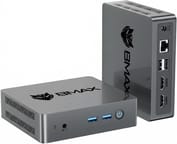 Bmax B3 Pro | Bmax B3 Pro | |
| Price | List Price: $159.99 Amazon Prices: | List Price: $199.99 Amazon Prices: Loading prices... |
| Version | 8GB/256GB/Intel N5095 | 8GB/256GB/Intel N4500 |
| Performance Rating | 2.6 | 2.3 |
| Operating System | Windows 11 Pro | Windows 11 Pro |
| Processor | Quad-core 2.00 Ghz (max 2.90 Ghz) Intel Celeron Processor N5095 | Dual-core 1.10 Ghz (max 2.80 Ghz) Intel Celeron Processor N4500 |
| GPU | Integrated Intel UHD Graphics | Integrated Intel UHD Graphics |
| RAM | 8 GB | 8 GB LPDDR4 |
| Internal Storage | 256 GB | 256 GB |
| Dimensions width x length x thickness | 4.41 x 4.92 x 1.73 inches (112.01 x 124.97 x 43.94 mm) | 4.41 x 4.92 x 1.34 inches (112.01 x 124.97 x 34.04 mm) |
| Weight | 0.66 lbs (0.3 kg) | 0.6 lbs (0.27 kg) |
| WiFi | Wi-Fi 5 (802.11ac) | Wi-Fi 5 (802.11ac) |
| Bluetooth | Bluetooth 5.0 | Bluetooth 5.0 |
| Ethernet | 1 Ethernet port at 1 Gbps | 1 Ethernet port at 1 Gbps |
| HDMI | 2 Full-Size HDMI Ports | 2 Full-Size HDMI Ports |
| DisplayPort | No DisplayPort | No DisplayPort |
| VGA | No VGA Ports | No VGA Ports |
| USB Ports | 4 USB 3, 1 USB-C Video output is via the two HDMI ports; the USB-C port is data-only | 4 USB 3, 1 USB-C Video output is via the two HDMI ports; the USB-C port is data-only |
| Thunderbolt Ports | No | No |
| OCuLink | No | No |
| Internal SATA Ports | No SATA ports | No SATA ports |
| Card Reader | microSD Card Reader | microSD Card Reader |
| Headphone Jack | combo | combo |
| Fanless | No | No |
| VESA Mount | Yes | Yes |
| In the Box | Mini PC, power adapter, HDMI cable, VESA mounting bracket with screws, user manual | Mini PC, power adapter, HDMI cable, VESA mounting bracket with screws, user manual |
| Expandability | RAM upgradable to 32GB via 2x DDR4 SO-DIMM slots, storage expandable via M.2 2280 SATA slot and internal 2.5-inch SATA bay | RAM is 8GB LPDDR4 soldered (not upgradeable); storage expands via one M.2 SATA and one M.2 NVMe slot; no 2.5-inch bay |
Related Mini PCs
-
 Bmax B2 PowerThe Bmax B2 Power is a palm-sized mini PC with an Intel Celeron 5205U, 8GB of DDR4, a 256GB NVMe…
 -
 Bmax B1 PlusThe Bmax B1 Plus is an ultra-budget mini PC on Intel's 2016 Celeron J3355, with 6GB of soldered…
 -
 BOSGAME E2 AirThe BOSGAME E2 Air is a budget desk box for office work and a multi-monitor setup. It pairs an AMD…
 -
 BOSGAME E2 PlusThe BOSGAME E2 Plus is a budget office mini PC built on the AMD Ryzen 5 3501U, a relabelled 2019…
 -
 CyberGeek Nano J1The CyberGeek Nano J1 is a budget mini PC with an Intel Celeron N5095, 16GB of DDR4, a 1TB NVMe…
 -
 ORIGIMAGIC C3The ORIGIMAGIC C3 is a small office and signage box built on the Intel Core i3-5005U, a dual-core…
Two RAM slots and two storage bays in a half-pound shell

The plastic enclosure measures 4.92 x 4.41 x 1.73 inches and weighs 0.66 pounds, light enough to mount behind a monitor with the included VESA bracket or tuck into a corner of a crowded desk. Lightweight plastic is what the budget price buys, though the layout spreads ports across more than one side, which helps with cable routing. The front panel holds the power button and USB 3.0 ports for peripherals you swap often; the rear carries the two HDMI outputs, the remaining USB ports, Gigabit Ethernet, and a barrel-style power connector.
The Intel Celeron N5095 runs four cores at a 2.0GHz base clock and boosts to 2.9GHz. In AKGamerTech’s hands-on review, the system drew about 24 watts under load and held CPU temperatures around 85 degrees Celsius during stress testing, which is enough thermal headroom for sustained light workloads. The integrated Intel UHD Graphics plays 4K video smoothly. Minecraft runs fine on it, while Fortnite proved unplayable in testing.
Four USB 3.0 Type-A ports, a data-only USB-C port, WiFi 5 (802.11ac), and Bluetooth 5.0 cover peripherals and wireless duty. One Gigabit Ethernet port handles wired networking, a cost reduction from the two ports on the B3 Plus. Storage grows through the M.2 2280 SATA slot and the internal 2.5-inch SATA bay, which connects by ZIF cable and takes a traditional hard drive or a larger SSD.
Reviewer Insights

AKGamerTech’s Perspective
AKGamerTech unboxes the BMAX B3 and finds an HDMI cable and a VESA mounting bracket in the box. In a teardown he shows the dual RAM slots and the M.2 storage, and notes the 2.5-inch SATA expansion bay while criticizing the lack of dedicated mounting screws for it.
He concludes that while “the CPU is not like a very powerful one,” it handles everyday tasks fine. He runs into a display issue that he fixes by “changing the refresh rate from 60 hertz to 30 or less,” and points out the Minecraft Education Edition that ships pre-installed on the Windows image. He summarizes that “it’s a good mini PC for its price” and praises its thermal efficiency, stating “it wouldn’t get hotter than 85 degrees Celsius… so it wouldn’t overheat.”
Customer Reviews
Bob C., a verified buyer, wrote that “it was easy to set up with ample ports” and that “this very small PC could easily replace the large desktop PC of yesteryear.” Skipper, also verified, hooked one up to a TV for streaming, “got rid of useless Microsoft Windows 11 and installed Linux Mint 22,” and called it a “simple setup.”
A verified buyer named Bob gave it four stars but reported a recurring boot problem, saying it “stops booting when the PC;s logo appears on the monitor” and that it “has booted properly only two times out of approx. 20 boot up’s,” though he added he is “a tech so I will figure it out.”
A sub-$200 desktop for office work, streaming, and signage
At around $160 the B3 Pro covers basic productivity, homework and streaming, and signage or home theater duty where the two 4K HDMI outputs matter. Tool-less access, two DDR4 SO-DIMM slots, and the M.2 plus 2.5-inch storage options let it take more RAM and a bigger drive later, which stretches the life of a machine bought in the budget mini PC market.
Content creation, software development, modern games, and heavy multitasking sit past what the Celeron N5095 can carry. The chip is efficient and capable for basic tasks, and a mini PC with an AMD Ryzen or Intel Core processor is the step up for those workloads. Starry Hope’s Mini PC Comparison Chart lines the B3 Pro up against similar machines.
Frequently Asked Questions
Can the Bmax B3 Pro run Windows 11?
The B3 Pro ships with Windows 11 pre-installed and supports all Windows 11 features. The Intel Celeron N5095 processor meets Microsoft’s hardware requirements, and a clean Windows 11 installation is possible.
How many monitors can the Bmax B3 Pro support?
Two, through the dual HDMI 2.0 ports, each supporting 4K resolution at 60Hz. The USB-C port is data-only and does not output video, so the two HDMI ports are your display connections.
Can I upgrade the RAM and storage in the Bmax B3 Pro?
The tool-less sliding lid opens onto two DDR4 SO-DIMM slots that take up to 32GB of RAM. Storage expands through the M.2 2280 SATA slot and the internal 2.5-inch SATA bay.
Is the Bmax B3 Pro good for gaming?
Light titles only. Minecraft runs acceptably, but more demanding games like Fortnite are unplayable, and the integrated Intel UHD Graphics lacks the power for modern 3D games. A mini PC with a dedicated GPU or stronger integrated graphics is the better buy if gaming is a priority.
How loud is the Bmax B3 Pro during operation?
The B3 Pro stays quiet in everyday use. It has a small active fan rather than a fanless design, and the low-power Celeron keeps it unobtrusive during light tasks like web browsing or office work. One reviewer found it never exceeded about 85 degrees Celsius under stress without overheating, so the fan has little reason to spin up hard.
Can the Bmax B3 Pro be mounted behind a monitor?
A VESA mounting bracket comes in the box, so the B3 Pro attaches to the back of any VESA-compatible monitor. That saves desk space, which is why the setup is common in offices and home theaters.
Does the Bmax B3 Pro support Linux?
Yes. The B3 Pro runs popular Linux distributions including Ubuntu. The Intel Celeron N5095 processor has good Linux driver support, and the standard hardware components generally work out of the box with most modern distributions.
What is the power consumption of the Bmax B3 Pro?
The B3 Pro drew around 24 watts from the wall under load in one reviewer’s testing, with a low idle draw typical of its Celeron N5095 platform. That makes it an economical choice for systems that run continuously, such as digital signage or home servers.