
Bmax B1 Plus
Published on

The Bmax B1 Plus is a palm-sized Windows 11 mini PC built around the Intel Celeron J3355, a dual-core Apollo Lake chip Intel launched in the third quarter of 2016. It pairs that processor with 6GB of soldered LPDDR3 and 128GB of eMMC storage, then adds two HDMI outputs, gigabit Ethernet, Wi-Fi 5, and Bluetooth 5.0 in a chassis measuring 4.25 by 4.13 by 1.42 inches and weighing under half a pound. Two internal M.2 slots (one SATA, one NVMe) let you move the system onto a real drive later, and a VESA bracket ships in the box so the machine can hide behind a monitor. Bmax still sells it new in 2026 on a chip that is a decade old, and its PassMark CPU Mark of roughly 1,205 lands below the Celeron N4000 in Bmax’s own older MaxMini B1 Pro.
Pros and Cons
| Pros | Cons |
|---|---|
| Two HDMI outputs drive a second display | Celeron J3355 is a 2-core chip from 2016 |
| Two M.2 slots, one SATA and one NVMe | 6GB of LPDDR3 is soldered with no upgrade path |
| Gigabit Ethernet plus Wi-Fi 5 and Bluetooth 5.0 | 128GB of eMMC is slower than any real SSD |
| Palm-sized and under half a pound | Both HDMI ports are labeled 1.4b, not 2.0 |
| VESA bracket and HDMI cable included | The chip is absent from Microsoft’s Windows 11 processor list |
| Rated at 15W, cheap to leave running | No USB-C, no DisplayPort, no card reader |
Bmax B1 Plus Comparison Chart
 Bmax B1 Plus | |
| Price | List Price: $169.99 Amazon Prices: Loading prices... |
| Version | 6GB/128GB/Intel J3355 |
| Performance Rating | 1.5 |
| Operating System | Windows 11 Home |
| Processor | Dual-core 2.00 Ghz (max 2.50 Ghz) Intel Celeron J3355 |
| GPU | Integrated Intel HD Graphics 500 |
| RAM | 6 GB LPDDR3 (6GB LPDDR3-1600, soldered) |
| Internal Storage | 128 GB eMMC |
| Dimensions width x length x thickness | 4.25 x 4.13 x 1.42 inches (107.95 x 104.9 x 36.07 mm) |
| Weight | 0.49 lbs (0.22 kg) |
| WiFi | Wi-Fi 5 (802.11ac) |
| Bluetooth | Bluetooth 5.0 |
| Ethernet | 1 Ethernet port at 1 Gbps |
| HDMI | 2 Full-Size HDMI Ports |
| DisplayPort | No DisplayPort |
| VGA | No VGA Ports |
| USB Ports | 2 USB 2.0, 2 USB 3 2x USB 3.0 front, 2x USB 2.0 rear |
| Thunderbolt Ports | No |
| OCuLink | No |
| Internal SATA Ports | No SATA ports |
| Card Reader | No Card Reader |
| Headphone Jack | combo |
| Fanless | No |
| VESA Mount | Yes |
| In the Box | Mini PC, VESA bracket, 12V power adapter, HDMI cable, user guide |
| Expandability | Storage only: two M.2 slots (one SATA, one NVMe) up to 2TB. Memory is soldered. |
Related Mini PCs
-
 Bmax B2 PowerThe Bmax B2 Power is a palm-sized mini PC with an Intel Celeron 5205U, 8GB of DDR4, a 256GB NVMe…
 -
 Bmax B3 ProThe Bmax B3 Pro is a budget mini PC with an Intel Celeron N5095, dual 4K HDMI outputs, WiFi 5, and…
 -
 AWOW AK10The AWOW AK10 is an Intel N100 mini PC with 8GB of soldered DDR5, a 256GB SSD in an M.2 slot that…
 -
 Beelink Mini SA compact Celeron N5095 mini PC with dual 4K HDMI outputs, a swappable M.2 SSD plus a 2.5-inch…
 -
 CHUWI HeroBox (2023)The CHUWI HeroBox (2023) is an Intel N100 mini PC with 8GB of LPDDR5, a 256GB M.2 drive, a 2.5-inch…
 -
 GMKtec NucBox 5The GMKtec NucBox 5 is a palm-sized Intel Celeron N5105 mini PC with 8GB of RAM, a user-replaceable…
A 2016 Celeron, 6GB Soldered, and Two M.2 Slots

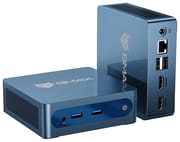
The chassis measures 4.25 by 4.13 by 1.42 inches and weighs 0.49 pounds, small enough to disappear behind a monitor on the bundled VESA bracket. The front face carries a 3.5mm combo audio jack, two USB 3.0 Type-A ports, a power button, and a recessed clear-CMOS pinhole. The rear holds the 12V barrel jack, a gigabit RJ45 port, two USB 2.0 Type-A ports, and the two HDMI outputs. There is no USB-C anywhere on the box, no DisplayPort, and no card reader, so a modern dock or a camera card needs an adapter. Unlike the fanless MaxMini B1 Pro, this model runs an active fan; Bmax’s own materials describe a “smart fan” paired with a copper heat pipe.
Intel’s spec page for the J3355 lists two cores, two threads, a 2.00 GHz base with a 2.50 GHz burst, 2MB of cache, and a 10W TDP on a 14nm Apollo Lake design launched in Q3 2016, with a recommended customer price of $24. Graphics come from Intel HD Graphics 500 with 12 execution units. PassMark scores the chip at roughly 1,205 on CPU Mark. For scale, the Intel N100 that anchors most current budget mini PCs scores about 5,305 and the N150 about 5,343, so a typical 2026 entry-level box is close to four and a half times quicker on the same benchmark. Intel’s spec page also lists an end-of-servicing-updates date of September 30, 2023 for this part, so no further firmware or microcode is coming from Intel.
The 6GB of LPDDR3 is soldered to the board, and Intel caps the SoC at 8GB in any case, so there is no memory upgrade path at all. The 128GB of onboard storage is eMMC, a flash type closer to what a phone uses than to an SSD, and Windows 11 plus its updates eat into that quickly. The two M.2 slots are the one upgrade this chassis allows: one runs SATA, one runs NVMe, and Bmax rates them for drives up to 2TB. The NVMe slot has a ceiling of its own, because the J3355 provides PCI Express revision 2.0 with six lanes in total, so a current drive cannot reach the speeds it would hit in a newer mini PC.
The retail listing advertises 4K at 60Hz, but Bmax’s own port diagram labels both HDMI ports 1.4b, and HDMI 1.4 does not carry enough bandwidth for 4K at 60Hz, topping out at 30Hz instead. Treat the 4K60 line as a vendor claim rather than a specification to plan around, and expect 1080p at 60Hz to be the comfortable working ceiling. The machine also ships with Windows 11 Home preinstalled, yet Microsoft’s list of Windows 11 supported Intel processors starts at the Celeron J4000 series, and the J3355 is a J3000-series part that does not appear on it. Microsoft’s stated position for hardware that falls outside the Windows 11 requirements is that it is not entitled to receive updates, so plan for the possibility that a future feature update declines to install.
No Independent Test of This Configuration Exists

Searching for “Bmax B1 Plus” coverage turns up an earlier machine that shares the name: a Celeron N3350 version with 64GB of eMMC, a fanless chassis, HDMI plus VGA rather than two HDMI ports, Bluetooth 4.2, and a microSD reader. That is a different chip generation in a different chassis, so its measured results for power draw, storage speed, and thermals do not carry over to the J3355 model sold today.
No measured power, thermal, or benchmark data exists for the J3355 model, so the specification sheet is the only basis for judging it, and none of its limits change with a firmware update or a fresh Windows install.
Best as a fixed single-task signage box
If you need a small, low-power Windows endpoint for one fixed task, such as digital signage, a shop-floor terminal, a kiosk running a single browser tab, or a spare machine parked next to a printer or scanner, the rated 15W draw, two HDMI outputs, gigabit Ethernet, and a VESA bracket in the box cover the requirement. The two M.2 slots also mean an owner can move Windows off the eMMC and keep the machine useful longer than the stock configuration suggests.
Most other buyers are better served further up Bmax’s own range. The MaxMini B1 Pro runs a faster Celeron N4000 (CPU Mark near 1,432) with 8GB instead of 6GB, while the B4 Plus and B4 Ultra step up to the Intel N100 and N150 and score roughly four and a half times higher on the same benchmark; the N100 in the B4 Plus appears on Microsoft’s supported-processor list, and that model adds a replaceable memory module and a 2.5-inch drive bay on top. Compare against those before committing to this one. For a wider view of what else is on the shelf, see Starry Hope’s Mini PC Comparison Chart.
Frequently Asked Questions
What processor does the Bmax B1 Plus use?
It uses the Intel Celeron J3355, a dual-core, two-thread Apollo Lake chip launched in the third quarter of 2016. It runs at a 2.00 GHz base with a 2.50 GHz burst, carries 2MB of cache and a 10W TDP, and includes Intel HD Graphics 500. It scores roughly 1,205 on PassMark’s CPU Mark, which places it below current entry-level parts such as the Intel N100.
Can the RAM in the Bmax B1 Plus be upgraded?
No. The 6GB of LPDDR3 is soldered to the board with no memory slot, and Intel’s specification caps the J3355 at 8GB regardless, so 6GB is permanent for the life of the machine.
Can you add an SSD to the Bmax B1 Plus?
Yes. The B1 Plus has two M.2 slots, one SATA and one NVMe, rated by Bmax for drives up to 2TB, and the 128GB of eMMC stays in place alongside them. Note that the J3355 provides PCI Express 2.0, so an NVMe drive will run well short of the speeds it reaches in a newer system.
Do the HDMI ports support 4K at 60Hz?
Not reliably. Both outputs are labeled HDMI 1.4b, and the HDMI 1.4 standard tops out at 4K 30Hz, so the listing’s 4K60 figure is a vendor claim rather than a specification. Plan around 1080p at 60Hz for desktop work.
Is the Bmax B1 Plus officially supported by Windows 11?
It ships with Windows 11 Home preinstalled, but the Celeron J3355 does not appear on Microsoft’s published list of Windows 11 supported Intel processors, which starts at the Celeron J4000 series. Microsoft’s stated position for hardware outside the Windows 11 requirements is that it is not entitled to receive updates, so a future feature update may refuse to install.
What ports does the Bmax B1 Plus have?
The front has a 3.5mm combo audio jack, two USB 3.0 Type-A ports, a power button, and a clear-CMOS pinhole. The rear has a 12V power input, a gigabit Ethernet port, two USB 2.0 Type-A ports, and two HDMI outputs. There is no USB-C, no DisplayPort, and no card reader.
Is the Bmax B1 Plus fanless?
No. It uses an active fan, which Bmax describes as a smart fan with a copper heat pipe. The similarly named MaxMini B1 Pro is the fanless model in the range.
What comes in the box with the Bmax B1 Plus?
The package contains the mini PC, a VESA mounting bracket, a 12V power adapter, an HDMI cable, and a user guide.