
Blackview MP100 (Ryzen 5 7430U)
Published on

The Blackview MP100 is a 5-inch-square desktop for office work, media playback, and small home server jobs, built around AMD’s 6-core Ryzen 5 7430U. Blackview first sold the MP100 with Ryzen 7 chips and added this 7430U configuration in September 2025. The review units at Lon.TV and Tek Syndicate both came with all 16GB of memory on one stick, which leaves the integrated graphics running on a single memory channel. A second 8GB or 16GB module fixes that, and the board has a free slot for it. The chassis also takes a second NVMe drive and a 2.5-inch SATA drive, and Blackview covers the machine for three years.
Pros and Cons
| Pros | Cons |
|---|---|
| Six Zen 3 cores and 12 threads, PassMark about 16,000 | Review units shipped with one 16GB stick (single-channel memory) |
| Full-size DisplayPort drives a 4K monitor at 144Hz | Ethernet tops out at 1Gbps |
| Second M.2 NVMe slot plus a 2.5-inch SATA bay | No USB4 or Thunderbolt |
| USB-C video output on the front | Radeon Vega 7 graphics are weak for 3D games |
| Lon.TV measured 10 to 11 watts at idle | Fan can switch on at idle and is noticeable during light use |
| Three-year warranty and a VESA bracket in the box | Plastic case |
Related Videos
Blackview MP100 (Ryzen 5 7430U) Comparison Chart
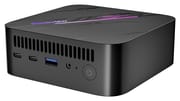 Blackview MP100 (Ryzen 5 7430U) | |
| Price | List Price: $400.00 Amazon Prices: Loading prices... |
| Version | 16GB/512GB/Ryzen 5 7430U |
| Performance Rating | 4.2 |
| Operating System | Windows 11 Pro |
| Processor | Hexa-core 2.30 Ghz (max 4.30 Ghz) AMD Ryzen 5 7430U |
| GPU | Integrated Radeon RX Vega 7 Graphics |
| RAM | 16 GB DDR4 SO-DIMM, single-channel (1x16GB in review units; 2nd slot free) |
| Internal Storage | 512 GB NVMe SSD |
| Dimensions width x length x thickness | 5 x 5 x 1.77 inches (127 x 127 x 44.96 mm) |
| Weight | 1.08 lbs (0.49 kg) |
| WiFi | Wi-Fi 6 (802.11ax) |
| Bluetooth | Bluetooth 5.2 |
| Ethernet | 1 Ethernet port at 1 Gbps |
| HDMI | 1 Full-Size HDMI Port |
| DisplayPort | 1 DisplayPort (Full-size DP (4K 144Hz); one front USB-C carries video at up to 4K 60Hz) |
| VGA | No VGA Ports |
| USB Ports | 1 USB 2.0, 2 USB 3, 2 USB-C Front: 2x USB-C 10Gbps, 1x USB-A 10Gbps. Rear: 1x USB-A 10Gbps, 1x USB 2.0 |
| Thunderbolt Ports | No |
| OCuLink | No |
| Internal SATA Ports | No SATA ports |
| Card Reader | No Card Reader |
| Headphone Jack | combo |
| Fanless | No |
| VESA Mount | Yes |
| In the Box | Power adapter, HDMI cable, VESA mount and screws, manual |
| Expandability | Two DDR4-3200 SO-DIMM slots, up to 64GB. Second M.2 NVMe slot plus a 2.5-inch SATA bay. |
Related Mini PCs
-
 Beelink SER3The Beelink SER3 pairs an AMD Ryzen 7 3750H (Radeon Vega 10) with dual 4K HDMI output and extensive…
 -
 Beelink SER5 (5500U)The Beelink SER5 (5500U) is a Ryzen 5 5500U mini PC with 16GB of DDR4 in two slots (64GB max), a…
 -
 Bmax MaxMini B11 ProA palm-sized office mini PC with an Intel Core Ultra 5 115U, 16GB of soldered LPDDR5, a 512GB SSD…
 -
 BOSGAME E5The BOSGAME E5 is a versatile mini PC powered by the AMD Ryzen 3 5300U processor. With dual 2.5GbE…
 -
 BOSGAME E6 ECOThe BOSGAME E6 ECO is a 5-inch Wildcat Lake mini PC with the Intel Core 3 304, 12GB of soldered…
 -
 FIREBAT AM02 (Ryzen 5 6600H)The FIREBAT AM02 is a compact Windows mini PC with a six-core AMD Ryzen 5 6600H, Radeon 660M…
Ports, chassis, and storage bays

The MP100 measures 5 x 5 x 1.8 inches and weighs about 1.1 pounds. A slotted vent runs across the top half of the front panel. Below it sit two USB-C ports, a USB-A 3.2 Gen 2 port, a combo headphone and microphone jack, and the power button. The back holds Gigabit Ethernet, a second USB-A 3.2 Gen 2 port, a USB 2.0 port, a full-size DisplayPort, HDMI 2.0, and a barrel power jack. Both USB-C ports run at 10Gbps. Blackview’s spec sheet lists 4K 60Hz output on both, but Lon.TV found that one of the two is a full-function port with display output. DisplayPort, HDMI, and that USB-C port together drive three 4K screens.
Four screws on the bottom release the lid. The inside of the lid carries a 2.5-inch SATA bay that connects to the board by a ribbon cable, so lift the lid gently. Under that bay are two DDR4-3200 SO-DIMM slots (64GB maximum), the 512GB NVMe SSD, and an empty second M.2 2280 slot. Blackview rates each M.2 slot for drives up to 2TB at PCIe 3.0 speeds. Tek Syndicate measured the stock SSD at 3,556 MB/s read and 2,649 MB/s write. Wireless is WiFi 6 with Bluetooth 5.2. An RGB light strip runs across the top, and Blackview’s preinstalled software sets its effect, speed, and brightness or turns it off.
Ryzen 5 7430U performance and memory
The Ryzen 5 7430U is a Zen 3 laptop chip with 6 cores, 12 threads, and a 4.3GHz boost. AMD released it in 2023 as a refresh of the Ryzen 5 5625U. Its PassMark score of about 16,000 puts it well ahead of Intel N100 and N150 boxes, but behind current Ryzen 7 8845HS and Core Ultra systems. The integrated GPU is Radeon Vega 7, an older design than the RDNA graphics in newer Ryzen chips.
Single-channel memory costs this machine the most in graphics work. Lon.TV ran 3DMark Time Spy at 956 with the stock stick and 1,373 after adding a second one. No Man’s Sky at 720p on the lowest settings went from about 20 to 25 fps to 35 to 40 fps with the same change. On one stick the Speedometer browser benchmark scored 20.3, and 4K YouTube played smoothly, so everyday desktop work gains little from the upgrade. A matching module gives the GPU both memory channels. Two 8GB sticks keep the total at 16GB; adding a second 16GB stick raises it to 32GB.
Power draw is low for six cores. Lon.TV measured 10 to 11 watts at idle and about 46 watts at peak. The unit scored 98.6% on the 3DMark stress test, so sustained performance barely dropped. Ubuntu found the audio, Ethernet, WiFi, and Bluetooth with no extra drivers.
Reviewer Insights

Lon.TV
Lon Seidman of Lon.TV tested a 16GB/512GB unit that Blackview supplied, first with its single stick and then with a second one added. With the stock stick, web browsing at 4K was quick: “I found performance on this, even at 4K 60, which is what we’re running it at right now, to be very fast and responsive.” 4K YouTube played smoothly with only a couple of dropped frames (“So no real reservations here in regards to video playback or streaming”). A simple 4K project in DaVinci Resolve with a cross-dissolve transition played back: “It’s a little on the sluggish side, but it’s able to get the job done.”
The first boot showed an unfamiliar icon on the Windows desktop, and his malware scans with several tools found nothing. The RGB control software uses a USB-to-serial driver that may be hard to find after a reinstall. He also noted that the fan sometimes turns on at idle and is on the loud side for web browsing, though it stays fairly quiet under full load. Of the memory layout he said “It was really disappointing though that they included so much RAM but put it all on a single stick.” He pointed to the core count, the three internal drive positions, and the low idle draw as a fit for Docker containers and self-hosted apps.
Tek Syndicate
Tek Syndicate measured temperatures in the mid-70s Celsius during a stress test and 47.4 decibels with the meter close to the case, against a room level of 44.9. His summary: “I’m going to say that this thing is relatively cool and also decently quiet.” His unit also had one 16GB stick, even though Blackview’s site lists dual-channel memory. His benchmark runs came in at 1,396 single-core and 7,204 multi-core in Cinebench R23, 1,875 and 5,740 in Geekbench, and 21.6 fps in Unigine Valley.
He called the CPU “Pretty snappy for what it is” and said “I think the case is nice.” He expected more from the Radeon GPU in Unigine Valley, and he pointed to Ryzen 7 7840HS machines with Radeon 780M graphics for gaming, which may also bring USB4 and DDR5. He still found lighter 3D games such as House of the Dying Sun playable.
Should you buy it?
The MP100 fits office work, web browsing, and 4K video playback, and its six cores, three drive positions, and low idle draw suit Docker containers and self-hosted apps. The DisplayPort output runs a 4K monitor at 144Hz, Ubuntu found all the hardware, and the warranty runs three years. Budget for a second memory stick so the graphics get both channels.
Skip it for 3D gaming or for moving large files over a fast home network. The GEEKOM A5 (2025 Edition) uses the same Ryzen 5 7430U with 2.5GbE, but it has an M.2 2242 SATA slot where the MP100 has a second full-length NVMe slot, and the MP100 keeps the 4K 144Hz DisplayPort output. For gaming, Tek Syndicate pointed to Ryzen 7 7840HS machines with Radeon 780M graphics. The Beelink SER7 is one of them. The Mini PC Comparison Chart filters by chip, Ethernet speed, and drive slots.
Frequently Asked Questions
What RAM should I add to the Blackview MP100?
A DDR4-3200 SO-DIMM laptop module that matches the installed 16GB stick. A matching 16GB module gives 32GB in dual-channel mode. The board accepts up to 64GB across its two slots.
Is the Blackview MP100 good for gaming?
Only for light and older games. Tek Syndicate’s single-stick unit scored 1,725 in Unigine Superposition at 1080p Medium, an average of 12.9 fps. Emulation, game streaming, and indie titles suit it better, and a second memory stick raised No Man’s Sky at 720p from about 20 to 25 fps to 35 to 40 fps in Lon.TV’s test.
How many drives can the Blackview MP100 hold?
Three: two M.2 2280 NVMe SSDs and one 2.5-inch SATA drive. Blackview rates each NVMe slot for up to 2TB and the SATA bay for up to 2TB.
Which output do I use for a 144Hz monitor?
DisplayPort. It is the only output that runs 4K at 144Hz. HDMI 2.0 and the video-capable USB-C port stop at 4K 60Hz.
Can I turn off the RGB lighting on the Blackview MP100?
Yes. The preinstalled lighting app has an off setting along with breathing, color cycle, and auto modes, plus speed and brightness sliders. Tek Syndicate found no option to pick one fixed color.