
Bmax MaxMini B11 Pro
Published on

The Bmax MaxMini B11 Pro is a palm-sized desktop for office work, browsing, video calls, and multi-monitor setups, built on Intel’s Core Ultra 5 115U. Bmax sells one configuration: 16GB of LPDDR5 soldered to the board and a 512GB SSD. The memory cannot be upgraded, so 16GB is the most this machine will ever have; storage can grow through a free M.2 slot and a 2.5-inch SATA bay. The 115U is a 15-watt laptop chip from late 2023.
Pros and Cons
| Pros | Cons |
|---|---|
| Three display outputs: HDMI 2.1, DisplayPort 2.1, and USB-C | 16GB of LPDDR5 is soldered and cannot be upgraded |
| Free M.2 2280 slot plus a 2.5-inch SATA bay | Memory runs at 4400MT/s, well below the 7467MT/s the chip supports |
| 2.5GbE Ethernet, WiFi 6, and Bluetooth 5.2 | No USB4 or Thunderbolt port |
| Quick Sync raised a Handbrake transcode from 46fps to 290fps in El Cronista’s test | Two of the four USB-A ports are USB 2.0 |
| Under a pound, with a VESA bracket in the box | The SSD is PCIe 3.0, slower than current PCIe 4.0 drives |
| Windows 11 Pro preinstalled; Ubuntu is supported | The 2023 chip’s NPU is rated at 11 TOPS, far short of Copilot+ PC requirements |
Bmax MaxMini B11 Pro Comparison Chart
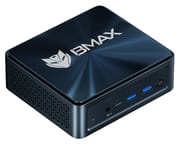 Bmax MaxMini B11 Pro | |
| Price | List Price: $459.99 Amazon Prices: Loading prices... |
| Version | 16GB/512GB/Core Ultra 5 115U |
| Performance Rating | 3.9 |
| Operating System | Windows 11 Pro |
| Processor | Octa-core 1.50 Ghz (max 4.20 Ghz) Intel Core Ultra 5 115U |
| GPU | Integrated Intel Graphics |
| RAM | 16 GB LPDDR5 (Soldered, 4400MT/s) |
| Internal Storage | 512 GB NVMe SSD |
| Dimensions width x length x thickness | 4.96 x 4.41 x 2.05 inches (125.98 x 112.01 x 52.07 mm) |
| Weight | 0.88 lbs (0.4 kg) |
| WiFi | Wi-Fi 6 (802.11ax) |
| Bluetooth | Bluetooth 5.2 |
| Ethernet | 1 Ethernet port at 2.5 Gbps |
| HDMI | 1 Full-Size HDMI Port |
| DisplayPort | 1 DisplayPort (DP 2.1; video also over USB-C) |
| VGA | No VGA Ports |
| USB Ports | 2 USB 2.0, 2 USB 3, 1 USB-C Front: USB-C, 2x USB-A 3.2. Rear: 2x USB-A 2.0 |
| Thunderbolt Ports | No |
| OCuLink | No |
| Internal SATA Ports | 1 SATA port, includes 2.5" drive bay (2.5-inch SATA bay) |
| Card Reader | No Card Reader |
| Headphone Jack | combo |
| Fanless | No |
| VESA Mount | Yes |
| In the Box | 65W power adapter, HDMI cable, VESA bracket and screws, manual |
| Expandability | 16GB LPDDR5 soldered. Free M.2 2280 NVMe slot and a 2.5-inch SATA bay. |
Related Mini PCs
-
 Bmax B9 PlusThe Bmax B9 Plus is a compact mini PC with a 12-core Intel Core i5-1250P, 24GB of LPDDR5 memory, a…
 -
 Bmax B4 Plus 2025 (Intel N95)The 2025 Bmax B4 Plus is a palm-sized Windows 11 Pro desktop with an Intel N95, 12GB of soldered…
 -
 Beelink SER3The Beelink SER3 pairs an AMD Ryzen 7 3750H (Radeon Vega 10) with dual 4K HDMI output and extensive…
 -
 Beelink SER5 (5500U)The Beelink SER5 (5500U) is a Ryzen 5 5500U mini PC with 16GB of DDR4 in two slots (64GB max), a…
 -
 BOSGAME E5The BOSGAME E5 is a versatile mini PC powered by the AMD Ryzen 3 5300U processor. With dual 2.5GbE…
 -
 BOSGAME E7The BOSGAME E7 pairs a 6-core Intel Core 3 100U with two Gigabit Ethernet ports and triple 4K@60Hz…
Three display outputs and two free drive slots

The chassis measures about 5 x 4.4 x 2 inches and weighs about 0.9 pounds, in a dark blue finish with vents on the sides. The front panel carries a 3.5mm combo jack, the USB-C port, two USB-A 3.2 ports, and the power button. The back holds the 2.5GbE port, two USB-A 2.0 ports, HDMI 2.1, DisplayPort 2.1, and the barrel power input. The USB-C port also carries video, so HDMI, DisplayPort, and USB-C can drive three monitors at once. It is not a USB4 or Thunderbolt port, so there is no fast external dock or eGPU path.
The Core Ultra 5 115U has 8 cores (2 performance, 4 efficient, 2 low-power efficient) and 10 threads, boosting to 4.2GHz. Its PassMark CPU score of about 12,800 is roughly 2.4 times that of the Intel N150 in budget boxes like the Bmax B4 Ultra. Intel’s spec sheet names the integrated GPU Intel Graphics, with 3 Xe cores at up to 1.8GHz. The chip also has an Intel AI Boost NPU rated at 11 TOPS.
The 512GB NVMe SSD uses a PCIe 3.0 x4 link, and Windows 11 Pro comes preinstalled.
El Cronista measured fast transcoding and playable older games

Adrián Mansilla at El Cronista tested the B11 Pro in a Spanish-language review published in June 2026. He found that office apps, browsing with many tabs, video calls, light photo editing, and media playback all ran smoothly. His benchmark runs came in at 7,734 points in Cinebench R23, 1,414 in CrossMark, and 2,007 single-core and 7,079 multi-core in Geekbench 6. CrystalDiskMark measured the SSD at 2,823MB/s read and 1,270MB/s write, which he called quick for booting and app loading but below high-end PCIe 4.0 drives.
Converting a 1080p H.264 video to H.265 in Handbrake ran at an average of 46fps on the CPU alone and 290fps with Intel Quick Sync turned on. For gaming, Shadow of the Tomb Raider at the lowest settings managed 30fps at 1080p and 44fps at 720p. GTA V Legacy with normal textures did better, at 67fps at 1080p and 118fps at 720p. His verdict was that the B11 Pro is not a gaming PC, but it can handle casual titles, older games, and retro emulation.
He found the machine mostly silent in everyday use, with a hum like a laptop under strain during sustained load. The cooler uses copper heat pipes. The BIOS offers four fan profiles (Full on, Balanced, Performance, and Silent), and the unit ships in Balanced. He called WiFi 6 more than enough for most homes and offices, though some pricier rivals have WiFi 7.
The FIREBAT F1 has more than twice the CPU score for about $10 more
The FIREBAT F1 lists at $470.00 with the same 16GB of soldered LPDDR5 and a 512GB SSD. Its 8-core, 16-thread Ryzen 7 H 255 has a PassMark score of about 28,200, against about 12,800 for the 115U, and it pairs that chip with Radeon 780M graphics. The F1 also has a USB4 port and two PCIe 4.0 M.2 slots, one of them free. The B11 Pro keeps a 2.5-inch SATA bay that the F1 lacks, has DisplayPort 2.1 where the F1 has 1.4, and weighs 0.88 pounds against 1.1. Both have 2.5GbE and WiFi 6. The F1 figures here are PassMark and spec-sheet numbers; the B11 Pro figures above are El Cronista’s measurements. Other boxes are in Starry Hope’s Mini PC Comparison Chart.
Frequently Asked Questions
Can I upgrade the RAM in the Bmax MaxMini B11 Pro?
No. The memory is soldered to the motherboard. If 16GB is too tight, look for a mini PC with SO-DIMM slots.
How much storage can I add to the B11 Pro?
Up to two more drives: an NVMe SSD in the free M.2 2280 slot and a 2.5-inch laptop drive in the SATA bay. That gives three drives in total with the fitted 512GB SSD.
How many monitors can the B11 Pro run?
Three at once. Use HDMI 2.1, DisplayPort 2.1, and a USB-C to DisplayPort or USB-C to HDMI cable for the third screen.
Is the B11 Pro good for gaming?
Only for light and older games. Dropping to 720p helps: El Cronista measured Shadow of the Tomb Raider at 44fps at 720p on the lowest settings, against 30fps at 1080p.
Does the B11 Pro have Thunderbolt or USB4?
No. Bmax lists the USB-C port as full-featured, with data and video output, but it is not USB4 or Thunderbolt.
Is the B11 Pro a Copilot+ PC?
No. Microsoft requires an NPU rated at 40 TOPS or more for Copilot+ PCs, and the 115U’s NPU is rated at 11 TOPS.
Can the B11 Pro run Linux?
Yes. Bmax lists Ubuntu as a supported operating system alongside the preinstalled Windows 11 Pro.