
BOSGAME E6 ECO
Published on

The BOSGAME E6 ECO is a small, quiet desktop on Intel’s entry-level “Wildcat Lake” chip, for people replacing an older N100 or N150 mini PC used for office work, browsing, and light editing. Robtech measured the lowest fan noise of the Core 3 304 machines he tested, and Wccftech measured lower temperatures than on the other Core 3 304 devices it had tested. The chip limits it to everyday work, with weak graphics and slow video encoding, and the 12GB of memory is soldered and can never be upgraded.
Pros and Cons
| Pros | Cons |
|---|---|
| Lowest fan noise under load of the Core 3 304 minis in Robtech’s tests | 12GB of soldered memory is the only option |
| Cool running: Wccftech saw a 69C peak, lower than the 80C-plus on other Core 3 304 devices it tested | Weak iGPU; games run at 720p with low settings |
| Wi-Fi 7 and Bluetooth 5.4 | Slow video encoding on the CPU; Premiere not suited to footage above 1080p |
| Three 4K60 outputs: HDMI 2.0, DisplayPort 1.4, and front USB-C | The included SSD is slow, and the spare slot is only PCIe 4.0 x1 |
| Front USB-C accepts USB PD power and carries 10Gbps data and video | Fitting a second drive means removing a standoff first |
| About 7 watts at idle from the wall; Ubuntu works | Gigabit Ethernet only; no BIOS updates posted |
Related Videos
BOSGAME E6 ECO Comparison Chart
 BOSGAME E6 ECO | |
| Price | List Price: $379.99 Amazon Prices: Loading prices... |
| Version | 12GB/512GB/Intel Core 3 304 |
| Performance Rating | 3.3 |
| Operating System | Windows 11 Pro |
| Processor | 5-core 1.50 Ghz (max 4.30 Ghz) Intel Core 3 304 |
| GPU | Integrated Intel Graphics |
| RAM | 12 GB LPDDR5X (Soldered LPDDR5X-6400, not upgradeable) |
| Internal Storage | 512 GB NVMe SSD |
| Dimensions width x length x thickness | 5.08 x 5.04 x 1.73 inches (129.03 x 128.02 x 43.94 mm) |
| Weight | unknown |
| WiFi | Wi-Fi 7 (802.11be) |
| Bluetooth | Bluetooth 5.4 |
| Ethernet | 2 Ethernet ports at 1 Gbps |
| HDMI | 1 Full-Size HDMI Port |
| DisplayPort | 1 DisplayPort (DP 1.4, plus DP Alt Mode on front USB-C) |
| VGA | No VGA Ports |
| USB Ports | 2 USB 2.0, 2 USB 3, 1 USB-C Front: 2x USB-A 10Gbps, 1x USB-C 10Gbps (PD in). Rear: 2x USB 2.0 |
| Thunderbolt Ports | No |
| OCuLink | No |
| Internal SATA Ports | No SATA ports |
| Card Reader | No Card Reader |
| Headphone Jack | combo |
| Fanless | No |
| VESA Mount | Yes |
| In the Box | Mini PC, 19V 65W power adapter, VESA mount, HDMI cable, manual |
| Expandability | RAM soldered. Spare M.2 2242 slot (PCIe 4.0 x1) free. |
Related Mini PCs
-
 BOSGAME E5The BOSGAME E5 is a versatile mini PC powered by the AMD Ryzen 3 5300U processor. With dual 2.5GbE…
 -
 BOSGAME E7The BOSGAME E7 pairs a 6-core Intel Core 3 100U with two Gigabit Ethernet ports and triple 4K@60Hz…
 -
 Beelink SER3The Beelink SER3 pairs an AMD Ryzen 7 3750H (Radeon Vega 10) with dual 4K HDMI output and extensive…
 -
 Beelink SER5 (5500U)The Beelink SER5 (5500U) is a Ryzen 5 5500U mini PC with 16GB of DDR4 in two slots (64GB max), a…
 -
 Bmax MaxMini B11 ProA palm-sized office mini PC with an Intel Core Ultra 5 115U, 16GB of soldered LPDDR5, a 512GB SSD…
 -
 Getorli GT103The Getorli GT103 is a Ryzen 5 7430U mini PC with two 2.5 Gigabit Ethernet ports, three display…
Case, ports, chip, and the two M.2 slots

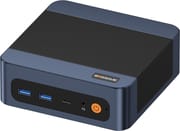
The E6 ECO measures about 5.1 by 5 inches and 1.7 inches tall. The case is navy blue with a textured finish and black mesh across the top and down both sides. The front panel holds two USB-A ports at 10Gbps, a 10Gbps USB-C port, a 3.5mm headset jack, the power button, and a CMOS reset pinhole. The USB-C port carries DisplayPort video and accepts USB PD power. On the back are the 19V barrel jack for the 65W adapter, two Gigabit Ethernet ports (not 2.5GbE), HDMI 2.0, DisplayPort 1.4, and two USB 2.0 ports. HDMI, DisplayPort, and USB-C together drive three 4K displays at 60Hz, and a VESA mount comes in the box.
The Core 3 304 has one performance core and four low-power efficiency cores, five threads in all, with a 4.3GHz boost clock, a single Xe3 graphics core, and a 15 TOPS NPU. Its PassMark CPU Mark is around 11,645, well above the Intel N150. The 12GB of LPDDR5X runs at 6400 MT/s and is soldered to the board, so it cannot be upgraded or replaced. The chip supports memory up to 7467 MT/s, so the E6 ECO runs a little below the maximum. Wireless is Wi-Fi 7 with Bluetooth 5.4.
Storage is a 512GB Kingfast PCIe 3.0 NVMe SSD in a slot wired for PCIe 4.0 x2, so the drive runs at PCIe 3.0 x2. BOSGAME lists the second slot as M.2 2242 PCIe 4.0, and Robtech found it wired for a single PCIe 4.0 lane. The Wi-Fi card sits underneath the SSD. The case opens with four screws under the rubber feet, and three more screws hold down the SSD bracket.
Reviewer Insights

Robtech
Robtech tested the E6 ECO against three other Core 3 304 mini PCs and a range of older budget machines. He found the build decent, with some flex in the top and bottom under pressure, and said “the design looks better in person than in the photos.” He also noted that “Price-wise, this is one of the better options for the low-end Wildcat Lake minis we’ve looked at,” and that a Wi-Fi 7 card was more than he expected at this level. In Cinebench single-core, the E6 ECO ran at full speed with no difference between the four Core 3 304 units, while its multi-core score was the lowest of the four by a small margin. In Geekbench 6 multi-core it came close to the best result.
“The Core 3304 is not a great choice for encoding video,” he says, and a Ryzen 5 6600H machine won that test easily. The chip’s AV1 Quick Sync hardware encoding cut encode time by around 90 percent. He rejects the AI marketing for this chip and says an older Ryzen 7 7730U would beat it running an open-source model locally. Graphics are weak, though far better than the Intel N series, and emulation runs well because of the strong single-core speed. The E6 ECO was the fastest of the Core 3 304 units at compiling code. Photoshop runs acceptably, but he does not recommend Premiere for anything above 1080p and points to the Core 5 320 as a far better choice for that work.
“Fan noise is the lowest under load from the Core 3 minis we’ve looked at, which is great considering its lower price tag,” he says, and CPU temperatures stayed under 90C. Idle draw at the wall was 7 watts, similar to the other Core 3 304 machines. The SSD was slow but stayed cool, Bluetooth range was a bit above average, and Wi-Fi on the 5GHz band had no dropouts at 39 feet from the router.
Adding a second SSD requires removing a standoff first, which can leave scratch marks without the right tools. A malware scan of the preinstalled Windows 11 Pro flagged a registry change that shows file extensions; he says it is not malicious and appears on every BOSGAME mini PC he has tested. Ubuntu worked. The BIOS offers Wake on LAN, a power mode setting, HDMI CEC, AC power loss recovery, and a manual fan curve. BOSGAME posts driver downloads but no BIOS updates, and the warranty is 12 months. He named the E6 ECO his pick of the four Core 3 304 mini PCs he had tested, for its performance, lower fan noise, and price.
Wccftech
Wccftech’s review found the E6 ECO set to a 25W PL1 and 35W PL2, higher than the 15W PL1 Wccftech saw on the Beelink EQi 304. In CPU tests the chip drew around 16 to 18 watts. Idle temperatures were 31 to 32C and the chip peaked at 69C, well below the peaks above 80C that Wccftech measured on other Core 3 304 devices. “Bosgame has done a really good job on the cooling of this PC,” the review says. Inside, the cooler uses two copper heat pipes, a finned heatsink, and a blower fan.
The review’s gaming tests were run at 720p. Skyrim Special Edition reached about 60 fps indoors and 40 to 50 fps outdoors at low settings. Cyberpunk 2077 ran at 28 to 33 fps at low settings with XeSS Ultra Performance, and 50 to 70 fps with frame generation turned on. Red Dead Redemption 2 ran at about 30 to 35 fps. Wccftech lists the 12GB of memory, which “can be used up quickly,” and the single USB-C port as drawbacks. “It’s not a multitasking powerhouse, and it’s not a machine designed with gamers in mind,” the review says, while concluding that “It’s light, it’s cooled well, and it offers the performance that lightweight PC users need in a decently designed package.”
KL Tech Videos
In his video, KL Tech Videos ran the E6 ECO on Ubuntu after removing the preinstalled Windows 11 Pro, which was already using about 5GB of the 12GB of memory. Under Ubuntu the system used 2.2GB. He reports a Cinebench R23 multi-core score of 6,729, against 2,949 for the Intel N100. In his stress test all five cores ran at 100 percent, with the performance core at 3.9GHz, the efficiency cores at up to 3.1GHz, and temperatures that did not “really exceed about 67° C.”
His gaming tests on Ubuntu covered older and lighter titles. Prison Architect, Red Alert 3, GTA San Andreas, and Oblivion all ran, and World of Warships reached up to 60 fps, with the CPU at about 42 to 43C. Skyrim ran at about 20 fps on the lowest settings, which he still called playable, and Planet Coaster ran at 18 to 20 fps. The simulation game Airport CEO pushed the CPU to 73C, against 45 to 50C in Skyrim, while the case stayed “cool to the touch.” Kdenlive ran without problems, and Docker and Jellyfin took him less than 60 seconds to install. He calls it “the most entertaining, yet productive mini PC that I have come across in a very long time.”
Who it’s for
The E6 ECO fits a buyer moving up from an Intel N150 box such as the Beelink EQ14 who wants a quiet machine for office work, browsing, image editing, and older games or emulation. Low idle power, dual Ethernet, and working Ubuntu support also make it a reasonable small home server. It had the lowest fan noise in Robtech’s group of Core 3 304 machines and the lowest peak temperature in Wccftech’s.
Skip it if you edit video above 1080p, encode video often, or need more than 12GB of memory. The ACEMAGIC Kron K5 comes in a Core 5 320 version, the chip Robtech recommends for Premiere work. The Beelink EQi 304 adds 10GbE, and some of its models take SO-DIMM memory. The wo-we H8 uses the same chip with 8GB of memory and a louder fan. For other Core Series 3 machines, see the Wildcat Lake guide and the Mini PC Comparison Chart.
Frequently Asked Questions
What processor does the BOSGAME E6 ECO use?
The Intel Core 3 304 from the Wildcat Lake family. It has five cores, only one of them a performance core, so it is quick in single-threaded work but slow at multi-threaded jobs such as video encoding.
Can I upgrade the RAM in the BOSGAME E6 ECO?
No. The 12GB of LPDDR5X-6400 is soldered to the board. Storage can be expanded through a second M.2 2242 slot, wired for PCIe 4.0 x1.
Is the BOSGAME E6 ECO quiet?
Yes, for its class. Robtech measured the lowest fan noise under load of the Core 3 304 mini PCs he tested, and Wccftech saw the chip peak at 69C. The BIOS also lets you set the fan curve by hand.
How many monitors can the BOSGAME E6 ECO drive?
Three at 4K and 60Hz: one on HDMI 2.0, one on DisplayPort 1.4, and one on the front USB-C port through DisplayPort Alt Mode.
Are the Ethernet ports 2.5GbE?
No. Both RJ45 ports are Gigabit. For faster wired networking, look at the Beelink EQi 304, which has a 10GbE port, or the ACEMAGIC Kron K5 with 2.5GbE.
Does the BOSGAME E6 ECO run Linux?
Yes. Robtech tested Ubuntu on it without problems, and KL Tech Videos ran Ubuntu with Docker, Jellyfin, and Kdenlive. It ships with Windows 11 Pro.
How much power does the BOSGAME E6 ECO use?
Little: about 7 watts at idle from the wall in Robtech’s testing, and a 25W sustained power limit out of the box. It ships with a 19V 65W adapter, and the front USB-C port can power it instead.