
wo-we H8
Published on

The wo-we H8 is a low-cost way into Intel’s Core 3 304 “Wildcat Lake” chip for someone replacing an Intel N100 or N150 desktop. It runs office work, video encoding, and light games much faster than those boxes, and it drives three 4K monitors. The tradeoffs are a creaky plastic case, loud fan noise under load, thermal throttling on long jobs, and 8GB of memory that can never be upgraded. Buy it if the price gap to other Core 3 304 machines matters more to you than noise and build quality.
Pros and Cons
| Pros | Cons |
|---|---|
| CPU scores roughly 80 to 112 percent ahead of the Intel N150 in Robtech’s Cinebench runs | 8GB of soldered LPDDR5 is the only memory option |
| Graphics 29 to 84 percent faster than the N150 across three 3DMark tests | Reaches 98C and throttles under sustained load; Photoshop results trail other Core 3 304 minis |
| Three 4K60 outputs: HDMI 2.0, DisplayPort 1.4, and front USB-C | Loudest fan under load in Robtech’s test group |
| Front USB-C takes 100W USB PD input and carries 10Gbps data and video | The included SSD sits in the slower x1 slot and runs near SATA speed |
| Two Gigabit Ethernet ports and a second M.2 slot | Plastic chassis flexes and creaks |
| About 6 watts at idle from the wall | Ubuntu does not support the MediaTek Wi-Fi card; basic BIOS with no updates posted |
Related Videos
wo-we H8 Comparison Chart
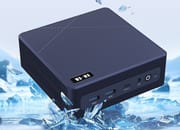 wo-we H8 | |
| Price | List Price: $399.99 Amazon Prices: Loading prices... |
| Version | 8GB/256GB/Intel Core 3 304 |
| Performance Rating | 3.2 |
| Operating System | Windows 11 Pro |
| Processor | 5-core 1.50 Ghz (max 4.30 Ghz) Intel Core 3 304 |
| GPU | Integrated Intel Graphics |
| RAM | 8 GB LPDDR5, single-channel (Soldered LPDDR5-6400, not upgradeable) |
| Internal Storage | 256 GB NVMe SSD |
| Dimensions width x length x thickness | 5.04 x 5.04 x 1.69 inches (128.02 x 128.02 x 42.93 mm) |
| Weight | unknown |
| WiFi | Wi-Fi 6E (802.11ax) |
| Bluetooth | Bluetooth 5.2 |
| Ethernet | 2 Ethernet ports at 1 Gbps |
| HDMI | 1 Full-Size HDMI Port |
| DisplayPort | 1 DisplayPort (DP 1.4, plus DP Alt Mode on front USB-C) |
| VGA | No VGA Ports |
| USB Ports | 2 USB 2.0, 2 USB 3, 1 USB-C Front: 2x USB-A 5Gbps, 1x USB-C 10Gbps (PD in). Rear: 2x USB 2.0 |
| Thunderbolt Ports | No |
| OCuLink | No |
| Internal SATA Ports | No SATA ports |
| Card Reader | No Card Reader |
| Headphone Jack | combo |
| Fanless | No |
| VESA Mount | Yes |
| In the Box | Mini PC, 19V 65W power adapter, VESA bracket, HDMI cable, manual |
| Expandability | RAM soldered. Second M.2 2280 slot (PCIe 4.0 x2) free, up to 4TB. |
Related Mini PCs
-
 Beelink SER5 Mini PCThe Beelink SER5 is a compact AMD mini PC (Ryzen 5 5560U or Ryzen 7 5700U) with Radeon graphics,…
 -
 BOSGAME E5 PlusThe BOSGAME E5 Plus pairs a four-core Ryzen 3 5400U with two 2.5GbE ports, two memory slots, and a…
 -
 GMKtec NucBox M2 Pro SPalm-sized GMKtec mini PC built on Intel's 11th-gen Core i7-1185G7, with triple 4K60 output, Intel…
 -
 PELADN WO4The PELADN WO4 pairs AMD's six-core Ryzen 5 5600H with dual Ethernet, two DDR4 SO-DIMM slots and a…
 -
 Lenovo ThinkCentre neo 50q Gen 4The Lenovo ThinkCentre neo 50q Gen 4 is a 1-liter business desktop built around a 13th Gen Intel…
 -
 Lenovo ThinkCentre neo 50q Gen 5The Lenovo ThinkCentre neo 50q Gen 5 is a 1-liter business desktop built on the Intel Core 5 210H,…
Ports, memory, and the two M.2 slots

The H8 measures about 5 inches square and 1.7 inches tall. The front panel holds two USB-A ports at 5Gbps, a USB-C port, a 3.5mm headset jack, the power button, and a CMOS reset pinhole. The USB-C port carries 10Gbps data and DisplayPort Alt Mode video, and wo-we rates it for 100W USB PD 3.0. It is not a USB4 port, even though the Core 3 304 supports USB4. The rear carries the 19V barrel jack for the 65W adapter, two Gigabit Ethernet ports, HDMI 2.0, DisplayPort 1.4, and two USB 2.0 ports. HDMI, DisplayPort, and USB-C together drive three 4K displays at 60Hz. A VESA bracket comes in the box.
The Core 3 304 has one performance core and four efficiency cores, five threads in all, with a boost clock of 4.3GHz, a single Xe3 graphics core, and a 15 TOPS NPU. Its PassMark CPU Mark is around 11,645, well above the N150. The 8GB of LPDDR5 runs at 6400 MT/s and is soldered to the board, so it cannot be upgraded. Wireless is Wi-Fi 6E and Bluetooth 5.2 on a MediaTek card. Some units shipped with labels that list an older Wi-Fi standard; wo-we states that the hardware is Wi-Fi 6E.
Storage is a 256GB NVMe SSD, a PCIe 3.0 drive installed in the slot wired for PCIe 4.0 x1. The board has a second M.2 2280 slot, wired for PCIe 4.0 x2, that ships empty and takes a drive of up to 4TB. Moving the included SSD to the empty slot, or adding a faster drive there, gives the boot drive twice as many PCIe lanes. There is no heatsink on the SSD.
Reviewer Insights

Robtech
Robtech tested the H8 against budget Intel N-series boxes rather than higher-end mini PCs. “In single core Cinebench, the 304 steamrolls the N150. Against the best result, it is around 80% ahead,” he says, and “Multicore sees another massive leap. This time 112%.” In Geekbench 6 the gap was 88 percent single-core and about 90 percent multi-core, and the H8 finished his H.264 encode in less than half the N150’s time. On graphics, “it is 29% faster in Fire Strike, 77% in Time Spy, and 84% in Steel Nomad Light. This is what we would consider a multi-generational improvement.” He calls light esports gaming playable on it, while saying this is not a machine to buy for gaming.
The H8 holds its clocks for a while, but Robtech says that “under a sustained load” it “will eventually hit 98C and thermal throttle like it did during the long Adobe Photoshop benchmark. This is the worst result for a mini PC out of the box with active cooling on this chart.” That throttling explains his Photoshop result: “Adobe Photoshop performance with the H8 is poor compared to the other minis with the same CPU.” Premiere results matched the other Core 3 304 machines. He says “Fan noise under load is the highest of all the minis on this list,” and “But make no mistake, this is not a quiet mini PC.” He adds that the noise is not high-pitched. Power draw is low at rest: “An idle power draw from the wall of 6 watts is excellent and 37 watts maximum puts it on the high end of Intel N series”, which he says still works out to better performance per watt.
The factory storage layout leaves the faster slot empty. “There is a Gen 3 SSD in the H8 mini PC, and since it is in the Gen 4 X1 slot, it only runs at Gen 3 X1 speed. And this in turn makes the drive not much faster than SATA.” Of the empty slot beside it, he says “The slot next to it is Gen 4x2, which is where the drive should be”. He calls the build weak: “The plastic is cheap, the chassis flexes, and hello, squeak city.” One rubber foot came off when he opened the case. He does like the power adapter: “I really like the compact power supply, and it is great to see USB-C PD supported.”
“Testing Ubuntu and unfortunately the MediaTek Wi-Fi chip is not supported,” he says. The BIOS offers Wake on LAN, HDMI CEC, and power-loss recovery, and he describes it as “Not much else really, just the very basics.” Firmware support is also limited: “BIOS updates are non-existent on the wo-we website, so you can expect exactly none for this one,” though a driver pack is posted. He also found that “Bluetooth range is pretty mediocre,” while Wi-Fi on the 5GHz band worked without problems at 39 feet from the router. The warranty is 12 months.
An N150 upgrade with a loud fan
The H8 fits a buyer whose current desktop is an Intel N150 box such as the Beelink EQ14 and who wants a large jump in CPU and graphics speed for office work, browsing, 1080p editing in Premiere, and light games. Dual Gigabit LAN connects it to two networks at once, and the three 4K outputs run a three-monitor desk. Plan on moving the SSD to the x2 slot, or adding a second drive there, to get full speed from storage.
Skip it if you want a quiet machine or run long CPU-heavy jobs: it throttles and has the loudest fan in its test group. Skip it for Linux too, unless you are ready to swap the MediaTek Wi-Fi card or run on Ethernet. The Beelink EQi 304 adds 10GbE, two Thunderbolt 4 ports, and an internal power supply, and its DDR5 models take an SO-DIMM upgrade. The ACEMAGIC Kron K5, also sold with the Core 3 304, swaps the second Ethernet port for a single 2.5GbE port and has a 20Gbps USB-C port.
Frequently Asked Questions
What processor does the wo-we H8 use?
The Intel Core 3 304, a Wildcat Lake chip with one performance core and four efficiency cores (five threads), a 4.3GHz boost clock, a single Xe3 graphics core, and a 15 TOPS NPU. Its PassMark CPU Mark is around 11,645.
How much faster is the wo-we H8 than an Intel N150 mini PC?
In Robtech’s testing it scored about 80 percent higher than the best N150 result in Cinebench single-core and 112 percent higher in multi-core, 88 and about 90 percent higher in Geekbench 6, and 29 to 84 percent higher across Fire Strike, Time Spy, and Steel Nomad Light.
Can I upgrade the RAM in the wo-we H8?
No. The 8GB of LPDDR5-6400 is soldered to the board. Storage can be expanded through a second M.2 2280 slot that takes a drive of up to 4TB.
How many monitors can the wo-we H8 drive?
Three at 4K and 60Hz: one on HDMI 2.0, one on DisplayPort 1.4, and one on the front USB-C port through DisplayPort Alt Mode.
Is the wo-we H8 loud?
Under load, yes. Robtech measured the highest fan noise of the budget mini PCs on his chart, though he notes the sound is not high-pitched. The CPU also reaches 98C and throttles during long, heavy workloads.
Does the wo-we H8 run Linux?
Robtech tested Ubuntu and found that the MediaTek Wi-Fi card was not supported. Plan on using Ethernet or replacing the Wi-Fi card if you want to run Linux.
How much power does the wo-we H8 use?
Robtech measured about 6 watts at idle and 37 watts at peak from the wall. It ships with a 19V 65W power adapter, and the front USB-C port also accepts USB PD power.