
CHUWI LarkBox X (Core i3-1220P)
Published on

The CHUWI LarkBox X (Core i3-1220P) is a 5-inch square desktop for office work, browsing, and media on up to three monitors. It reuses the two-tone shell of the N100 LarkBox X (2023) with a different board inside: a 10-core Intel Core i3-1220P, two DDR4 SO-DIMM slots, and two M.2 slots. It ships in one configuration, 8GB of memory and a 256GB SSD, and both are small for the chip. The socketed memory and the second M.2 slot let you fix that later, which the soldered N100 model could not do.
Pros and Cons
| Pros | Cons |
|---|---|
| 10-core Core i3-1220P, far ahead of N100 and N150 boxes in multi-thread work | Ships only as 8GB/256GB, small for a 10-core chip |
| Two DDR4 SO-DIMM slots, up to 32GB | DDR4, not DDR5 |
| Two M.2 2280 slots, one of them PCIe 4.0 x4 | Ethernet tops out at 1Gbps, where the N100 model had a 2.5GbE port |
| Three 4K outputs, two of them at 144Hz | No USB4 or Thunderbolt |
| Dual Gigabit Ethernet, Wi-Fi 6, Bluetooth 5.2 | Integrated 64EU graphics limit games to casual titles |
| VESA bracket in the box | The chip dates from early 2022 |
CHUWI LarkBox X (Core i3-1220P) Comparison Chart
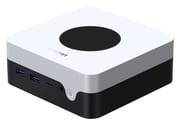 CHUWI LarkBox X (Core i3-1220P) | |
| Price | List Price: $290.00 Amazon Prices: Loading prices... |
| Version | 8GB/256GB/Core i3-1220P |
| Performance Rating | 3.7 |
| Operating System | Windows 11 Pro |
| Processor | Deca-core 3.30 Ghz (max 4.40 Ghz) Intel Core i3-1220P |
| GPU | Integrated Intel UHD Graphics |
| RAM | 8 GB DDR4 SO-DIMM (DDR4-3200, 2 SO-DIMM slots, 32GB max) |
| Internal Storage | 256 GB NVMe SSD |
| Dimensions width x length x thickness | 5 x 5 x 1.9 inches (127 x 127 x 48.26 mm) |
| Weight | 0.88 lbs (0.4 kg) |
| WiFi | Wi-Fi 6 (802.11ax) |
| Bluetooth | Bluetooth 5.2 |
| Ethernet | 2 Ethernet ports at 1 Gbps |
| HDMI | 1 Full-Size HDMI Port |
| DisplayPort | 1 DisplayPort (DP 1.2 and USB-C each to 4K 144Hz) |
| VGA | No VGA Ports |
| USB Ports | 4 USB 3, 1 USB-C 4x USB-A 3.2 Gen 2; USB-C 10Gbps with DP and PD |
| Thunderbolt Ports | No |
| OCuLink | No |
| Internal SATA Ports | No SATA ports |
| Card Reader | No Card Reader |
| Headphone Jack | front |
| Fanless | No |
| VESA Mount | Yes |
| In the Box | Mini PC, 65W power adapter, VESA bracket |
| Expandability | Up to 32GB DDR4 (2x SO-DIMM). Two M.2 2280 slots, up to 1TB each. |
Related Mini PCs
-
 Beelink SER5 Mini PCThe Beelink SER5 is a compact AMD mini PC (Ryzen 5 5560U or Ryzen 7 5700U) with Radeon graphics,…
 -
 BOSGAME E5 PlusThe BOSGAME E5 Plus pairs a four-core Ryzen 3 5400U with two 2.5GbE ports, two memory slots, and a…
 -
 GMKtec NucBox M2 Pro SPalm-sized GMKtec mini PC built on Intel's 11th-gen Core i7-1185G7, with triple 4K60 output, Intel…
 -
 ORIGIMAGIC N5The ORIGIMAGIC N5 is a small desktop with a four-core Ryzen 3 5400U, two 2.5GbE ports, two M.2…
 -
 PELADN WO4The PELADN WO4 pairs AMD's six-core Ryzen 5 5600H with dual Ethernet, two DDR4 SO-DIMM slots and a…
 -
 wo-we H8The wo-we H8 is a budget 5-inch mini PC built on Intel's Core 3 304 Wildcat Lake chip for buyers…
Ports and display outputs

The box measures about 5 x 5 x 1.9 inches and weighs about 0.9 pounds. A large round mesh vent sits on the white top, and the ports split between the front and the back. The front holds two USB-A ports, the USB-C port, a headphone jack, and the power button. The back carries two more USB-A ports, HDMI, DisplayPort, two Ethernet jacks, and the barrel power input. All four USB-A ports are USB 3.2 Gen 2 (10Gbps).
The USB-C port carries 10Gbps data, Power Delivery, and video. USB-C and DisplayPort 1.2 each drive one 4K display at 144Hz, and HDMI 2.1 drives a third at 4K 60Hz, all three at once. Wireless is Wi-Fi 6 with Bluetooth 5.2, and the two Ethernet jacks both run at 1Gbps. A 19V, 65W adapter powers the machine, and a VESA bracket ships in the box for mounting it behind a monitor.
Core i3-1220P performance and memory

Intel launched the Core i3-1220P in early 2022 as a 12th-generation Alder Lake laptop chip. It has two performance cores and eight efficient cores (12 threads), boosts to 4.4GHz, and has a PassMark average CPU Mark of about 14,400. That is roughly 2.7 times the Intel N100 in the 2023 LarkBox X (about 5,300) and Intel’s follow-on N150. It also edges out the Intel Core 3 100U (about 13,100) that CHUWI uses in the newer LarkBox X 100U. CHUWI says the fan holds the chip at its full 28W in Performance Mode without thermal throttling.
The integrated Intel UHD Graphics has 64 execution units at up to 1.1GHz. It decodes 4K video in hardware and handles light photo editing and older or casual games, but current 3D games are beyond it. The 8GB of DDR4-3200 is enough for office apps and a moderate number of browser tabs. The two SO-DIMM slots take up to 16GB each. Swap or add a module to reach 16GB, or fit two 16GB modules for 32GB. Filling both slots runs the memory in dual channel, which the integrated graphics benefit from.
Storage and the second M.2 slot
The 256GB NVMe SSD sits in one of two M.2 2280 slots. The first slot is PCIe 4.0 x4 and the second is PCIe 3.0 x4 or SATA, each for a drive of up to 1TB. That leaves room to add a second drive for media or backups without an external USB drive. There is no 2.5-inch bay. 256GB fills up fast once Windows updates and a few large apps are in place, so plan on the second slot or a larger first drive.
Choosing between the LarkBox models
CHUWI uses the LarkBox name on several different machines. The LarkBox X (2023) shares this shell but runs a 4-core N100 with 12GB of soldered LPDDR5 and one SATA M.2 slot, plus one 1GbE and one 2.5GbE jack. The LarkBox X 100U keeps the shell again with a newer Core 3 100U and 16GB of memory. The LarkBox S also uses the Core i3-1220P, but in a smaller 4.6-inch square case with RGB lighting, one M.2 slot, one Ethernet jack, Wi-Fi 5, and two HDMI ports. Pick this model over the LarkBox S for the second M.2 slot, the second Ethernet port, and Wi-Fi 6.
Conclusion
The LarkBox X i3 suits a home or office desk running two or three monitors for office apps, browsing, video calls, and media. Its Core i3-1220P scores about 14,400 in PassMark, roughly 2.7 times an N100, so it has more room than N100 boxes for multi-thread work and light photo editing. The two SO-DIMM slots and the second M.2 slot mean the small 8GB/256GB build can grow to 32GB and two drives, and the two Ethernet ports can serve one network each in a small router or firewall build.
Skip it for games beyond casual titles, for wired transfers faster than 1Gbps, or for a USB4 dock. The GEEKOM Mini IT12 has a 2.5GbE port and two USB4 ports. Buyers who will not open the case should pick a box that ships with 16GB from the start. To compare other boxes, use Starry Hope’s Mini PC Comparison Chart.
Frequently Asked Questions
Is the CHUWI LarkBox X i3-1220P the same machine as the LarkBox S?
No. They share the Core i3-1220P, but the LarkBox S is a separate design: a smaller case of about 4.6 x 4.6 x 1.6 inches with RGB lighting, 16GB of memory and a 512GB SSD as standard, a 90W adapter, two USB-C ports, and two HDMI ports (one HDMI 2.0, one HDMI 1.4).
What is the largest SSD the LarkBox X i3-1220P supports?
CHUWI rates each M.2 slot for up to 1TB, for 2TB across both. The faster PCIe 4.0 slot suits the boot drive, and the second slot also accepts a SATA M.2 drive.
Does the LarkBox X i3-1220P have 2.5GbE?
No. Both Ethernet ports run at 1Gbps. Two separate ports still let it act as a small router or firewall box with one port per network, but a 2.5GbE USB adapter is the route to faster wired transfers.
Which Windows version comes on the LarkBox X i3-1220P?
CHUWI’s specification sheet lists Windows 11 Pro. Some store listings name Windows 11 Home, so check the edition on the listing if you need a Pro feature such as joining a work domain.
Does the LarkBox X i3-1220P have a card reader?
No. There is no SD or microSD slot, so camera cards need a USB reader on one of the four USB-A ports or the 10Gbps USB-C port.