
GMKtec NucBox M2 Pro S
Published on

The GMKtec NucBox M2 Pro S is a palm-sized desktop built around Intel’s Core i7-1185G7, a four-core, eight-thread Tiger Lake chip with Iris Xe graphics running 96 execution units. GMKtec put it on its global store in late September 2025 as an inexpensive productivity box rather than a flagship, and the spec sheet reflects that: two HDMI 2.0 outputs and a USB-C port that together drive three 4K displays, an Intel I226-V 2.5GbE controller, Wi-Fi 6, two DDR4 SO-DIMM slots, and two M.2 bays. GMKtec sells it three ways, from a barebone shell with no memory, storage, or operating system up to a 32GB/1TB configuration with Windows 11 Pro preinstalled, and Amazon carries a 16GB/1TB SKU alongside those. The tradeoff sits in the silicon. The i7-1185G7 launched in the third quarter of 2020 and Intel now lists it as discontinued, so a machine still on sale in 2026 is running a chip closer to six years old than one.
Pros and Cons of the GMKtec NucBox M2 Pro S
| Pros | Cons |
|---|---|
| Core i7-1185G7 with 4 cores, 8 threads, 4.8 GHz boost, and roughly 9,900 on PassMark’s multi-thread test | Tiger Lake silicon that launched in Q3 2020 and Intel has since marked discontinued |
| Triple 4K60 output from two HDMI 2.0 ports plus DisplayPort Alt Mode on the USB-C | The USB-C carries DisplayPort and 5Gbps data only, with no USB4 or Thunderbolt despite what some listings claim |
| Intel I226-V 2.5GbE alongside Wi-Fi 6 and Bluetooth 5.2 | Carey Holzman measured 5,561 in Cinebench on the performance profile against GMKtec’s quoted 5,700 to 5,800 |
| Two SO-DIMM slots take user-replaceable DDR4-3200 up to 64GB | The fan cycles up often enough to notice on a box this small |
| Dual M.2 bays (2280 NVMe to 8TB plus 2242 SATA to 2TB) for up to 10TB | GMKtec publishes drivers only through free Google Drive links that hit a daily download cap |
| Barebone SKU plus BIOS power profiles for quiet, balanced, and performance operation | Several Amazon buyers report units that stopped booting, one at two weeks and one at about 13 months |
Related Videos
GMKtec NucBox M2 Pro S Comparison Chart
4 configurations
| Configuration | RAM | Storage | OS | Performance | List price | Amazon price | Compare |
|---|---|---|---|---|---|---|---|
| Barebone (no RAM/SSD/OS) | None | None | No OS | 3.6 | $279.99 | Details
| |
| 16GB/512GB | 16 GB | 512 GB SSD | Windows 11 Pro | 3.6 | $459.99 | Loading... | Details
|
| 16GB/1TB | 16 GB | 1 TB SSD | Windows 11 Pro | 3.6 | $499.99 | Loading... | Details
|
| 32GB/1TB | 32 GB | 1 TB SSD | Windows 11 Pro | 4.0 | $579.99 | Details
|
Specs shared by every configuration
| Processor | Quad-core 3.00 Ghz (max 4.80 Ghz) Intel Core i7-1185G7 |
|---|---|
| GPU | Integrated Intel Iris Xe Graphics |
| Dimensions width x length x thickness | 4.49 x 4.17 x 1.67 inches (114.05 x 105.92 x 42.42 mm) |
| Weight | 0.8 lbs (0.36 kg) |
| WiFi | Wi-Fi 6 (802.11ax) |
| Bluetooth | Bluetooth 5.2 |
| Ethernet | 1 Ethernet port at 2.5 Gbps |
| HDMI | 2 Full-Size HDMI Ports |
| DisplayPort | DP Alt Mode via USB-C (4K@60Hz) |
| VGA | No VGA Ports |
| USB Ports | 1 USB 2.0, 3 USB 3, 1 USB-C 2x USB-A 10Gbps, 1x USB-A 5Gbps, 1x USB 2.0; USB-C is DP plus 5Gbps data |
| Thunderbolt Ports | No |
| OCuLink | No |
| Internal SATA Ports | No SATA ports |
| Card Reader | No Card Reader |
| Headphone Jack | combo |
| Fanless | No |
| VESA Mount | Yes |
| In the Box | Mini PC, 100W power adapter, VESA mount with screws, HDMI cable, manual, warranty card |
| Expandability | 2x SO-DIMM DDR4-3200 to 64GB; M.2 2280 NVMe to 8TB plus M.2 2242 SATA to 2TB (10TB max). |
Related Mini PCs
-
 GMKtec NucBox M6The GMKtec NucBox M6 pairs an AMD Ryzen 5 6600H with Radeon 660M graphics, up to 32GB of DDR5, two…
 -
 GMKtec M8The GMKtec M8 is a compact mini PC with an AMD Ryzen 5 PRO 6650H, an OCuLink port for an external…
 -
 Beelink SER5 Mini PCThe Beelink SER5 is a compact AMD mini PC (Ryzen 5 5560U or Ryzen 7 5700U) with Radeon graphics,…
 -
 BOSGAME E5 PlusThe BOSGAME E5 Plus pairs a four-core Ryzen 3 5400U with two 2.5GbE ports, two memory slots, and a…
 -
 CHUWI LarkBox X (Core i3-1220P)The CHUWI LarkBox X (Core i3-1220P) is a three-monitor office desktop with upgradable memory and a…
 -
 ORIGIMAGIC N5The ORIGIMAGIC N5 is a small desktop with a four-core Ryzen 3 5400U, two 2.5GbE ports, two M.2…
Detailed Insights into the GMKtec NucBox M2 Pro S
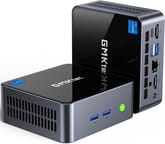
GMKtec lists the chassis at about 4.5 by 4.2 by 1.7 inches and 0.8 pounds, which is the same footprint as the older NucBox M2 and the NucBox M3. It is a gunmetal metal box with a glossy black lid and tall ventilation slots milled into both side walls. The front face keeps two USB-A ports and a backlit power button within reach, while the rear carries both HDMI 2.0 outputs, the USB-C, two more USB-A ports, the 3.5mm CTIA audio jack, the RJ45 network port, and the DC input. Cooling comes from what GMKtec calls a superconducting copper dual-turbine assembly, and a VESA bracket ships in the box so the unit can sit behind a monitor.
The i7-1185G7 is a 10nm SuperFin part with four cores, eight threads, 12MB of cache, and a 4.8 GHz single-core boost from a 3.0 GHz configurable base, and it scores about 9,900 on PassMark’s multi-thread test. Carey Holzman ran Cinebench across all three BIOS power profiles and got 5,285 multi-core and 1,439 single-core at a 92C peak on the stock balanced profile, 5,561 and 1,478 at 94C on performance, and 5,136 on quiet with the temperature still landing at 92C. Because the thermal cost of the top profile is two degrees for several hundred points, he recommended running it in performance mode rather than the balanced default it ships in. The Iris Xe iGPU with 96 execution units clocks to 1.35 GHz and is enough for media playback, light 1080p titles, and multi-monitor desktop work, but there is no discrete graphics option and no eGPU port.
Connectivity is the part of the spec sheet that has aged best. The 2.5GbE port uses an Intel I226-V controller rather than a Realtek chip, wireless is Wi-Fi 6 through a Realtek 8852BE card rated to 1201 Mbps with Bluetooth 5.2 alongside it, and the display block manages three simultaneous 4K60 outputs across the two HDMI ports and the USB-C. Storage runs through two M.2 slots: a 2280 bay GMKtec rates for NVMe drives up to 8TB and a 2242 bay for a SATA drive up to 2TB, for 10TB total. Memory sits in two SO-DIMM slots that accept DDR4-3200 to 64GB, so both memory and storage are user-serviceable. What the box does not have is a modern high-speed port: several Amazon listings advertise “USB4.0”, but GMKtec’s own specification table describes the single Type-C as DisplayPort and data at 5Gbps, and there is no Thunderbolt controller.
Reviewer Insights on the GMKtec NucBox M2 Pro S
Carey Holzman
Carey Holzman covered the machine across two live streams, a first look and teardown and a follow-up the week after. He was not working from a review sample: he bought the unit from Amazon with channel funds, telling viewers “we bought this using funds that come in from the channel through our memberships.”
On the teardown he found nothing locked down. He rated the access itself as good as it gets (“you couldn’t ask for anything any easier to get into”) and the internals fully serviceable: “This is not soldered in. That’s not soldered in. The RAM is not soldered in. So, it’s fully upgradable.” The second M.2 bay is where he stopped being impressed. It is a 2242 slot wired for SATA, and after comparing its ceiling against the 2280 NVMe bay he wrote it off: “that 2242 is SATA only. So for numerous reasons of capacity limitation and speed limitation, I wouldn’t use it. You’re just going to spend more to get less.” On GMKtec’s 10TB total-storage figure his read was that “you really only have one useful M.2 drive in my opinion,” and on the bay itself, “it’s nice it’s there, but I wouldn’t use it personally.” The fan was his other reservation from that first session. He did not call it loud, saying “it’s not loud by any means, but it’s louder than silent,” yet it ramped often enough that he ruled the machine out for his repair-shop customers: “Overall, I don’t think I would sell this to a customer only because it’s an i7 and that fan hearing it ramp up is happening quite a bit more often.” His explanation was the thermal one: “that’s a problem when you put a hotter chip into a smaller package.”
The follow-up stream covered a clean Windows 11 reinstall, CrystalDiskMark, and Cinebench runs on each of the three power profiles. His hardware measurements were unremarkable in a good way. CrystalDiskInfo identified the bundled 512GB drive as an AirDisk part running Gen3 x4, CrystalDiskMark returned roughly 3,600 MB/s sequential reads and 2,495 MB/s writes, and his verdict on it was simply that “the drive is fine. It’s fine.” The Cinebench spread told a more interesting story, because performance mode gained several hundred points for a two-degree temperature penalty, leading him to conclude that “because it’s making such a tiny difference in temperature and a significant difference in performance I think this should be default in performance mode and I very rarely ever say that.”
The reinstall exposed the problem he spent most of the follow-up on. GMKtec hosts driver packages on free Google Drive links, which enforce a daily bandwidth cap: “one of the issues we had with the machine was when we wiped Windows and reinstalled it, we were missing drivers and when we went to the GMK tech website, they only make their drivers available via free Google Drive service.” He hit the cap live on air twice and was blunt about the consequence for a buyer mid-repair, saying “it’s just not the best for customer service when your customers are told, ‘Well, too many customers came before you today, so you’ll just have to do without your drivers until tomorrow.’” His workaround was to download the package before you need it: “I would highly recommend, when you buy one of these machines, whether you need it or not, go ahead and download the drivers when you don’t need them, put them away for when you do.”
His overall call came down against the machine on age and value rather than on how it works. “This is my least favorite GMK tech we reviewed lately. I can’t recommend this one,” he said, adding “however, it’s not a bad computer. I just feel like because it’s so tiny, the fan runs quite a bit. And for the price, I feel like, you know, it’s a pretty old processor.” Later in the same stream he put it more bluntly, calling the machine “almost bottom of the barrel in 2026” and saying “it’s just too old, and I don’t think they should be selling it.” He also found GMKtec’s advertised Cinebench figure out of reach on his sample, noting “we’re not matching what they’re saying this can do” and describing the claim as “a little bit exaggerated on their PR.” He closed by separating the machine from the value question: “It’s not a bad computer by any stretch of the imagination. I just think you can do better for the money.”
Ryan Adapts
Ryan Adapts took the opposite tack, treating the unit as a general-purpose box and testing it with 3DMark, a storage benchmark, a local LLM, and a Linux Mint install. He framed the audience plainly: “this is mostly meant for, you know, like replacing a work machine, some, you know, casual internet usage.” On the cooling he was positive, noting “it has a copper dual turbine cooling system and that should be able to help maintain performance even in the 40 watt performance mode” and that at idle and on light tasks “it is pretty dang quiet.” His storage run reported a slowest figure of 106.36 MB/s, an average of 360.37 MB/s, and a peak of 1522.47 MB/s across 3DMark’s storage workloads.
He was clear about the graphics ceiling, saying “it doesn’t have a dedicated GPU, so you know, no AAA gaming.” Reading off 3DMark’s per-title estimates, he put Fortnite at “1080p Ultra, it’ll do 85 plus frames per second” and GTA V at “less than 20 at 1440, but 145 plus at 1080p ultra.” For media duty he was more enthusiastic: “it’ll run Plex Jellyfin playback, anything like that just fine for like 99% of use cases.” Running a 20-billion-parameter model locally through Ollama, he timed 78.4 seconds of thinking and remarked that “it’s actually thinking pretty fast compared to one I did yesterday on a different machine which was an i9 and this is an i7.”
Two practical notes came out of his session. The Linux Mint Cinnamon installer picked up the USB drive as a boot option without a BIOS change and produced what he called a good split install, though he suspected the factory Windows 11 image has BitLocker enabled, which would complicate keeping both systems. His one physical complaint was port placement: “and then you have a headphone jack on the back. I do wish that was on the front, but you know, it is what it is.”
The two agree on the baseline and split on the extras. Neither found a performance problem for everyday desktop work, and Ryan Adapts extended that to Plex and Jellyfin duty. The second M.2 bay is where they part: Ryan Adapts read the pair of slots as storage headroom, pointing out that “you could like have a lot of storage on this thing if you wanted,” while Carey Holzman judged the 2242 SATA bay too small and too slow to be worth filling. The fan divides them as well. Ryan Adapts found it quiet enough at everyday loads to be a non-issue; Holzman did not call it loud either, but it ramped often enough that he would not put one in front of a customer, and he held the age of the processor against the machine on top of that.
Customer Reviews of the GMKtec NucBox M2 Pro S
Amazon buyers of the M2 Pro S mostly like the size-to-speed ratio. Sean Rogers, a verified buyer, wrote that “I wasn’t expecting this to be so small when I ordered it. I have several differ types of mini computers yet this is smaller then them all. it works very well and is very fast. Doesn’t seem to heat up very much.” Skoshi, another verified buyer, uses one as a portable desktop with a slim external LCD and folding keyboard, and turned the review into a feature request for the next generation: “Switch to USB-C power… many of us have USB-C power delivery all over the place now and it would simplify the set up of this device” and “add more USB-C… so you should be able to have 2 USB-C items plugged in and a USB-C power in all at the same time.”
The complaints cluster in two places. Fan noise under trivial load comes up early: a verified buyer posting as Anonymous Buyer titled a four-star review “Small and loud but powerful” and described how “some of the slightest things like scrolling on Youtube … will make it sound like a base PS4 trying to run PS5 games.” The more serious pattern is longevity. Rengen Li reported a unit that “just died without any warning” two weeks in and returned it inside the window; Spider96 wrote that “it lasted a year and one month to the date I bought it,” with the power supply light flashing and no boot.
Lawrence Wonderly’s review runs through three stages. His first unit would not power up consistently and kept dropping its network adapter; he then raised the review to five stars after GMKtec replaced the machine free of charge past the return window; and his latest update reverses that again, reporting that the replacement’s “ethernet fails almost daily” and concluding, “This is the second unit of this type with this issue. I will not purchase another one going forward.” Sheila F., who bought a batch for an office, called the support representative she dealt with prompt and informative through the replacement process. Together these reviews describe a fast, tidy little desktop with several failure reports among its reviews, and a support organization that answers, though answering is not the same as the replacement holding up.
Conclusion
The NucBox M2 Pro S makes sense for a narrow set of jobs, and Ryan Adapts named most of them himself: a home lab node for something like Proxmox, a triple-display desktop replacement, a portable workstation small enough for carry-on luggage, and a home theater box for Plex or Jellyfin. It has the ports and the expansion room those jobs need, and neither reviewer found the chip short of the everyday desktop work they put it through. The barebone SKU is the most interesting configuration, since it lets you pick your own DDR4 and NVMe drive rather than take the AirDisk unit GMKtec bundles. Linux runs cleanly on it, which matters more than usual on a machine whose Windows driver package is awkward to obtain.
The case against it is the calendar. The i7-1185G7 launched in 2020 and Intel has discontinued it, and Carey Holzman put that together with the fan noise when he said he could not recommend the machine, even after conceding it works. GMKtec’s driver distribution is a real risk for anyone who plans a clean OS install, and the failure reports in the buyer reviews are frequent enough to be worth weighing. If you want the same chassis with newer silicon, the NucBox M3 uses a 12th-generation Core i5-12450H in an identical footprint.
For those comparing options, see our Mini PC Comparison Chart to weigh the NucBox M2 Pro S against other compact Intel and AMD systems.
Frequently Asked Questions
What processor does the GMKtec NucBox M2 Pro S use?
It uses the Intel Core i7-1185G7, an 11th-generation Tiger Lake chip with four cores, eight threads, 12MB of cache, and a 4.8 GHz single-core boost from a 3.0 GHz configurable base. It scores roughly 9,900 on PassMark’s multi-thread benchmark and carries Iris Xe graphics with 96 execution units clocking to 1.35 GHz.
Can I upgrade the RAM and storage in the NucBox M2 Pro S?
Yes. Two SO-DIMM slots accept user-replaceable DDR4-3200 memory up to 64GB, and there are two M.2 bays: a 2280 slot GMKtec rates for NVMe drives up to 8TB and a 2242 slot for a SATA drive up to 2TB, for 10TB of total capacity. A barebone SKU ships with all four empty so you can supply your own memory, drive, and operating system.
Does the NucBox M2 Pro S have USB4 or Thunderbolt?
No. Some retail listings advertise “USB4.0”, but GMKtec’s own specification table describes the single Type-C port as DisplayPort output plus data at 5Gbps, and no Thunderbolt controller is fitted. The four Type-A ports break down as two USB 3.2 Gen 2 at 10Gbps, one USB 3.2 Gen 1 at 5Gbps, and one USB 2.0.
How many monitors can the NucBox M2 Pro S drive?
Three, all at 4K and 60Hz. Two come from the HDMI 2.0 ports on the rear and the third runs over DisplayPort Alt Mode on the USB-C port. Buyers who need more display outputs than that generally add a USB-C dock, which frees both HDMI ports for direct connections.
Is the NucBox M2 Pro S any good for gaming?
Only for older and lighter titles. There is no discrete graphics option and no eGPU port, so everything runs on the Iris Xe iGPU. Reading off his 3DMark results, Ryan Adapts put Fortnite at 85 or more frames per second at 1080p Ultra and GTA V at 145 or more at the same settings, while 1440p fell under 20 frames per second in GTA V. His summary was that without a dedicated GPU there is no AAA gaming here.
How loud is the fan on the NucBox M2 Pro S?
Reports differ. Ryan Adapts called it “pretty dang quiet” at idle and on light tasks. Carey Holzman did not call it loud either (“it’s not loud by any means, but it’s louder than silent”), but it ramped often enough on his unit that he said he would not sell one to a customer, putting it down to “a hotter chip into a smaller package.” One Amazon buyer titled a four-star review “Small and loud but powerful” after hearing it spin up while scrolling a web page. The BIOS quiet profile lowers the power limit, which in Holzman’s Cinebench runs cost about 425 points against performance mode and about 150 against the balanced profile the machine ships in.
Where do I get drivers if I reinstall Windows?
GMKtec publishes the driver package on its own support pages, but the download itself is hosted on free Google Drive links with a daily bandwidth cap. Carey Holzman hit that cap twice while reinstalling Windows on camera and recommends downloading the package as soon as the machine arrives and archiving it, so a wipe later does not leave you waiting for the limit to reset.
How is the NucBox M2 Pro S different from the NucBox M2?
They share the same 4.5-inch chassis and the same Tiger Lake generation, but they are separate products with different processors. The older NucBox M2 runs a Core i7-11390H, while the M2 Pro S runs a Core i7-1185G7 and is sold under its own model name and SKU on GMKtec’s store, including a barebone option the M2 never offered.