
PELADN WO4
Published on

The PELADN WO4 is a five-inch-square desktop for someone who wants multi-core speed at the price most machines charge for an Intel N-series chip. It runs AMD’s Ryzen 5 5600H, a six-core, twelve-thread 45W laptop part from 2021 that still scores about 16,500 on PassMark’s CPU Mark, roughly triple what the N100-class boxes in this bracket manage. Two Ethernet jacks, two DDR4 SO-DIMM slots and a 2.5-inch drive bay make it a plausible home server as well as a desk machine. Which configuration you take decides this purchase. PELADN sells the WO4 with a slow SATA SSD in some listings and a PCIe 3.0 NVMe drive in others, and the units reviewers received arrived with a single RAM stick, which PCWorld and Robtech flag as the machine’s biggest self-inflicted limit.
Pros and Cons
| Pros | Cons |
|---|---|
| Six Zen 3 cores and twelve threads, around 16,500 on PassMark’s CPU Mark | Review units shipped with one RAM stick, so graphics ran single-channel |
| 2.5GbE plus a second gigabit jack, useful for a firewall or NAS build | Radeon Vega 7 dates to 2021 and struggles with modern AAA games |
| Two DDR4 SO-DIMM slots, up to 64GB | Some listings ship a SATA SSD that reviewers measured at a sixth of the NVMe speed |
| A 2.5-inch SATA bay on top of the M.2 slot | Only one M.2 slot, and it runs at PCIe 3.0 |
| TechPowerUp measured about 8.1W average idle over 24 hours | Reviewers disagree on how hard the RAM and SSD are to reach |
| Quiet enough that TechPowerUp heard no high-pitched whine at 40 dB under load | Robtech’s unit arrived with the lid magnets unglued |
| Robtech saw CPU temperatures only approach 90C even at a 54W limit | TechPowerUp found the USB-C port carries data only, not video |
Related Videos
PELADN WO4 Comparison Chart
 PELADN WO4 | PELADN WO4 | PELADN WO4 | |
| Price | List Price: $309.99 Amazon Prices: Loading prices... | List Price: $379.99 Amazon Prices: Loading prices... | List Price: $369.99 Amazon Prices: Loading prices... |
| Version | 8GB/256GB | 16GB/512GB SATA | 16GB/512GB NVMe |
| Performance Rating | 3.8 | 4.2 | 4.2 |
| CPU Mark | 16,504 | 16,504 | 16,504 |
| Operating System | Windows 11 Pro | Windows 11 Pro | Windows 11 Pro |
| Processor | Hexa-core 3.30 Ghz (max 4.20 Ghz) AMD Ryzen 5 5600H | Hexa-core 3.30 Ghz (max 4.20 Ghz) AMD Ryzen 5 5600H | Hexa-core 3.30 Ghz (max 4.20 Ghz) AMD Ryzen 5 5600H |
| GPU | Integrated Radeon RX Vega 7 Graphics | Integrated Radeon RX Vega 7 Graphics | Integrated Radeon RX Vega 7 Graphics |
| RAM | 8 GB DDR4 SO-DIMM, 2-channel (8GB DDR4-2666, one stick) | 16 GB DDR4 SO-DIMM, 2-channel (16GB DDR4-2666) | 16 GB DDR4 SO-DIMM, 2-channel (16GB DDR4-3200) |
| Internal Storage | 256 GB M.2 2280 SATA SSD | 512 GB M.2 2280 SATA SSD | 512 GB PCIe 3.0 NVMe SSD |
| Dimensions width x length x thickness | 5.04 x 5.04 x 2.05 inches (128.02 x 128.02 x 52.07 mm) | 5.04 x 5.04 x 2.05 inches (128.02 x 128.02 x 52.07 mm) | 5.04 x 5.04 x 2.05 inches (128.02 x 128.02 x 52.07 mm) |
| Weight | 1.1 lbs (0.5 kg) | 1.1 lbs (0.5 kg) | 1.1 lbs (0.5 kg) |
| WiFi | Wi-Fi 6 (802.11ax) | Wi-Fi 6 (802.11ax) | Wi-Fi 6 (802.11ax) |
| Bluetooth | Bluetooth 5.2 | Bluetooth 5.2 | Bluetooth 5.2 |
| Ethernet | 2 Ethernet ports at 2.5 Gbps | 2 Ethernet ports at 2.5 Gbps | 2 Ethernet ports at 2.5 Gbps |
| HDMI | 1 Full-Size HDMI Port | 1 Full-Size HDMI Port | 1 Full-Size HDMI Port |
| DisplayPort | 1 DisplayPort (DP 1.4 (4K@60)) | 1 DisplayPort (DP 1.4 (4K@60)) | 1 DisplayPort (DP 1.4 (4K@60)) |
| VGA | No VGA Ports | No VGA Ports | No VGA Ports |
| USB Ports | 2 USB 2.0, 2 USB 3, 1 USB-C Front: 2x USB-A 3.2, 1x Type-C. Rear: 2x USB 2.0 | 2 USB 2.0, 2 USB 3, 1 USB-C Front: 2x USB-A 3.2, 1x Type-C. Rear: 2x USB 2.0 | 2 USB 2.0, 2 USB 3, 1 USB-C Front: 2x USB-A 3.2, 1x Type-C. Rear: 2x USB 2.0 |
| Thunderbolt Ports | No | No | No |
| OCuLink | No | No | No |
| Internal SATA Ports | 1 SATA port, includes 2.5" drive bay (2.5-inch bay on the lid, ribbon cable included) | 1 SATA port, includes 2.5" drive bay (2.5-inch bay on the lid, ribbon cable included) | 1 SATA port, includes 2.5" drive bay (2.5-inch bay on the lid, ribbon cable included) |
| Card Reader | No Card Reader | No Card Reader | No Card Reader |
| Headphone Jack | combo | combo | combo |
| Fanless | No | No | No |
| VESA Mount | Yes | Yes | Yes |
| In the Box | Mini PC, 19V power adapter, HDMI cable, SATA ribbon cable, VESA mount, manual | Mini PC, 19V power adapter, HDMI cable, SATA ribbon cable, VESA mount, manual | Mini PC, 19V power adapter, HDMI cable, SATA ribbon cable, VESA mount, manual |
| Expandability | Two DDR4 SO-DIMM slots, up to 64GB. One M.2 2280 PCIe 3.0 slot, up to 4TB. One 2.5-inch SATA bay, up to 1TB. | Two DDR4 SO-DIMM slots, up to 64GB. One M.2 2280 PCIe 3.0 slot, up to 4TB. One 2.5-inch SATA bay, up to 1TB. | Two DDR4 SO-DIMM slots, up to 64GB. One M.2 2280 PCIe 3.0 slot, up to 4TB. One 2.5-inch SATA bay, up to 1TB. |
See every AMD Ryzen 5 5600H configuration in the chart
Related Mini PCs
-
 PELADN WI-7 (Pentium Gold 7505)The PELADN WI-7 is a palm-sized office PC built on the dual-core Intel Pentium Gold 7505, with…
 -
 PELADN WO5 (Ryzen 3 4300U)A small, light office PC built on AMD's 2020 Ryzen 3 4300U, with socketed DDR4, two M.2 slots, and…
 -
 Beelink SER5 Mini PCThe Beelink SER5 is a compact AMD mini PC (Ryzen 5 5560U or Ryzen 7 5700U) with Radeon graphics,…
 -
 BOSGAME E5 PlusThe BOSGAME E5 Plus pairs a four-core Ryzen 3 5400U with two 2.5GbE ports, two memory slots, and a…
 -
 CHUWI LarkBox X (Core i3-1220P)The CHUWI LarkBox X (Core i3-1220P) is a three-monitor office desktop with upgradable memory and a…
 -
 GMKtec NucBox M2 Pro SPalm-sized GMKtec mini PC built on Intel's 11th-gen Core i7-1185G7, with triple 4K60 output, Intel…
Dual Ethernet, two memory slots and a 2021 iGPU

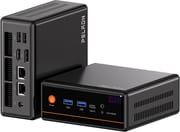
The chassis measures 5.04 inches square and 2.05 inches tall and weighs about 1.1 pounds. The front face carries an orange power button, two USB-A 3.2 ports, a Type-C port, a 3.5mm combo jack and a CMOS reset pinhole, with an orange stripe running the width of the panel and a purple WO badge at the right edge. The back holds the barrel power input, two RJ45 jacks, DisplayPort 1.4, HDMI 2.0 and two USB 2.0 ports. TechPowerUp’s LJay liked the look, calling the front plate distinct and almost retro next to the usual square minis.
Inside is the Ryzen 5 5600H: six Zen 3 cores, twelve threads, 3.3GHz base and 4.2GHz boost on a 45W envelope, with Radeon RX Vega 7 graphics. That is 2021 silicon in a 2026 box, and the split shows up clearly in benchmarks. On the CPU side it holds its own: TechPowerUp’s Fire Strike physics score of 19,587 and Robtech’s Cinebench runs both put it well clear of the Intel N-series machines it competes with on price. On the graphics side Vega 7 is spent. TechPowerUp’s Time Spy graphics score came in at 1,270 against a 6,555 CPU score, and it concluded that “At 1080p, lighter games remain playable, but modern AAA titles struggle hard even on the lowest presets.”
Both Ethernet ports sit on the rear panel. One is 2.5GbE and the other is gigabit, both on Realtek controllers, which is enough for a pfSense or OPNsense box or a small NAS. Wireless is WiFi 6 on a Realtek RTL8852BE module with Bluetooth 5.2, and Robtech measured Bluetooth and WiFi range at the top of the budget group he tests, with no dropouts at 39 feet on the 5GHz band. The sources give different accounts of video output. PELADN’s own specification page lists DisplayPort 1.4 video on the front Type-C port alongside 10Gbps data, and PCWorld and Robtech both describe that port as carrying display output at 10Gbps, while TechPowerUp reported that “The USB-C port is data only, so all video output comes from the HDMI and DisplayPort connectors on the back.” Both rear outputs run 4K at 60Hz, so a two-display setup is certain and a third over USB-C is worth confirming with PELADN before you plan around it. Robtech also found the Type-C port does not do Power Delivery, so a USB-C monitor cannot power the machine.
The units reviewers received shipped with a single SO-DIMM, leaving the second slot empty and the Vega 7 running in single channel: Robtech, Tek Syndicate and PCWorld all tested single-channel machines, and PELADN ships the 8GB configuration with a single 8GB stick. Robtech tested both ways and found the gap large. A second 16GB DDR4-3200 stick lifted his Forza frame rate by 46 percent at the stock power limit, and he called it his biggest issue with the machine, saying “you’re leaving a lot of performance on the table, especially on the iGPU side.” PCWorld hit the same wall from the other direction, listing single-channel RAM among its cons and concluding that “The built-in SATA SSD and the single-channel RAM are holding the system back.” The drive varies by configuration as well. PELADN sells the WO4 with a SATA M.2 drive in some configurations, which PCWorld measured at 529 MB/s read and 442 MB/s write, and with a PCIe 3.0 NVMe drive in others, which TechPowerUp measured around 3,300 MB/s read and Tek Syndicate at 2,841 MB/s read and 2,615 MB/s write. Both sit in the same M.2 2280 slot, and both are replaceable, so the SATA configuration is a fixable problem rather than a permanent one.
Robtech saw CPU temperatures only approach 90C with the power limit pushed to 54W, and Tek Syndicate logged a peak of 80.4C after fifteen minutes of load. TechPowerUp measured about 40 dB at 30 cm under heavy workloads and wrote that “The fan ramps quickly once the CPU warms up, but the tone stays steady and does not have any high-pitched whine.” Power draw is modest: TechPowerUp’s 24-hour idle monitoring averaged 8.1W, and a Cinebench multicore pass averaged 60.38W. Robtech’s out-of-the-box fan measurement was 37 dBA under load, though he found the 54W performance profile too loud to live with and recommended staying on the default limit.
Reviewer Insights

TechPowerUp
TechPowerUp put the WO4 through its full mini PC suite in December 2025. Its framing of the value case is that the chip carries the machine: “For anyone shopping in the budget category, this chip alone makes the WO4 stand out because many systems in this range ship with far weaker processors.” Benchmarks back the split between CPU and graphics. Night Raid returned 16,969 graphics and 10,580 CPU for a 15,559 overall; Time Spy managed 1,270 graphics against 6,555 CPU; Fire Strike posted 4,193 graphics and 19,587 physics.
Its cons list runs to upgrades that require removing the motherboard completely, a single PCIe 3.0 NVMe slot, Vega graphics that limit modern gaming, a USB-C port without video output, and only 16GB of RAM with a 512GB drive as shipped. On the internals it was blunt: “Upgrades aren’t as simple as they are on many other mini PCs, because the RAM and NVMe slot sit on the underside of the motherboard,” and “To access them, you have to remove the four board screws and flip the board over before you can swap memory or storage.” Its closing line was that “The PELADN WO4 is a small, budget-friendly mini PC that easily handles day-to-day computing, all with a unique look and feel.”
PCWorld
PCWorld had Christoph Hoffmann test a SATA-SSD unit in August 2026 and landed on a qualified verdict: “The Peladn WO4 5600H provides a decent foundation for a modest price, but it’s not an unqualified bargain.” His pros were solid multi-core performance, the two LAN ports, the magnetic cover, stable temperatures with no audible throttling, and three display outputs with WiFi 6 and Bluetooth 5.2. His cons were the older platform with no modern iGPU or NPU, the SATA SSD, and single-channel RAM in the test unit.
The numbers explain the hedge. His 3DMark CPU run hit 4,550 multi-thread and 825 single-thread, and PCMark 10 returned 4,287 overall with 9,053 in Essentials and 6,219 in Productivity, all respectable for the price. Time Spy graphics came in at 680, about half of TechPowerUp’s dual-channel result, and CrystalDiskMark reported 529 MB/s read and 442 MB/s write from the SATA drive. On thermals he noted that “When idle, the WO4 remains pleasantly quiet,” and that “Under sustained load, the processor temperature stabilized between 70 and 80 degrees,” with power draw under 8 watts idle and around 55 watts at full load. On the lid he wrote: “It is precisely this cover that is the device’s standout feature. It is held in place magnetically and can be lifted off without tools.”
Robtech
Robtech reviewed the 5600H refresh against his sub-$250 budget group and put it on top, saying “PELADN’s WO4 really is the budget performance king if that’s what you’re looking for.” On Cinebench multi-core he reported that “In performance mode, it hits more than triple Intel’s N series,” and he added a Linux kernel compile benchmark where the WO4 held up against machines nearing a thousand dollars.
His complaints were specific. The lid magnets on his unit had come unglued in transit: “My unit shouldn’t have passed QC with a glue already having let go on all the magnets.” The single RAM stick was the bigger one: “My biggest issue with this mini is that it comes with just one stick of RAM… you’re leaving a lot of performance on the table, especially on the iGPU side.” He also wanted a 2x8GB option for buyers who will not install a second stick themselves, and USB-C Power Delivery to round out the port set. On the lid design itself he was positive, describing the WO4 as one of the easiest minis on the market to open and reaching the RAM and SSD by lifting the magnetic top.
Tek Syndicate
Tek Syndicate tested the NVMe configuration and focused on what the machine can do day to day. He opened by settling the listing’s confusing “upgraded 5700U” wording, saying “You’re going to want the 5600H” and noting that the 14 percent figure alongside it is PELADN’s own advertised number rather than a measured one. His Cinebench run returned 1,335 single-core and 8,451 multi-core, and he described the single-core result as making the machine feel snappy for regular use.
On the top panel he agreed with Robtech: “This was so easy to open that it’s like every mini PC should be this easy to open.” The 2.5-inch bay was the opposite experience. The drive mounts to the underside of the lid through a thin ribbon adapter tucked under a plastic lip, and he said “The ribbon cable is fussy and fiddly and frustrating… if you have big hands, it’s going to be frustrating.” Video work went better than he expected: scrubbing and a long cross dissolve on two 4K files at full resolution both held up, and he concluded “I mean, you could totally edit on this.” Gaming was the limit, with Unigine Valley averaging 22.5 FPS at 1080p high for a score of 942, and his summary was “Don’t expect to be doing AAA gaming stuff on this.” He also spent time fighting AMD’s online driver installer, which failed repeatedly until he used the offline package, and noticed PELADN had left its own shortcuts on the preinstalled desktop.
Where the reviews disagree
TechPowerUp, PCWorld and Robtech all rate the 5600H well above the Intel N-series machines at this price, and PCWorld and Robtech both flag the single RAM stick. Internal access divides them most. Robtech and Tek Syndicate both lift the magnetic lid by hand to reach the RAM and the M.2 slot, and PCWorld calls that cover the device’s standout feature. TechPowerUp’s unit put the RAM and NVMe slot on the underside of the motherboard and needed four screws out and the board flipped, which it listed as a con. Confirm which layout your unit has before planning a quick upgrade.
On storage speed and graphics the explanation is plainer: they tested different configurations. PCWorld’s SATA drive measured 529 MB/s read, while TechPowerUp’s NVMe drive measured around 3,300 MB/s and Tek Syndicate’s 2,841 MB/s. PCWorld’s single-channel Time Spy graphics result of 680 sits at about half of TechPowerUp’s 1,270, whose unit ran dual-channel DDR4-3200.
Customer Reviews
Amazon buyers of the 16GB/512GB model rate it 4.4 stars across 35 ratings, and the written reviews split between smooth installs and outright failures. A buyer posting as hornms used the WO4 as a development machine for a week, ran Visual Studio, VS Code, Docker and git against several projects, and wrote that “It is sufficiently fast to do real professional development, is 100% silent, takes no space on your desk.” Dylan C. bought one for browsing and visual novels and singled out the lid: “The side panel just literally pulls off since its held on by ultra strong magnets, so you can get to the internals with ease.” CapnBill wiped Windows for Linux Mint and added a 1TB internal drive without trouble. David called out the same magnetic top as his favorite detail.
A buyer posting as Ebreezy reported a unit that died outright after three months: “The device truly went from functioning normally one moment, to being a useless paperweight the next,” and described being routed between PELADN and the Amazon storefront without a resolution. A buyer in Mexico received an 8GB/256GB machine after ordering from a listing that advertised 32GB and 1TB, which is a reason to read the configuration on the listing carefully before ordering. Another reviewer, OSCAR, had a first unit fail within hours and pixelate both displays, then reported the Amazon replacement running without trouble since.
A cheap six-core box for buyers who will add a stick of RAM
Buy a second matching SO-DIMM with it, check that the configuration you ordered carries an NVMe rather than a SATA drive, and you get a six-core machine that compiles code, edits 4K timelines and routes network traffic for roughly what an N100 box costs. The 2.5-inch bay and the empty second memory slot give it more runway than most machines in this bracket.
Buyers who want a machine that is finished out of the box should look elsewhere. The single RAM stick most units ship with, the SATA drive in some configurations and the 2021-era Vega 7 all mean the stock experience undersells what the hardware can do, and none of the reviewers pretended otherwise. If modern integrated graphics are the point, a newer Ryzen or Core Ultra machine is the category to shop; our look at whether the AI tax is worth paying covers what that step up costs. To line the WO4 up against the rest of the catalog, use the Mini PC Comparison Chart.
Frequently Asked Questions
What processor does the PELADN WO4 use?
The AMD Ryzen 5 5600H, a six-core, twelve-thread Zen 3 processor with a 3.3GHz base clock, a 4.2GHz boost and a 45W envelope. Graphics come from the integrated Radeon RX Vega 7. The chip launched in 2021 and scores about 16,500 on PassMark’s CPU Mark, which puts it roughly three times ahead of the Intel N-series chips in the same price bracket and behind current Ryzen AI and Core Ultra parts.
Can I upgrade the RAM in the PELADN WO4?
Yes, and you should. The WO4 has two DDR4 SO-DIMM slots and supports up to 64GB, but the units reviewers received came with a single stick, which leaves the integrated graphics running in single channel. Robtech measured a 46 percent frame-rate gain in Forza after adding a second 16GB DDR4-3200 stick at the stock power limit, and PCWorld listed single-channel memory among its cons.
How much storage can the PELADN WO4 hold?
One M.2 2280 slot running PCIe 3.0 x4 takes up to 4TB, and a 2.5-inch SATA bay on the underside of the lid takes up to 1TB more. Which drive arrives depends on the configuration: some WO4 configurations ship a SATA M.2 SSD that PCWorld measured at 529 MB/s read, while others ship a PCIe 3.0 NVMe drive that TechPowerUp measured around 3,300 MB/s. Both use the same slot, so a SATA unit can be upgraded.
How many displays can the PELADN WO4 drive?
Two are certain, using the rear HDMI 2.0 and DisplayPort 1.4 outputs, both at 4K and 60Hz. A third over the front Type-C port depends on whose account you follow: PELADN’s specification page lists DisplayPort 1.4 video on that port, and PCWorld and Robtech both describe it as carrying display output, while TechPowerUp found it data-only on its unit. Confirm with PELADN if a third screen is the reason you are buying.
Is the PELADN WO4 good for a firewall or NAS build?
The hardware fits that use. It carries one 2.5GbE and one gigabit Realtek jack, supports wake-on-LAN and automatic power-on after an AC power loss, and pairs an M.2 slot with a 2.5-inch drive bay. Robtech confirmed the preinstalled Windows 11 Pro image scanned clean of malware and that current Ubuntu ran without issue, and one Amazon buyer replaced Windows with Linux Mint and added a 1TB internal drive.
Is the PELADN WO4 loud?
Not at the default power limit. TechPowerUp measured about 40 dB at 30 cm under heavy load and reported no high-pitched whine, Robtech logged 37 dBA under load out of the box, and Tek Syndicate described the fans as quiet and unobtrusive. Robtech did find the 54W performance profile in the BIOS too loud for his liking and recommended leaving the stock limit in place.
What comes in the box with the PELADN WO4?
The mini PC, a 19V power adapter, an HDMI cable, a ribbon cable for the 2.5-inch drive bay, a VESA mounting bracket with screws and a user manual. Windows 11 Pro is preinstalled. PELADN lists a three-year limited warranty on the WO4.