
wo-we P7
Published on

The wo-we P7 is a budget mini PC for someone who wants a new Windows desktop for everyday work and does not need much speed. It pairs the AMD Ryzen 5 3501U, a reissue of a 2019 laptop chip, with 8GB of DDR4 and a 256GB NVMe drive, and it leaves room to grow: a free RAM slot, a free M.2 slot, and a second Gigabit Ethernet port. Buy it if the upgrade room and the second network port matter more to you than a newer, faster chip.
Pros and Cons
| Pros | Cons |
|---|---|
| Two SO-DIMM slots and two M.2 slots, with nothing soldered to the board | The Zen+ Ryzen 5 3501U is a 2019-class design with modest multi-core speed |
| Two Gigabit Ethernet ports for a router, firewall, or second network | 8GB in one stick runs the memory in single-channel mode until you add a second module |
| Triple display output through HDMI 2.0, DisplayPort 1.4, and USB-C | WiFi 5 and Bluetooth 5.0 rather than WiFi 6 or newer |
| A reviewer’s clean Windows reinstall needed no wo-we drivers: AMD’s Adrenalin package and Windows covered every device | The bottom panel has no vents, so the RAM and SSD sit in still air |
wo-we P7 Comparison Chart
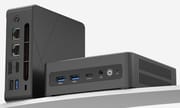 wo-we P7 | |
| Price | List Price: $259.00 Amazon Prices: Loading prices... |
| Version | 8GB/256GB |
| Performance Rating | 2.8 |
| Operating System | Windows 11 Pro |
| Processor | Quad-core 2.10 Ghz (max 3.70 Ghz) AMD Ryzen 5 3501U |
| GPU | Integrated Radeon RX Vega8 Graphics |
| RAM | 8 GB DDR4 SO-DIMM, 2-channel (2x SO-DIMM, one free, up to 32GB) |
| Internal Storage | 256 GB NVMe SSD |
| Dimensions width x length x thickness | 5.04 x 5.04 x 1.69 inches (128.02 x 128.02 x 42.93 mm) |
| Weight | unknown |
| WiFi | Wi-Fi 5 (802.11ac) |
| Bluetooth | Bluetooth 5.0 |
| Ethernet | 2 Ethernet ports at 1 Gbps |
| HDMI | 1 Full-Size HDMI Port |
| DisplayPort | 1 DisplayPort (DP 1.4 at 4K60) |
| VGA | No VGA Ports |
| USB Ports | 1 USB 2.0, 3 USB 3, 1 USB-C 3x USB-A 5Gbps, 1x USB 2.0, 1x USB-C 5Gbps |
| Thunderbolt Ports | No |
| OCuLink | No |
| Internal SATA Ports | No SATA ports |
| Card Reader | No Card Reader |
| Headphone Jack | combo |
| Fanless | No |
| VESA Mount | Yes |
| In the Box | Mini PC, 19V/3.42A power adapter, HDMI cable, VESA mount with screws, manual |
| Expandability | Up to 32GB DDR4 (2x SO-DIMM, one free). Second M.2 2280 NVMe slot free, up to 4TB per slot. No 2.5-inch bay. |
Related Mini PCs
-
 wo-we H5The wo-we H5 is a compact mini PC powered by the Intel Twin Lake N150 processor, offering triple 4K…
 -
 wo-we H8The wo-we H8 is a budget 5-inch mini PC built on Intel's Core 3 304 Wildcat Lake chip for buyers…
 -
 Bmax B2 PowerThe Bmax B2 Power is a palm-sized mini PC with an Intel Celeron 5205U, 8GB of DDR4, a 256GB NVMe…
 -
 Bmax B3 ProThe Bmax B3 Pro is a budget mini PC with an Intel Celeron N5095, dual 4K HDMI outputs, WiFi 5, and…
 -
 BOSGAME E2 AirThe BOSGAME E2 Air is a budget desk box for office work and a multi-monitor setup. It pairs an AMD…
 -
 BOSGAME E2 PlusThe BOSGAME E2 Plus is a budget office mini PC built on the AMD Ryzen 5 3501U, a relabelled 2019…
A 2026 box built on a 2019 chip design

AMD lists the Ryzen 5 3501U with four cores, eight threads, a 2.1 GHz base clock, a 3.7 GHz boost, 4MB of L3 cache, and Radeon Vega 8 graphics on a 12nm process (AMD product page). The design is Zen+ (codename Picasso). wo-we markets it as a new 2026-generation CPU, and AMD released the part in 2026, but the cores and graphics are the same Zen+ and Vega design that shipped in 2019 laptops as the Ryzen 5 3500U. The chip handles office apps, browsing, video, and calls, without the multi-core headroom of newer Zen 3 and Zen 4 parts.
The memory controller is dual-channel DDR4, but the P7 ships with one 8GB stick, so graphics and multi-core speed improve when you add a matching second module. Windows also reserves part of that memory for the Vega 8 graphics, which leaves less than 8GB for apps. The Radeon Vega 8 handles older and lighter games; it is not a machine for recent 3D titles.
Ports, memory, and storage

The rear panel carries the barrel power jack, two Gigabit RJ45 jacks, HDMI 2.0, DisplayPort 1.4, one 5Gbps USB-A port, one USB 2.0 port, and a Kensington lock slot. The front holds two more 5Gbps USB-A ports, a 5Gbps USB-C port that also carries video, a 3.5mm combo audio jack, the power button, and a small pinhole button. HDMI and DisplayPort each drive a 4K screen at 60Hz. wo-we’s spec graphics list the USB-C output as 4K at 60Hz in one place and 1080p at 60Hz in another, so plan on HDMI and DisplayPort for 4K monitors.
Inside are two DDR4 SO-DIMM slots (one filled, 32GB maximum), two M.2 2280 NVMe slots (one filled, up to 4TB each), and a removable WiFi 5 and Bluetooth 5.0 card. There is no 2.5-inch drive bay. The box measures about 5 x 5 x 1.7 inches, ships with a 19V/3.42A (about 65W) adapter, and includes a VESA bracket for mounting behind a monitor.
How the P7 compares
The ORIGIMAGIC C4 Plus uses the same Ryzen 5 3501U and the same port layout: two Gigabit jacks, HDMI 2.0, DisplayPort, a rear USB 2.0 port, two M.2 slots, and two SO-DIMM slots. The chassis and ports match closely enough that the two appear to share one underlying design, so compare them on price and seller support. The BOSGAME E2 Air also runs the 3501U but has one Ethernet port, one M.2 slot, and no DisplayPort, so the P7 is the better pick for anyone who wants a second drive or a second network.
If you need a faster chip more than upgrade room, the ORIGIMAGIC COMET C4 uses the H-series Ryzen 5 3550H and ships with 16GB and 512GB. The Starry Hope Mini PC Comparison Chart lines up all of these.
Reviewer Insights
CareyHolzman
Carey Holzman tested the P7 across two live streams. In Part 1 he unboxed it, set up Windows 11 Pro, opened the case, and reinstalled Windows. At first power-on he said “It’s completely silent.” Inside, he found one 8GB DDR4-2666 stick with no maker label, an unbranded PCIe Gen 3 x4 SSD, a removable WiFi card, and Realtek controllers for both the wireless and the two wired ports. His verdict on the layout: “Very upgradeable. Two NVME slots, two RAM sockets, nothing soldered to the board.” The bottom panel has no vents (“But there is no cooling in the bottom half of this.”), and filling the box with extra RAM and fast storage could add heat, in his view. As for speed, the P7 is a value machine: “This isn’t a rocket ship.”
At the time, wo-we’s support site did not list the P7, which drew the comment “Yeah, the driver support’s really lacking.” The clean install went fine anyway. Windows loaded the wireless driver during setup, AMD’s Adrenalin package added the chipset and graphics drivers, and the Realtek Ethernet driver appeared once the machine was online, which he put down to Windows Update. No wo-we driver pack was needed.
In Part 2 he showed the benchmark results. The P7 scored 3416 in the multi-core CPU test and 935 in the single-core test. The hottest temperature reading he showed was 87.4C, the cores never passed 81.2C, and the SSD stayed at 43C. On fan noise he said “It did not get loud. It got more noticeable.”
Frequently Asked Questions
What processor is in the wo-we P7?
An AMD Ryzen 5 3501U with 4 cores, 8 threads, a 2.1 GHz base clock, a 3.7 GHz boost, and Radeon Vega 8 graphics. AMD released it in 2026, but it uses the 12nm Zen+ design from 2019 and is close to the older Ryzen 5 3500U.
Can I upgrade the RAM and storage in the P7?
Yes. It has two DDR4 SO-DIMM slots, one filled with an 8GB module, for up to 32GB in total. It also has two M.2 2280 NVMe slots, one holding the 256GB boot drive and one free, each taking a drive of up to 4TB. There is no 2.5-inch bay.
Does the P7 have two Ethernet ports?
Yes. It has two Gigabit RJ45 ports on Realtek controllers, which makes it usable as a small router or firewall, or for connecting to two networks at once.
How many monitors can the P7 run?
Three: one on HDMI 2.0, one on DisplayPort 1.4, and one on USB-C. HDMI and DisplayPort each run 4K at 60Hz. wo-we lists the USB-C output as both 4K and 1080p at 60Hz in different spec graphics, so use HDMI and DisplayPort for 4K screens.
Do I need wo-we drivers to reinstall Windows on the P7?
In Carey Holzman’s test, no. After a clean Windows 11 install, AMD’s Adrenalin package supplied the chipset and graphics drivers, and Windows supplied the Realtek network drivers (the wireless one during setup, the wired one through what he took to be Windows Update). wo-we also says it sends drivers on request through its support channel.
How is the P7 different from the ORIGIMAGIC C4 Plus?
The two share the Ryzen 5 3501U, dual Gigabit Ethernet, HDMI plus DisplayPort, two M.2 slots, and two SO-DIMM slots. The C4 Plus is sold by ORIGIMAGIC in NVMe and SATA configurations, and the P7 by wo-we with an NVMe drive.