
BOSGAME E2 Air
Published on

The BOSGAME E2 Air is a cheap Windows desktop for office work, browsing and video calls. It drives three displays, and because the memory sits in sockets rather than soldered to the board, the 8GB it ships with is not a dead end. The M.2 2280 slot runs the SATA interface, though, so a faster NVMe drive is never an option.
Pros and Cons
| Pros | Cons |
|---|---|
| Two HDMI 2.0 outputs at 4K60 plus USB-C video | USB-C output is capped at 1080p60 |
| Two DDR4 SO-DIMM slots with a 32GB ceiling | Ships with 8GB, the practical floor for Windows 11 |
| Radeon Vega 8 is well clear of Intel N-series graphics | Ryzen 5 3501U is a Picasso-generation part on 12nm |
| Windows 11 Pro preinstalled at a budget price | Wi-Fi 5 and Bluetooth 5.0, a generation behind |
| VESA mount, screws and HDMI cable in the box | Single gigabit Ethernet jack, not 2.5GbE |
| Four USB-A ports and a 3.5mm audio jack on a small chassis | M.2 storage runs SATA only, so no NVMe upgrade |
BOSGAME E2 Air Comparison Chart
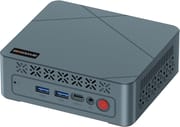 BOSGAME E2 Air | |
| Price | List Price: $329.99 Amazon Prices: Loading prices... |
| Version | 8GB/256GB |
| Performance Rating | 2.8 |
| CPU Mark | 6,195 |
| Operating System | Windows 11 Pro |
| Processor | Quad-core 2.10 Ghz (max 3.70 Ghz) AMD Ryzen 5 3501U |
| GPU | Integrated Radeon RX Vega8 Graphics |
| RAM | 8 GB DDR4 SO-DIMM, 2-channel (DDR4-2400, two SO-DIMM slots to 32GB) |
| Internal Storage | 256 GB M.2 SATA SSD |
| Dimensions width x length x thickness | --- |
| Weight | 1.98 lbs (0.9 kg) |
| WiFi | Wi-Fi 5 (802.11ac) |
| Bluetooth | Bluetooth 5.0 |
| Ethernet | 1 Ethernet port at 1 Gbps |
| HDMI | 2 Full-Size HDMI Ports |
| DisplayPort | Both HDMI 2.0 at 4K60; USB-C video at 1080p60 |
| VGA | No VGA Ports |
| USB Ports | 1 USB 2.0, 3 USB 3, 1 USB-C Front 2x USB 3.2 (5Gbps) and USB-C; rear 1x USB 3.2, 1x USB 2.0 |
| Thunderbolt Ports | No |
| OCuLink | No |
| Internal SATA Ports | No SATA ports |
| Card Reader | No Card Reader |
| Headphone Jack | combo |
| Fanless | No |
| VESA Mount | Yes |
| In the Box | Mini PC, power adapter, HDMI cable, VESA mount with screws, user guide |
| Expandability | Two DDR4 SO-DIMM slots to 32GB. M.2 2280 storage, SATA interface only. |
See every AMD Ryzen 5 3501U configuration in the chart
Related Mini PCs
-
 BOSGAME E2 PlusThe BOSGAME E2 Plus is a budget office mini PC built on the AMD Ryzen 5 3501U, a relabelled 2019…
 -
 BOSGAME E4 AirThe BOSGAME E4 Air pairs a 2019 Ryzen 5 3500U with two gigabit Ethernet jacks, socketed DDR4…
 -
 Bmax B2 PowerThe Bmax B2 Power is a palm-sized mini PC with an Intel Celeron 5205U, 8GB of DDR4, a 256GB NVMe…
 -
 Bmax B3 ProThe Bmax B3 Pro is a budget mini PC with an Intel Celeron N5095, dual 4K HDMI outputs, WiFi 5, and…
 -
 CyberGeek Nano J1The CyberGeek Nano J1 is a budget mini PC with an Intel Celeron N5095A, 16GB of DDR4, a 1TB NVMe…
 -
 ORIGIMAGIC C3The ORIGIMAGIC C3 is a small office and signage box built on the Intel Core i3-5005U, a dual-core…
The Ryzen 5 3501U against current budget silicon

AMD lists the Ryzen 5 3501U in its Ryzen 3000 series under the Picasso codename on a 12nm process, with a launch date of the second quarter of 2026: a recent SKU built on the Picasso design AMD first shipped in 2019. It has four cores, eight threads, a 2.1 GHz base clock and a 3.7 GHz boost, and PassMark rates it at 6,195. The Intel N100 common in cheap mini PCs scores 5,305 and the newer N150 scores 5,343, so the AMD part is roughly 16 to 17 percent faster on multi-threaded work.
Radeon Vega 8 scores 1,283 on PassMark’s G3D test against roughly 760 for the N100 and 850 for the N150, a wider margin than the CPU gap. It covers 4K video playback, a browser with a dozen tabs and older or lightweight games. Zen 2 and Zen 3 boxes are a different class again: BOSGAME’s own E5 uses a Ryzen 3 5300U that PassMark scores at 9,205 and adds 2.5-gigabit networking. Anyone whose work is heavier than documents and video calls should price that tier before settling here.
The 3501U tops out at DDR4-2400 across two channels, and PCI Express 3.0 is as far as its lanes go, both of which follow from the Ryzen 3000-series design rather than from BOSGAME’s build.
Three display outputs, two of which reach 4K

Both rear HDMI ports are HDMI 2.0 and each drives a 4K panel at 60Hz. The front USB-C port carries video as well, but only at 1080p60, so a three-screen desk means two 4K panels and one 1080p panel. The third output suits a chat window or a dashboard rather than detailed work.
The front face carries two USB 3.2 Type-A ports at 5Gbps, the USB-C port, a 3.5mm audio jack and the power button. The rear adds one more 5Gbps USB-A port, a USB 2.0 port, the two HDMI outputs, a gigabit RJ45 jack and the barrel power input. There is no SD card reader. Wireless is Wi-Fi 5 and Bluetooth 5.0, a generation behind the Wi-Fi 6 radios that newer budget boxes carry.
Socketed memory, but storage stops at SATA
The two DDR4 SO-DIMM slots are the reason this machine stays useful past its launch configuration. 8GB is the practical floor for Windows 11, and a pair of 16GB modules takes it to 32GB with a screwdriver rather than leaving the memory soldered down. Our guide to soldered versus socketed memory covers why that matters more than the shipped amount.
The M.2 2280 slot runs the SATA interface, so the 256GB drive can grow in capacity but never in speed. A SATA SSD caps out around 550 MB/s where an NVMe drive in the same slot shape would run several times that. On a machine bought for spreadsheets and browser tabs the difference rarely shows, but it does rule out the cheap NVMe upgrade that many mini PCs in this class accept.
Windows 11 Pro preinstalled, with Linux listed as supported
The E2 Air ships with Windows 11 Pro, which brings BitLocker, Remote Desktop hosting and domain join on a machine this cheap. BOSGAME also lists Ubuntu and Linux as supported. Ryzen 3000-series mobile silicon with Vega graphics has mature open-source kernel and Mesa driver coverage, so a lightweight desktop distribution is a reasonable second life for the box.
BOSGAME lists TPM 2.0 along with Wake on LAN, real-time-clock wake and automatic power-on, so a box mounted behind a monitor or driving a signage screen can be woken and patched without anyone reaching around for the power button.
Who the E2 Air suits
A reception desk, a classroom cart, a point-of-sale counter or a household second computer all fit the Ryzen 5 3501U comfortably, and the VESA bracket in the box means the machine can hang out of sight. Buyers who expect to keep it for years should plan on a memory upgrade early and accept that the drive will always be a SATA one. To line it up against other models, use Starry Hope’s Mini PC Comparison Chart.
Frequently Asked Questions
Can the BOSGAME E2 Air run three 4K monitors?
No. Both HDMI 2.0 ports drive a 4K display at 60Hz, but the USB-C video output is limited to 1080p at 60Hz. Three screens work; only two of them reach 4K.
How much memory can the E2 Air take?
Up to 32GB of DDR4 across two SO-DIMM slots. It ships with 8GB, so both slots can be replaced with larger modules later.
Can I fit an NVMe SSD in the E2 Air?
No. The M.2 2280 slot runs the SATA interface, so it accepts M.2 SATA drives only. Capacity can be increased, but the interface speed cannot.
How does the Ryzen 5 3501U compare with an Intel N150?
PassMark rates the Ryzen 5 3501U at 6,195 and the Intel N150 at 5,343, so the AMD chip is about 16 percent faster on CPU work. Its Radeon Vega 8 graphics score 1,283 on PassMark’s G3D test against roughly 850 for the N150.
Does the E2 Air have a fan?
Yes. Cooling is active, with vents on the front and side panels. It is not a fanless design.
Can it run Linux?
BOSGAME lists Ubuntu and Linux alongside Windows 11 as supported. Ryzen 3000-series mobile silicon with Vega graphics has mature open-source driver support in current kernels.
Can the E2 Air mount behind a monitor?
Yes. A VESA bracket and its screws are included in the box, so the machine can hang off the back of a compatible display or arm.
What is in the box?
The mini PC, a 19V power adapter, an HDMI cable, a VESA mounting bracket with screws and a user guide. Keyboard, mouse and monitor are not included.