
BMAX B6 with Core i3-8109U
Published on

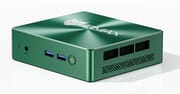
The BMAX B6 with the Core i3-8109U is a palm-sized office and media box that BMAX announced in August 2026. It runs a dual-core Intel chip from 2018, so it suits documents, web apps, and video, and it trails the four-core Intel N100 and N150 in multi-core benchmarks. The memory is soldered at 12GB, but a free M.2 slot takes a second SSD. BMAX also sells a different 10th-generation build under the B6 name, which has its own page. This B6 is the 8th-generation model in the dark green case.
Pros and Cons
| Pros | Cons |
|---|---|
| Free M.2 2280 slot takes a second NVMe SSD | 12GB of LPDDR3 is soldered and cannot be upgraded |
| Dark green metal case weighs about 0.7 pounds and mounts on VESA | The 2018 Core i3-8109U scores below the Intel N100 in PassMark multi-core |
| Two video outputs: HDMI 1.4 and DisplayPort 1.2 | HDMI 1.4 tops out at 4K 30Hz; only DisplayPort runs 4K at 60Hz |
| F9 Smart Recovery restores Windows to its factory state | Intel ended servicing updates for this chip in June 2025 |
| Windows 11 Pro installed; BMAX lists Ubuntu support | No USB-C port, and two of the four USB-A ports are USB 2.0 |
| A reviewer played 4K 60fps YouTube smoothly | WiFi 5 only, no WiFi 6 or 6E |
BMAX B6 with Core i3-8109U Comparison Chart
 BMAX B6 with Core i3-8109U | |
| Price | List Price: $249.99 Amazon Prices: Loading prices... |
| Version | 12GB/256GB/Intel Core i3-8109U |
| Performance Rating | 2.6 |
| Operating System | Windows 11 Pro |
| Processor | Dual-core 3.00 Ghz (max 3.60 Ghz) Intel Core i3-8109U |
| GPU | Integrated Intel Iris Plus Graphics |
| RAM | 12 GB LPDDR3 (Soldered, 1600MHz) |
| Internal Storage | 256 GB M.2 SATA SSD |
| Dimensions width x length x thickness | 4.4 x 4.9 x 1.3 inches (111.76 x 124.46 x 33.02 mm) |
| Weight | 0.68 lbs (0.31 kg) |
| WiFi | Wi-Fi 5 (802.11ac) |
| Bluetooth | Bluetooth 5.0 |
| Ethernet | 1 Ethernet port at 1 Gbps |
| HDMI | 1 Full-Size HDMI Port |
| DisplayPort | 1 DisplayPort (DP 1.2, 4K at 60Hz) |
| VGA | No VGA Ports |
| USB Ports | 2 USB 2.0, 2 USB 3 Front: 2x USB 3.2. Rear: 2x USB 2.0 |
| Thunderbolt Ports | No |
| OCuLink | No |
| Internal SATA Ports | No SATA ports |
| Card Reader | No Card Reader |
| Headphone Jack | combo |
| Fanless | No |
| VESA Mount | Yes |
| In the Box | Power adapter (12V 3A), HDMI cable, VESA bracket with screws, user guide |
| Expandability | Memory soldered. One free M.2 2280 slot for a second SSD; BMAX quotes up to 4TB total. |
Related Mini PCs
-
 Bmax B6 TurboAn office desktop for buyers who want socketed memory they can raise to 32GB, at the cost of a 2019…
 -
 Bmax B4 Plus 2025 (Intel N95)The 2025 Bmax B4 Plus is a palm-sized Windows 11 Pro desktop with an Intel N95, 12GB of soldered…
 -
 ACEMAGIC Vista V1The ACEMAGIC Vista V1 is an ultra-budget mini PC sold in several Intel configs (N95, N97, and…
 -
 ACEMAGICIAN T8 PlusThe ACEMAGICIAN T8 Plus is a compact mini PC for multi-display setups, with triple 4K HDMI output,…
 -
 Beelink MINI S12 ProThe Beelink MINI S12 Pro is a budget Intel N100 mini PC with up to 16GB of DDR4, a 512GB NVMe SSD,…
 -
 Beelink MINI S12The Beelink MINI S12 is a compact, low-power Intel N95 mini PC with dual 4K HDMI, four USB 3.2…
Case, ports, and the free M.2 slot

The case is about 4.9 x 4.4 x 1.3 inches and weighs about 0.7 pounds, according to BMAX’s product page. The lid has a radial brushed texture in dark green with the BMAX logo, and the sides carry vent slots over a hatched grille. The front holds a reset hole, a 3.5mm headset jack, two USB 3.2 ports, and the power button. The rear has HDMI 1.4, DisplayPort 1.2, two USB 2.0 ports, Gigabit Ethernet, and a 12V barrel power input. A VESA bracket ships in the box, so the B6 can hang behind a monitor.
Intel rates the chip’s HDMI output at 4096 x 2304 at 30Hz and its DisplayPort output at 60Hz, so a 4K 60Hz monitor belongs on the DisplayPort and a second 4K screen on HDMI runs at 30Hz. Wireless is dual-band WiFi 5 with Bluetooth 5.0.
The 12GB of LPDDR3 memory is soldered to the board, and BMAX says it cannot be upgraded. The included 256GB drive is an M.2 2280 SATA SSD. The board has two M.2 2280 positions, one for NVMe and one that accepts SATA or NVMe, and BMAX rates them for up to 4TB in total. A fan and two copper heat pipes cool the chip, and BMAX rates the fan at 35dB.
PassMark scores against the N100 and N150

The Intel Core i3-8109U is an 8th-generation Coffee Lake chip that Intel launched in the second quarter of 2018. It has 2 cores and 4 threads, runs at 3.0GHz base and 3.6GHz boost, and is rated at 28W. Intel lists it as discontinued, and its servicing updates ended on June 30, 2025. Its graphics are Intel Iris Plus Graphics 655 with 128MB of eDRAM, which decodes 4K video in hardware.
The chip scores 4,176 in PassMark’s CPU Mark. The Intel N100 scores 5,305 and the N150 scores 5,343, so the four-core N-series chips in many budget mini PCs come out ahead in multi-core work. BMAX markets the i3-8109U as faster than the N95 and N100; the PassMark figures do not support that. The i3-8109U has two cores at higher clock speeds and Iris Plus graphics with eDRAM, where the N100 and N150 have four slower cores. N150 boxes are listed in Starry Hope’s Mini PC Comparison Chart.
Green Apple Online’s hands-on review
Green Apple Online, a Thai-language channel, reviewed the 12GB/256GB B6 and confirmed the Core i3-8109U in Windows. The reviewer opened the case to show the 256GB M.2 2280 drive and the empty slot for a second drive, and said the RAM cannot be changed. The box held a VESA bracket with screws, a 36W 12V 3A adapter, and one HDMI cable.
The reviewer played 4K YouTube at 60fps comfortably and also ran a 1080p 60fps clip. Facebook and Netflix ran smoothly on a single screen. The reviewer did not have two monitors or Microsoft Office on hand, so neither was tested. They said the B6 is not meant for gaming, did not recommend it for game streaming, and noted that a graphics card cannot be added. They liked BMAX Smart Recovery most. Pressing F9 at startup opens a factory reset that restores Windows to its original state, and they said many mini PCs they had reviewed do not have it.
Frequently Asked Questions
Can I upgrade the RAM in the BMAX B6 with Core i3-8109U?
No. The 12GB of LPDDR3 runs at 1600MHz and is soldered to the board. Only storage can be added, through the free M.2 2280 slot.
Can the BMAX B6 drive two 4K monitors?
Yes, one on each port, with the HDMI 1.4 screen limited to 30Hz at 4K. It has no USB-C port, so a third screen is not an option.
Is the Core i3-8109U faster than an Intel N100?
Not in multi-core work. PassMark’s CPU Mark puts the i3-8109U at 4,176 and the N100 at 5,305, about 27% higher.
How do I factory reset the BMAX B6?
Turn the machine on and press F9 repeatedly. The BMAX Smart Recovery screen opens; choose Factory Reset. Windows returns to its original state, and you set it up again from the first-start screens.
Is this the same machine as the 10th-generation BMAX B6?
No. The 10th-generation B6, which heise tested as the B6 Plus, uses an Intel Core i3-1000NG4, i5-1030NG7, or i7-1060NG7 and has two HDMI ports and a USB-C port. This B6 uses the 8th-generation Core i3-8109U in a dark green metal case with one HDMI port, one DisplayPort, and no USB-C.