
Bmax B6 Turbo
Published on

The Bmax B6 Turbo is a small desktop for office work and two-monitor setups, built on the Intel Core i5-8257U, a quad-core laptop chip Intel launched in the third quarter of 2019. Unlike the Bmax B6, which has its memory soldered to the board, the Turbo has two DDR4 SO-DIMM slots, ships with 16GB, and takes up to 32GB. The chip is seven years old, and one of its two video outputs stops at 4K 30Hz.
Pros and Cons
| Pros | Cons |
|---|---|
| Quad-core, eight-thread Core i5-8257U boosts to 3.9GHz | The chip launched in 2019 and Intel lists it as discontinued |
| PassMark CPU Mark of about 7,381, ahead of the Intel N100 and N150 | HDMI 1.4b drives 4K at 30Hz only; the DisplayPort alone reaches 4K at 60Hz |
| 16GB DDR4 in socketed SO-DIMM slots, upgradable to 32GB | Memory runs at DDR4-2400, the chip’s limit |
| Two M.2 2280 slots, one free for a second SSD | No USB-C port, and only two of the four USB-A ports are USB 3.2 |
| Wi-Fi 6 and Bluetooth 5.2 | Gigabit Ethernet only |
| VESA mount in the box, and a 4.9 x 4.4 x 1.3 inch chassis | Intel Iris Plus 645 graphics are not built for modern 3D games |
Bmax B6 Turbo Comparison Chart
 Bmax B6 Turbo | |
| Price | List Price: $309.99 Amazon Prices: Loading prices... |
| Version | 16GB/512GB/Core i5-8257U |
| Performance Rating | 3.4 |
| Operating System | Windows 11 Pro |
| Processor | Quad-core 1.40 Ghz (max 3.90 Ghz) Intel Core i5-8257U |
| GPU | Integrated Intel Iris Plus Graphics |
| RAM | 16 GB DDR4 SO-DIMM (2x SO-DIMM slots, up to 32GB; BMAX does not say whether the 16GB is one stick or two) |
| Internal Storage | 512 GB M.2 SSD |
| Dimensions width x length x thickness | 4.92 x 4.41 x 1.3 inches (124.97 x 112.01 x 33.02 mm) |
| Weight | 0.74 lbs (0.34 kg) |
| WiFi | Wi-Fi 6 (802.11ax) |
| Bluetooth | Bluetooth 5.2 |
| Ethernet | 1 Ethernet port at 1 Gbps |
| HDMI | 1 Full-Size HDMI Port |
| DisplayPort | 1 DisplayPort (DP 1.2, 4K at 60Hz) |
| VGA | No VGA Ports |
| USB Ports | 2 USB 2.0, 2 USB 3 Front: 2x USB-A 3.2. Rear: 2x USB-A 2.0 |
| Thunderbolt Ports | No |
| OCuLink | No |
| Internal SATA Ports | No SATA ports |
| Card Reader | No Card Reader |
| Headphone Jack | combo |
| Fanless | No |
| VESA Mount | Yes |
| In the Box | Mini PC, power adapter, HDMI cable, VESA mount with screws, user guide |
| Expandability | Two DDR4 SO-DIMM slots, up to 32GB. Two M.2 2280 slots. |
Related Mini PCs
-
 BMAX B6 with Core i3-8109UA small office mini PC in a dark green metal case that BMAX launched in 2026 around Intel's 2018…
 -
 Bmax B4 Plus 2025 (Intel N95)The 2025 Bmax B4 Plus is a palm-sized Windows 11 Pro desktop with an Intel N95, 12GB of soldered…
 -
 ACEMAGIC Vista V1The ACEMAGIC Vista V1 is an ultra-budget mini PC sold in several Intel configs (N95, N97, and…
 -
 ACEMAGICIAN T8 PlusThe ACEMAGICIAN T8 Plus is a compact mini PC for multi-display setups, with triple 4K HDMI output,…
 -
 Beelink MINI S12 ProThe Beelink MINI S12 Pro is a budget Intel N100 mini PC with up to 16GB of DDR4, a 512GB NVMe SSD,…
 -
 Beelink MINI S12The Beelink MINI S12 is a compact, low-power Intel N95 mini PC with dual 4K HDMI, four USB 3.2…
Front and rear ports, HDMI 1.4b and DisplayPort 1.2

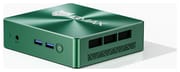
The case measures about 4.9 x 4.4 x 1.3 inches and weighs about three-quarters of a pound, in a dark green finish with a brushed top. The front panel holds a clear CMOS pinhole, a 3.5mm headset jack, two USB 3.2 Type-A ports, and the power button. The back carries HDMI, DisplayPort, two USB 2.0 ports, Gigabit Ethernet, and the 12V barrel power input. BMAX ships a VESA bracket and screws, so the box can hang on the back of a monitor.
BMAX lists the DisplayPort as version 1.2 and the HDMI port as 1.4b, and both ports can drive a monitor at the same time. Intel’s specifications for the i5-8257U give 4096 x 2304 as the top resolution on both, at 60Hz on DisplayPort and 30Hz on HDMI. A 4K monitor on HDMI feels sluggish for desktop work at 30Hz, so a desk with two screens works best with the 4K monitor on DisplayPort and a 1440p or 1080p monitor on HDMI.
Wireless comes from a Wi-Fi 6 radio (802.11ax, dual band) with Bluetooth 5.2. Wired networking is a single Gigabit Ethernet port, which suits an office desk but caps file transfers at about 1Gbps.
Core i5-8257U ahead of an N100 on multi-core work

The Core i5-8257U has four cores and eight threads, a 1.4GHz base clock, a 3.9GHz turbo, 6MB of cache, and a 15W rating. PassMark rates it at about 7,381, which puts it ahead of the four-core Intel N100 (about 5,305) and N150 (about 5,343), though well behind current Ryzen and Core Ultra chips.
Intel Iris Plus Graphics 645 handles the displays, with 48 execution units and a top clock of 1.05GHz.
BMAX and Intel both rate the platform for 32GB. The chip supports DDR4 up to 2400MT/s across two channels, so faster modules run at that speed. BMAX does not say whether the 16GB is one stick or two, and dual-channel operation needs a module in each slot. Storage spans two M.2 2280 slots: one NVMe slot on two PCIe 3.0 lanes and one slot that takes SATA or NVMe drives on four PCIe 3.0 lanes. The included 512GB SSD fills one, which leaves the other free for a second drive. Windows 11 Pro comes preinstalled, and BMAX includes a recovery tool that resets Windows to factory state.
Beelink SER5 for USB-C video and a third monitor
The Beelink SER5 adds a USB-C port that carries video and a DisplayPort 1.4 output, and its HDMI, DisplayPort, and USB-C ports drive up to three monitors. Starry Hope’s Mini PC Comparison Chart lines the B6 Turbo up against other models on specs and ports.
Frequently Asked Questions
Can I upgrade the RAM in the Bmax B6 Turbo?
Yes. Two 16GB DDR4 SO-DIMMs reach the 32GB maximum. If the stock 16GB is a single stick, one more 16GB module gets there; if it is two 8GB sticks, both come out. Laptop-size SO-DIMM modules fit; desktop DIMMs do not.
How is the B6 Turbo different from the Bmax B6?
The B6 uses 10th-generation Ice Lake chips with soldered LPDDR4 and two HDMI ports. The B6 Turbo uses the 8th-generation Core i5-8257U with socketed DDR4, one HDMI port and one DisplayPort, and Wi-Fi 6 instead of Wi-Fi 5.
Can I add a second SSD?
Yes, one M.2 2280 slot is free. Neither slot runs PCIe 4.0, so a PCIe 4.0 drive runs at PCIe 3.0 speed.
Does the Bmax B6 Turbo have USB-C?
No. A USB-C monitor needs a cable that takes DisplayPort from the PC and outputs USB-C to the display; many cables of this type only convert the other way, from USB-C to DisplayPort. USB devices use the four USB-A ports.
Will it run Linux?
Yes. BMAX lists Ubuntu support alongside the preinstalled Windows 11 Pro.