
Beelink EQi 304
Published on

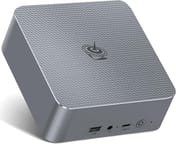
The Beelink EQi 304 is the first mini PC built around Intel’s Core 3 304, the entry-level “Wildcat Lake” chip made on the Intel 18A process. A 10GbE RJ45 port sits next to a 2.5GbE port on the back, two Thunderbolt 4 ports run at 40Gbps beside them, and the 85W power supply lives inside the 5-inch square chassis instead of in a brick under the desk. Storage starts with 512GB of onboard UFS 3.1 flash, with two M.2 2280 slots underneath the heatsink for up to 8TB more. Desk work, file shuffling, and always-on home-server duty are the jobs this hardware is set up for. A single Xe3 graphics core puts gaming and rendering out of reach.
Pros and Cons
| Pros | Cons |
|---|---|
| 10GbE and 2.5GbE ports on separate Realtek and Intel controllers | CNX Software could not get an NVIDIA eGPU dock detected on either Thunderbolt 4 port |
| Two Thunderbolt 4 ports at 40Gbps with DisplayPort Alt Mode | Single-channel memory only, one SO-DIMM slot on the DDR5 models |
| Built-in 85W power supply, so only an AC cord runs to the wall | The 16GB LPDDR5 configuration is soldered and cannot be upgraded |
| Measured idle draw around 6W, roughly 20W under sustained load | M.2 slots are PCIe 4.0 x2 and x1, so neither runs at full x4 bandwidth |
| Fan noise measured 38.2 dBA at idle and 40.4 dBA under load | A single Xe3 graphics core rules out modern gaming |
| Cinebench R23 single-core of 1,732 and a clean Ubuntu 26.04 install | ABS plastic chassis, and the wireless module is Wi-Fi 6 despite 6E marketing |
Related Videos
Beelink EQi 304 Comparison Chart
 Beelink EQi 304 | Beelink EQi 304 | Beelink EQi 304 | |
| Price | List Price: $469.00 Amazon Prices: Loading prices... | List Price: $629.00 Amazon Prices: Loading prices... | List Price: $699.00 Amazon Prices: |
| Version | 16GB/512GB/Intel Core 3 304 | 24GB/512GB/Intel Core 3 304 | 32GB/512GB/Intel Core 3 304 |
| Performance Rating | 3.6 | 3.9 | 4.0 |
| Operating System | Windows 11 Pro | Windows 11 Pro | Windows 11 Pro |
| Processor | 5-core 1.50 Ghz (max 4.30 Ghz) Intel Core 3 304 | 5-core 1.50 Ghz (max 4.30 Ghz) Intel Core 3 304 | 5-core 1.50 Ghz (max 4.30 Ghz) Intel Core 3 304 |
| GPU | Integrated Intel Graphics | Integrated Intel Graphics | Integrated Intel Graphics |
| RAM | 16 GB LPDDR5, single-channel (Soldered LPDDR5, not upgradeable) | 24 GB DDR5 SO-DIMM, single-channel (Single SO-DIMM slot, up to 64GB) | 32 GB DDR5 SO-DIMM, single-channel (Single SO-DIMM slot, up to 64GB) |
| Internal Storage | 512 GB UFS 3.1 | 512 GB UFS 3.1 | 512 GB UFS 3.1 |
| Dimensions width x length x thickness | 4.96 x 4.96 x 1.74 inches (125.98 x 125.98 x 44.2 mm) | 4.96 x 4.96 x 1.74 inches (125.98 x 125.98 x 44.2 mm) | 4.96 x 4.96 x 1.74 inches (125.98 x 125.98 x 44.2 mm) |
| Weight | 1.1 lbs (0.5 kg) | 1.1 lbs (0.5 kg) | 1.1 lbs (0.5 kg) |
| WiFi | Wi-Fi 6 (802.11ax) | Wi-Fi 6 (802.11ax) | Wi-Fi 6 (802.11ax) |
| Bluetooth | Bluetooth 5.2 | Bluetooth 5.2 | Bluetooth 5.2 |
| Ethernet | 2 Ethernet ports at 10 Gbps | 2 Ethernet ports at 10 Gbps | 2 Ethernet ports at 10 Gbps |
| HDMI | 1 Full-Size HDMI Port | 1 Full-Size HDMI Port | 1 Full-Size HDMI Port |
| DisplayPort | DP Alt Mode via both Thunderbolt 4 ports | DP Alt Mode via both Thunderbolt 4 ports | DP Alt Mode via both Thunderbolt 4 ports |
| VGA | No VGA Ports | No VGA Ports | No VGA Ports |
| USB Ports | 2 USB 2.0, 1 USB 3, 1 USB-C Front: 1x USB-A 3.2 (10Gbps), 1x USB-C 3.2 (10Gbps). Rear: 2x Thunderbolt 4, 2x USB 2.0 | 2 USB 2.0, 1 USB 3, 1 USB-C Front: 1x USB-A 3.2 (10Gbps), 1x USB-C 3.2 (10Gbps). Rear: 2x Thunderbolt 4, 2x USB 2.0 | 2 USB 2.0, 1 USB 3, 1 USB-C Front: 1x USB-A 3.2 (10Gbps), 1x USB-C 3.2 (10Gbps). Rear: 2x Thunderbolt 4, 2x USB 2.0 |
| Thunderbolt Ports | 2 | 2 | 2 |
| OCuLink | No | No | No |
| Internal SATA Ports | No SATA ports | No SATA ports | No SATA ports |
| Card Reader | No Card Reader | No Card Reader | No Card Reader |
| Headphone Jack | combo | combo | combo |
| Fanless | No | No | No |
| VESA Mount | No | No | No |
| In the Box | Mini PC, AC power cord (5 ft), HDMI cable (3.3 ft), user manual, hello card | Mini PC, AC power cord (5 ft), HDMI cable (3.3 ft), user manual, hello card | Mini PC, AC power cord (5 ft), HDMI cable (3.3 ft), user manual, hello card |
| Expandability | One DDR5 SO-DIMM slot to 64GB on the 24GB and 32GB models (16GB LPDDR5 is soldered). Dual M.2 2280 PCIe 4.0 slots to 8TB. | One DDR5 SO-DIMM slot to 64GB on the 24GB and 32GB models (16GB LPDDR5 is soldered). Dual M.2 2280 PCIe 4.0 slots to 8TB. | One DDR5 SO-DIMM slot to 64GB on the 24GB and 32GB models (16GB LPDDR5 is soldered). Dual M.2 2280 PCIe 4.0 slots to 8TB. |
Related Mini PCs
-
 Beelink EQi13The Beelink EQi13 is a five-inch-square Windows 11 Pro mini PC with its 85W power supply inside the…
 -
 Beelink EQR5The Beelink EQR5 is a compact AMD mini PC (Ryzen 5 5650U or Ryzen 7 5825U) with Radeon graphics,…
 -
 Lenovo Yoga Mini iLenovo's round 5-inch aluminum desktop puts Intel Panther Lake in a 1.3-pound chassis with dual…
 -
 ACEMAGIC AD15The ACEMAGIC AD15 is an Intel mini PC sold with an 11th or 12th-gen Core i5 (or the 8-core Core…
 -
 BOSGAME P4 PlusThe BOSGAME P4 Plus pairs an AMD Ryzen 7 5825U with dual 2.5GbE, Wi-Fi 6E, swappable DDR4, and one…
 -
 iKOOLCORE R2The iKOOLCORE R2 is a palm-sized networking mini PC with four 2.5GbE ports (three Intel i226-V, one…
Five cores, dual LAN, and two unequal M.2 slots

The chassis measures about 5 inches square and 1.7 inches tall, and weighs just over a pound. It is ABS plastic rather than the aluminum Beelink uses higher up the range, and reviewers noticed: CNX Software wrote that “The case appears to be made of ABS plastic, which feels like a cheaper design than some mini PCs we recently reviewed.” The front panel carries a USB-A 3.2 port at 10Gbps, a 3.5mm combo jack, a USB-C 3.2 port for data, a power button, and a status LED. The back holds the two Thunderbolt 4 ports, two USB 2.0 ports, a 4Kp60 HDMI 2.0 output, the 10GbE and 2.5GbE RJ45 jacks, a clear CMOS button, and the AC inlet. Getting inside means peeling off four rubber feet, removing four screws, and lifting the base with a small pull tab.
The Core 3 304 is a five-core, five-thread part: one performance core running 1.5GHz to 4.3GHz and four low-power efficiency cores running 1.4GHz to 3.3GHz, with 6MB of cache and a 15W base power rating that turbos to 35W. CNX Software recorded 1,732 points in Cinebench R23 single-core and TechRadar 1,696, while multi-core lands at 4,863 and 4,785 respectively. TechRadar also logged 2,337 single-core and 6,303 multi-core in Geekbench and a PCMark 10 score of 4,733. The chip carries a PassMark CPU Mark around 11,645, which puts it in the everyday-productivity band. Graphics are a single Xe3 core clocked to 2.3GHz; Beelink advertises 24 TOPS of AI throughput, and TechRadar writes: “Beelink quotes AI performance at 24 TOPS across the CPU, GPU and NPU for local AI processing.” Intel’s own specification sheet splits that figure into 15 TOPS from the NPU and 9 TOPS from the integrated graphics.
CNX Software found both wired network controllers working correctly under Windows and Ubuntu, the 10GbE port on a Realtek RTL8127 and the 2.5GbE port on an Intel I226-V. Wireless comes from a MediaTek MT7922 module that CNX identified during the teardown, which is Wi-Fi 6 and Bluetooth 5.2 rather than the Wi-Fi 6E the retail listings advertise. Onboard storage is 512GB of UFS 3.1 flash, quick enough to boot and run applications but well short of a modern NVMe drive: TechRadar measured 1,977.4 MB/s read and 806.79 MB/s write with CrystalDiskMark. The two M.2 2280 slots take up to 4TB each, though they are wired at PCIe 4.0 x2 and x1, and TechRadar’s Crucial T710 test drive returned 3,510 MB/s in the faster slot against 1,750 MB/s in the slower one.
Reviewer Insights

CNX Software
Jean-Luc Aufranc ran the EQi 304 through a three-part review covering the teardown and first boot, Windows 11 Pro, and Ubuntu 26.04. He measured 5.7 to 6.2 watts at idle on Wi-Fi, 6.8 to 7.2 watts with the 10GbE link active, 19.5 watts during a sustained Cinebench R23 multi-core run, and a peak CPU temperature of 86 degrees Celsius with no thermal throttling detected, only power limits. Noise came in at 38.2 to 38.5 dBA at idle against a 36.4 to 37.0 dBA room floor, rising only to 39.8 to 40.4 dBA under load.
On the rear ports, CNX Software writes: “The USB 3.2 and USB 2.0 ports work as advertised. However, the Thunderbolt 4 ports were not reliable for me.” An NVIDIA eGPU dock was never detected on either port, and a Thunderbolt 3 NVMe enclosure only connected on the second port after repeated attempts. “Those two 40 Gbps ports are a big disappointment, especially since I felt they were a key selling point of the mini PC. Hopefully, it’s just a driver/interoperability issue, and it will be fixed soon,” the review concludes. He also wrote of the Ubuntu 26.04 install: “Despite the Intel Core 3 304 chip being a brand-new CPU, I had no issues during installation.”
TechRadar
Alastair Jennings used the machine for a week of document work and photo editing. His review opens with the verdict that “The EQi is highly tuned to an office environment, and when connected to my 10GbE network, it felt right at home.” On day-to-day speed he writes: “The design is a little lacklustre, but when opening Microsoft Office, Lightroom, and browsing the internet, the speed was surprisingly sharp.”
“A Time Spy graphics score of 773, compared to 3,963 for the CPU, shows exactly where the limitations are,” he writes, adding that “The single Xe3 core is built for displays, video playback and light graphical work, not gaming.” His practical use case was offloading camera files: a CFExpress Type-B reader on the Thunderbolt 4 port feeding a NAS over the 10GbE link, at a transfer speed he says far exceeds any other machine he knows.
WCCFtech
“The UFS 3.1 storage is decent, but not all that great. Windows encountered major hiccups when running on it, and I had to switch over to an M.2 drive, which ran perfectly,” Hassan Mujtaba writes in his review. The other three items on his list are the single-channel memory layout, a CPU and GPU he considers suited only to entry-level productivity work, and a price he attributes to the DRAM and NAND shortages: without those, he reckons a machine like this would sell for $300 to $350.
He treats the machine mainly as the debut vehicle for a new Intel platform. “This is the first Mini PC to feature Wildcat Lake, and as such, we’ve been looking forward to really trying this out, as this platform has the potential to disrupt the entry-tier segment,” he writes, characterizing the silicon as “a stripped-down version of Panther Lake on the same 18A architecture” that “is said to be a great fit” for regular office, business, and productivity tasks. He liked the built-in PSU for the portability it buys: “The power supply is an 85W design, which means you don’t need to carry an adapter to boot the PC up, just a wall-mount cable would do the trick.”
LinuxLinks
The LinuxLinks review series ran the machine under Linux. In the benchmarking installment, the EQi 304 finished a Smallpt render in 19.4 seconds against 43.3 seconds for an Intel N100 machine, and processed 12.76 million nodes per second in the single-threaded Crafty chess benchmark. The series concludes: “The Core 3 304 cannot compete with high-end processors in sustained, heavily multithreaded workloads… However, its remarkably capable P-core means the EQi 304 should feel fast and responsive during typical desktop use.”
“The Beelink EQi 304 is not a fanless mini PC, but its cooling system is very well tuned,” the reviewer writes in the noise installment, noting that the fan is audible from one meter at idle but does not surge as load changes. The same installment covers the BIOS fan controls: “In my experience, this degree of fan-control flexibility is extremely rare on mini PCs.”
Lon.TV
Lon Seidman’s video review focuses on the always-on case. He measured lower idle draw than CNX Software did, reporting that “It sits at about 5.4 W idle. So, if you are running it as a little mini server, it’s really not going to consume that much power.” He also called it “a really quiet mini PC even when it’s getting stressed” and flagged the storage caveat that the onboard “UFS storage is not very fast though” compared with an NVMe drive.
He also flagged how the memory splits across the two configurations: “what’s weird about this device is that the 16 GB version has non-upgradable memory, but this one with the 24 gigs can be upgraded.”
ETA PRIME
ETA PRIME picked out the rear ports first: “we usually don’t get Thunderbolt 4, but this actually has two Thunderbolt 4 ports around back that run at a 40 gig protocol.” He also noted the internal power supply, saying “This has a built-in power supply. We don’t have to worry about any kind of external bricks,” and put the running cost this way: “Leaving this thing running 24 hours a day isn’t going to burn much energy at all.”
EVO Tech measured a Cinebench single-core result close to the written reviews, observing that “That single-core performance, a score of 1711, pretty much puts it in the range of Zen 4,” while also confirming that “we are still only on single-channel memory” and warning that “This is just not gaming hardware at all… unless you’re going to be doing kind of like a retro build, I would really recommend not trying to game on this.” At the roughly $450 the machine was selling for when he tested it, he calls that “devastatingly bad levels of performance” for the money, and points out that it ends up measured against Ryzen 7 7735HS boxes selling for about $100 less rather than the N150 machines it replaces. Britec09 put his emphasis on noise, saying “Under full load, I found it to be really quiet. There was no noise hardly coming from it at all,” and singled out the networking: “it’s quite rare to see a dual Ethernet port on the back.”
Lon.TV hit trouble only with one older Thunderbolt 3 drive that locked the system up, and said everything else worked; CNX Software could not get an eGPU detected on either port and said on that basis it could not recommend the machine at the time of his review.
A quiet 10GbE desktop for moving files
If you have 10GbE at home or in a small office and you move large files to a NAS, this machine lines up with that work: the 10GbE jack, the Thunderbolt 4 connectors for a card reader or an external drive, and roughly six watts at idle for a box that stays powered all day. It also serves as an always-on home server or a Linux desktop, since Ubuntu 26.04 installed without intervention and both network controllers worked out of the box.
One P-core and four efficiency cores on a single memory channel cap multi-threaded work, so heavy batch jobs are slow going. The single Xe3 graphics core drives displays and plays video; games are out. If external GPU support is the reason you want Thunderbolt 4, wait for confirmation that the PCIe link problem CNX Software documented has been fixed. And if you plan to add memory later, skip the 16GB LPDDR5 model, since that configuration is soldered.
Buyers who want the same Beelink chassis with more cores can compare the Raptor Lake EQI13 PRO and the Alder Lake EQi12, both of which trade the 10GbE port and Thunderbolt 4 for higher multi-core throughput. Starry Hope’s Mini PC Comparison Chart lays the specifications side by side.
Frequently Asked Questions
What processor does the Beelink EQi 304 use?
The EQi 304 uses the Intel Core 3 304, an entry-level “Wildcat Lake” chip built on the Intel 18A process and launched in the second quarter of 2026. It has five cores and five threads: one performance core running 1.5GHz to 4.3GHz and four low-power efficiency cores running 1.4GHz to 3.3GHz, with 6MB of cache and a 15W base power rating. Its PassMark CPU Mark is around 11,645.
Can I upgrade the RAM in the Beelink EQi 304?
It depends on the configuration. The 16GB model uses LPDDR5 soldered to the board and cannot be upgraded. The 24GB and 32GB models use a DDR5 SO-DIMM in a single slot that accepts up to 64GB. Either way the memory runs in single-channel mode, because the Core 3 304 provides only one memory channel.
What ports does the Beelink EQi 304 have?
The front carries a USB-A 3.2 port at 10Gbps, a 3.5mm combo audio jack, and a USB-C 3.2 port at 10Gbps for data. The rear adds two Thunderbolt 4 ports at 40Gbps with DisplayPort Alt Mode, two USB 2.0 Type-A ports, one HDMI 2.0 output good for 4K at 60Hz, a 10GbE RJ45 jack, a 2.5GbE RJ45 jack, a clear CMOS button, and the AC power inlet. There is no card reader.
How many monitors can the Beelink EQi 304 drive?
Three, at 4K and 60Hz each. Two displays connect through the Thunderbolt 4 ports using DisplayPort Alt Mode and the third through the HDMI 2.0 output. Intel lists three displays as the maximum the Core 3 304 supports.
How much storage can the Beelink EQi 304 hold?
Every configuration ships with 512GB of UFS 3.1 flash soldered to the board, and two M.2 2280 slots sit under the heatsink for up to 8TB of additional NVMe storage. The two slots are not equally fast: one is wired for PCIe 4.0 x2 and the other for PCIe 4.0 x1, so put your primary drive in the wider slot.
How much power does the Beelink EQi 304 draw?
CNX Software measured 5.7 to 6.2 watts at the wall while idling on Wi-Fi, rising to 6.8 to 7.2 watts with the 10GbE link active. A sustained Cinebench R23 multi-core run settled at about 19.5 watts after an initial burst above 30 watts. Lon.TV recorded roughly 5.4 watts at idle on his sample.
Does the Beelink EQi 304 need an external power brick?
No. The 85W power supply is built into the chassis, so a standard AC cord runs from the wall straight to the unit. WCCFtech and ETA PRIME both singled that out as a point in the machine’s favor: no adapter to carry, and no brick sitting under the desk.
Does the Beelink EQi 304 run Linux?
Yes. CNX Software installed Ubuntu 26.04 with a Linux 7.0 kernel and reported no issues despite the processor being brand new, with the 10GbE and 2.5GbE controllers, Wi-Fi, and Bluetooth all working. LinuxLinks ran its own benchmark series on the machine under Linux without flagging driver problems.
Is the Beelink EQi 304 good for gaming?
No. The integrated graphics amount to a single Xe3 core, and TechRadar’s Time Spy graphics score of 773 against a CPU score of 3,963 shows where the imbalance sits. Older and lighter titles run, but modern games do not. A mini PC with AMD Radeon graphics or a discrete GPU is the better choice for gaming.