
Beelink EQi13
Updated on

The Beelink EQi13 is a Windows 11 Pro mini PC just under five inches square, built around a power supply that lives inside the case, so it runs from a single AC cord instead of a laptop-style brick. Beelink sells it with two 13th-generation Intel chips: an eight-core Core i5-13420H and a twelve-core Core i5-13500H, both paired with soldered LPDDR5 memory and two M.2 2280 PCIe 4.0 slots. Two HDMI ports drive a pair of 4K displays at 60Hz, two Ethernet jacks support link aggregation or network isolation, and the front face carries a USB-C port that moves data at 10Gbps but sends no video. One configuration on Amazon breaks that pattern: the 16GB DDR4 build lists SO-DIMM memory slots and 2.5-gigabit Ethernet in place of soldered memory and Gigabit jacks. Which configuration you buy sets both the memory ceiling and the wired network speed, so read the specification block before ordering.
Pros and Cons of the Beelink EQi13
| Pros | Cons |
|---|---|
| The 85W power supply is inside the case, so there is no external brick | LPDDR5 memory is soldered on every configuration except the DDR4 build |
| Two Ethernet jacks with link aggregation support | USB-C carries data only, with no DisplayPort Alt Mode or Power Delivery |
| Two M.2 2280 PCIe 4.0 x4 slots, rated 2TB each | Gigabit Ethernet on every configuration except the DDR4 build |
| Dual HDMI output at 4K 60Hz | The i5-13420H uses Intel UHD graphics, not Iris Xe |
| Beelink rates the MSC 2.0 cooling at 32 dB | No USB4, no Thunderbolt, and no VESA mounting holes |
| Windows 11 Pro and a three-year warranty | On PassMark, the i5-13420H scores level with 2022’s i5-12450H |
| Firmware supports Wake on LAN and auto power on | The built-in supply idles at 11 to 12 watts on the EQi13 Pro, high for the class |
Beelink EQi13 Comparison Chart
6 configurations
| Configuration | Processor | RAM | Storage | GPU | List price | Amazon price | Compare |
|---|---|---|---|---|---|---|---|
| 16GB LPDDR5/500GB/Intel Core i5-13420H | Core i5-13420HCPU Mark 17,176 | 16 GB | 500 GB SSD | Intel UHD Graphics | $499.00 | Details
| |
| 16GB DDR4/500GB/Intel Core i5-13420H | Core i5-13420HCPU Mark 17,176 | 16 GB | 500 GB SSD | Intel UHD Graphics | $499.00 | Loading... | Details
|
| 24GB LPDDR5/500GB/Intel Core i5-13420H | Core i5-13420HCPU Mark 17,176 | 24 GB | 500 GB SSD | Intel UHD Graphics | $549.00 | Loading... | Details
|
| 24GB LPDDR5/1TB/Intel Core i5-13500H | Core i5-13500HCPU Mark 23,027 | 24 GB | 1 TB SSD | Intel Iris Xe Graphics | $659.00 | Details
| |
| 24GB LPDDR5/1TB/Intel Core i5-13420H | Core i5-13420HCPU Mark 17,176 | 24 GB | 1 TB SSD | Intel UHD Graphics | $620.00 | Loading... | Details
|
| 24GB LPDDR5/500GB/Intel Core i5-13500H | Core i5-13500HCPU Mark 23,027 | 24 GB | 500 GB SSD | Intel Iris Xe Graphics | $750.00 | Loading... | Details
|
Specs shared by every configuration
| Operating System | Windows 11 Pro |
|---|---|
| Dimensions width x length x thickness | 4.96 x 4.96 x 1.74 inches (125.98 x 125.98 x 44.2 mm) |
| Weight | 1.15 lbs (0.52 kg) |
| WiFi | Wi-Fi 6 (802.11ax) |
| Bluetooth | Bluetooth 5.2 |
| HDMI | 2 Full-Size HDMI Ports |
| DisplayPort | No DisplayPort |
| VGA | No VGA Ports |
| USB Ports | 1 USB 2.0, 3 USB 3, 1 USB-C USB-C is 10Gbps data only, no DP Alt Mode |
| Thunderbolt Ports | No |
| OCuLink | No |
| Internal SATA Ports | No SATA ports |
| Card Reader | No Card Reader |
| Headphone Jack | combo |
| Fanless | No |
| VESA Mount | No |
| In the Box | Mini PC, HDMI cable (100cm), AC cable (150cm), user manual |
See every Intel Core i5-13420H configuration in the chartSee every Intel Core i5-13500H configuration in the chart
Related Mini PCs
-
 Beelink EQR5The Beelink EQR5 is a compact AMD mini PC (Ryzen 5 5650U or Ryzen 7 5825U) with Radeon graphics,…
 -
 Beelink EQR6The Beelink EQR6 on sale now is a Ryzen 5 6600H mini PC for office work and small home network…
 -
 ACEMAGIC AD15The ACEMAGIC AD15 is an Intel mini PC sold with an 11th or 12th-gen Core i5 (or the 8-core Core…
 -
 BOSGAME P4 PlusThe BOSGAME P4 Plus pairs an AMD Ryzen 7 5825U with dual 2.5GbE, Wi-Fi 6E, swappable DDR4, and one…
 -
 Lenovo Yoga Mini iLenovo's round 5-inch aluminum desktop puts Intel Panther Lake in a 1.3-pound chassis with dual…
 -
 Blackview MP100 (Ryzen 5 7430U)A 5-inch-square Ryzen 5 7430U mini PC with 16GB of DDR4, a 512GB SSD, room for two more drives, and…
Detailed Information on the Beelink EQi13

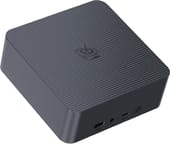
The chassis is a charcoal square slab measuring 4.96 inches on each side and 1.74 inches tall, with a fine diamond pattern pressed into the top panel and the Beelink logo in the middle of it. Beelink lists the weight at 1.15 pounds. The front face carries one USB-A port at 10Gbps, a 3.5mm combo audio jack, a USB-C port at 10Gbps, a clear-CMOS pinhole, and the power button. The rear holds two more USB-A ports at 10Gbps, one USB 2.0 port, two HDMI outputs rated for 4K at 60Hz, the two Ethernet jacks, and a C-style AC inlet where most mini PCs put a barrel jack. That inlet is the reason for the design: the 85W supply sits inside the case, so the desk gets one cord instead of a cord and a brick.
Memory is soldered on the LPDDR5 configurations, and Beelink states that on its own product page and in the Amazon listings alike: 16GB or 24GB, with no slot to add more later. Storage is where the machine stays flexible. Two M.2 2280 slots sit under the lid, both wired for PCIe 4.0 x4, and Beelink rates each for a 2TB drive. The preinstalled SSD fills one of them, so a 500GB configuration leaves a full slot open for a second drive without disturbing the boot volume. Anyone planning to keep the machine for several years should size the memory at purchase, because that is the one specification an owner cannot change later.
Every LPDDR5 configuration has two Gigabit Ethernet ports, and on the 24GB i5-13420H builds they are Realtek RTL8111H controllers. The 16GB DDR4 configuration is a different build: its specification card shows two 2.5GbE jacks, a MediaTek MT7920 Wi-Fi 6 radio with Bluetooth 5.4, and two DDR4 SO-DIMM slots in place of soldered memory. Its written text disagrees with its own images on the radio, still naming the Intel AX101 and Bluetooth 5.2 of the other builds. The 2.5GbE jacks and the SO-DIMM slots appear in both the text and the images, so the wireless module is the one specification left unsettled. The port layout is otherwise identical across both builds, so the fork between them is memory upgradeability and wired network speed. Either way, both jacks support link aggregation, which is what puts a machine like this into home labs and soft-router duty.
Wireless on the LPDDR5 builds is Wi-Fi 6 through an Intel AX101 module with Bluetooth 5.2. Display output stops at the two HDMI ports, because the USB-C port handles data only and carries no DisplayPort Alt Mode, so two screens is the ceiling over the built-in outputs. There is no USB4 or Thunderbolt port either, which rules out an external GPU and any single-cable docking setup. Beelink does not fit VESA mounting holes to this chassis, so the EQi13 sits on a desk or a shelf rather than hiding behind a monitor.
Performance of the Beelink EQi13

The Core i5-13420H in the base configuration is an eight-core, twelve-thread Raptor Lake H part with a 2.1 GHz base clock, a 4.6 GHz boost, and 12MB of cache, and PassMark’s CPU Mark puts it around 17,176. That is roughly three times an Intel N150 at about 5,343, which is enough headroom for a browser full of tabs, an IDE, video calls, and a couple of virtual machines running at once. On the same scale it also lands level with the previous generation’s i5-12450H at about 17,442, so the newer model number does not buy extra multi-threaded throughput. The Core i5-13500H configuration is the real step up at about 23,027, and it trades the i5-13420H’s Intel UHD graphics for Iris Xe. Both are 2023 silicon, and current Core Ultra H parts clear them by a wide margin, with a Core Ultra 5 225H scoring about 28,509.
Reviewer Insights on the Beelink EQi13
We found no independent hands-on test of the plain EQi13. The closest measured data comes from CNX Software’s review of the EQi13 Pro, which shares this chassis, the MSC 2.0 cooling, the built-in 85W supply, and the same Core i5-13500H, but runs a DDR4 SO-DIMM board. CNX found the Pro’s PL1 and PL2 power limits both set to 35W against Intel’s 45W and 115W maximums, writing that “Beelink may have decided to lower the values because the Core i5-13500H processor is installed in a compact mini PC, making cooling more challenging.”
Their sound meter read 39.4 to 40.1 dBA at idle and 41.4 to 45.7 dBA during a 3DMark run, taken about two inches above the case in a room whose own floor measured 38 to 39 dBA, so the machine adds roughly a decibel at idle. Wall power at idle came in at 10.9 to 12.3 watts, and CNX counted that against the machine, tracing it to the built-in supply: “The idle power consumption is a worry, as it’s fairly high, and other similar computers are usually well under 10 Watts (6W typ.).” They put the standing cost at roughly 100 kWh a year for a unit left idling around the clock. Those figures describe the Pro rather than the EQi13, but they set the expectation for this shell: quiet enough to sit on a desk, held under the chip’s rated ceiling, and drawing more at idle than the rest of the class.
Conclusion: Who the Beelink EQi13 Is For
The EQi13 suits a fixed desk where the work is a browser, an office suite, a code editor, and a video call, and where a tidy setup matters. The internal power supply removes the external adapter this class of machine normally needs, the two Ethernet jacks cover link aggregation, a soft-router VM, or keeping two networks apart, and the free M.2 slot means storage never becomes the reason to replace the machine. The i5-13500H configurations add four more cores and Iris Xe graphics for people whose work includes video timelines or several virtual machines at once.
It is a poor fit for anyone who needs graphics performance or a third display. Intel UHD graphics on the i5-13420H handle 4K playback and desktop work but not modern games, and the two HDMI ports are the only video outputs. On the LPDDR5 configurations, soldered memory also fixes the ceiling on the day of purchase. Buyers who want DDR4 SO-DIMM slots already have them on the 16GB DDR4 configuration of this same machine, whose specification card shows that board sold with 32GB in two 16GB modules as well. The Beelink EQi13 Pro uses SO-DIMM memory across its whole range and adds a Core i7-13620H option, and anyone weighing the older 12th-generation version can compare it against the Beelink EQi12. To place any of them against the wider field, use Starry Hope’s Mini PC Comparison Chart.
Frequently Asked Questions
What processor does the Beelink EQi13 use?
Beelink sells the EQi13 with a choice of two 13th-generation Intel chips. The base configuration uses the Core i5-13420H, an eight-core, twelve-thread part with a 2.1 GHz base, a 4.6 GHz boost, 12MB of cache, and Intel UHD graphics; PassMark’s CPU Mark scores it around 17,176. The i5-13500H configurations use the twelve-core, sixteen-thread Core i5-13500H with Iris Xe graphics, which scores about 23,027.
Can the RAM in the Beelink EQi13 be upgraded?
Not on the LPDDR5 configurations. Beelink lists the 16GB and 24GB LPDDR5 builds as onboard memory that cannot be expanded, so whatever the machine ships with is permanent. The one exception is the 16GB DDR4 configuration, which has two DDR4 SO-DIMM slots instead of soldered memory. Check the specification block on the exact configuration before assuming either way.
Does the Beelink EQi13 have 2.5G Ethernet?
It depends on the configuration. Beelink’s product page specifies two Gigabit ports on the LPDDR5 builds, and the 24GB i5-13420H builds use Realtek RTL8111H controllers. The 16GB DDR4 configuration lists two 2.5GbE jacks in both its written text and its specification card. That same listing is inconsistent about the wireless module, showing a MediaTek MT7920 with Bluetooth 5.4 on the card while the text repeats the Intel AX101 and Bluetooth 5.2 of the other builds. Both builds support link aggregation across the two ports.
Does the Beelink EQi13 need an external power brick?
No. The 85W power supply is built into the chassis, and the rear panel takes a standard AC cord rated for 100 to 240 volts at 1.9 amps. That is the design’s main selling point: one cable to the wall, with no brick sitting on the desk or hanging behind it.
How many displays can the Beelink EQi13 drive?
Two, using the pair of HDMI ports, each rated for 4K at 60Hz. The USB-C port on the front is a 10Gbps data port with no DisplayPort Alt Mode, so it cannot drive a third screen, and there is no DisplayPort connector on the chassis.
How much storage can the Beelink EQi13 hold?
Beelink rates the two M.2 2280 slots at 2TB each, for 4TB in total, and both run at PCIe 4.0 x4. The preinstalled 500GB or 1TB drive occupies one slot, leaving the other free for a second SSD. Some Amazon listings for the same machine claim a higher per-slot ceiling than Beelink’s own specification does.
Can the Beelink EQi13 be VESA mounted?
No. Beelink does not fit VESA mounting holes to this chassis and does not include a bracket, so the EQi13 has to sit on a surface. Anyone who needs the machine behind a monitor would have to use a third-party shelf or cradle.
Is the Beelink EQi13 good for gaming?
No. The i5-13420H uses Intel UHD graphics and the i5-13500H uses Iris Xe, both integrated parts suited to 4K video playback, desktop work, and older or lightweight titles rather than modern games. There is no USB4 or Thunderbolt port, so an external GPU is not an option either.