
BOSGAME P4 Plus
Updated on

The BOSGAME P4 Plus is a compact Mini PC built around the AMD Ryzen 7 5825U, an eight-core, sixteen-thread Zen 3 mobile processor that boosts to 4.50 GHz. Configurations range from 16GB DDR4 / 512GB NVMe at the entry tier up to 32GB / 1TB on the top SKU, with both versions wrapped in a sub-litre chassis measuring 5.12 x 5.08 x 1.81 inches. Windows 11 Pro ships pre-installed, and the system targets the same audience as the Beelink SER5 and MINISFORUM UM560: people who want a full Ryzen 7 desktop replacement without a tower-sized footprint.
Where the P4 Plus tries to stand out from the dozens of similar Ryzen mini PCs is the I/O layout. It carries two 2.5GbE LAN jacks, WiFi 6E with Bluetooth 5.2, and a triple-display configuration spanning HDMI, DisplayPort, and USB-C with DisplayPort alt-mode. That combination is uncommon at the sub-$450 tier and is the main reason someone would pick it over a single-LAN Beelink. The trade-offs are a chassis that runs a small active fan (no fanless option here), a single USB-C port (limiting for dock workflows), and no SD card reader or VESA bracket in the box.
| Pros | Cons |
|---|---|
| High-performance AMD Ryzen 7 5825U processor with eight cores and 16 threads | No fanless design, so it may produce noise under heavy loads |
| 32GB dual-channel DDR4 RAM for multitasking | Lacks a built-in SD card reader for additional storage options |
| 1TB M.2 NVMe PCIe 4.0 storage for fast read/write speeds | No support for 2.5-inch SATA drives |
| Triple-display support via HDMI, DisplayPort, and USB-C | VESA mount not included for mounting flexibility |
| Dual 2.5Gbps Ethernet ports for advanced networking setups | Limited USB-C ports (only one available) |
| Wi-Fi 6E and Bluetooth 5.2 for modern wireless connectivity | Not entirely fanless, which may not appeal to silent-PC enthusiasts |
| Compact and portable design | Limited expandability beyond RAM and M.2 storage |
BOSGAME P4 Plus Comparison Chart
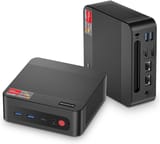 BOSGAME P4 Plus | BOSGAME P4 Plus | BOSGAME P4 Plus | |
| Price | List Price: $359.99 Amazon Prices: | List Price: $439.99 Amazon Prices: | List Price: $439.99 Amazon Prices: |
| Version | 16GB/512GB/Ryzen 7 5825U | 32GB/1TB/Ryzen 7 5825U | 32GB/1TB/Ryzen 7 5700U |
| Performance Rating | 7.1 | 7.7 | 7.4 |
| Operating System | Windows 11 Pro | Windows 11 Pro | Windows 11 Pro |
| Processor | Octa-core 2.00 Ghz (max 4.50 Ghz) AMD Ryzen 7 5825U | Octa-core 2.00 Ghz (max 4.50 Ghz) AMD Ryzen 7 5825U | Octa-core 1.80 Ghz (max 4.30 Ghz) AMD Ryzen 7 5700U |
| GPU | Integrated AMD Radeon Graphics | Integrated AMD Radeon Graphics | Integrated AMD Radeon Graphics |
| RAM | 16 GB | 32 GB | 32 GB |
| Internal Storage | 512 GB | 1 TB | 1 TB |
| Dimensions width x length x thickness | 5.12 x 5.08 x 1.81 inches (130.05 x 129.03 x 45.97 mm) | 5.12 x 5.08 x 1.81 inches (130.05 x 129.03 x 45.97 mm) | 5.12 x 5.08 x 1.81 inches (130.05 x 129.03 x 45.97 mm) |
| Weight | unknown | unknown | unknown |
| WiFi | Wi-Fi 6E (802.11ax) | Wi-Fi 6E (802.11ax) | Wi-Fi 6E (802.11ax) |
| Bluetooth | Bluetooth 5.2 | Bluetooth 5.2 | Bluetooth 5.2 |
| Ethernet | 2 Ethernet ports at 2.5 Gbps | 2 Ethernet ports at 2.5 Gbps | 2 Ethernet ports at 2.5 Gbps |
| HDMI | 1 Full-Size HDMI Port | 1 Full-Size HDMI Port | 1 Full-Size HDMI Port |
| DisplayPort | 1 DisplayPort (Supports triple display with DP, HDMI, and USB-C.) | 1 DisplayPort (Supports triple display with DP, HDMI, and USB-C.) | 1 DisplayPort (Supports triple display with DP, HDMI, and USB-C.) |
| VGA | No VGA Ports | No VGA Ports | No VGA Ports |
| USB Ports | 2 USB 2.0, 2 USB 3, 1 USB-C (USB-C supports DisplayPort) | 2 USB 2.0, 2 USB 3, 1 USB-C (USB-C supports DisplayPort) | 2 USB 2.0, 2 USB 3, 1 USB-C (USB-C supports DisplayPort) |
| Thunderbolt Ports | No | No | No |
| OCuLink | No | No | No |
| Internal SATA Ports | No SATA ports | No SATA ports | No SATA ports |
| Card Reader | No Card Reader | No Card Reader | No Card Reader |
| Headphone Jack | combo | combo | combo |
| Fanless | No | No | No |
| VESA Mount | No | No | No |
| In the Box | Mini PC, power adapter (DC 19V), documentation. | Mini PC, power adapter (DC 19V), documentation. | Mini PC, power adapter (DC 19V), documentation. |
| Expandability | Supports dual-channel RAM and M.2 NVMe storage expansion. | Supports dual-channel RAM and M.2 NVMe storage expansion. | Supports dual-channel RAM and M.2 NVMe storage expansion. |
Related Mini PCs
-
 BOSGAME E5The BOSGAME E5 is a versatile mini PC powered by the AMD Ryzen 3 5300U processor. With dual 2.5GbE…
 -
 BOSGAME P4 UltraA compact Ryzen 7 7730U mini PC with dual 2.5GbE LAN, Wi-Fi 6E, two PCIe 3.0 M.2 slots, and a…
 -
 ACEMAGIC AD15The ACEMAGIC AD15 is an Intel mini PC sold with an 11th or 12th-gen Core i5 (or the 8-core Core…
 -
 Beelink EQR5The Beelink EQR5 is a compact AMD mini PC (Ryzen 5 5650U or Ryzen 7 5825U) with Radeon graphics,…
 -
 Beelink EQi12The Beelink EQi12 is a 12th-gen Intel mini PC (Core i3-1220P up to i7-12650H) with 24GB of soldered…
 -
 ACEMAGICIAN AM06 Pro Mini PCThe ACEMAGICIAN AM06 Pro is a compact AMD Ryzen mini PC (Ryzen 7 5700U, 5800U, or Ryzen 5 7430U)…
Inside the P4 Plus: Processor, Memory, and Storage
The Ryzen 7 5825U at the heart of the P4 Plus is a refresh of AMD’s 5800U (Zen 3, Cezanne) tuned for the same 15W default TDP. Eight cores and sixteen threads at a 4.50 GHz boost give it enough headroom for daily browser-and-Office work with twenty-plus Chrome tabs, a Teams call, and a background Docker container, which is the kind of workload that exposes weaker N100 and N150 mini PCs. Single-thread responsiveness is closer to a desktop than the chip’s small fan and chassis would suggest. The integrated Vega 8 graphics handle 4K H.265 video decode in hardware and will run older esports titles (CS2, League of Legends, Valorant) at 1080p with reduced settings, but anything Unreal Engine 5 or heavily ray-traced is well beyond what this iGPU is designed for.
Memory is the spec that varies most across SKUs. The 16GB variant ships as 2x8GB SO-DIMM in dual-channel, while the 32GB variant uses 2x16GB. Both are user-replaceable DDR4 SO-DIMMs (rated up to 3200 MT/s), which is a real advantage over the soldered LPDDR5 you find in newer Intel N-series boxes. If you can stretch budget, the 32GB SKU is the better long-term buy: Windows 11 plus a browser session can easily push past 12GB on its own, and the gap between 16GB and 32GB at this price point is typically less than $80.
Storage is a single M.2 2280 NVMe slot wired to PCIe Gen4 x4. The factory drive in the 1TB SKU benchmarks roughly in the 3,500 MB/s sequential read range based on what we have seen from comparable BOSGAME and Beelink shipments using the same Yansen / KingSpec OEM modules. The absence of a second M.2 slot or a 2.5-inch SATA bay limits homelab setups that want a fast OS drive plus a larger bulk drive: an external USB enclosure on the 10 Gbps USB-C port is the workaround. There is no Thunderbolt or USB4, so eGPU is off the table.
Networking and Display Output
Dual 2.5GbE is the differentiator that earns the P4 Plus a second look from people shopping for a small router, OPNsense / pfSense box, or a Proxmox host that needs separate LAN and WAN interfaces. The chassis uses two Realtek RTL8125 controllers (the de facto standard at this tier), which means Linux out-of-box support is reliable; both interfaces auto-negotiate down to 1GbE if your switch is older. WiFi 6E adds the 6 GHz band on top of 5 GHz, which is meaningful if you already own a Wi-Fi 6E or Wi-Fi 7 router and want to avoid the crowded 5 GHz spectrum in a dense apartment building. Bluetooth 5.2 handles standard peripherals (mice, keyboards, headphones) without issue.
The display story is generous on paper and slightly awkward in practice. You get one HDMI 2.0, one DisplayPort 1.4, and one USB-C with DisplayPort alt-mode, which means three independent 4K monitors at up to 60 Hz. The trade-off: the USB-C port is also the only USB-C on the system, so using it for a fourth display means giving up dock workflows that route a webcam, keyboard, and external drive through a single cable. Power delivery does not come over the USB-C port (the P4 Plus uses a barrel DC-19V input from a separate brick), which keeps the port purely data-and-video.
Front I/O is two USB 3.2 Gen 1 Type-A and the single USB-C, plus a combo headphone/mic jack and the power button. The rear adds two more USB 2.0 Type-A, both Ethernet jacks, HDMI, DisplayPort, and the DC barrel input. That works out to four USB-A total and one USB-C: enough for a keyboard, mouse, printer, and webcam without a hub, but tight if you regularly swap thumb drives in and out. There is no SD card reader on either face of the chassis, and no VESA bracket is included in the box, so if you want to mount this behind a monitor you will need to source a separate kit.
Reviewer Insights on the BOSGAME P4 Plus
There is a coverage gap worth stating plainly before any verdict: as of June 2026, no established publication and no trusted hands-on channel has independently tested the BOSGAME P4 Plus. Starry Hope checked the outlets that normally cover mini PCs at this tier (NotebookCheck, Tom’s Hardware, ServeTheHome, TechRadar, PCMag) and the reviewer channels we track for mini PC coverage; none has published a review of this exact model. The YouTube results that rank for “BOSGAME P4 Plus review” (from channels such as Verified Reviews, NeoTech, finderBinder, and 4KGearLab) are short clips built from spec-sheet slides and product renders, narrated by a synthetic voice, with no measured data on screen: no wattage figures, no fan-noise readings, no thermal logs, no benchmark runs. The written pages that rank for the model (minipc-review.com, minipc-mothership.com, intensewebs.com) are templated, author-less articles that present the manufacturer’s spec sheet as if it were test data. We do not treat either kind of source as a review, and we will not attribute numbers to a reviewer who never recorded them.
Rather than invent a verdict, here is what can be stated about the hardware with confidence. The processor is the AMD Ryzen 7 5825U, an eight-core, sixteen-thread Zen 3 mobile part (a refresh of the 5800U) with a 4.50 GHz maximum boost and a 15W default TDP that vendors can raise within the chassis thermal budget. In Starry Hope’s processor reference it carries a PassMark CPU Mark of 18,350, effectively a tie with the 5800U it descends from (18,344) and a touch ahead of the newer-numbered Ryzen 7 7730U (17,677). That puts it more than three times the multi-thread throughput of the Intel N150 (5,478) that powers entry-tier mini PCs, while current Zen 4 and Zen 5 parts such as the Ryzen 7 8845HS (28,853) sit well above it. The third configuration swaps in the Ryzen 7 5700U, which scores 15,853 on the same scale, roughly a 14 percent multi-thread step down from the 5825U at the same core count.
What that means in 2026 is straightforward: the 5825U is a four-year-old midrange mobile chip whose CPU throughput is still comfortably enough for a browser-and-Office workload, a Plex or Jellyfin server with hardware transcoding, or a Proxmox host running a handful of LXC containers. The dual 2.5GbE and the WiFi 6E radio remain the genuinely uncommon parts of the spec at this price. What we cannot tell you, because no one has published the measurements, is how this specific chassis behaves under sustained load: its idle and load power draw, its fan-noise floor and ceiling, and its package temperatures during a long all-core run are exactly the figures a real review would supply, and we are not going to estimate them as if a reviewer had. If silence is a hard requirement, the published spec already settles it: this is an actively cooled box with no fanless option, so a passively cooled alternative like the MeLE Quieter 4C is the safer pick for a bedroom HTPC. Where the P4 Plus clearly falls short on paper is anything needing a discrete GPU, Thunderbolt, or a second M.2 slot, none of which it has.
Who Should Buy the BOSGAME P4 Plus
Pick the P4 Plus if you want a Ryzen 7 mini PC with dual 2.5GbE for under $450 and you are comfortable buying a less-reviewed brand because the spec sheet matches your use case. Networking enthusiasts, homelab tinkerers, and anyone running a Proxmox / OPNsense node will get more out of the dual LAN than a Beelink SER5 buyer would. The 32GB / 1TB SKU is the better value: the price gap to the 16GB / 512GB tier is small relative to the productivity headroom you gain.
Skip it if your priority is silent operation, if you need eGPU support, or if brand reputation and service responsiveness matter more to you than spec-per-dollar (Beelink and MINISFORUM have larger US service footprints). For comparison shopping, our Mini PC Comparison Chart lets you stack the P4 Plus against the SER5 Pro, the UM560 XT, and the GMKtec M5 on the specs that actually matter for your workload.
Frequently Asked Questions
Does the BOSGAME P4 Plus support triple monitors?
Yes, the BOSGAME P4 Plus supports triple-monitor setups. It features HDMI, DisplayPort, and a USB-C port with DisplayPort functionality, allowing you to connect up to three displays simultaneously.
Can I upgrade the RAM or storage on the BOSGAME P4 Plus?
Absolutely! The BOSGAME P4 Plus supports dual-channel RAM, so you can upgrade or replace the existing 32GB DDR4 memory. Additionally, it has an M.2 NVMe PCIe 4.0 slot for storage, making it easy to expand or upgrade your storage capacity.
Does it have a fanless design?
No, the BOSGAME P4 Plus is not fanless. It uses an active cooling system, which means it may produce some noise under heavy workloads. This design helps maintain optimal performance during demanding tasks.
What’s included in the box?
The BOSGAME P4 Plus comes with the Mini PC itself, a power adapter (DC 19V), and documentation to help you get started.
Does the BOSGAME P4 Plus have an SD card reader?
No, this Mini PC does not include a built-in SD card reader. If you need to use SD cards, you’ll need an external card reader.
What kind of Ethernet ports does it have?
The BOSGAME P4 Plus is equipped with two 2.5Gbps Ethernet ports, making it ideal for advanced networking setups, such as high-speed data transfers or server configurations.
Can I mount the BOSGAME P4 Plus using a VESA mount?
Unfortunately, the BOSGAME P4 Plus does not include VESA mount compatibility. If mounting is essential for your setup, you may need to consider alternative solutions or other Mini PCs with VESA support.
Is this Mini PC suitable for gaming?
The BOSGAME P4 Plus is equipped with AMD Radeon Graphics, which can handle casual gaming and older titles at lower settings. However, it is not designed for high-end gaming or graphically intensive tasks.
What operating system does it run?
The BOSGAME P4 Plus comes pre-installed with Windows 11 Pro, offering a modern and secure operating system for both personal and professional use.