
MINISFORUM M2 Air-304
Published on

The Minisforum M2 Air-304 is a very small, low-power desktop for office work, web browsing, and media playback. Minisforum sells it barebone, for buyers who already have a memory stick, an SSD, and a Windows license, or ready to use with 16GB of memory and a 500GB SSD. Its chip has strong single-core speed and weak multi-core and graphics results, so it suits daily desktop work and falls behind on video editing, modern games, and heavy compute.
Pros and Cons
| Pros | Cons |
|---|---|
| Socketed DDR5 up to 64GB, where the KAMRUI Pinova P2 Core 3 304 and ACEMAGIC Kron K5 solder their memory | One memory slot means single-channel memory, which limits the integrated graphics and local AI work |
| PCIe 4.0 x4 M.2 slot; Carey Holzman measured close to 6,000MB/s on the bundled Kingston drive | One M.2 slot, with only a microSD slot for added storage inside the case |
| USB4 at 40Gbps plus a second USB-C port, both with DisplayPort and power input | At the bottom of Robtech’s multi-core, video encoding, and AI charts |
| Two Intel 2.5GbE ports, Wi-Fi 6E, and Bluetooth 5.4 | The barebone needs its own memory, SSD, and operating system before it will run |
| ETA PRIME measured 4W idle and 31W at most from the wall | Case screws sit under glued rubber feet, and no spare feet come in the box |
| Two-year warranty, per Robtech and Carey Holzman | A clean Windows install had no Ethernet or Wi-Fi driver in Carey Holzman’s test |
Related Videos
MINISFORUM M2 Air-304 Comparison Chart
 MINISFORUM M2 Air-304 | MINISFORUM M2 Air-304 | |
| Price | List Price: $263.00 Amazon Prices: Minisforum store: | List Price: $559.00 Amazon Prices: Minisforum store: |
| Version | Barebone (no RAM or SSD) | 16GB/500GB |
| Performance Rating | 3.6 | 3.6 |
| CPU Mark | 12,264 | 12,264 |
| Operating System | No OS | Windows 11 Pro |
| Processor | 5-core 1.50 Ghz (max 4.30 Ghz) Intel Core 3 304 | 5-core 1.50 Ghz (max 4.30 Ghz) Intel Core 3 304 |
| GPU | Integrated Intel Graphics | Integrated Intel Graphics |
| RAM | 0 GB DDR5 SO-DIMM, single-channel (One SO-DIMM slot, up to DDR5-6400) | 16 GB DDR5 SO-DIMM, single-channel (16GB DDR5-5600 fitted; slot takes up to DDR5-6400) |
| Internal Storage | 0 GB M.2 NVMe SSD | 500 GB NVMe PCIe 4.0 SSD |
| Dimensions width x length x thickness | 4.41 x 4.41 x 1.46 inches (112.01 x 112.01 x 37.08 mm) | 4.41 x 4.41 x 1.46 inches (112.01 x 112.01 x 37.08 mm) |
| Weight | 0.97 lbs (0.44 kg) | 0.97 lbs (0.44 kg) |
| WiFi | Wi-Fi 6E (802.11ax) | Wi-Fi 6E (802.11ax) |
| Bluetooth | Bluetooth 5.4 | Bluetooth 5.4 |
| Ethernet | 2 Ethernet ports at 2.5 Gbps | 2 Ethernet ports at 2.5 Gbps |
| HDMI | 2 Full-Size HDMI Ports | 2 Full-Size HDMI Ports |
| DisplayPort | DP 1.4 Alt Mode on USB4 and USB-C | DP 1.4 Alt Mode on USB4 and USB-C |
| VGA | No VGA Ports | No VGA Ports |
| USB Ports | 1 USB 2.0, 2 USB 3, 2 USB-C (1 USB4) Front: 2x USB-A 10Gbps. Rear: USB4 40Gbps, USB-C 10Gbps, USB-A 2.0 | 1 USB 2.0, 2 USB 3, 2 USB-C (1 USB4) Front: 2x USB-A 10Gbps. Rear: USB4 40Gbps, USB-C 10Gbps, USB-A 2.0 |
| Thunderbolt Ports | No | No |
| OCuLink | No | No |
| Internal SATA Ports | No SATA ports | No SATA ports |
| Card Reader | microSD Card Reader | microSD Card Reader |
| Headphone Jack | front | front |
| Fanless | No | No |
| VESA Mount | Yes | Yes |
| In the Box | Mini PC, 19V 65W power adapter, short HDMI cable, VESA bracket with screws, manual | Mini PC, 19V 65W power adapter, short HDMI cable, VESA bracket with screws, manual |
| Expandability | Up to 64GB DDR5-6400 in one SO-DIMM slot. One M.2 2280 PCIe 4.0 x4 slot. microSD slot. | Up to 64GB DDR5-6400 in one SO-DIMM slot. One M.2 2280 PCIe 4.0 x4 slot. microSD slot. |
See every Intel Core 3 304 configuration in the chart
Related Mini PCs
-
 MINISFORUM M1 LiteThe MINISFORUM M1 Lite is a quiet, palm-sized Intel Core Ultra 5 125U mini PC with USB4, three…
-
 MINISFORUM M2-356HThe MINISFORUM M2-356H puts Intel's Panther Lake Core Ultra 7 356H in a 520-gram box with two DDR5…
-
 Beelink SER5 Mini PCThe Beelink SER5 is a compact AMD mini PC (Ryzen 5 5560U or Ryzen 7 5700U) with Radeon graphics,…
-
 BOSGAME E5 PlusThe BOSGAME E5 Plus pairs a four-core Ryzen 3 5400U with two 2.5GbE ports, two memory slots, and a…
-
 CHUWI LarkBox X (Core i3-1220P)The CHUWI LarkBox X (Core i3-1220P) is a three-monitor office desktop with upgradable memory and a…
-
 GMKtec NucBox M2 Pro SPalm-sized GMKtec mini PC built on Intel's 11th-gen Core i7-1185G7, with triple 4K60 output, Intel…
USB4, four video outputs, and two 2.5GbE ports

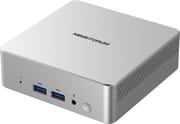
The case measures about 4.4 x 4.4 x 1.5 inches and weighs about 1 pound, and Minisforum supports VESA mounting. The front holds a reset pinhole, two USB-A 3.2 Gen 2 ports at 10Gbps, a 3.5mm combo jack, and the power button, with a microSD slot on the side. The back carries a USB4 port at 40Gbps, a USB-C port at 10Gbps, two HDMI 2.0 ports, one USB 2.0 port, two 2.5GbE ports, the barrel power input, and a Kensington lock slot. Both Type-C ports carry DisplayPort 1.4 video and accept up to 65W of power input, and the USB4 port can also supply 15W to a device.
Minisforum rates the machine for three 4K displays at 60Hz at once, and all four video outputs (two HDMI, USB4, USB-C) reach 4K at 60Hz. Networking uses Intel parts throughout: I226-V controllers for both Ethernet ports and an AX211 module for Wi-Fi 6E and Bluetooth 5.4. The wireless module sits in its own M.2 2230 slot under the SSD.
A single performance core and room for one memory stick and one SSD

The Intel Core 3 304 is a Wildcat Lake part with one performance core and four efficient cores, five threads in total, and a 4.3GHz boost. It pairs with one Xe3 graphics core and an NPU rated at 15 TOPS. Its PassMark multi-thread score of about 12,300 sits well above the Intel N150 (about 5,300) and well below 12-core chips such as the Core 5 220H (about 21,900). Minisforum runs it at 28W in Balanced mode and 15W in Silent mode, and the BIOS switches between them. Robtech found that the BIOS also lets you lower the power limit, set the fan by hand, and turn on wake on LAN and restart after power loss.
Memory goes in one DDR5 SO-DIMM slot that takes up to 64GB at 6400MT/s. Because the chip has one memory channel, a larger stick adds capacity and does not add bandwidth. Storage is one M.2 2280 slot at PCIe 4.0 x4, which Minisforum rates for 2TB, and there is no 2.5-inch bay. The ready-to-use build comes with 16GB of DDR5-5600 and a Kingston SSD, running Windows 11 Pro.
The shell is plastic and the base is metal, and that base works as the heat sink for the SSD and memory through thermal pads. A blower fan handles the chip. Minisforum lists 27.9dB at idle and 32.7dB at full load in Balanced mode, and 27dB and 28.1dB in Silent mode, measured at 50cm.
Reviewer Insights
ETA PRIME
ETA PRIME tested browsing, 4K playback, benchmarks, games, and emulators. On speed he said “It’s definitely not the most powerful unit on the market, but that’s not the point.” In Geekbench 7 the Core 3 304 scored 2,145 single-core against 2,047 for a Ryzen 3 210, and the four-core, eight-thread Ryzen won on multi-core. PCMark 10 gave 5,407, against 3,465 for the Ryzen 3 210 and 2,884 for an Intel N150. 4K YouTube playback ran with no dropped frames.
Left 4 Dead 2 ran above 120 FPS at 1080p high, and the fan had not spun up: “This thing is super quiet.” Skyrim dipped at 1080p high and held 60 FPS at medium. Cyberpunk 2077 averaged about 29 FPS at 720p low, so it needed XeSS multi-frame generation. GameCube and PS2 emulation ran at 60 FPS at 1080p in the games he tried. From the wall he measured 4W at idle, 7W during 4K playback, 24W on average while gaming, and 31W at most in benchmarks. He suggested it for some photo editing, documents, light games, emulators, and signage, and added: “I personally wouldn’t be doing any kind of like 4K video editing on this.”
Robtech
Robtech reviewed the 16GB build, whose SSD showed as 512GB, and tested it against mid-range and high-end mini PCs because of the price of that build. He praised the plastic-and-metal case with no flex: “It feels shockingly substantial in the hands and weighs pretty hefty.” Single-core results were the strong point, placing around the middle of his Cinebench chart. Multi-core CPU, H.264 and AV1 encoding, and CPU AI tests all put it at the bottom of the chart, with Quick Sync included in the AV1 run. A small Llama model produced 4.46 tokens per second, and the integrated graphics scored about 2,000 in Fire Strike, which he placed around an Intel N305.
An RTX 4070 Super over USB4 ran into the limits of the CPU and the USB4 bandwidth, and he advised a frame rate cap for that setup. For Adobe Premiere he said he would stay with 1080p projects. Ubuntu worked fine, power draw stayed under 40W from the wall, and Wi-Fi had no trouble at about 39 feet on 5GHz. The bundled SSD struck him as a budget drive that did not get hot or throttle. He thought Minisforum could have run the fan slower given the low CPU temperatures: “Still under 40 dBA fan noise isn’t bad, but for the wattage, it’s not impressive.” He disliked the screws hidden under glued-on feet.
His verdict on the 16GB build was “The price to performance just isn’t there,” though he said the barebone price is not too bad. He pointed buyers who do not need a low-power machine to the Minisforum UM870.
Carey Holzman
Carey Holzman covered a sample Minisforum sent him across two live streams, Part 1 and Part 2, before the machine reached buyers. Taking it apart, he found that “that bottom is metal” and serves as the heat sink, with a Kingston SSD and Crucial memory inside. The four case screws sit under adhesive rubber feet with no spares in the box. He was “a little disappointed about that,” though he called it “as far as complaints go, pretty minor.” In Silent mode, he said, “you won’t even hear the thing,” which suits signage or a home theater PC.
In Part 2, Cinebench multi-core scored about 5,400 in Balanced mode and about 5,300 in Silent mode, and the hottest core reached 87 degrees in Balanced mode and only 2 to 3 degrees less in Silent, which he summed up as “a very cool running chip.” CrystalDiskMark on the bundled SSD reached nearly 6,000MB/s, about three times the KAMRUI Pinova P2 he tested alongside it, whose slots run at half width. Given the choice on a budget machine between a second slot and faster storage, he chose speed: “I want the performance.”
He then wiped Windows and reinstalled it. The clean install had no driver for either Ethernet port or for Wi-Fi, along with a list of other unknown devices, so he used a USB Ethernet adapter to get online. Minisforum’s driver package appeared on its support page during the stream, and it finished the job after some manual steps, which led him to say “there needs to be like a read me document or something.” Anyone building a barebone unit should keep a USB network adapter or the driver package on a flash drive ready before installing Windows. On the shipped setup he said “if you’re doing office work, this thing is fantastic,” and he called it a fit for hosting a Plex server.
Conclusion
The M2 Air-304 suits office work, video playback, signage, or a light always-on job at very low power, and buyers who want to choose their own memory and SSD. Robtech aimed his value complaint at the 16GB build and said the barebone price is not too bad, so the barebone is the one to look at first if you already own a memory stick and an SSD.
The five-core chip sat at the bottom of Robtech’s multi-core and encoding charts, so video editing and multi-core work belong on something else, and the integrated graphics hold back modern games. The Minisforum UM870 has far more multi-core speed in a larger case. The KAMRUI Pinova P2 Core 3 304 uses the same chip and has two SSD slots at half width, and the Beelink EQi 304 adds a 10GbE port and Thunderbolt 4. The Mini PC Comparison Chart lists these and other options side by side.
Frequently Asked Questions
Can I upgrade the memory and storage?
Yes. Reaching the memory and SSD means peeling off the rubber feet, which hide the case screws and have no spares in the box. The slots take up to 64GB of DDR5 and a 2TB M.2 2280 SSD.
What do I need to buy for the barebone version?
A DDR5 SO-DIMM, an M.2 2280 NVMe SSD, and an operating system. Windows 11 is the system Minisforum lists. Have a USB network adapter or Minisforum’s driver package ready, because a clean Windows install had no Ethernet or Wi-Fi driver in Carey Holzman’s test.
How many monitors can it run?
Minisforum rates it for three at once, each up to 4K at 60Hz, from its two HDMI 2.0 ports, USB4 port, and USB-C port.
Is it good for gaming?
Only for older or light games and emulators. ETA PRIME got above 120 FPS in Left 4 Dead 2 at 1080p high, and about 29 FPS in Cyberpunk 2077 at 720p low before frame generation.
Is it loud?
ETA PRIME found it quiet in a game run, and Carey Holzman expected Silent mode to be inaudible. Robtech measured under 40 dBA and thought Minisforum could have run the fan slower at this wattage. Silent mode lowers the power to 15W, and it cost Holzman about 100 points in Cinebench multi-core.
Does it run Linux?
Robtech tried Ubuntu and said it worked fine. Minisforum lists only Windows 11 as a supported system.