
MINISFORUM M1 Lite
Published on

The MINISFORUM M1 Lite is a quiet, palm-sized desktop for office work, streaming, and light home server duty, built around Intel’s 12-core Core Ultra 5 125U. It is the entry model in MINISFORUM’s M1 family: a lower-power sibling of the M1 Pro with a U-series chip in most builds, Wi-Fi 6E instead of Wi-Fi 7, and no OCuLink port. The 16GB build that reviewers tested ran a single memory stick, so plan on adding a second one if you want the full performance of the chip. MINISFORUM sells it as a barebone, in 16GB/512GB and 32GB/1TB builds, and as a 32GB/1TB build with the 14-core Core Ultra 5 125H.
Pros and Cons
| Pros | Cons |
|---|---|
| Very quiet: Hubwood called it near silent at idle and under full load | The reviewed 16GB builds ran one memory stick in single-channel mode |
| USB4 port takes 65 to 100W power input for a one-cable desk setup | Integrated graphics struggle with current AAA games |
| Three display outputs: HDMI, DisplayPort 1.4, and USB4 | Early driver pack lacked the MediaTek Wi-Fi and Bluetooth driver |
| Two DDR5 SO-DIMM slots (up to 96GB) and two PCIe 4.0 M.2 slots | No speakers, and no fan or power-mode software |
| 2.5GbE from an Intel i226-V controller, plus Wi-Fi 6E and Bluetooth 5.2 | Opening it means peeling off glued rubber feet |
| Low power draw, about 10W at idle in one review | The Core Ultra 5 125U dates from late 2023 and trails newer AMD chips in multi-core work |
Related Videos
MINISFORUM M1 Lite Comparison Chart
 MINISFORUM M1 Lite | MINISFORUM M1 Lite | MINISFORUM M1 Lite | MINISFORUM M1 Lite | |
| Price | List Price: $607.00 Amazon Prices: Loading prices... | List Price: $303.00 Amazon Prices: | List Price: $839.00 Amazon Prices: | List Price: $799.00 Amazon Prices: |
| Version | 16GB/512GB/Intel Core Ultra 5 125U | Barebone/Intel Core Ultra 5 125U | 32GB/1TB/Intel Core Ultra 5 125U | 32GB/1TB/Intel Core Ultra 5 125H |
| Performance Rating | 4.4 | 4.4 | 4.8 | 5.3 |
| Operating System | Windows 11 Pro | No OS | Windows 11 Pro | Windows 11 Pro |
| Processor | Twelve-core 3.30 Ghz (max 4.30 Ghz) Intel Core Ultra 5 125U | Twelve-core 3.30 Ghz (max 4.30 Ghz) Intel Core Ultra 5 125U | Twelve-core 3.30 Ghz (max 4.30 Ghz) Intel Core Ultra 5 125U | Fourteen-core 3.60 Ghz (max 4.50 Ghz) Intel Core Ultra 5 Processor 125H |
| GPU | Integrated Intel Graphics | Integrated Intel Graphics | Integrated Intel Graphics | Integrated Intel Arc graphics |
| RAM | 16 GB DDR5 SO-DIMM (Single 16GB stick in reviewed units) | 0 GB DDR5 SO-DIMM | 32 GB DDR5 SO-DIMM | 32 GB DDR5 SO-DIMM |
| Internal Storage | 512 GB PCIe 4.0 NVMe SSD | 0 GB PCIe 4.0 NVMe SSD | 1 TB PCIe 4.0 NVMe SSD | 1 TB PCIe 4.0 NVMe SSD |
| Dimensions width x length x thickness | 5.12 x 4.96 x 1.98 inches (130.05 x 125.98 x 50.29 mm) | 5.12 x 4.96 x 1.98 inches (130.05 x 125.98 x 50.29 mm) | 5.12 x 4.96 x 1.98 inches (130.05 x 125.98 x 50.29 mm) | 5.12 x 4.96 x 1.98 inches (130.05 x 125.98 x 50.29 mm) |
| Weight | 1.32 lbs (0.6 kg) | 1.32 lbs (0.6 kg) | 1.32 lbs (0.6 kg) | 1.32 lbs (0.6 kg) |
| WiFi | Wi-Fi 6E (802.11ax) | Wi-Fi 6E (802.11ax) | Wi-Fi 6E (802.11ax) | Wi-Fi 6E (802.11ax) |
| Bluetooth | Bluetooth 5.2 | Bluetooth 5.2 | Bluetooth 5.2 | Bluetooth 5.2 |
| Ethernet | 1 Ethernet port at 2.5 Gbps | 1 Ethernet port at 2.5 Gbps | 1 Ethernet port at 2.5 Gbps | 1 Ethernet port at 2.5 Gbps |
| HDMI | 1 Full-Size HDMI Port | 1 Full-Size HDMI Port | 1 Full-Size HDMI Port | 1 Full-Size HDMI Port |
| DisplayPort | 1 DisplayPort (DP 1.4 (8K@60Hz), plus DP Alt Mode on USB4) | 1 DisplayPort (DP 1.4 (8K@60Hz), plus DP Alt Mode on USB4) | 1 DisplayPort (DP 1.4 (8K@60Hz), plus DP Alt Mode on USB4) | 1 DisplayPort (DP 1.4 (8K@60Hz), plus DP Alt Mode on USB4) |
| VGA | No VGA Ports | No VGA Ports | No VGA Ports | No VGA Ports |
| USB Ports | 2 USB 2.0, 2 USB 3, 1 USB-C (1 USB4) Front: 2x USB-A 10Gbps; rear: USB4 (DP, PD in 65-100W), 2x USB-A 2.0 | 2 USB 2.0, 2 USB 3, 1 USB-C (1 USB4) Front: 2x USB-A 10Gbps; rear: USB4 (DP, PD in 65-100W), 2x USB-A 2.0 | 2 USB 2.0, 2 USB 3, 1 USB-C (1 USB4) Front: 2x USB-A 10Gbps; rear: USB4 (DP, PD in 65-100W), 2x USB-A 2.0 | 2 USB 2.0, 2 USB 3, 1 USB-C (1 USB4) Front: 2x USB-A 10Gbps; rear: USB4 (DP, PD in 65-100W), 2x USB-A 2.0 |
| Thunderbolt Ports | No | No | No | No |
| OCuLink | No | No | No | No |
| Internal SATA Ports | No SATA ports | No SATA ports | No SATA ports | No SATA ports |
| Card Reader | No Card Reader | No Card Reader | No Card Reader | No Card Reader |
| Headphone Jack | combo | combo | combo | combo |
| Fanless | No | No | No | No |
| VESA Mount | Yes | Yes | Yes | Yes |
| In the Box | Mini PC, 90W power adapter, HDMI cable, VESA bracket, screws, spare rubber feet, manual | Mini PC, 90W power adapter, HDMI cable, VESA bracket, screws, spare rubber feet, manual | Mini PC, 90W power adapter, HDMI cable, VESA bracket, screws, spare rubber feet, manual | Mini PC, 90W power adapter, HDMI cable, VESA bracket, screws, spare rubber feet, manual |
| Expandability | Up to 96GB DDR5-5600 (2x SO-DIMM). 2x M.2 2280 PCIe 4.0 slots. | Up to 96GB DDR5-5600 (2x SO-DIMM). 2x M.2 2280 PCIe 4.0 slots. | Up to 96GB DDR5-5600 (2x SO-DIMM). 2x M.2 2280 PCIe 4.0 slots. | Up to 96GB DDR5-5600 (2x SO-DIMM). 2x M.2 2280 PCIe 4.0 slots. |
Related Mini PCs
-
 MINISFORUM UM750 NeoThe MINISFORUM UM750 Neo puts AMD's six-core Ryzen Z1 handheld chip in a 5-inch aluminum-look box…
 -
 MINISFORUM AI X1-255The MINISFORUM AI X1-255 is a Ryzen 7 255 mini PC with Radeon 780M graphics, two DDR5 SO-DIMM…
 -
 Beelink SER3The Beelink SER3 pairs an AMD Ryzen 7 3750H (Radeon Vega 10) with dual 4K HDMI output and extensive…
 -
 Beelink SER5 (5500U)The Beelink SER5 (5500U) is a Ryzen 5 5500U mini PC with 16GB of DDR4 in two slots (64GB max), a…
 -
 BOSGAME E5The BOSGAME E5 is a versatile mini PC powered by the AMD Ryzen 3 5300U processor. With dual 2.5GbE…
 -
 BOSGAME E7The BOSGAME E7 pairs a 6-core Intel Core 3 100U with two Gigabit Ethernet ports and triple 4K@60Hz…
A small Core Ultra box built for one-cable desks

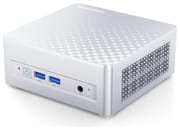
The M1 Lite measures about 5.1 x 5.0 x 2.0 inches and weighs 1.3 pounds. The front carries the power button, two 10Gbps USB-A ports, and a combo audio jack. Everything else sits on the back: the barrel power input, a 40Gbps USB4 port, two USB-A 2.0 ports, 2.5GbE, DisplayPort 1.4, and HDMI. The USB4 port carries video up to 8K at 60Hz, accepts 65 to 100W of USB-C power input, and supplies 15W to a portable display, so a monitor with USB-C power delivery can run the whole machine over one cable. MINISFORUM rates the HDMI port as 2.1, but it runs at up to 4K 60Hz, the HDMI 2.0 limit. A 90W barrel adapter ships in the box for desks without a USB-C monitor.
The Core Ultra 5 125U is a Meteor Lake laptop chip with 12 cores, 14 threads, a 4.3GHz boost, four Xe graphics cores, and an NPU, rated at 21 TOPS of combined AI throughput. MINISFORUM runs it at a 35W balanced power level, well above Intel’s 15W base power for the chip. It scores about 16,700 in PassMark’s CPU Mark, enough for office work, browsing, development, and 4K media. For multi-core work, the Ryzen 7 H 255 in the MINISFORUM X1 Lite scores around 28,200 on the same test. The GMKtec NucBox K15 uses the same 125U in a larger chassis with three M.2 slots and OCuLink.
Two DDR5-5600 SO-DIMM slots take up to 96GB, and two M.2 2280 PCIe 4.0 slots take NVMe drives. The 125U uses dual-channel memory, so a single-stick build lowers graphics and multi-core performance. The bottom cover comes off after you peel back the four glued rubber feet and remove four screws; the fan is attached to the cover by a short cable, so lift it off gently. Wireless is a MediaTek Wi-Fi 6E and Bluetooth 5.2 card.
Reviewer Insights

Hubwood
Hubwood tested the 16GB/512GB build, which shipped with a single 16GB stick, and said that “single channel config in my test unit here is going to reduce the performance by quite a bit.” The reviewer singled out the cooling, saying “The M1 Lite is super silent all the time,” and called it “one of the most silent mini PCs I’ve ever tested,” at around 34 decibels, with the CPU near 75 degrees Celsius in a 22-degree room. Power draw was about 10W at idle and 45 to 55W under full load. A BIOS option lifts the chip to about 45W for a small gain.
Benchmarks came in at 585 multi-core and 94 single-core in Cinebench 2024 (615 multi-core at the higher power setting), 2,138 single-core and 8,113 multi-core in Geekbench 6, and 3,537 in 3DMark Fire Strike. The Puget Systems Premiere Pro test would not finish. In games, CS2 averaged 68 fps at 1080p on the low preset and BioShock Infinite about 52 fps at 1080p medium, while Cyberpunk 2077 managed about 22 fps even with upscaling. The 512GB Kingston SSD read at almost 5GB/s. On the downside, the reviewer listed the clunky proprietary 90W adapter, the missing speakers, and the lack of control software for fan or power modes. The verdict: “it’s not a gamer, particularly not for AAA games,” but for image editing, lighter video editing, and indie games “it will do its job as a lightweight desktop replacement.”
Britec09
Britec09 reviewed a sample MINISFORUM sent, also fitted with one stick of memory and a 512GB Kingston PCIe 4.0 drive. It scored 2,094 single-core and 7,800 multi-core in Geekbench 6 and 8,528 multi-core and 1,604 single-core in Cinebench R23, and the drive read at 5,908MB/s and wrote at 3,687MB/s. A CPU stress test showed 3 percent package-ring thermal throttling, which the reviewer said he had not seen before on a MINISFORUM mini PC. A 400Mbps 4K HEVC 10-bit file played smoothly, and 4K streaming on a 4K TV dropped frames only at the start and while scrubbing: “So, really, really good for 4K streaming.” The reviewer suggested it for general computing, Plex, home labs, and retro or light games, and said that for AAA games “I will probably choose another mini PC from Minisforum that can handle those games better.”
Carey Holzman
Carey Holzman unboxed the M1 Lite and installed Windows on it in a long, unscripted live stream. Carey found the machine quiet during setup (“The mini PC is just quiet as all get out”) and said of the chip and price: “I wouldn’t hesitate for one second to start putting these in offices to all of my clients.” The M1 Lite driver package on MINISFORUM’s support site did not contain the right driver for the MediaTek MT7902 card, which handles both Wi-Fi and Bluetooth, so Carey tracked one down elsewhere and said he would report it to MINISFORUM. Benchmarks were left for a later stream.
Who the M1 Lite suits
The M1 Lite fits office desks, home media setups, and small home servers where noise matters more than peak speed. Budget for a second memory stick if you buy the 16GB build, and expect to install the Wi-Fi driver yourself on a clean Windows install. For gaming beyond older and indie titles, or for heavier multi-core work, an AMD Ryzen box such as the X1 Lite fits better: its Ryzen 7 H 255 scores about 70 percent higher in PassMark’s CPU Mark. The Mini PC Comparison Chart lists both side by side.
Upgrades
Accessories that fit the MINISFORUM M1 Lite's USB4 or Thunderbolt ports.

Core X V2
A Thunderbolt 5 enclosure that Razer lists as working with Thunderbolt 4 and USB4 hosts; it fits a four-slot card and needs an ATX power supply.

DEG2 eGPU Dock
Connects over USB4 or Thunderbolt 5, with an OCuLink input behind a switch, and adds an M.2 slot; it needs an ATX or SFX power supply.

Breakaway Box 850 T5
Has an 850W power supply built in, so only the graphics card is extra, and works with Thunderbolt 4 and USB4 Windows PCs.

TS4 Thunderbolt 4 Dock
An 18-port dock that CalDigit lists for Thunderbolt 4 and USB4 hosts, with 2.5GbE and a DisplayPort 1.4 output.

TBT4-UD5 Thunderbolt 4 Dock
Two HDMI ports drive two 4K60 monitors from one Thunderbolt 4 or USB4 port on a Windows PC.

Revodok Max 208 Thunderbolt 4 Dock
Adds three Thunderbolt 4 ports for dual 4K60 displays plus gigabit Ethernet; it has no HDMI port, so monitors connect over USB-C or an adapter.
Frequently Asked Questions
Can I upgrade the RAM in the MINISFORUM M1 Lite?
Yes. It has two DDR5-5600 SO-DIMM slots and supports up to 96GB. The 16GB units that reviewers tested had a single stick, so adding a matching second stick enables dual-channel memory and improves graphics and multi-core performance.
Can the MINISFORUM M1 Lite be powered over USB-C?
Yes. The rear USB4 port accepts 65 to 100W of power input, so a monitor with USB-C power delivery can power the machine and carry video and data over one cable. A 90W barrel adapter is also included.
How many monitors does the MINISFORUM M1 Lite support?
Three. HDMI runs up to 4K at 60Hz, and DisplayPort 1.4 and USB4 each run up to 8K at 60Hz or 4K at 144Hz. All three can be used at the same time.
Is the MINISFORUM M1 Lite good for gaming?
Only for older, indie, and retro games. With a single memory stick, Hubwood measured 68 fps in CS2 at 1080p low and about 52 fps in BioShock Infinite at 1080p medium, but Cyberpunk 2077 ran at about 22 fps. Hubwood and Britec09 advised against it for AAA games.
How loud is the MINISFORUM M1 Lite?
Very quiet. MINISFORUM rates it under 45 decibels, and Hubwood measured around 34 decibels and called it near silent at idle and under full load. Its cooling uses a blower fan with phase-change thermal material.
What is the difference between the M1 Lite and the M1 Pro?
The M1 Pro uses faster H-series Core Ultra chips, Wi-Fi 7, two USB4 ports, and an OCuLink adapter for an external graphics card. The M1 Lite uses the lower-power Core Ultra 5 125U (or the 125H in one build), Wi-Fi 6E, one USB4 port, and no OCuLink.