
GMKtec NucBox K15
Updated on

The GMKtec NucBox K15 pairs the 12-core Intel Core Ultra 5 125U (Meteor Lake U-series) with a pre-installed OCuLink PCIe 4.0 x4 port, three M.2 slots that scale to 24TB of NVMe storage, dual 2.5GbE Ethernet, a 40Gbps USB4 port, and WiFi 6E. The 1.5-liter chassis is larger than the U-series silicon needs, which leaves room for cooling, the three drives, and the networking hardware. It runs quiet, holds three drives and two network drops, and keeps an eGPU port on the back panel.
The iGPU is the weak point in an otherwise expandable box
| Pros | Cons |
|---|---|
| Pre-installed OCuLink PCIe 4.0 x4 port for external GPU upgrades | Integrated Intel Graphics is the 4-core Xe-LPG iGPU, not Arc |
| Three M.2 2280 PCIe 4.0 NVMe slots supporting up to 24TB total | Larger than typical sub-liter U-series mini PCs |
| RAM ceiling up to 96GB across two DDR5 SODIMM slots | External power brick despite the spacious chassis |
| Dual 2.5GbE Ethernet (Realtek RTL8125) for home server and NAS duty | Rear USB-A ports are USB 2.0 rather than 3.x |
| USB4 (40Gbps) and WiFi 6E for high-bandwidth wireless and wired peripherals | NPU only delivers 11 TOPS, behind newer Lunar Lake and Strix Halo parts |
| Runs notably cool and quiet thanks to dual-fan cooling in a larger case | RGB strip and gaming-style styling feel out of step with the productivity use case |
Related Videos
GMKtec NucBox K15 Comparison Chart
 GMKtec NucBox K15 | GMKtec NucBox K15 | GMKtec NucBox K15 | |
| Price | List Price: $719.99 Amazon Prices: Loading prices... | List Price: $969.99 Amazon Prices: Loading prices... | List Price: $579.99 Amazon Prices: |
| Version | 32GB/1TB/Core Ultra 5 125U | 48GB/1TB/Core Ultra 5 125U | 16GB/1TB/Core Ultra 5 125U |
| Performance Rating | 4.8 | 4.9 | 4.4 |
| Operating System | Windows 11 Pro | Windows 11 Pro | Windows 11 Pro |
| Processor | Twelve-core 3.30 Ghz (max 4.30 Ghz) Intel Core Ultra 5 125U | Twelve-core 3.30 Ghz (max 4.30 Ghz) Intel Core Ultra 5 125U | Twelve-core 3.30 Ghz (max 4.30 Ghz) Intel Core Ultra 5 125U |
| GPU | Integrated Intel Graphics | Integrated Intel Graphics | Integrated Intel Graphics |
| RAM | 32 GB DDR5 SO-DIMM, 2-channel (32GB (2x16GB) DDR5-4800) | 48 GB DDR5 SO-DIMM | 16 GB DDR5 SO-DIMM |
| Internal Storage | 1 TB PCIe 4.0 NVMe SSD | 1 TB | 1 TB |
| Dimensions width x length x thickness | 6.06 x 5.94 x 2.9 inches (153.92 x 150.88 x 73.66 mm) | 6.06 x 5.94 x 2.9 inches (153.92 x 150.88 x 73.66 mm) | 6.06 x 5.94 x 2.9 inches (153.92 x 150.88 x 73.66 mm) |
| Weight | 1.95 lbs (0.89 kg) | 1.95 lbs (0.89 kg) | 1.95 lbs (0.89 kg) |
| WiFi | Wi-Fi 6E (802.11ax) | Wi-Fi 6E (802.11ax) | Wi-Fi 6E (802.11ax) |
| Bluetooth | Bluetooth 5.2 | Bluetooth 5.2 | Bluetooth 5.2 |
| Ethernet | 2 Ethernet ports at 2.5 Gbps | 2 Ethernet ports at 2.5 Gbps | 2 Ethernet ports at 2.5 Gbps |
| HDMI | 1 Full-Size HDMI Port | 1 Full-Size HDMI Port | 1 Full-Size HDMI Port |
| DisplayPort | 1 DisplayPort (DP 1.4, plus DP Alt Mode on USB-C and USB4 (4x 8K output)) | 1 DisplayPort (DP 1.4, plus DP Alt Mode on USB-C and USB4 (4x 8K output)) | 1 DisplayPort (DP 1.4, plus DP Alt Mode on USB-C and USB4 (4x 8K output)) |
| VGA | No VGA Ports | No VGA Ports | No VGA Ports |
| USB Ports | 2 USB 2.0, 3 USB 3, 2 USB-C (1 USB4) Front: 3x USB-A 3.2 Gen 2 (10Gbps), 1x USB-C 3.2 Gen 2 (10Gbps, DP, PD); Rear: 2x USB-A 2.0, 1x USB4 (40Gbps, DP, PD) | 2 USB 2.0, 3 USB 3, 2 USB-C (1 USB4) Front: 3x USB-A 3.2 Gen 2 (10Gbps), 1x USB-C 3.2 Gen 2 (10Gbps, DP, PD); Rear: 2x USB-A 2.0, 1x USB4 (40Gbps, DP, PD) | 2 USB 2.0, 3 USB 3, 2 USB-C (1 USB4) Front: 3x USB-A 3.2 Gen 2 (10Gbps), 1x USB-C 3.2 Gen 2 (10Gbps, DP, PD); Rear: 2x USB-A 2.0, 1x USB4 (40Gbps, DP, PD) |
| Thunderbolt Ports | No | No | No |
| OCuLink | PCIe 4.0 x4 (pre-installed) for eGPU | PCIe 4.0 x4 (pre-installed) for eGPU | PCIe 4.0 x4 (pre-installed) for eGPU |
| Internal SATA Ports | No SATA ports | No SATA ports | No SATA ports |
| Card Reader | No Card Reader | No Card Reader | No Card Reader |
| Headphone Jack | 3.5mm combo (front) | 3.5mm combo (front) | 3.5mm combo (front) |
| Fanless | No | No | No |
| VESA Mount | Yes | Yes | Yes |
| In the Box | Mini PC, power adapter, HDMI cable, VESA mount with screws, manual, warranty card | Mini PC, power adapter, HDMI cable, VESA mount with screws, manual, warranty card | Mini PC, power adapter, HDMI cable, VESA mount with screws, manual, warranty card |
| Expandability | Up to 96GB DDR5 (2x SODIMM). 3x M.2 2280 PCIe 4.0 slots (24TB total). OCuLink PCIe 4.0 x4 for eGPU. | Up to 96GB DDR5 (2x SODIMM). 3x M.2 2280 PCIe 4.0 slots (24TB total). OCuLink PCIe 4.0 x4 for eGPU. | Up to 96GB DDR5 (2x SODIMM). 3x M.2 2280 PCIe 4.0 slots (24TB total). OCuLink PCIe 4.0 x4 for eGPU. |
Related Mini PCs
-
 GMKtec NucBox K17Quiet 0.7-litre Lunar Lake mini PC with the Core Ultra 5 226V, Arc 130V graphics, a spare PCIe Gen5…
 -
 GMKtec Nucbox M3The GMKtec Nucbox M3 is a compact mini PC built on the 8-core Intel Core i5-12450H, with up to 32GB…
 -
 Beelink SEi12The Beelink SEi12 is a 12th-gen Intel mini PC sold in Core i5-12450H, i7-12650H, and i3-1220P…
 -
 Bmax B9 PlusThe Bmax B9 Plus is a compact mini PC with a 12-core Intel Core i5-1250P, 24GB of LPDDR5 memory, a…
 -
 ACEMAGIC K1 (Ryzen 7030 Series)The Ryzen 7030-series ACEMAGIC K1 puts a 6-core Ryzen 5 7530U or 7430U, or a 4-core Ryzen 3 7330U,…
 -
 ACEMAGIC K1The ACEMAGIC K1 is a 5-inch mini PC built on the AMD Ryzen 7 5700U (a Ryzen 3 4300U variant also…
The rear panel carries OCuLink, USB4, and dual 2.5GbE

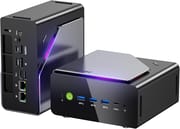
The K15 measures 6.06 x 5.94 x 2.90 inches and weighs only about 1.95 pounds, light for its footprint. The chassis pairs a dark plastic shell with a brushed silver top plate, an RGB light strip down the front edge, and a hardware fan-mode button on the back panel. The front panel carries a power button with a green ring, three USB-A 3.2 Gen 2 ports at 10Gbps, a USB-C 3.2 Gen 2 port with DisplayPort Alt Mode and Power Delivery, and a 3.5mm combo audio jack. The rear collects the heavy connectivity: a 40Gbps USB4 Type-C port (also DP and PD capable), HDMI 2.1, DisplayPort 1.4, an OCuLink port, two USB 2.0 ports, two 2.5GbE RJ45 jacks (Realtek RTL8125), a Kensington lock slot, and the DC barrel input. NotebookCheck calls the resulting layout “easy to service,” with removable RAM, swappable WiFi, and three accessible NVMe slots once you pull the side covers.
The Intel Core Ultra 5 125U is the U-series Meteor Lake chip: 12 cores arranged as 2 performance, 8 efficient, and 2 low-power efficient, for 14 threads total, with a 4.3GHz peak turbo and 12MB of L3 cache. It is rated at a 15W base TDP with a 35W performance mode you can enable from the K15’s BIOS. That covers heavy multitasking, code compilation, virtual machines, and 4K media work, and stops short of the multi-core throughput an H-series part delivers. Lon Seidman called the machine “the Toyota Camry of mini PCs,” reliable and unspectacular, and said the iGPU “are not as advanced as they are on the 125H that will be in a more higher-end unit.” Running Linux, he reported: “It actually felt snappier on the Linux side than the Windows side because Windows has been getting a bit bloated lately,” with WiFi, Bluetooth, audio, and Ethernet all working out of the box.
The pre-installed OCuLink port delivers a full PCIe 4.0 x4 lane straight to an external GPU dock, which keeps the bandwidth ahead of what USB4 or Thunderbolt 4 can sustain. Wireless is handled by an Intel WiFi 6E (802.11ax) card with Bluetooth 5.2, and the card itself is on a standard M.2 module so it can be replaced later. Display output covers four simultaneous monitors at up to 8K through the combination of HDMI 2.1, DisplayPort 1.4, the front USB-C, and the rear USB4 port. Three M.2 2280 PCIe 4.0 NVMe slots take drives up to 8TB each, for a 24TB total. TechRadar points to that storage ceiling as the draw for AI workloads and for homelab builders who need bulk NVMe capacity.
Reviewer Insights

Lon.TV’s Perspective
Lon Seidman frames the NucBox K15 as a mid-range workhorse rather than a flashy gaming machine, returning to the “Toyota Camry of mini PCs” line throughout the review. He opened it on camera: “It is very upgradable. After you remove the metal sheathing on it and unscrew the sides, you get access to the main board,” with the three NVMe slots and the WiFi card all replaceable. Across 3DMark, Speedometer, and gaming tests, Cyberpunk 2077 dipped to around 25-30 FPS on low settings on integrated graphics, and he notes that adding an OCuLink eGPU dock removes that ceiling entirely. He praises the cooling profile (“very quiet… even under full load”) and the dual 2.5GbE ports for home server use, with the main reservation aimed at the U-series iGPU and the price climbing into Core Ultra 7 territory when the memory market is volatile.
Chase Brogan’s Perspective
Chase Brogan tested the K15 as a retro and emulation box. He calls out the OCuLink inclusion as a meaningful convenience: “Nice thing about this is it’s already pre-installed. A lot of mini PCs don’t come with the OCuLink pre-installed.” His emulation testing covered Nintendo Switch, Wii U, GameCube, and PlayStation 3, including PS3: “I was impressed by that because I didn’t think PS3 was going to be a good experience, and it turned out to be a very good experience.” He repeatedly notes the chassis is bigger than the typical ultra-compact mini PC but lighter than expected, with rubber feet on multiple sides for either horizontal or vertical placement. His overall take is that the K15 functions as a flexible base: capable on its own for productivity and retro emulation, and ready to scale into modern AAA gaming once an external GPU is attached.
NotebookCheck
NotebookCheck scored the K15 73% and titled their review “Affordable mini PC with an oversized design.” Their verdict is that “the NucBox K15 is notable for its large size relative to other mini PCs with similar Core U-series CPUs. Consequently, the system runs cooler and quieter than most others while offering more integrated ports including OCuLink and support for up to three internal SSDs.” They specifically flag the external power brick as a missed opportunity given the size of the chassis (“It’s especially unfortunate that the model still requires an external power brick despite its large form factor”) and warn that the Core Ultra 5 125U “may be on the slow side for more advanced tasks beyond HTPC or retail scenarios.” Their pros list highlights the cool, quiet operation, the triple internal SSDs with removable RAM, and the OCuLink port with multiple USB-C outputs. Cons hit the weak graphics and NPU performance and the somewhat out-of-place RGB styling.
TechRadar
TechRadar headlines the K15 as the cheapest OCuLink mini PC currently available and emphasizes storage and display flexibility. Their summary points to “starting price of $360 for barebone configuration,” OCuLink for external GPU connectivity, “three internal M.2 PCIe 4.0x4 slots supporting up to 24TB total storage,” quad-display output across HDMI, DP, USB4, and Type-C, and dual 2.5G LAN ports. They raise one con: “Integrated GPU is insufficient for extreme gaming demands.”
Customer Reviews
Across 311 ratings on Amazon, the GMKtec NucBox K15 averages 4.4 stars, with 72 percent at five stars and 7 percent at one star. Verified buyer Joel McGee, who paid $450 on sale for the 32GB/2TB configuration, wrote that “you would be hard pressed to find something that matches the price to performance ratio for a Windows PC,” and singled out the I/O: “I love that I can output video from HDMI, DisplayPort and USB4.” Verified buyer Brian Werner runs two 4K monitors “and have not experienced any display issues,” and noted the fan is audible but “isn’t loud.” Verified buyer Kevin Greenwood said “the hardware does become hot to the touch when gaming” and suggested extra cooling.
Verified buyer Yasiris reported the unit “kept restarting and giving many blue screen until it stopped working after 4 days” and returned it. Nic B, also a verified buyer, started at five stars but added in an update that “it does seem to crash applications almost everyday” and gets laggy and loud in performance mode. One verified buyer (listed as Amazon Customer) liked it overall but flagged that Bluetooth devices “were paired, but simply did not work when connected to the PC.” If you buy one, treat the first weeks as a burn-in window and keep the return option open. Read more owner reviews on Amazon.
A homelab desktop that leaves gaming to an external GPU
For users who want a quiet desktop replacement, a home server with room for three NVMe drives and two 2.5GbE ports, or a starting point they can later turn into a gaming rig with an external GPU, the K15 delivers a feature set that is hard to find at this price tier. The combination of triple M.2 expansion, a 96GB RAM ceiling, USB4, and a pre-installed OCuLink port is the real differentiator.
The integrated Intel Graphics is the 4-core Xe-LPG iGPU rather than the 8-core Arc graphics found in the Core Ultra 5 125H of the Beelink SEI14 or the upcoming Lunar Lake parts, so out-of-the-box frame rates stay modest until a dock is attached. Sustained multi-threaded work is better served by an H-series machine such as the GMKtec K12 or a Ryzen AI 9 HX 370 system, and the 1.5-liter chassis that buys the quiet running and the three drive bays rules the K15 out for a desk that needs the smallest possible box.
The Starry Hope Mini PC Comparison Chart lines up specs across the OCuLink-capable mini PCs from GMKtec, Beelink, and Minisforum.
Frequently Asked Questions
What processor does the GMKtec NucBox K15 use?
The K15 ships with the Intel Core Ultra 5 125U, a Meteor Lake U-series chip with 12 cores (2 performance, 8 efficient, 2 low-power efficient) and 14 threads. It boosts to 4.3GHz, carries a 12MB L3 cache, and is rated at a 15W base TDP with a 35W performance mode available from BIOS. Its multi-thread PassMark score is around 16,865, which puts it in the same productivity tier as the Ryzen 7 7840U. The integrated GPU is the 4-core Intel Graphics Xe-LPG iGPU, paired with an Intel AI Boost NPU rated at 11 TOPS.
What is OCuLink and why does the NucBox K15 include it?
OCuLink is a wired interconnect that exposes PCIe lanes directly to an external dock or GPU enclosure. The K15’s port carries a full PCIe 4.0 x4 lane, which gives an external GPU more sustained bandwidth than USB4 or Thunderbolt 4 can deliver. GMKtec ships the connector pre-installed on the rear panel, so adding an eGPU dock such as the GMK GP1 only requires the OCuLink cable rather than aftermarket internal modifications.
Can I upgrade the RAM and storage in the NucBox K15?
Yes. The K15 has two DDR5 SODIMM slots that take the system to a 96GB RAM ceiling, with the retail configurations shipping at 4800MT/s. Storage is even more flexible: three M.2 2280 NVMe slots wired for PCIe 4.0 x4, supporting drives up to 8TB each for a 24TB total. RAM and SSDs are accessible after removing the side covers, and the WiFi module is also socketed on a standard M.2 card so it can be swapped later.
What ports does the GMKtec NucBox K15 have?
The front panel carries three USB-A 3.2 Gen 2 ports at 10Gbps, one USB-C 3.2 Gen 2 port with DisplayPort Alt Mode and Power Delivery, and a 3.5mm combo audio jack. The rear panel adds a 40Gbps USB4 Type-C port (also DP and PD capable), HDMI 2.1, DisplayPort 1.4, an OCuLink port (PCIe 4.0 x4), two USB 2.0 Type-A ports, two 2.5 Gigabit Ethernet jacks driven by Realtek RTL8125 controllers, a Kensington lock slot, and the DC barrel input. The system can drive four displays simultaneously across HDMI, DP, USB-C, and USB4.
How does the NucBox K15 run on Linux?
WiFi 6E, Bluetooth 5.2, audio, both 2.5GbE Ethernet ports, and the integrated graphics all worked out of the box in Lon.TV’s testing, and he found the system slightly snappier under Linux than under Windows 11 Pro. Meteor Lake needs a reasonably recent kernel for full Xe-LPG GPU and NPU support, so a current Ubuntu LTS or Fedora release is the safe baseline.
Does the NucBox K15 include a VESA mount?
Yes. The retail box includes the mini PC, an external power adapter, an HDMI cable, a VESA mount with screws, a user manual, and a warranty card. Chase Brogan notes the rubber feet on the chassis support both horizontal and vertical placement, so the K15 can stand on a desk, hide behind a monitor on the VESA bracket, or sit upright next to one.
Can the K15 play modern AAA games on integrated graphics?
Not at high settings. The Core Ultra 5 125U uses the 4-core Intel Graphics (Xe-LPG) iGPU at roughly 1.85GHz, which is closer to the older Iris Xe class than to the 8-core Arc graphics in the Core Ultra H-series. Lon.TV measured Cyberpunk 2077 at roughly 25-30 FPS on low settings. The K15 handles esports titles, indie games, older AAA releases, and full Switch and PS3 emulation comfortably, but for modern AAA games at acceptable framerates the intended upgrade path is to attach a discrete GPU through the OCuLink port.