
Beelink SEi12
Updated on

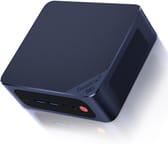
The Beelink SEi12 runs Windows 11 Pro on an Intel Core i5-12450H (eight cores, 12 threads), with i7-12650H and i3-1220P builds sold alongside it. Two SO-DIMM slots take DDR4 up to 64GB. At 4.96 by 4.45 by 1.65 inches, the case hangs off the back of a monitor on the bracket in the box, and the processor’s Intel UHD engine covers desktop work, 4K video, and lighter games. Networking runs over 2.5G Ethernet, WiFi 6, and Bluetooth 5.2, and the port set adds four USB 3 ports, two HDMI outputs, a DisplayPort, and a USB-C port that carries DisplayPort and data. Storage splits across one M.2 NVMe slot and a 2.5-inch SATA bay.
| Pros | Cons |
|---|---|
| 4.96 by 4.45 by 1.65 inches, VESA mountable | Four USB 3 ports and one USB-C |
| Intel Core i5-12450H, eight cores and 12 threads | USB-C carries DisplayPort and data, no USB4 or Thunderbolt |
| DDR4 upgradable to 64GB | One M.2 slot, so a second drive has to be 2.5-inch SATA |
| M.2 NVMe slot plus a 2.5-inch SATA bay | Intel UHD Graphics keeps gaming to lighter titles |
| 2.5G Ethernet, WiFi 6, Bluetooth 5.2 | Hypervisors want the E-cores switched off in BIOS |
| Ships with Windows 11 Pro |
Related Videos
Beelink SEi12 Comparison Chart
 Beelink SEi12 | Beelink SEi12 | Beelink SEi12 | Beelink SEi12 | |
| Price | List Price: $549.00 Amazon Prices: | List Price: $439.00 Amazon Prices: | List Price: $469.00 Amazon Prices: | List Price: $349.00 Amazon Prices: |
| Version | 32GB/512GB/Intel Core i7-12650H | 16GB/512GB/Intel Core i5-12450H | 16GB/1TB/Intel Core i5-12450H | 24GB/512GB/Intel Core i3-1220P |
| Performance Rating | 5.3 | 4.3 | 4.3 | 4.4 |
| Operating System | Windows 11 Pro | Windows 11 Pro | Windows 11 Pro | Windows 11 Pro |
| Processor | Deca-core 3.50 Ghz (max 4.70 Ghz) Intel Core i7-12650H | Octa-core 3.30 Ghz (max 4.40 Ghz) Intel Core i5-12450H | Octa-core 3.30 Ghz (max 4.40 Ghz) Intel Core i5-12450H | Deca-core 3.30 Ghz (max 4.40 Ghz) Intel Core i3-1220P |
| GPU | Integrated Intel UHD Graphics | Integrated Intel UHD Graphics | Integrated Intel UHD Graphics | Integrated Intel UHD Graphics |
| RAM | 32 GB | 16 GB | 16 GB | 24 GB |
| Internal Storage | 512 GB | 512 GB | 1 TB | 512 GB |
| Dimensions width x length x thickness | 4.96 x 4.45 x 1.65 inches (125.98 x 113.03 x 41.91 mm) | 4.96 x 4.45 x 1.65 inches (125.98 x 113.03 x 41.91 mm) | 4.96 x 4.45 x 1.65 inches (125.98 x 113.03 x 41.91 mm) | 4.96 x 4.45 x 1.65 inches (125.98 x 113.03 x 41.91 mm) |
| Weight | unknown | unknown | unknown | unknown |
| WiFi | Wi-Fi 6 (802.11ax) | Wi-Fi 6 (802.11ax) | Wi-Fi 6 (802.11ax) | Wi-Fi 6 (802.11ax) |
| Bluetooth | Bluetooth 5.2 | Bluetooth 5.2 | Bluetooth 5.2 | Bluetooth 5.2 |
| Ethernet | 1 Ethernet port at 2.5 Gbps | 1 Ethernet port at 2.5 Gbps | 1 Ethernet port at 2.5 Gbps | 1 Ethernet port at 2.5 Gbps |
| HDMI | 2 Full-Size HDMI Ports | 2 Full-Size HDMI Ports | 2 Full-Size HDMI Ports | 2 Full-Size HDMI Ports |
| DisplayPort | 1 DisplayPort | 1 DisplayPort | 1 DisplayPort | 1 DisplayPort |
| VGA | No VGA Ports | No VGA Ports | No VGA Ports | No VGA Ports |
| USB Ports | 4 USB 3, 1 USB-C (Type-C port supports DisplayPort and data, not USB4/Thunderbolt) | 4 USB 3, 1 USB-C (Type-C port supports DisplayPort and data, not USB4/Thunderbolt) | 4 USB 3, 1 USB-C (Type-C port supports DisplayPort and data, not USB4/Thunderbolt) | 4 USB 3, 1 USB-C (Type-C port supports DisplayPort and data, not USB4/Thunderbolt) |
| Thunderbolt Ports | No | No | No | No |
| OCuLink | No | No | No | No |
| Internal SATA Ports | 1 SATA port, includes 2.5" drive bay (2.5" internal drive mount) | 1 SATA port, includes 2.5" drive bay (2.5" internal drive mount) | 1 SATA port, includes 2.5" drive bay (2.5" internal drive mount) | 1 SATA port, includes 2.5" drive bay (2.5" internal drive mount) |
| Card Reader | No Card Reader | No Card Reader | No Card Reader | No Card Reader |
| Headphone Jack | combo | combo | combo | combo |
| Fanless | No | No | No | No |
| VESA Mount | Yes | Yes | Yes | Yes |
| In the Box | Mini PC, user manual, power brick, power cable, mounting screws, VESA bracket, HDMI cable | Mini PC, user manual, power brick, power cable, mounting screws, VESA bracket, HDMI cable | Mini PC, user manual, power brick, power cable, mounting screws, VESA bracket, HDMI cable | Mini PC, user manual, power brick, power cable, mounting screws, VESA bracket, HDMI cable |
| Expandability | RAM upgradable, storage expandable with both NVMe and SATA options | RAM upgradable, storage expandable with both NVMe and SATA options | RAM upgradable, storage expandable with both NVMe and SATA options | RAM upgradable, storage expandable with both NVMe and SATA options |
Related Mini PCs
-
 Beelink SER3The Beelink SER3 pairs an AMD Ryzen 7 3750H (Radeon Vega 10) with dual 4K HDMI output and extensive…
 -
 Beelink SER5 (5500U)The Beelink SER5 (5500U) is a Ryzen 5 5500U mini PC with 16GB of DDR4 in two slots (64GB max), a…
 -
 Bmax B9 PlusThe Bmax B9 Plus is a compact mini PC with a 12-core Intel Core i5-1250P, 24GB of LPDDR5 memory, a…
 -
 AYANEO Retro Mini PC AM01The AYANEO Retro Mini PC AM01 is a beige, 1984 Macintosh-styled box built on the AMD Ryzen 7 5825U,…
 -
 BOSGAME P1The BOSGAME P1 is an 8-core AMD Ryzen 7 5700U mini PC with Radeon Vega 8 graphics, 32GB of DDR4, a…
 -
 GEEKOM Mini IT11The GEEKOM Mini IT11 is a compact Tiger Lake mini PC (Intel Core i7-11390H or i5-1155G7, Iris Xe…
Two drive bays and a BIOS with overclocking controls
The fabric top hides fingerprints and wipes clean, and the internal layout leaves memory and storage exposed for upgrades or maintenance. Builds ship with 16GB to 32GB of DDR4, expandable to 64GB, and the M.2 slot takes an NVMe SSD of up to 2TB. The 2.5-inch SATA bay sits alongside it for a second, larger drive.
The Core i5-12450H holds a steady pace through office work, multimedia, and CPU-side graphics editing. Intel UHD Graphics rules out heavy gaming, though it plays lighter titles and drives 4K video without trouble.
A small dedicated fan cools the NVMe drive, and the 2.5-inch drive mount doubles as a heatsink. The BIOS carries overclocking controls and network boot options.
Reviewer Insights
The chassis shipped with several 12th-gen Alder Lake chips, so the figures below belong to the chip each reviewer tested, and Robtech’s i5-1235U unit is a build the page does not list. As 2026 hardware these are mid-tier mobile parts: the i5-12450H in two of the four builds posts a PassMark CPU score around 17,400, the top-of-line i7-12650H lands near 23,300, and the entry i3-1220P sits around 14,400. That puts the line below today’s Ryzen 7 and Core Ultra mini PCs but still comfortable for everyday work, light virtualization, and emulation.
Robtech: the multi-core gap widens under sustained load while emulation holds full speed
Robtech benchmarked the 10-core, 12-thread i5-1235U version (16GB DDR4-3200) head to head against Intel’s NUC 12 Pro. In Cinebench R20 the SEi12 trailed the i5 NUC by only 4 percent in single-core, but the gap widened to about 20 percent in multi-core; a 10-minute Cinebench R23 stress run put it 5 percent behind in single-core and 24 percent behind in multi-core, and the NUC pulled 17 percent ahead in video encoding. On graphics it was roughly 7 percent behind the NUC 12 Pro in both 3DMark DX11 and DX12, with the previous-gen i5 NUC even edging it out in DX12.
Gaming against the other 12th-gen i5 minis was a mixed picture: about 5 percent behind the NUC in Forza Horizon 5, a consistently higher frame rate than the NUC in Hades, but well behind in Spider-Man (up to a 30 percent frame-rate drop at worst), while Valorant was memory-bandwidth limited and performed similarly across all three. Emulation held up well: PlayStation 2 titles ran full speed (Gran Turismo 4 locked to 60fps at 1080p), Wii U games ran full speed at 1080p apart from Breath of the Wild, and PlayStation 3 games dropped frames at 1080p but were playable at 720p. On power and thermals he noted the extra SSD fan adds about 5 watts at idle, peak power draw was in line with the other minis, and the maximum temperature was lower than other units he had stress-tested, though thermal throttling still showed up under a full all-core load. Fan noise was low (quieter than the Asus mini he compared against), with the only nitpick being a slightly higher-pitched fan than he prefers. His attempt to run an external GPU dock failed with a Windows code 43 error. He framed it as a good cheaper 12th-gen option for buyers who do not need the NUC’s dual Thunderbolt 4, 2.5G Ethernet, or stronger multi-core performance.
VirtualizationHowto: a boot storm of Ubuntu VMs barely moved the CPU
Brandon Lee at VirtualizationHowto evaluated the Core i7-12650H build (6 performance cores plus 4 efficiency cores, 10 cores and 16 threads, bursting to 4.7 GHz with 24MB of cache) with 32GB of DDR4-3200 as a home-lab hypervisor host. On Proxmox he booted roughly 30 Ubuntu Server 22.04 VMs at once, each allocated 1.5GB of RAM and 2 vCPUs, and reported it “actually a bit challenging to max out the CPU” because the chip chewed through the boot storm and ramped back to idle quickly. He metered power directly: about 20 watts on boot, around 25 watts with all 30 VMs sitting idle, and roughly 94 watts when he pinned the CPU at 99 to 100 percent, so a 20-to-94-watt working range.
He called out two quirks for virtualization. The unit’s Realtek NIC (which he identified as 1-gigabit; the spec sheet says 2.5G) is fine under Proxmox or Linux but is not bound by VMware ESXi, so ESXi users need a USB network adapter. And modern hypervisors do not cleanly schedule Alder Lake’s performance and efficiency cores, so his most stable setup disabled the E-cores in the BIOS (12 logical CPUs presented) rather than running the full 16. The dual storage paths, one M.2 2280 NVMe slot plus the 2.5-inch SATA bay, gave him the fast and bulk tiers a small virtualization host wants. His takeaway was a powerful, power-efficient little Proxmox box with a couple of caveats worth planning around.
A quiet box for browser work and 4K video
Under 5 inches wide, it fits on a dorm desk or an office shelf, and the VESA bracket moves it behind the monitor entirely. The i5 chip, up to 32GB of RAM, and NVMe storage handle office work and video calls without complaint.
Fan noise stays low under load in Robtech’s measurements, which suits a shared room or a quiet office. Two HDMI outputs, a DisplayPort, and 2.5G Ethernet feed a pair of monitors and a wired network from the back panel, so the cable run stays short.
As a living-room machine it handles 4K content and streaming, and Intel UHD Graphics covers casual gaming sessions on lighter titles.
Anyone who needs dedicated graphics or an external GPU should look elsewhere: Robtech’s eGPU dock attempt ended in a Windows code 43 error. Thunderbolt is missing too, which points toward the Beelink SEI14 or another brand.
The build decides the price: $349.00 for the i3-1220P, $439.00 for the 16GB i5-12450H, and $549.00 for the 32GB i7-12650H that Brandon Lee ran his VMs on. Buyers weighing cloud subscription alternatives should check the cloud PC vs local cost breakdown to see how quickly local hardware pays for itself. Amazon listings have gone unavailable, so stock is intermittent, and Beelink has since moved the line on to the SEi13 and SEi14. Line the specs up against current models in the Mini PC Comparison Tool.
Frequently Asked Questions
Can the SEi12 run Linux?
Yes. VirtualizationHowto ran Proxmox, a Linux-based hypervisor, on the i7-12650H build, with Ubuntu Server 22.04 guests on top of it.
What type of RAM does the SEi12 use, and is it upgradable?
Memory is DDR4 SO-DIMM and upgradable to 64GB. Builds leave the factory with 16GB, 24GB, or 32GB installed.
Does the SEi12 have options for storage expansion?
One M.2 2280 slot holds the NVMe SSD, in 512GB and 1TB builds, and a 2.5-inch SATA bay takes a second drive.
What are the graphics capabilities of the SEi12?
Graphics are Intel UHD, integrated into the processor. That covers business applications, 4K video, and lighter games, and it rules out high-end gaming and GPU-intensive work.
Is the SEi12 fanless?
No. An internal fan cools the system, with a second small fan over the NVMe drive, and Robtech rated the noise low under load.
Can the SEi12 be mounted to the back of a monitor?
Yes. The VESA bracket ships in the box and attaches it behind a monitor, which frees desk space and shortens the cable run.
What are the networking capabilities of the SEi12?
Wired networking runs through a 2.5 gigabit LAN port, and wireless is WiFi 6 with Bluetooth 5.2.
Does the SEi12 have Thunderbolt ports?
No. On the SEi12 (i5-12450H), the USB-C port is a USB 3.2 port with DisplayPort output, not USB4 or Thunderbolt. Robtech tried an external GPU dock on it and could not get it working. (Beelink’s separate SEi12 Pro, with the i5-1240P, does add USB4/Thunderbolt 4.)
What comes in the box with the SEi12?
The box holds the mini PC, a user manual, a power brick, a power cable, mounting screws, a VESA bracket, and an HDMI cable.
Is the SEi12 suitable for running virtual machines?
Yes. VirtualizationHowto booted roughly 30 Ubuntu Server VMs at once on the 32GB i7-12650H build under Proxmox, with the E-cores disabled in BIOS for stable scheduling.