
MINISFORUM X1 Lite-255
Updated on

The MINISFORUM X1 Lite-255 is a small performance mini PC built around AMD’s Ryzen 7 255 (8 cores, 16 threads, up to 4.9GHz) with Radeon 780M graphics. It measures roughly 5 x 5 x 2 inches and weighs about 0.67kg. Two USB4 ports and an included OCuLink adapter for external GPU expansion cover external-GPU expansion. This is the AMD Ryzen 7 255 model, which some outlets, Hostbor among them, review under the plain AI X1 name. The AI X1 Pro (Ryzen AI 9 HX 370) is a separate machine.
Pros and Cons
| Pros | Cons |
|---|---|
| 8-core, 16-thread Zen 4 CPU scores near 17,000 in Cinebench R23 multi-core | Five USB ports total, so a hub is likely |
| Radeon 780M holds 60 FPS in Street Fighter 6 at 1080p | OCuLink adapter uses one of only two M.2 slots |
| Dual USB4 ports with DisplayPort Alt Mode support | Can reach 92C under sustained heavy loads |
| Included OCuLink adapter runs an eGPU about 45% faster than USB4 | No dedicated NPU for AI acceleration |
| 0.84L chassis with an aluminum top and sides | Barrel jack power instead of USB-C Power Delivery |
| Two SO-DIMM slots take up to 128GB of DDR5-5600 | WiFi 6E and Bluetooth 5.2 rather than WiFi 7 |
Related Videos
MINISFORUM X1 Lite-255 Comparison Chart
 MINISFORUM X1 Lite-255 | MINISFORUM X1 Lite-255 | MINISFORUM X1 Lite-255 | MINISFORUM X1 Lite-255 | |
| Price | List Price: $663.00 Amazon Prices: Loading prices... | List Price: $639.00 Amazon Prices: Loading prices... | List Price: $739.00 Amazon Prices: | List Price: $449.00 Amazon Prices: Loading prices... |
| Version | 32GB/512GB | 32GB/1TB | 64GB/1TB | Barebone |
| Performance Rating | 5.6 | 5.6 | 5.8 | 5.2 |
| Operating System | Windows 11 Pro | Windows 11 Pro | Windows 11 Pro | Windows 11 Pro |
| Processor | Octa-core 3.80 Ghz (max 4.90 Ghz) AMD Ryzen 7 H 255 | Octa-core 3.80 Ghz (max 4.90 Ghz) AMD Ryzen 7 H 255 | Octa-core 3.80 Ghz (max 4.90 Ghz) AMD Ryzen 7 H 255 | Octa-core 3.80 Ghz (max 4.90 Ghz) AMD Ryzen 7 H 255 |
| GPU | Integrated AMD Radeon 780M | Integrated AMD Radeon 780M | Integrated AMD Radeon 780M | Integrated AMD Radeon 780M |
| RAM | 32 GB | 32 GB | 64 GB | 0 GB |
| Internal Storage | 512 GB | 1 TB | 1 TB | 0 GB |
| Dimensions width x length x thickness | 5.12 x 4.96 x 1.86 inches (130.05 x 125.98 x 47.24 mm) | 5.12 x 4.96 x 1.86 inches (130.05 x 125.98 x 47.24 mm) | 5.12 x 4.96 x 1.86 inches (130.05 x 125.98 x 47.24 mm) | 5.12 x 4.96 x 1.86 inches (130.05 x 125.98 x 47.24 mm) |
| Weight | 1.48 lbs (0.67 kg) | 1.48 lbs (0.67 kg) | 1.48 lbs (0.67 kg) | 1.48 lbs (0.67 kg) |
| WiFi | Wi-Fi 6E (802.11ax) | Wi-Fi 6E (802.11ax) | Wi-Fi 6E (802.11ax) | Wi-Fi 6E (802.11ax) |
| Bluetooth | Bluetooth 5.2 | Bluetooth 5.2 | Bluetooth 5.2 | Bluetooth 5.2 |
| Ethernet | 1 Ethernet port at 2.5 Gbps | 1 Ethernet port at 2.5 Gbps | 1 Ethernet port at 2.5 Gbps | 1 Ethernet port at 2.5 Gbps |
| HDMI | 1 HDMI Port | 1 HDMI Port | 1 HDMI Port | 1 HDMI Port |
| DisplayPort | 1 DisplayPort | 1 DisplayPort | 1 DisplayPort | 1 DisplayPort |
| VGA | No VGA Ports | No VGA Ports | No VGA Ports | No VGA Ports |
| USB Ports | 1 USB 2.0, 2 USB 3, 2 USB-C (2 USB4) | 1 USB 2.0, 2 USB 3, 2 USB-C (2 USB4) | 1 USB 2.0, 2 USB 3, 2 USB-C (2 USB4) | 1 USB 2.0, 2 USB 3, 2 USB-C (2 USB4) |
| Thunderbolt Ports | No | No | No | No |
| OCuLink | Via included M.2 adapter (PCIe 4.0 x4, uses one M.2 slot) | Via included M.2 adapter (PCIe 4.0 x4, uses one M.2 slot) | Via included M.2 adapter (PCIe 4.0 x4, uses one M.2 slot) | Via included M.2 adapter (PCIe 4.0 x4, uses one M.2 slot) |
| Internal SATA Ports | No SATA ports | No SATA ports | No SATA ports | No SATA ports |
| Card Reader | No Card Reader | No Card Reader | No Card Reader | No Card Reader |
| Headphone Jack | combo | combo | combo | combo |
| Fanless | No | No | No | No |
| VESA Mount | Yes | Yes | Yes | Yes |
| In the Box | Mini PC, 19V 120W power adapter, HDMI cable, VESA mounting bracket with screws, M.2 to OCuLink adapter, user manual | Mini PC, 19V 120W power adapter, HDMI cable, VESA mounting bracket with screws, M.2 to OCuLink adapter, user manual | Mini PC, 19V 120W power adapter, HDMI cable, VESA mounting bracket with screws, M.2 to OCuLink adapter, user manual | Mini PC, 19V 120W power adapter, HDMI cable, VESA mounting bracket with screws, M.2 to OCuLink adapter, user manual |
| Expandability | RAM upgradable to 128GB via 2x DDR5-5600 SO-DIMM slots, storage expandable via 2x M.2 2280 PCIe Gen 4 slots (up to 8TB total), OCuLink support for external GPU via included adapter | RAM upgradable to 128GB via 2x DDR5-5600 SO-DIMM slots, storage expandable via 2x M.2 2280 PCIe Gen 4 slots (up to 8TB total), OCuLink support for external GPU via included adapter | RAM upgradable to 128GB via 2x DDR5-5600 SO-DIMM slots, storage expandable via 2x M.2 2280 PCIe Gen 4 slots (up to 8TB total), OCuLink support for external GPU via included adapter | RAM upgradable to 128GB via 2x DDR5-5600 SO-DIMM slots, storage expandable via 2x M.2 2280 PCIe Gen 4 slots (up to 8TB total), OCuLink support for external GPU via included adapter |
Related Mini PCs
-
 MINISFORUM M1-1295The MINISFORUM M1-1295 is a Core i9-12950HX mini PC with two DDR4 SO-DIMM slots (96GB max), two…
 -
 MINISFORUM M1 ProThe MINISFORUM M1 Pro is a compact aluminum mini PC sold in two CPU tiers: the 14-core Intel Core…
 -
 Beelink EQR7The Beelink EQR7 pairs an AMD Ryzen 7 7735U with a built-in power supply, dual Gigabit Ethernet,…
 -
 Beelink SER5 MAX (Ryzen 7 7735HS)The Beelink SER5 MAX pairs an 8-core Ryzen 7 7735HS and Radeon 680M graphics with 24GB of LPDDR5,…
 -
 BOSGAME M4The BOSGAME M4 pairs an AMD Ryzen 7 8745HS with 32GB of DDR5, an OCuLink port for an external GPU,…
 -
 BOSGAME P3 LiteThe BOSGAME P3 Lite pairs an AMD Ryzen 7 6800H and Radeon 680M graphics with dual 2.5G Ethernet,…
Dual USB4, OCuLink, and a 128GB memory ceiling

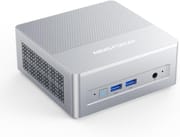
The chassis pairs an aluminum alloy top and sides with a plastic base and back panel, and the silver metallic finish is fingerprint-resistant. The front panel houses two USB 3.2 Gen2 ports running at 10Gbps, a 3.5mm combo audio jack, and a power button. Around back sit the two USB4 ports (both supporting DisplayPort Alt Mode, with one handling power delivery), a single USB 2.0 port, HDMI 2.1 FRL, DisplayPort 1.4, and 2.5 Gigabit Ethernet. The layout is well spaced, but the low USB-A count means most desks will want a hub within reach.
The AMD Ryzen 7 255 processor is a refresh of the Ryzen 7 8745HS, built on AMD’s Zen 4 architecture with 8 cores and 16 threads capable of boosting up to 4.9GHz. In benchmarks, reviewers have recorded Cinebench R23 multi-core scores around 16,000-17,000 and Geekbench 6 scores exceeding 12,000 in multi-core tests. The integrated Radeon 780M is strong for the class, delivering playable framerates in 1080p eSports titles at low settings, including a steady 60 FPS in Street Fighter 6 in ETA PRIME’s testing. Mr. Sujano found the 780M outperformed Intel’s Core Ultra 9 285H in his integrated-graphics comparison.
The two USB4 ports run at 40Gbps each, which covers external displays, storage, and accessories at the same time. MINISFORUM also includes an M.2 to OCuLink adapter in the box for connecting an external GPU enclosure, and reviewers measured approximately 45% better eGPU performance via OCuLink compared to USB4 connections. Memory tops out at 128GB of DDR5-5600 across two SO-DIMM slots, and two M.2 2280 PCIe Gen 4 x4 slots take the storage, though the OCuLink adapter claims one of them. WiFi 6E and Bluetooth 5.2 handle wireless connectivity, with 2.5 Gigabit Ethernet available for wired connections.
Reviewer benchmarks, thermals, and the eGPU path

Rob Tech’s Perspective
Rob Tech frames the X1 Lite as “a more NUC-style mini PC instead of the Mac inspiration of the Pro” model. He focused on the OCuLink eGPU path, testing an external RTX 4070 Super over OCuLink, and warned that “You’re going to have to sacrifice the second M.2 storage slot if you plan to use an Oculink eGPU.” His thermal testing showed the CPU hitting as high as 92C in performance mode.
ETA PRIME’s Perspective
ETA PRIME sees significant potential in the X1 Lite-255, suggesting that “this little mini PC could turn out to be the best budget mini PC of 2026 given the specs that this thing’s rocking, price, and overall IO.” His testing covers the system’s power delivery, noting it can sustain 64-70W TDP in performance mode. Unlike other reviewers who reported higher temperatures, his thermal testing showed maximum CPU temperatures of only 78°C while remaining quiet even under load. He highlights the versatile USB4 port that supports single-cable operation with compatible monitors, explaining that “all you need is a single cable with the correct monitor to get this thing up and running; your monitor is going to send power to the unit and in turn it’s going to send that video signal right back to the monitor.” He praises the included OCuLink adapter and notes that without it, “you can do up to 8 TB of storage in the X1 Lite.” However, he cautions that the price “does jump up significantly going up to 32 gigs of RAM and 1 TB of storage,” making the barebones option attractive for users who already have components on hand.
Mr. Sujano’s Perspective
Mr. Sujano came away highly impressed with the X1 Lite-255’s overall performance, declaring “This thing has excelled for pretty much everything I’ve thrown at it.” He was particularly enthusiastic about the gaming performance, stating that “in my testing, it beat the pants off the Intel Core Ultra 9 285H” in integrated graphics benchmarks. His thermal testing showed more moderate temperatures of 60-70C under gaming loads with idle temps around 47C, suggesting some variance between units or testing conditions. He praised the easy upgradeability and silver metallic finish but expressed disappointment with the limited USB port count, noting “I’m a little bit disappointed to see a lack of USB ports on this device.” For home office use, content creation, and light 1080p gaming, he considers it highly recommended.
Hostbor’s Written Review
Hostbor reviewed the Ryzen 7 255 version and gave it a 7.8/10, rating it well as a portable gaming PC with eGPU connectivity via OCuLink. Its benchmark testing recorded Cinebench R23 of 1728 single and 16997 multi-core, and Geekbench 6 of 2584 single and 12967 multi-core. It measured OCuLink at “45% better eGPU performance vs USB4,” which makes the included adapter the main draw for anyone planning an external graphics card. Hostbor also flagged a practical assembly note: check that the factory thermal pads have their protective plastic removed, an easy-to-miss quality-control issue.
Family Pop TV
Family Pop TV framed the X1 Lite-255 as a cost-focused take on the Pro line, with a plastic chassis that “doesn’t feel premium” and no built-in speaker, and the budget redirected to performance and expandability. The Ryzen 7 with Radeon 780M handled office work and light gaming but struggled with modern AAA titles like Star Wars Outlaws on its own, which is where the bundled OCuLink adapter for an external GPU comes in.
A small Ryzen box that grows with an external GPU
The MINISFORUM X1 Lite-255 packs an 8-core Ryzen 7 255 and a Radeon 780M (capable for 1080p eSports) into a 5-inch box, and the included OCuLink adapter gives it an external-GPU upgrade path. The 128GB RAM ceiling and two M.2 slots leave room for more memory and storage later. It suits a small desk that may one day need a discrete GPU.
It tops out at five USB ports (a hub helps), it can run hot under sustained load (reviewers saw up to 92C in performance mode), and the Ryzen 7 255 has no dedicated NPU, so it is a poor fit for on-device AI work. If local AI is your goal, running large language models locally is far better served by Strix Halo systems with 128GB of unified memory. To compare this against other models, use Starry Hope’s Mini PC Comparison Chart.
Upgrades
Accessories that fit the MINISFORUM X1 Lite-255's OCuLink and USB4 or Thunderbolt ports.
DEG1 eGPU Dock
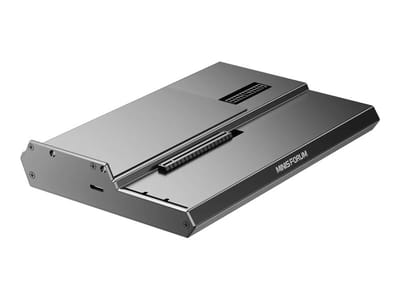
A plain OCuLink dock with a PCIe 4.0 x4 link for a desktop graphics card; it takes an ATX or SFX power supply that you supply.
EG02 eGPU Dock
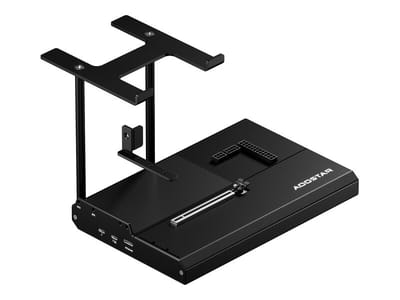
Connects over OCuLink for the full PCIe 4.0 x4 link and has Thunderbolt 5 as a second input; the graphics card and power supply are sold separately.

Core X V2
A Thunderbolt 5 enclosure that Razer lists as working with Thunderbolt 4 and USB4 hosts; it fits a four-slot card and needs an ATX power supply.

DEG2 eGPU Dock
Connects over USB4 or Thunderbolt 5, with an OCuLink input behind a switch, and adds an M.2 slot; it needs an ATX or SFX power supply.

Breakaway Box 850 T5
Has an 850W power supply built in, so only the graphics card is extra, and works with Thunderbolt 4 and USB4 Windows PCs.

TS4 Thunderbolt 4 Dock
An 18-port dock that CalDigit lists for Thunderbolt 4 and USB4 hosts, with 2.5GbE and a DisplayPort 1.4 output.

TBT4-UD5 Thunderbolt 4 Dock
Two HDMI ports drive two 4K60 monitors from one Thunderbolt 4 or USB4 port on a Windows PC.

Revodok Max 208 Thunderbolt 4 Dock
Adds three Thunderbolt 4 ports for dual 4K60 displays plus gigabit Ethernet; it has no HDMI port, so monitors connect over USB-C or an adapter.
Frequently Asked Questions
What is OCuLink and why does it matter on the X1 Lite-255?
OCuLink (Optical-Copper Link) is a high-speed PCIe connection standard that provides 64Gbps bandwidth when using PCIe 4.0 x4. The included M.2 to OCuLink adapter lets you connect an external GPU enclosure, and reviewers measured approximately 45% better eGPU performance that way than over USB4.
Can the X1 Lite-255 handle gaming?
Yes, the integrated Radeon 780M can handle 1080p gaming at low to medium settings in many titles, including a steady 60 FPS in Street Fighter 6 in ETA PRIME’s testing. For more demanding games or higher settings, the included OCuLink adapter lets you connect an external GPU for significantly better performance.
How much memory can it take?
Up to 128GB of DDR5-5600 across two SO-DIMM slots. Pre-configured units ship with 32GB or 64GB, and the bottom panel comes off to reach the slots. That ceiling leaves room for virtual machines and large working sets.
How loud is it under load?
The X1 Lite-255 uses active cooling with a fan, dual heat pipes, and phase-change thermal material. Under typical workloads, reviewers measured noise levels around 29-35dB, which is essentially whisper-quiet. Under heavy gaming or sustained CPU loads, fan noise increases to approximately 40-45dB, which is noticeable but not disruptive in most environments.
What displays can I connect?
The X1 Lite-255 can drive up to three displays simultaneously. It features HDMI 2.1 FRL (supporting up to 8K@60Hz or 4K@120Hz), DisplayPort 1.4 (supporting 8K@60Hz or 4K@144Hz), and both USB4 ports support DisplayPort Alt Mode (8K@60Hz or 4K@144Hz each).
Does the X1 Lite-255 have WiFi 7?
No, the X1 Lite-255 comes with WiFi 6E and Bluetooth 5.2. The separate AI X1 Pro has WiFi 7 and Bluetooth 5.4. WiFi 6E still covers the 6GHz band, so the practical gap on a home network is small.
What comes in the box?
The box holds the mini PC, a 19V 120W power adapter, an HDMI cable, a VESA mounting bracket with screws, an M.2 to OCuLink adapter, and a user manual. The VESA mount and the OCuLink adapter are both accessories you would otherwise buy separately.