
MINISFORUM UM880 Plus
Updated on

The MINISFORUM UM880 Plus is a 5-inch cube built around the AMD Ryzen 7 8845HS, an 8-core, 16-thread chip that boosts to 5.1GHz. Its OCuLink port carries PCIe 4.0 x4 out to an external graphics card, a wider pipe than the USB4 port beside it. On their own, the Radeon 780M graphics cover desktop work and lighter games. The rest of the port set is current: USB4, HDMI 2.1, DisplayPort 1.4, and 2.5 Gigabit Ethernet.
What works and what to plan around
| Pros | Cons |
|---|---|
| OCuLink port runs PCIe 4.0 x4 out to an external GPU | The OCuLink adapter occupies one of the two M.2 slots |
| Quiet at idle; load noise measured at 34dB by Hostbor and above 40 dBA by Robtech | MediaTek WiFi card lacks native Linux driver support |
| Sustained 65W TDP performance without thermal throttling | Only two USB 2.0 ports for wired peripherals |
| Supports up to 96GB DDR5 RAM and 8TB total storage | One 2.5G Ethernet port |
| USB4 with Alt DisplayPort and bidirectional Power Delivery | Radeon 780M needs reduced settings for The Witcher 3 and Cyberpunk 2077 |
| 67% power savings compared to traditional desktop systems | Bottom rubber feet must be removed to access upgrade screws |
Related Videos
MINISFORUM UM880 Plus Comparison Chart
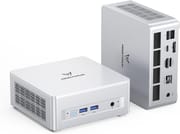 MINISFORUM UM880 Plus | |
| Price | List Price: $869.00 Amazon Prices: Loading prices... |
| Version | 32GB/1TB |
| Performance Rating | 5.7 |
| Operating System | Windows 11 Pro |
| Processor | Octa-core 3.80 Ghz (max 5.10 Ghz) AMD Ryzen 7 8845HS |
| GPU | Integrated AMD Radeon 780M |
| RAM | 32 GB |
| Internal Storage | 1 TB |
| Dimensions width x length x thickness | 5 x 5 x 2.17 inches (127 x 127 x 55.12 mm) |
| Weight | 1.32 lbs (0.6 kg) |
| WiFi | Wi-Fi 6E (802.11ax) |
| Bluetooth | Bluetooth 5.3 |
| Ethernet | 1 Ethernet port at 2.5 Gbps |
| HDMI | 1 HDMI Port |
| DisplayPort | 1 DisplayPort |
| VGA | No VGA Ports |
| USB Ports | 2 USB 2.0, 2 USB 3, 1 USB-C (1 USB4) |
| Thunderbolt Ports | No |
| OCuLink | Via M.2 adapter (PCIe 4.0 x4, uses one M.2 slot) |
| Internal SATA Ports | No SATA ports |
| Card Reader | No Card Reader |
| Headphone Jack | combo |
| Fanless | No |
| VESA Mount | Yes |
| In the Box | Mini PC, power adapter, HDMI cable, VESA mounting bracket, OCuLink adapter board, user manual, spare bottom feet |
| Expandability | RAM upgradable to 96GB DDR5 via 2x SO-DIMM slots. Storage expandable to 8TB total via 2x M.2 2280 PCIe 4.0 NVMe slots. OCuLink port enables external GPU expansion but uses one M.2 slot. WiFi card is user-replaceable. |
Related Mini PCs
-
 MINISFORUM M1-1295The MINISFORUM M1-1295 is a Core i9-12950HX mini PC with two DDR4 SO-DIMM slots (96GB max), two…
 -
 MINISFORUM M1 ProThe MINISFORUM M1 Pro is a compact aluminum mini PC sold in two CPU tiers: the 14-core Intel Core…
 -
 Beelink EQR7The Beelink EQR7 pairs an AMD Ryzen 7 7735U with a built-in power supply, dual Gigabit Ethernet,…
 -
 Beelink SER5 MAX (Ryzen 7 7735HS)The Beelink SER5 MAX pairs an 8-core Ryzen 7 7735HS and Radeon 680M graphics with 24GB of LPDDR5,…
 -
 BOSGAME M4The BOSGAME M4 pairs an AMD Ryzen 7 8745HS with 32GB of DDR5, an OCuLink port for an external GPU,…
 -
 BOSGAME P3 LiteThe BOSGAME P3 Lite pairs an AMD Ryzen 7 6800H and Radeon 680M graphics with dual 2.5G Ethernet,…
Two M.2 slots, and the OCuLink adapter wants one

The chassis measures 5 inches square and barely over 2 inches thick, shorter than an iPhone by reviewer COOLTOY’s hands-on measure. Aluminum top and bottom panels sandwich plastic sides that carry the port array, and the whole thing weighs 1.32 pounds. The rear panel holds HDMI 2.1, DisplayPort 1.4, USB4, two USB 3.2 ports, the 2.5G Ethernet jack, and the power input; the front adds two USB 2.0 ports, a 3.5mm combo audio jack, and the power button. VESA mounting hardware ships in the box, so it can hang behind a monitor and disappear from the desk.
In Hostbor’s testing the Ryzen 7 8845HS scored 1,787 single-core and 17,070 multi-core in Cinebench R23. NGXP Tech’s torture testing held the multi-core result at 16,000 to 16,600 across 10 consecutive runs with no thermal throttling. In Hostbor’s power testing, idle consumption sits around 15 watts, gaming draws roughly 45 watts, and full stress maxes out at the configured 65W TDP, with a peak temperature of 81.4 degrees Celsius. Hostbor measured noise at 34dB under that load; Robtech’s unit ran above 40 dBA under load, as covered below.
Two DDR5 SO-DIMM slots take 48GB modules for a 96GB ceiling, and the two M.2 2280 PCIe 4.0 slots hold up to 8TB of storage combined. The included OCuLink adapter board installs into one of those M.2 slots, so a buyer picks between maximum internal storage and the external graphics port. Wireless comes from WiFi 6E and Bluetooth 5.3, and the MediaTek MT7902 card is user-replaceable, which Linux owners can use to fit an Intel AX210 for better driver support.
Reviewer Insights

Robtech: the single RAM stick holds the 780M back
Robtech benchmarked the UM880 Plus twice, once in its shipping configuration with one 32GB stick and once with a second stick added and BIOS performance mode enabled. The stock 3DMark scores landed near the much weaker Minisforum UM750L, and the second stick produced large gains across Fire Strike, Time Spy, and Steel Nomad Light: “So much GPU performance is left on the table by only having a single stick of RAM.” The measured numbers were 8W at idle, close to 100W at the wall in performance mode, a CPU peak of 92 degrees Celsius, and load fan noise above the 40 dBA average even in the default balanced profile. The review confirms the wireless problem Linux buyers should plan for, “This MediaTek Wi-Fi chip does not play nicely with Linux and doesn’t work at all,” while wired Ubuntu worked fine. Two other complaints: the shipping RAM choice, “Why they put in a 32 GB stick is hard to fathom and really messes with its performance,” and the chassis, “Glued-on rubber feet is an automatic disqualifier for being easy to open.” Testing the same external GPU over both connections, Robtech found the extra bandwidth of OCuLink made a big difference against USB4.
Family Pop TV: 96GB of memory and a 35B model running offline
Family Pop TV swapped the shipping 32GB for 96GB to run large language models on the box with the network disconnected: “I opened it up and pushed it to 96 gigs because the extra memory is what takes this from technically functional to realistically usable.” The BIOS caps dedicated graphics memory no matter how much is installed, “The Radeon 780M here has a hard BIOS limit of 16 gigs for dedicated GPU memory,” but the models still ran because the integrated graphics pull from the shared system memory pool rather than the SSD swap file. Offline, 7B and 14B models responded at usable speed, 27B started pushing the limits, and “35B, that’s more of a stress test for the hardware than something you’d want to use all day.” The integrated graphics hit their ceiling on modern games in the same session: Star Wars ran at 1080p low settings, and Indiana Jones needed “720p, lowest settings, and yeah, it works, but nobody’s calling that a premium gaming experience.” An RTX 5080 attached over OCuLink lifted that, against the tradeoff the adapter board forces, “you’re basically choosing extra SSD storage or absurd desktop GPU performance.”
James Montemagno: .NET build times and 96GB of headroom
James Montemagno comes at this box as a software developer, booting up VS Code and timing a from-scratch .NET clean and build to gauge compilation performance. He notes the 32GB of RAM expands to 96GB and names the OCuLink port for an external GPU and USB4 as key points of the machine. He says he is “not much of a benchmark person,” and stays with practical developer workloads.
COOLTOY: name-brand internals, and an adapter you fit yourself
COOLTOY focuses on retro emulation, which he says is where these mini PCs shine. Running his emulators at 1080p and 60fps, he reports it handles retro consoles all the way up to Xbox, PlayStation 3, and PlayStation 4 smoothly, calling it “the most powerful mini PC I’ve played to date.” He is upfront that it is not the machine for modern PC games at high settings (“if you’re looking for modern PC games this really isn’t going to be for you”), pointing buyers toward the OCuLink eGPU route for that. Opening it up, he finds name-brand internals (a Kingston SSD and Crucial DDR5), and his one gripe is that the OCuLink adapter has to be self-installed, which means peeling off the bottom rubber feet to reach the screws.
The written reviews back the noise and power figures
According to Hostbor, it earns an 8.7 out of 10 rating and represents “one of the best values in the mini PC market” when priced under $550. Their testing put power savings at 67% versus traditional desktops, with annual electricity savings potentially exceeding $150. Retro Handhelds tested the system over several weeks and reported it was “easily the quietest of the bunch” compared to Beelink and GMKTec mini PCs with older Ryzen 7 processors. They also confirmed excellent Linux compatibility, with ZorinOS working out of the box with all necessary drivers. NGXP Tech calls it a compact workstation that “fits in your hand but rivals full-sized desktops,” praising the thermal management and DIY-friendly chassis design.
Customer Reviews
The Amazon listing pools reviews across several Minisforum models (some buyers are plainly reviewing the X1 Lite or the UM880 Pro), so the headline star average is not specific to this model. Verified buyer M. Brandon rates it 4.5 stars and runs it as a secondary living-room PC for light Steam games, measuring the bundled NVMe drive at around 5,400/4,000 MB/s read/write and noting that the single USB4 Type-C port is “a godsend” for carrying his monitor’s power and data over one cable. His main practical caution is the port count: “It only has two USB2.0 ports so if you have a wireless keyboard or mouse, you’ll be struggling for other devices.” He also recounts the bundled power brick shorting out and frying the unit after he dropped a controller on it; MINISFORUM issued an RMA and replacement after he reached out, though he had to repack the RAM and original SSD to return it. Read more owner reviews on Amazon.
The OCuLink port earns its M.2 slot only if you use it
The buying decision is whether to keep both M.2 slots filled with storage, or give one up to the adapter board and plan on an external graphics card later. Developers and video editors who want that upgrade path get it alongside 65W of sustained CPU power and room for 96GB of memory, which is where the money goes. It sits in 2026’s quiet best-buy tier of mid-range mini PCs, and buyers weighing it against Apple’s recently released sub-$600 laptop can find the full cost breakdown in our mini PC versus MacBook Neo comparison.
Linux owners should budget for the Intel AX210 wireless swap before the box arrives. Anyone unsure what to do with the pre-installed Windows can read our guide on whether to keep Windows, wipe it, or switch to Linux. If a silent desk matters more than the eGPU port, the tradeoffs against a portable machine are covered in our look at mini PCs for remote work. Starry Hope’s Mini PC Comparison Chart puts these specs beside the rest of the catalog.
Upgrades
Accessories that fit the MINISFORUM UM880 Plus's OCuLink and USB4 or Thunderbolt ports.
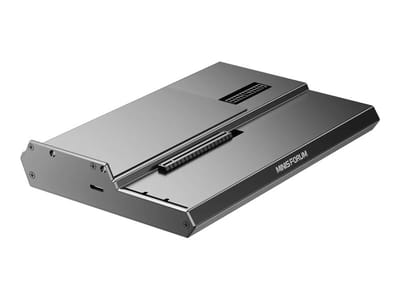
DEG1 eGPU Dock
A plain OCuLink dock with a PCIe 4.0 x4 link for a desktop graphics card; it takes an ATX or SFX power supply that you supply.
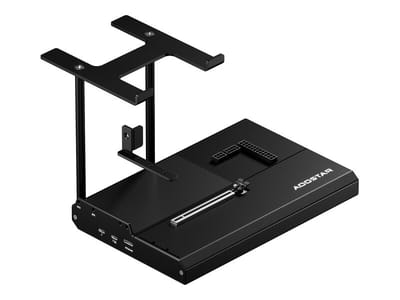
EG02 eGPU Dock
Connects over OCuLink for the full PCIe 4.0 x4 link and has Thunderbolt 5 as a second input; the graphics card and power supply are sold separately.

Core X V2
A Thunderbolt 5 enclosure that Razer lists as working with Thunderbolt 4 and USB4 hosts; it fits a four-slot card and needs an ATX power supply.

DEG2 eGPU Dock
Connects over USB4 or Thunderbolt 5, with an OCuLink input behind a switch, and adds an M.2 slot; it needs an ATX or SFX power supply.

Breakaway Box 850 T5
Has an 850W power supply built in, so only the graphics card is extra, and works with Thunderbolt 4 and USB4 Windows PCs.

TS4 Thunderbolt 4 Dock
An 18-port dock that CalDigit lists for Thunderbolt 4 and USB4 hosts, with 2.5GbE and a DisplayPort 1.4 output.

TBT4-UD5 Thunderbolt 4 Dock
Two HDMI ports drive two 4K60 monitors from one Thunderbolt 4 or USB4 port on a Windows PC.

Revodok Max 208 Thunderbolt 4 Dock
Adds three Thunderbolt 4 ports for dual 4K60 displays plus gigabit Ethernet; it has no HDMI port, so monitors connect over USB-C or an adapter.
Frequently Asked Questions
What is the OCuLink port and why does it matter?
OCuLink is a PCIe 4.0 x4 connection with 64Gbps of bandwidth, faster than USB4 or Thunderbolt 4 for an external GPU. A desktop graphics card attached that way loses little performance, which turns a compact productivity machine into a gaming or creative workstation when needed.
How much RAM and storage can the UM880 Plus support?
Up to 96GB of DDR5, using two 48GB SO-DIMM modules. Storage reaches 8TB total across two M.2 2280 PCIe 4.0 NVMe slots that take up to 4TB each, and the OCuLink adapter occupies one of those slots.
How quiet is the MINISFORUM UM880 Plus during operation?
Hostbor measured 34dB under load, while Robtech measured fan noise above 40 dBA even in the default balanced profile. Retro Handhelds specifically noted it was “easily the quietest” compared to Beelink and GMKTec units with similar Ryzen processors. In normal daily use, the dual-fan cooling system is rarely audible.
Can the UM880 Plus run Linux?
Yes. Retro Handhelds confirmed that ZorinOS works out of the box with all necessary drivers. The included MediaTek MT7902 WiFi card lacks proper Linux driver support, so plan on swapping it for an Intel AX210 card (around $20) for full wireless compatibility.
How many displays can the UM880 Plus support simultaneously?
Three 4K displays run at once, through the HDMI 2.1 port (8K at 60Hz capable), DisplayPort 1.4 (4K at 120Hz), and USB4 with Alt DisplayPort mode. That covers multi-monitor productivity setups, or a mix of work displays and a gaming monitor.
What gaming performance can I expect from the integrated graphics?
Esports and lighter titles at 1080p are where the AMD Radeon 780M is strongest. NGXP Tech measured League of Legends at 170 FPS, Valorant at over 200 FPS, Counter-Strike 2 at 160 FPS, and Fortnite at 85 FPS, while heavier games such as The Witcher 3 (65 FPS) and Cyberpunk 2077 (43 FPS) need reduced settings. For 4K gaming or the most demanding AAA titles, connect an external GPU over OCuLink.
What comes in the box with the UM880 Plus?
The box holds the mini PC itself, a power adapter, an HDMI cable, a VESA mounting bracket with screws, the OCuLink adapter board for the M.2 to OCuLink connection, a user manual, and spare bottom rubber feet. Fitting the OCuLink adapter inside the chassis is left to the buyer.