
Lenovo ThinkCentre M75q Gen 5
Updated on

The Lenovo ThinkCentre M75q Gen 5 is the AMD half of Lenovo’s Tiny desktop line. Where the Intel-based ThinkCentre M70q Gen 5 leans on a 14th Gen Core i5, this one moves to AMD’s Ryzen PRO 8000 series, which puts up to eight Zen 4 cores, Radeon RDNA 3 integrated graphics, and an on-die NPU rated for up to 16 TOPS into a chassis that fits inside a shoe box. Lenovo sells it into banking, healthcare, and retail deployments, and the same specification sheet makes it a candidate for a home lab or a small office that wants desktop capability without surrendering desk space.
Pros and cons
| Pros | Cons |
|---|---|
| AMD Ryzen PRO 8000 series with up to 8 Zen 4 cores | Single 1GbE port; no 2.5GbE or 10GbE option |
| Radeon 780M graphics on the 8700GE build handle light gaming and 4K editing | Front USB-C is data only (no USB4, Thunderbolt, or DisplayPort Alt Mode) |
| Officially supports 64GB DDR5; 128GB works in testing | 35W TDP trims GPU performance versus 65W desktop chips |
| Toolless dual M.2 Gen4 slots and SO-DIMM access | Enterprise BIOS supervisor password can complicate resale |
| Roughly 10W at idle, plus AMD DASH management and VESA mounting | Mixed rear USB speeds (only one 10Gbps port at the back) |
Related Videos
Lenovo ThinkCentre M75q Gen 5 Comparison Chart
 Lenovo ThinkCentre M75q Gen 5 | Lenovo ThinkCentre M75q Gen 5 | Lenovo ThinkCentre M75q Gen 5 | Lenovo ThinkCentre M75q Gen 5 | |
| Price | List Price: $949.00 Amazon Prices: Loading prices... | List Price: $1,132.90 Amazon Prices: | List Price: $1,499.00 Amazon Prices: Loading prices... | List Price: $819.00 Amazon Prices: Loading prices... |
| Version | 16GB/512GB/Ryzen 5 PRO 8500GE | 32GB/1TB/Ryzen 5 PRO 8500GE | 32GB/1TB/Ryzen 7 PRO 8700GE | 8GB/256GB/Ryzen 3 PRO 8300GE |
| Performance Rating | 4.6 | 5.0 | 5.6 | 3.5 |
| Operating System | Windows 11 Pro | Windows 11 Pro | Windows 11 Pro | Windows 11 Pro |
| Processor | Hexa-core 3.40 Ghz (max 5.00 Ghz) AMD Ryzen 5 PRO 8500GE | Hexa-core 3.40 Ghz (max 5.00 Ghz) AMD Ryzen 5 PRO 8500GE | Octa-core 3.65 Ghz (max 5.10 Ghz) AMD Ryzen 7 PRO 8700GE | Quad-core 3.50 Ghz (max 4.90 Ghz) AMD Ryzen 3 PRO 8300GE |
| GPU | Integrated AMD Radeon 740M | Integrated AMD Radeon 740M | Integrated AMD Radeon 780M | Integrated AMD Radeon 740M |
| RAM | 16 GB DDR5 SO-DIMM | 32 GB DDR5 SO-DIMM | 32 GB DDR5 SO-DIMM | 8 GB DDR5 SO-DIMM |
| Internal Storage | 512 GB NVMe SSD | 1 TB NVMe SSD | 1 TB NVMe SSD | 256 GB NVMe SSD |
| Dimensions width x length x thickness | 7.05 x 7.2 x 1.44 inches (179.07 x 182.88 x 36.58 mm) | 7.05 x 7.2 x 1.44 inches (179.07 x 182.88 x 36.58 mm) | 7.05 x 7.2 x 1.44 inches (179.07 x 182.88 x 36.58 mm) | 7.05 x 7.2 x 1.44 inches (179.07 x 182.88 x 36.58 mm) |
| Weight | 2.76 lbs (1.25 kg) | 2.76 lbs (1.25 kg) | 2.76 lbs (1.25 kg) | 2.76 lbs (1.25 kg) |
| WiFi | Wi-Fi 6E (802.11ax) | Wi-Fi 6E (802.11ax) | Wi-Fi 6E (802.11ax) | Wi-Fi 6E (802.11ax) |
| Bluetooth | Bluetooth 5.3 | Bluetooth 5.3 | Bluetooth 5.3 | Bluetooth 5.3 |
| Ethernet | 1 Ethernet port at 1 Gbps | 1 Ethernet port at 1 Gbps | 1 Ethernet port at 1 Gbps | 1 Ethernet port at 1 Gbps |
| HDMI | 1 Full-Size HDMI Port | 1 Full-Size HDMI Port | 1 Full-Size HDMI Port | 1 Full-Size HDMI Port |
| DisplayPort | 1 DisplayPort (1x DP 1.4; up to 3 displays with optional ports) | 1 DisplayPort (1x DP 1.4; up to 3 displays with optional ports) | 1 DisplayPort (1x DP 1.4; up to 3 displays with optional ports) | 1 DisplayPort (1x DP 1.4; up to 3 displays with optional ports) |
| VGA | No VGA Ports | No VGA Ports | No VGA Ports | No VGA Ports |
| USB Ports | 3 USB 2.0, 3 USB 3, 1 USB-C Front: 1x USB-C 10Gbps (data only), 2x USB-A 10Gbps. Rear: 1x USB-A 10Gbps, 3x USB-A 2.0 | 3 USB 2.0, 3 USB 3, 1 USB-C Front: 1x USB-C 10Gbps (data only), 2x USB-A 10Gbps. Rear: 1x USB-A 10Gbps, 3x USB-A 2.0 | 3 USB 2.0, 3 USB 3, 1 USB-C Front: 1x USB-C 10Gbps (data only), 2x USB-A 10Gbps. Rear: 1x USB-A 10Gbps, 3x USB-A 2.0 | 3 USB 2.0, 3 USB 3, 1 USB-C Front: 1x USB-C 10Gbps (data only), 2x USB-A 10Gbps. Rear: 1x USB-A 10Gbps, 3x USB-A 2.0 |
| Thunderbolt Ports | No | No | No | No |
| OCuLink | No | No | No | No |
| Internal SATA Ports | No SATA ports | No SATA ports | No SATA ports | No SATA ports |
| Card Reader | No Card Reader | No Card Reader | No Card Reader | No Card Reader |
| Headphone Jack | combo | combo | combo | combo |
| Fanless | No | No | No | No |
| VESA Mount | Yes | Yes | Yes | Yes |
| In the Box | Mini PC, power adapter, keyboard, mouse, vertical stand | Mini PC, power adapter, keyboard, mouse, vertical stand | Mini PC, power adapter, keyboard, mouse, vertical stand | Mini PC, power adapter, keyboard, mouse, vertical stand |
| Expandability | 64GB DDR5 official via 2x SO-DIMM (128GB works unofficially), dual M.2 2280 Gen4 slots, optional rear punch-out I/O | 64GB DDR5 official via 2x SO-DIMM (128GB works unofficially), dual M.2 2280 Gen4 slots, optional rear punch-out I/O | 64GB DDR5 official via 2x SO-DIMM (128GB works unofficially), dual M.2 2280 Gen4 slots, optional rear punch-out I/O | 64GB DDR5 official via 2x SO-DIMM (128GB works unofficially), dual M.2 2280 Gen4 slots, optional rear punch-out I/O |
Related Mini PCs
-
 Lenovo ThinkCentre M70q Gen 6The Lenovo ThinkCentre M70q Gen 6 is a 1-liter business desktop running the 35W Intel Core Ultra 3…
 -
 Lenovo ThinkCentre M70q Gen 5The Lenovo ThinkCentre M70q Gen 5 is a 1-liter business desktop built on the 14th Gen Intel Core…
 -
 ACEMAGIC K1 (Intel Core i5-12600H)The Intel version of ACEMAGIC's K1 pairs the 12-core Core i5-12600H with triple 4K output, seven…
 -
 ACEMAGIC M5 Mini PCThe ACEMAGIC M5 packs the 14-core Intel Core i5-14500HX into a 5-inch square chassis. Triple 4K…
 -
 ASUS NUC 14 ProThe ASUS NUC 14 Pro pairs Intel Core Ultra processors with a toolless chassis, two DDR5 SODIMM…
 -
 GEEKOM A6The GEEKOM A6 pairs an AMD Ryzen 7 6800H with Radeon 680M graphics, USB4, 2.5GbE, and two M.2 slots…
Desktop-class cores in a 1-liter case, capped by one gigabit port

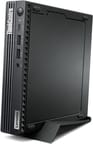
The M75q Gen 5 keeps the familiar Tiny chassis at 7.05 x 7.20 x 1.44 inches and just under 2.8 pounds, so it disappears behind a monitor on the included VESA mount or stands upright on its foot stand without claiming meaningful desk area. The matte-black finish and dense side venting are textbook ThinkCentre, and the internal layout has been reworked so the memory and both M.2 slots sit on the top side with toolless retention clips. In his teardown, ServeTheHome’s Patrick called it “one of the best project tiny mini micro nodes that we’ve ever reviewed,” largely because servicing it no longer means fighting with the chassis.
Two builds use the six-core Ryzen 5 PRO 8500GE (Amazon lists it simply as the Ryzen 5 8500GE), and the range tops out with the eight-core, sixteen-thread Ryzen 7 PRO 8700GE and its Radeon 780M graphics. Reviewers ran 4K timelines in Premiere Pro, sliced multicam edits, and prepped 3D prints in Cura without the system stumbling, and one summed up the experience by noting “it really is crazy how much they fit into one tiny case.” The 35W power envelope of the Tiny form factor clips integrated GPU performance by an estimated 15 to 25 percent compared to the same chips in a 65W desktop, so modern titles still want low settings on a machine that otherwise handles creator and productivity loads.
The rear panel carries a single HDMI 2.1 output and a DisplayPort 1.4 connector, with optional punch-out ports that let integrators add a second DisplayPort, HDMI, VGA, serial, or USB for up to three independent displays. USB comes to seven ports at uneven speeds. The two front USB-A ports and the front USB-C run at 10Gbps, while only one rear USB-A matches that pace and the other three rear ports are USB 2.0. As Patrick put it, “you only get a 1 gig port, you don’t get two and a half gig, and that’s just kind of a bummer.” WiFi 6E and Bluetooth 5.3 cover wireless duties, and AMD DASH provides out-of-band remote management for fleet administrators.
Two M.2 2280 PCIe Gen4 slots accept dual NVMe drives, and the two DDR5 SO-DIMM slots are rated to 64GB officially. ServeTheHome went further and verified 128GB of DDR5 running in the machine, calling it “absolutely game-changing” for virtualization and home-lab use even though Lenovo does not advertise that ceiling. Plan around the dual M.2 slots rather than counting on a SATA bay.
Reviewer Insights

ServeTheHome: memory headroom well past the official rating
ServeTheHome approached the M75q Gen 5 as a potential home-lab and virtualization node. The reviewer praised the Ryzen 7 PRO 8700GE, the strong Radeon 780M graphics, and the reworked, toolless internal layout, and confirmed that the machine runs 128GB of DDR5 despite Lenovo’s 64GB official limit: “for the first time we found it supports up to 128GB of memory, that’s absolutely game-changing for folks.” The criticisms centered on the lone 1GbE port and the front USB-C being data only, with the reviewer wishing it “had a display output or just had something extra to it other than just being the lone Type-C port.” Quiet operation in the 34 to 36 dBA range and AMD DASH manageability rounded out a positive verdict.
EPC: 4K editing and color grading clear on the 8700GE build
EPC framed the machine as a tiny workstation, testing a build with the Ryzen 7 PRO 8700GE and 64GB of DDR5. The reviewer joked “I feel like I’ve had sandwiches bigger than this,” then ran it through 4K video editing, 3D modeling, and color grading to argue that “this little ThinkCentre can do quite a bit in such a small form factor.” EPC sells the units it reviews, so the enthusiasm carries a commercial slant, and the channel also bundles keyboard, mouse, and an additional warranty that may not match every retail listing.
My PlayHouse: draw stays low until a full CPU stress test
My PlayHouse brought a power meter and a long-term owner’s eye, comparing the Gen 5 directly against an older Gen 2 unit running the Ryzen 5 PRO chip. Draw measured roughly 10W at idle and 10 to 15W during normal use, climbing to a 63W peak under full CPU stress that nearly saturates the bundled 65W power supply. The reviewer also explained that the enterprise BIOS supervisor password “is going to” sharply reduce resale value because the system board is effectively locked if the password is lost.
Customer Reviews
Across 4 ratings on Amazon, the Lenovo ThinkCentre M75q Gen 5 averages 4.5 stars. That is a very small sample, and the two written reviews are both 4-star verified purchases, so treat the picture as positive but thin rather than settled. Both owners describe the machine as fast and dependable: a verified buyer named Stetson wrote “product is excellent,” and a verified buyer named D. B. wrote “Great laptop. It’s fast and reliable.”
Stetson also flagged a networking gripe, writing that the “Connection to Ethernet is very fragile, finicky,” which is worth weighing if you plan to run this as a wired desktop. The other complaint is a buyer’s mistake rather than a defect. D. B. expected a touch-screen, but this is a headless mini PC that ships without any display, so a touch-screen was never part of the package. Read more owner reviews on Amazon.
Worth it for multi-core work and memory headroom
The Ryzen PRO 8000 series brings up to eight Zen 4 cores and Radeon 780M graphics, enough for development work and 4K video editing on a machine that occupies a liter of space. The toolless dual M.2 slots and the verified 128GB memory ceiling are what push it past office duty and into home-lab and virtualization territory. Against the Intel-based M70q Gen 5, the AMD build generally wins on multi-core throughput and integrated graphics, and that is the deciding factor for creator and lab workloads.
The reasons to hesitate are the single 1GbE port on a machine with this much compute, the front USB-C that carries no video or Thunderbolt, and the enterprise BIOS supervisor password. The first two are fixed at purchase and the third only bites on a used unit, so a buyer who needs wired throughput above one gigabit should look elsewhere, and one who needs cores should not. If you want to line it up against other compact systems, Starry Hope’s Mini PC Comparison Chart is a useful next stop.
Frequently Asked Questions
How is the ThinkCentre M75q Gen 5 different from the M70q Gen 5?
The M75q Gen 5 uses AMD Ryzen PRO 8000 series processors with Radeon RDNA 3 graphics, while the M70q Gen 5 uses Intel 14th Gen Core processors. They share the same 1-liter Tiny chassis, but the AMD machine generally offers stronger multi-core performance and faster integrated graphics, which makes it the better pick for creator and home-lab workloads.
How much RAM does the M75q Gen 5 support?
Lenovo officially rates it for up to 64GB of DDR5 across two SO-DIMM slots. ServeTheHome verified the machine running 128GB of DDR5, which Lenovo does not advertise but which is valuable for virtualization and home-lab use. The toolless internal layout keeps the memory accessible for upgrades.
Can the ThinkCentre M75q Gen 5 handle gaming?
On the tiers with Radeon 780M graphics, it plays many modern titles at 1080p with reduced settings and runs older or less demanding games comfortably. The 35W power limit of the Tiny chassis cuts graphics performance against a full desktop, so treat it as a casual gaming and content-creation machine rather than a dedicated gaming PC.
What kind of Ethernet does the M75q Gen 5 have?
There is a single 1 Gigabit Ethernet port driven by a Realtek RTL8111FP controller, with support for AMD DASH and Wake-on-LAN. Nothing faster is offered, and ServeTheHome called out the missing 2.5GbE as a limitation on a machine with this much compute headroom.
Does the front USB-C port support video output or Thunderbolt?
No. The front USB-C port is a 10Gbps data-only connection. It does not carry DisplayPort Alt Mode, USB4, or Thunderbolt, so external displays must connect through the rear HDMI, the DisplayPort output, or an optional punch-out video port.
Should second-hand buyers choose the M75q Gen 5?
Enterprise units may ship with a BIOS supervisor password that cannot be cleared by resetting the CMOS. If that password is unknown, the system board is effectively locked, which sharply lowers resale value. Anyone buying used should confirm the BIOS is unlocked before purchase.