
GEEKOM A6
Updated on

The GEEKOM A6 is an aluminum mini PC smaller than Apple’s Mac Mini, built around AMD’s Ryzen 7 6800H and its integrated Radeon 680M graphics. The base configuration sells for well under $500, and the port selection at that price runs to USB4, WiFi 6E, and 2.5 Gigabit Ethernet. Office productivity, creative work in Adobe’s suite, and light gaming all sit inside what this combination can do.
Pros and Cons
| Pros | Cons |
|---|---|
| Anodized aluminum chassis rather than plastic | RAM speed limited to DDR5-4800 despite having 5600MHz sticks |
| Small enough to hang behind a monitor at 4.43” x 4.43” x 1.46” | Secondary M.2 slot limited to 2242 SATA drives |
| USB4 at 40Gbps drives a display or an external GPU | Fan becomes noticeably audible under heavy loads |
| Four bottom screws reach the RAM and both M.2 slots | USB-C ports don’t support power delivery |
| VESA mount and HDMI cable come in the box | Older Zen 3+ architecture vs newer 7000/8000 series |
| 3-year warranty, longer than most vendors offer | No Thunderbolt certification despite USB4 |
Related Videos
GEEKOM A6 Comparison Chart
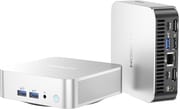 GEEKOM A6 | GEEKOM A6 | |
| Price | List Price: $499.00 Amazon Prices: | List Price: $579.00 Amazon Prices: Loading prices... |
| Version | 16GB/512GB | 32GB/1TB |
| Performance Rating | 4.8 | 5.2 |
| Operating System | Windows 11 Pro | Windows 11 Pro |
| Processor | Octa-core 3.20 Ghz (max 4.70 Ghz) AMD Ryzen 7 6800H | Octa-core 3.20 Ghz (max 4.70 Ghz) AMD Ryzen 7 6800H |
| GPU | Integrated AMD Radeon 680M | Integrated AMD Radeon 680M |
| RAM | 16 GB | 32 GB |
| Internal Storage | 512 GB | 1 TB |
| Dimensions width x length x thickness | 4.43 x 4.43 x 1.46 inches (112.52 x 112.52 x 37.08 mm) | 4.43 x 4.43 x 1.46 inches (112.52 x 112.52 x 37.08 mm) |
| Weight | 0.99 lbs (0.45 kg) | 0.99 lbs (0.45 kg) |
| WiFi | Wi-Fi 6E (802.11ax) | Wi-Fi 6E (802.11ax) |
| Bluetooth | Bluetooth 5.2 | Bluetooth 5.2 |
| Ethernet | 1 Ethernet port at 2.5 Gbps | 1 Ethernet port at 2.5 Gbps |
| HDMI | 2 Full-Size HDMI Ports | 2 Full-Size HDMI Ports |
| DisplayPort | No DisplayPort | No DisplayPort |
| VGA | No VGA Ports | No VGA Ports |
| USB Ports | 1 USB 2.0, 4 USB 3, 2 USB-C (1 USB4) | 1 USB 2.0, 4 USB 3, 2 USB-C (1 USB4) |
| Thunderbolt Ports | No | No |
| OCuLink | No | No |
| Internal SATA Ports | No SATA ports | No SATA ports |
| Card Reader | SD Card Reader | SD Card Reader |
| Headphone Jack | combo | combo |
| Fanless | No | No |
| VESA Mount | Yes | Yes |
| In the Box | Mini PC, user manual, metal VESA mount bracket, mounting screws, power cable, 120W power adapter, HDMI cable | Mini PC, user manual, metal VESA mount bracket, mounting screws, power cable, 120W power adapter, HDMI cable |
| Expandability | RAM upgradable to 64GB (2x SO-DIMM DDR5-4800). Storage expandable via second M.2 2242 SATA slot. | RAM upgradable to 64GB (2x SO-DIMM DDR5-4800). Storage expandable via second M.2 2242 SATA slot. |
Related Mini PCs
-
 GEEKOM A7 MaxThe GEEKOM A7 Max pairs an AMD Ryzen 9 7940HS with dual USB4, dual 2.5GbE, one filled DDR5 slot…
 -
 GEEKOM A8 MaxThe GEEKOM A8 Max adds dual 2.5G Ethernet ports to the A8 platform, with dual USB4 and up to 64GB…
 -
 ACEMAGIC K1 (Intel Core i5-12600H)The Intel version of ACEMAGIC's K1 pairs the 12-core Core i5-12600H with triple 4K output, seven…
 -
 ACEMAGIC M5 Mini PCThe ACEMAGIC M5 packs the 14-core Intel Core i5-14500HX into a 5-inch square chassis. Triple 4K…
 -
 ASUS NUC 14 ProThe ASUS NUC 14 Pro pairs Intel Core Ultra processors with a toolless chassis, two DDR5 SODIMM…
 -
 HP Elite Mini 805 G8HP's 1-liter Elite Mini 805 G8 pairs a 6-core AMD Ryzen 5 PRO 5650G with DDR4 memory, dual M.2…
A 4.4-inch aluminum box around an older Ryzen 7

The chassis is anodized aluminum alloy and feels dense for its size. At 4.43 inches square and barely 1.5 inches tall it takes less desk space than a paperback, and ventilation is cut through the enclosure rather than confined to one grille. The IceBlast cooling system routes airflow through multiple channels and exhausts out the rear. Under office workloads the fan stays in the background, but extended stress testing by CNX Software recorded CPU temperatures of 95 degrees Celsius without thermal throttling, and fan noise climbing to around 45 decibels at peak load.
The Ryzen 7 6800H is AMD’s previous mobile generation, a Zen 3+ part with 8 cores and 16 threads that boosts to 4.7 GHz. It misses the efficiency gains of the newer Ryzen 7000 and 8000 series, yet it still benchmarks competitively against many current offerings. CNX Software’s testing revealed Cinebench R23 scores of 1,511 single-core and 11,750 multi-core, with PassMark reporting an overall score of 6,066. The Radeon 680M alongside it carries 12 RDNA2 compute units, plays 4K video smoothly, drives up to four independent displays, and manages light gaming at reduced settings in titles like CS:GO, Valorant, and GTA V.
One USB4 port runs at 40 Gbps and carries both DisplayPort Alt Mode and external GPU enclosures, which leaves a route to more graphics power later. Two HDMI 2.0 ports handle monitors, a USB-C 3.2 Gen 2 port sits alongside them, and four USB-A ports split between USB 3.2 and USB 2.0 speeds. Wireless is WiFi 6E on a MediaTek MT7922 chip, and the Realtek 2.5 Gigabit Ethernet port measured 1.57 Gbps uploads and 1.40 Gbps downloads in CNX Software’s testing. The front panel carries a full-size SD card reader for photographers and content creators, along with a 3.5mm combo audio jack.
Reviewer Insights

The memory runs at 4,800 despite 5,600 sticks
ETA PRIME went to the build first. “I love this premium design that they’ve come up with,” he notes while examining the aluminum chassis. “When I say mini PC, I mean these A series from GeekCom are coming in at an absolutely tiny form factor.” His teardown reveals straightforward upgrade access with just four screws on the bottom panel. On memory he notes the speed cap: “This does come with two 5600 sticks, but it can only run up to 4,800. I do think that’s going to hold the iGPU back here.” He still recommends the A6 for users who don’t need the absolute latest processor generation.
A 10-second cold boot and a swappable Kingston drive
A cold start takes 10 seconds, and the system ships with a Kingston PCIe Gen 4 NVMe drive, both from the detailed unboxing and teardown by Chigz Tech Reviews. His examination of the port layout emphasizes the quad 4K display support achieved through the dual HDMI and dual USB-C outputs. “You can swap this drive out for up to a 4 TB drive,” he explains while discussing storage upgrade options, though he cautions about the WiFi antenna cable that requires careful handling during disassembly.
A 3-year warranty set against an older processor
The 3-year warranty “is more than most vendors offer,” says Robtech, who takes a more critical eye to the A6’s value and questions whether premium features justify the older processor choice. He confirms the clean Windows 11 Pro installation passed malware scans. He also notes annoyances like the glued rubber feet that complicate upgrades and the lack of power delivery support on the USB-C ports. His benchmark testing shows single-core performance trailing newer AMD chips but competitive multi-core and video encoding performance.
Four displays from a 4.4-inch square
Madlittlepixel was struck by how much the A6 packs into a 4.4-inch-square chassis: the Ryzen 7 6800H is a few years old but still handles office work, 4K streaming, and light-to-medium gaming. He called connectivity the standout, with dual USB4 Type-C plus dual HDMI for up to four displays, unusually generous for the footprint.
Cyberpunk at 1080p, with and without an eGPU
Matt Talks Tech tested the 32GB/1TB model and described one of its two USB-C ports as “a full USB 4 port,” which he used for an external Radeon RX 7800M. On the Radeon 680M alone, Cyberpunk 2077 at 1080p ran above 30 frames per second without upscaling and near 80 with FSR 3 and frame generation. With the eGPU attached it passed 80 frames per second without upscaling. He also noted the absence of bloatware, with “pure vanilla Windows 11” out of the box.
Review scores cluster at 4.5 and above
TechRadar and Tom’s Guide both scored it 4.5 out of 5. TechRadar called it an “ultra-compact mini PC with plenty of power for creative applications” and noted the premium pricing and noisy fans under load; Tom’s Guide called out its advantages over Apple’s Mac Mini M4 in both size and price and liked the quad monitor support and full-sized ports.
Windows Central gave the highest score, 4.65 out of 5, for reliability in daily Windows workloads and cloud gaming. The benchmark-heavy review at CNX Software found the networking excellent and the CPU temperatures and fan noise under sustained stress a concern.
Customer Reviews
Owners who are happy tend to praise the speed, small footprint, and quiet running. A verified buyer posting as buyandby liked “the less than 15 second boot” and the SSD-fast disk access, closing with “I highly recommend this wonderful powerhouse.” Other satisfied owners describe it as fast and powerful for everyday use and travel.
The negative reviews land on hardware that fails and on Geekom’s after-sale support. A verified buyer named R. Presley reported “Computer randomly shuts off for no reason and restarts” and could not get a reply from Geekom. Verified buyer Charlie Cole wrote that the unit “Quit working at 2 years old” and that, despite a stated 3-year warranty, the company “Ghosted me.” One owner whose system died just outside the return window later updated their review favorably after Geekom replaced the unit, so experiences with support are inconsistent rather than uniformly bad. Read more owner reviews on Amazon.
A compact home-office desktop with a route to an eGPU
The A6 fits a desk that cannot take a tower. Productivity applications, web conferencing, and media playback all run comfortably on the 6800H, and the Adobe suite is within reach of the 680M. The USB4 port leaves the door open to a discrete card later for anyone who wants more graphics performance than the integrated GPU can give.
Buyers chasing peak performance are better served by GEEKOM’s A7 or A8 models with newer processors, or by a competitor on current-generation silicon. The DDR5-4800 ceiling and the Zen 3+ architecture leave performance on the table, and the 2242 SATA secondary slot rules out a second high-speed drive. Starry Hope’s Mini PC Comparison Chart lines it up against those alternatives.
Frequently Asked Questions
What processor and graphics does the GEEKOM A6 use?
An AMD Ryzen 7 6800H with 8 cores and 16 threads, boosting up to 4.7 GHz, paired with integrated AMD Radeon 680M graphics and its 12 RDNA2 compute units. That pairing covers 4K video playback, creative applications, and light gaming with no dedicated GPU in the system.
Can I upgrade the RAM and storage in the A6?
Yes. Four screws on the bottom panel open the unit. RAM goes up to 64GB across two SO-DIMM DDR5-4800 slots, the primary M.2 2280 PCIe 4.0 slot takes drives up to 4TB, and a secondary M.2 2242 SATA-only slot holds an additional drive.
How many monitors can the A6 support?
Up to four independent displays at 4K resolution. Two HDMI 2.0 ports sit on the rear panel, and the USB4 and USB-C ports both carry DisplayPort Alt Mode for video output.
Does the A6 support external GPUs?
Yes. The USB4 port supports external GPU enclosures at 40 Gbps bandwidth, so an eGPU can take over gaming or professional graphics work. The USB-C ports do not supply power delivery, so the enclosure will need its own power source.
Is the A6 good for gaming?
Light to medium gaming runs reasonably well on the Radeon 680M integrated graphics. Esports titles like CS:GO and Valorant run smoothly, and even GTA V is playable at reduced settings. More demanding games need an external GPU on the USB4 port to lift graphics performance.
What networking options does the A6 offer?
WiFi 6E wireless via a MediaTek MT7922 chip, Bluetooth 5.2 for peripherals, and a 2.5 Gigabit Ethernet port using a Realtek controller. Testing by CNX Software showed 1.57 Gbps uploads and 1.40 Gbps downloads over Ethernet.
How loud is the A6 during operation?
Around 39-40 dBA under normal office workloads, which is barely noticeable in most environments. Heavy sustained loads such as rendering or stress testing push fan noise to 41-45 dBA, which becomes audible. Reviewers list this among the system’s few drawbacks.
What’s included in the A6 box?
The mini PC unit, a user manual, a metal VESA mount bracket with mounting screws, a power cable, a compact 120W power adapter, and an HDMI cable. The VESA bracket mounts the system behind a monitor to free up desk space.