
GEEKOM A7 Max
Updated on

The GEEKOM A7 Max is the brand’s flagship AMD-based mini PC, pairing the eight-core Ryzen 9 7940HS with Radeon 780M graphics inside a roughly five-and-a-quarter-inch square aluminum chassis. It targets desk users and home-lab tinkerers who want workstation-class CPU performance without giving up an entire desk corner to a tower. Dual 2.5 Gigabit Ethernet, dual USB4 ports, WiFi 6E, and a 36-month warranty equip it for daily-driver duty. Cooling lives under copper heat pipes and a single quiet fan rated under 36 dB by the manufacturer, with selectable 35W, 45W, 54W, and 70W power modes. The unit ships with a single 16GB DDR5 stick, so it runs single-channel and the integrated graphics lose performance until a second stick goes in.
Pros and Cons
| Pros | Cons |
|---|---|
| Eight-core Ryzen 9 7940HS with strong multithreaded throughput | Ships with a single 16GB DDR5 SODIMM, halving iGPU bandwidth |
| Dual 2.5GbE LAN ports usable for routing, NAS, or homelab work | Internal access requires removing rubber feet and a secondary shield |
| Dual USB4 (40Gbps) ports with PD and DisplayPort output | Only one M.2 2280 slot, no secondary SSD bay |
| Full-metal chassis rated for 200 kilograms of stacked weight, VESA mount included | No USB-C port on the front panel |
| Excellent Linux compatibility across mainstream distributions | Limited BIOS with no manual fan curve control |
| Three-year warranty and SD card reader with UHS-II support | Fan becomes clearly audible under sustained full load |
Related Videos
GEEKOM A7 Max Comparison Chart
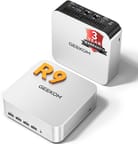 GEEKOM A7 Max | |
| Price | List Price: $799.00 Amazon Prices: Loading prices... |
| Version | 16GB/1TB/Ryzen 9 7940HS |
| Performance Rating | 5.4 |
| Operating System | Windows 11 Pro |
| Processor | Octa-core 4.00 Ghz (max 5.20 Ghz) AMD Ryzen 9 7940HS |
| GPU | Integrated AMD Radeon 780M |
| RAM | 16 GB DDR5 SO-DIMM, single-channel (Ships single-channel; dual-channel boosts iGPU.) |
| Internal Storage | 1 TB NVMe SSD |
| Dimensions width x length x thickness | 5.31 x 5.2 x 1.81 inches (134.87 x 132.08 x 45.97 mm) |
| Weight | 1.39 lbs (0.63 kg) |
| WiFi | Wi-Fi 6E (802.11ax) |
| Bluetooth | Bluetooth 5.2 |
| Ethernet | 2 Ethernet ports at 2.5 Gbps |
| HDMI | 2 Full-Size HDMI Ports |
| DisplayPort | DisplayPort over USB4 to drive up to four displays. |
| VGA | No VGA Ports |
| USB Ports | 1 USB 2.0, 5 USB 3, 2 USB-C (2 USB4) Front: 4x USB-A 10Gbps. Rear: 2x USB4 (40Gbps), 1x USB-A 10Gbps, 1x USB-A 2.0. No front USB-C. |
| Thunderbolt Ports | No |
| OCuLink | No |
| Internal SATA Ports | No SATA ports |
| Card Reader | SD Card Reader |
| Headphone Jack | combo |
| Fanless | No |
| VESA Mount | Yes |
| In the Box | Mini PC, 120W power adapter, HDMI cable, VESA bracket, manual. |
| Expandability | Up to 64GB DDR5 across 2 SODIMM slots; single M.2 2280 NVMe SSD bay. |
Related Mini PCs
-
 GEEKOM A8 MaxThe GEEKOM A8 Max adds dual 2.5G Ethernet ports to the A8 platform, with dual USB4 and up to 64GB…
 -
 GEEKOM IT13 MAXThe GEEKOM IT13 MAX pairs Intel's 16-core Core Ultra 9 185H (Meteor Lake) with dual 2.5GbE, two…
 -
 ACEMAGIC K1 (Intel Core i5-12600H)The Intel version of ACEMAGIC's K1 pairs the 12-core Core i5-12600H with triple 4K output, seven…
 -
 ACEMAGIC M5 Mini PCThe ACEMAGIC M5 packs the 14-core Intel Core i5-14500HX into a 5-inch square chassis. Triple 4K…
 -
 ASUS NUC 14 ProThe ASUS NUC 14 Pro pairs Intel Core Ultra processors with a toolless chassis, two DDR5 SODIMM…
 -
 HP Elite Mini 805 G8HP's 1-liter Elite Mini 805 G8 pairs a 6-core AMD Ryzen 5 PRO 5650G with DDR4 memory, dual M.2…
Dual USB4, Dual 2.5GbE, and One Filled Memory Slot

The A7 Max measures 5.31 x 5.20 x 1.81 inches and tips the scale at roughly 1.39 pounds, putting it firmly in the NUC-class footprint. The chassis is largely metal, and IT Pro reports the shell is rated to survive 200 kilograms of stacked weight. The front panel carries four 10Gbps USB-A ports, an SD card reader, a 3.5mm combo jack, the power button, and a Kensington slot. The rear carries two HDMI 2.0 outputs, two USB4 Type-C ports, two 2.5GbE jacks, one more 10Gbps USB-A, and a USB 2.0 Type-A alongside the DC input.
AMD’s Ryzen 9 7940HS is an eight-core, sixteen-thread Zen 4 part fabbed on TSMC’s 4nm node with a 5.2 GHz boost. PassMark places its multithreaded score around 30,560, enough for compiles, virtualization, and large project builds. Guru3D calls the A7 Max “compact, overqualified” and notes it handles modern multitasking “without the mini PC pause.” LevelUP Gaming and Tech and TechRadar both found the integrated Radeon 780M heavily memory-bound, with the stock single-channel RAM configuration cutting iGPU performance somewhere between 50 and 86 percent depending on the workload. Adding a second DDR5 SODIMM is the fastest, cheapest performance fix this machine accepts.
WiFi 6E and Bluetooth 5.2 cover wireless, while dual 2.5GbE Realtek RTL8125 controllers suit firewall, NAS, or load-balancing roles. The pair of USB4 ports run at the full 40Gbps, support DisplayPort alt mode, and accept Power Delivery, so the device can drive up to four displays in total or pair with an external GPU enclosure for graphics-heavy work. Storage expansion is handled through a single M.2 2280 NVMe Gen4 slot rated by GEEKOM for up to 2TB, plus an SD card reader on the front that NotebookCheck confirms is UHS-II.
Reviewer Insights

Tech TRX framed the A7 Max as a desktop replacement for real work rather than a media box, focusing on day-to-day responsiveness in productivity apps and 4K content creation. The reviewer praised the metal build and quiet operation under typical load, and leaned positive overall while noting that buyers will want to spec the RAM more carefully than the default configuration suggests.
The stock single-stick memory configuration drew the most pointed performance critique, from LevelUP Gaming and Tech. “This single stick memory configuration cuts GPU bandwidth literally in half and somewhere around to 70%,” they reported, with up to 86 percent gains on certain graphics tests after swapping to a dual-channel kit. They also flagged that internal access “isn’t user-friendly,” with screws hidden under the rubber feet and a secondary shield to remove before reaching the memory and storage. They closed by saying “Its biggest sin isn’t the raw power, it’s how that power is bottlenecked by a single memory stick.”
Five distributions ran without driver gymnastics for Learn Linux TV, which spent the review specifically on Linux compatibility and came away “very quiet” on issues. “Everything works,” the host concluded, noting that the AMD platform handled every distribution tested. They specifically called out the dual 2.5GbE ports as “a big deal” for home-lab and firewall builds. The fan, they noted, “stayed very quiet during normal use” and only became noticeable under sustained load.
Scores From NotebookCheck, TechRadar, and IT Pro
NotebookCheck handed the A7 Max a 78 percent score under the headline “performance that still convinces,” highlighting the chic design, dual USB4, dual 2.5G LAN, and stable SSD performance. They flagged the same single-stick RAM bottleneck other reviewers noted, plus limited BIOS options and the absence of OCuLink for true external GPU work. TechRadar was harsher with a 3.5 out of 5, writing that “Geekom didn’t realise a single memory module’s impact on performance is worrying” given the otherwise lovely engineering. They also called out the lack of a second 2280 M.2 slot and the difficult internal access. IT Pro, by contrast, returned a five-star verdict driven by the port loadout and chassis solidity, with the same single-channel RAM caveat in the cons column.
Juan Bagnell liked that the A7 Max steps up to a brilliantly machined metal frame and a wider port set than the usual ultra-small boxes. The Ryzen 9 7940HS is slightly older but stays competitive, landing near modern gaming-handheld performance, and the dual 2.5G Ethernet plus dual 40Gbps USB-C ports make it a credible home-server or creative-workstation base.
Customer Reviews
The GEEKOM A7 Max averages 4.3 stars across 424 Amazon ratings, with 69% of reviewers leaving five stars and 16% leaving four. Buyers name the small footprint and the fact that it is enough machine for everyday office and non-gaming use. Craig, a verified buyer, wrote “It’s a solid PC that is small enough and powerful enough for everyday use.” and compared its size to a Mac Mini. Several other verified owners echoed the form-factor and setup ease, with one noting it “Works like it should” as an alternative to a full tower.
The ratings also carry a negative tail, 8% one-star and 4% two-star. Scott Woods, a verified buyer, gave it four stars over the memory setup, reporting that the unit ships with a single 16GB DDR5 SODIMM running at 4800 rather than the advertised 5600, and concluded “Only give 4 stars because of the memory issue not functioning…” Kevin, a verified one-star reviewer, had to return a unit that “came in broken, made a super loud fan sound”.
Read more owner reviews on Amazon.
Buy It With a Second DDR5 Stick
The GEEKOM A7 Max is for power users and home-lab builders who want a Ryzen 9 inside a mini-PC footprint and plan to drop in a second DDR5 stick on day one. The dual 2.5GbE LAN and dual USB4 suit compact workstation duty and light Linux tinkering.
Run stock, it hits the single-channel ceiling the reviews describe, and integrated-GPU gaming suffers most. Users who want a second internal SSD bay, OCuLink-style external GPU support, or true workstation memory configurations will be better served by GEEKOM’s larger A8 Max or A9 Max siblings. Buyers who do not need dual NICs or USB4 might find better value in less elaborate Ryzen 7 mini PCs.
For those comparing options, see our Mini PC Comparison Chart to find the best match for your needs.
Upgrades
Accessories that fit the GEEKOM A7 Max's USB4 or Thunderbolt ports.

Core X V2
A Thunderbolt 5 enclosure that Razer lists as working with Thunderbolt 4 and USB4 hosts; it fits a four-slot card and needs an ATX power supply.

DEG2 eGPU Dock
Connects over USB4 or Thunderbolt 5, with an OCuLink input behind a switch, and adds an M.2 slot; it needs an ATX or SFX power supply.

Breakaway Box 850 T5
Has an 850W power supply built in, so only the graphics card is extra, and works with Thunderbolt 4 and USB4 Windows PCs.

TS4 Thunderbolt 4 Dock
An 18-port dock that CalDigit lists for Thunderbolt 4 and USB4 hosts, with 2.5GbE and a DisplayPort 1.4 output.

TBT4-UD5 Thunderbolt 4 Dock
Two HDMI ports drive two 4K60 monitors from one Thunderbolt 4 or USB4 port on a Windows PC.

Revodok Max 208 Thunderbolt 4 Dock
Adds three Thunderbolt 4 ports for dual 4K60 displays plus gigabit Ethernet; it has no HDMI port, so monitors connect over USB-C or an adapter.
Frequently Asked Questions
What processor does the GEEKOM A7 Max use?
The GEEKOM A7 Max ships with the AMD Ryzen 9 7940HS, an eight-core, sixteen-thread Zen 4 chip with a 4.0 GHz base clock and a 5.2 GHz boost on a 4nm process. PassMark scores it around 30,560 in multithreaded workloads, enough for compiles, virtualization, and content workflows. Integrated graphics are handled by the Radeon 780M (RDNA 3, 12 CUs).
Can I upgrade the RAM in the GEEKOM A7 Max?
Yes. The A7 Max has two DDR5 SODIMM slots and supports up to 64GB total per the manufacturer specification. Because the unit ships with a single 16GB stick, multiple reviewers strongly recommend adding a second matched module for dual-channel operation, the change that lifts integrated-GPU performance most.
What ports does the GEEKOM A7 Max have?
The front panel offers four USB-A 3.2 Gen 2 (10Gbps) ports, an SD card reader, a 3.5mm combo audio jack, the power button, and a Kensington lock slot. The rear adds two HDMI 2.0 outputs, two USB4 Type-C ports (40Gbps with Power Delivery and DisplayPort alt mode), one more USB-A 3.2 Gen 2, one USB 2.0 Type-A, two 2.5GbE RJ-45 jacks, and the DC input. There is no USB-C port on the front.
Can the GEEKOM A7 Max drive multiple monitors?
Yes, the A7 Max supports up to four simultaneous displays by combining its two HDMI 2.0 outputs with the two USB4 ports configured as DisplayPort alt mode. The dual USB4 ports also support 8K output per the manufacturer specification.
Does the GEEKOM A7 Max run Linux well?
Multiple Linux-focused reviews report excellent compatibility out of the box. Learn Linux TV tested five mainstream distributions and concluded “everything works” without driver intervention, while IT Pro independently confirmed Ubuntu 24.10 ran cleanly. The AMD Ryzen 9 7940HS plus Radeon 780M combination is well-supported on modern kernels, and the dual 2.5GbE ports support OPNsense, pfSense, or NAS roles.
What is included in the box with the GEEKOM A7 Max?
The A7 Max ships with the mini PC unit, a 120W power adapter, an HDMI cable, a VESA mounting bracket, and the user manual. GEEKOM also covers the device with a 36-month warranty (12 months free replacement plus 24 months free repair).
Is the GEEKOM A7 Max quiet?
GEEKOM’s own spec sheet rates operation under 36 dB, and in typical productivity use the fan is barely noticeable during normal browsing, office work, and video playback. Under sustained heavy load the fan becomes clearly audible, and the BIOS does not offer manual fan-curve control, so heavy gamers and video transcoders should expect some fan noise during long workloads.