
ACEMAGIC K1 (Intel Core i5-12600H)
Updated on

The Intel build of the ACEMAGIC K1 is a 5-inch square desktop built around the Core i5-12600H, a 12-core, 16-thread Alder Lake-H chip that boosts to 4.5GHz inside a 45-watt envelope. The money buys CPU throughput and port count. Two DDR4-3200 SO-DIMM slots accept up to 64GB, two M.2 2280 slots handle storage, and the port count runs to six USB-A connectors plus a USB-C port, with triple 4K@60Hz output across HDMI 2.0, DisplayPort 1.4b, and that USB-C connector. Windows 11 Pro is preinstalled and a VESA bracket ships in the box, so the whole machine can disappear behind a monitor. It fits a home office or a small-business desk, and the integrated Iris Xe graphics are the part of the platform that has aged.
ACEMAGIC’s naming needs untangling before the specs, because four different machines carry a K1 badge. The Intel Core i5-12600H build is one of them. Separately, ACEMAGIC sells a K1 built on the Ryzen 7 5700U, a Kron K1 using the AMD Ryzen Embedded R2544, and an ACEMAGICIAN Kron Mini K1 on the Ryzen 7 7730U. Those three are AMD builds with Radeon integrated graphics; this one is Intel with Iris Xe. Reviews published under the “Kron Mini K1” name sometimes cover this Intel machine: ITPro’s does, so its benchmarks describe the Intel build.
Pros and Cons
| Pros | Cons |
|---|---|
| 12 cores and 16 threads for a budget mini PC price (PassMark around 22,044) | Iris Xe graphics trail AMD’s Radeon 780M by a wide margin |
| Triple 4K@60Hz across HDMI 2.0, DisplayPort 1.4b, and USB-C | The 16GB configuration ships as one stick, so it runs single channel |
| Seven USB ports, three of them 10Gbps on the front | PCIe 3.0 storage speeds, about 3.4 GB/s read in testing |
| Two SO-DIMM slots take up to 64GB of DDR4-3200 | Gigabit Ethernet only, with no 2.5GbE option |
| Dual M.2 2280 slots, one of which also accepts SATA drives | ABS and polycarbonate shell under the silver finish |
| Windows 11 Pro preinstalled, VESA bracket included | Getting inside to upgrade means peeling the feet and lifting the board |
ACEMAGIC K1 (Intel Core i5-12600H) Comparison Chart
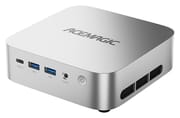 ACEMAGIC K1 (Intel Core i5-12600H) | ACEMAGIC K1 (Intel Core i5-12600H) | |
| Price | List Price: $579.00 Amazon Prices: Loading prices... | List Price: $729.00 Amazon Prices: |
| Version | 16GB/512GB | 32GB/1TB |
| Performance Rating | 4.8 | 5.2 |
| Operating System | Windows 11 Pro | Windows 11 Pro |
| Processor | Twelve-core 3.30 Ghz (max 4.50 Ghz) Intel Core i5-12600H | Twelve-core 3.30 Ghz (max 4.50 Ghz) Intel Core i5-12600H |
| GPU | Integrated Intel Iris Xe Graphics | Integrated Intel Iris Xe Graphics |
| RAM | 16 GB DDR4 SO-DIMM, single-channel (Ships as a single stick (single channel)) | 32 GB DDR4 SO-DIMM, 2-channel (2x 16GB, dual channel) |
| Internal Storage | 512 GB NVMe PCIe 3.0 | 1 TB NVMe PCIe 3.0 |
| Dimensions width x length x thickness | 5.05 x 5.05 x 1.61 inches (128.27 x 128.27 x 40.89 mm) | 5.05 x 5.05 x 1.61 inches (128.27 x 128.27 x 40.89 mm) |
| Weight | 1.15 lbs (0.52 kg) | 1.15 lbs (0.52 kg) |
| WiFi | Wi-Fi 6 (802.11ax) | Wi-Fi 6 (802.11ax) |
| Bluetooth | Bluetooth 5.2 | Bluetooth 5.2 |
| Ethernet | 1 Ethernet port at 1 Gbps | 1 Ethernet port at 1 Gbps |
| HDMI | 1 Full-Size HDMI Port | 1 Full-Size HDMI Port |
| DisplayPort | 1 DisplayPort (DP 1.4b (4K@60Hz); third 4K screen via USB-C) | 1 DisplayPort (DP 1.4b (4K@60Hz); third 4K screen via USB-C) |
| VGA | No VGA Ports | No VGA Ports |
| USB Ports | 6 USB 3, 1 USB-C 2x USB-A 10Gbps + USB-C (DP 1.4) front, 4x USB-A 5Gbps rear | 6 USB 3, 1 USB-C 2x USB-A 10Gbps + USB-C (DP 1.4) front, 4x USB-A 5Gbps rear |
| Thunderbolt Ports | No | No |
| OCuLink | No | No |
| Internal SATA Ports | No SATA ports | No SATA ports |
| Card Reader | No Card Reader | No Card Reader |
| Headphone Jack | combo | combo |
| Fanless | No | No |
| VESA Mount | Yes | Yes |
| In the Box | Mini PC, power adapter, HDMI cable, VESA bracket with screws, user manual | Mini PC, power adapter, HDMI cable, VESA bracket with screws, user manual |
| Expandability | Up to 64GB DDR4-3200 (2x SO-DIMM); dual M.2 2280 slots, up to 2TB each | Up to 64GB DDR4-3200 (2x SO-DIMM); dual M.2 2280 slots, up to 2TB each |
Related Mini PCs
-
 ACEMAGIC K5 (Ryzen 5 PRO 7640HS)The AMD build of ACEMAGIC's 5-inch K5 chassis pairs a six-core Zen 4 Ryzen 5 PRO 7640HS and Radeon…
 -
 ACEMAGIC M5 (Intel Core 5 220H)The ACEMAGIC M5 with the 12-core Intel Core 5 220H is a small Windows desktop for office and…
 -
 ASUS NUC 14 ProThe ASUS NUC 14 Pro pairs Intel Core Ultra processors with a toolless chassis, two DDR5 SODIMM…
 -
 FIREBAT F1The FIREBAT F1 puts an 8-core Ryzen 7 H 255 and Radeon 780M graphics in a 5-inch square chassis…
 -
 GEEKOM A6The GEEKOM A6 pairs an AMD Ryzen 7 6800H with Radeon 680M graphics, USB4, 2.5GbE, and two M.2 slots…
 -
 HP Elite Mini 805 G8HP's 1-liter Elite Mini 805 G8 pairs a 6-core AMD Ryzen 5 PRO 5650G with DDR4 memory, dual M.2…
Twelve cores and three 4K outputs in a plastic 5-inch box
The chassis measures about 5 inches square and 1.6 inches tall, and ITPro lists the unit at just over a pound. TechPowerUp describes the shell plainly: “The K1 uses a compact square chassis made from ABS and polycarbonate, with a simple smooth silver finish.” TechRadar reached the same conclusion by feel, noting that “the warmer, non-metal feel instantly highlighted the all-plastic construction.” Cooling is a centrifugal blower with dual heat pipes and dual fin stacks, drawing air through the base and exhausting out the rear and side. The front face carries two USB-A 3.2 Gen 2 ports at 10Gbps, a USB-C 3.2 Gen 2 port that handles both data and DisplayPort output, a combo audio jack, and the power button; the rear adds four USB-A 3.2 Gen 1 ports at 5Gbps, HDMI 2.0, DisplayPort 1.4b, Gigabit Ethernet, and the DC input for the 90-watt adapter.
The Core i5-12600H is an Alder Lake-H part that launched in January 2022, combining four performance cores and eight efficiency cores for 12 cores and 16 threads, 18MB of cache, and a 4.5GHz boost. In Starry Hope’s benchmark reference it posts a CPU Mark around 22,044, comfortably ahead of the Core i5-12450H at 17,442 that fills many mini PCs at similar prices, so the “beats the 12450H” claim in ACEMAGIC’s listing title holds up on CPU throughput. The Iris Xe iGPU here runs 80 execution units and scores about 2,596 on the G3D benchmark, against roughly 6,806 for AMD’s Radeon 780M in current Ryzen mini PCs. Spreadsheets, browser tabs, code, and video calls run fast on this hardware. GPU-bound work runs slowly on the Iris Xe.
TechPowerUp records the memory and storage layout as two SO-DIMM slots that “can take up to 64 GB total, which keeps upgrades simple and affordable,” alongside “two M.2 2280 slots running at PCIe 3.0 x4, and one of them also supporting SATA drives.” ACEMAGIC’s own spec page lists the second of those slots as taking PCIe 3.0/4.0 drives, but TechPowerUp measured the platform at PCIe 3.0 speeds, so treat 3.0 as what you will get. The 16GB configuration ships as a single 16GB stick rather than a matched pair, which halves memory bandwidth and costs integrated-graphics performance; the 32GB configuration ships as two 16GB sticks and runs in dual channel. The Amazon listing’s auto-generated spec table does not match the hardware (it lists UHD Graphics 630, an AMD socket, and a 16GB memory ceiling), and there is no 2.5-inch bay despite its bullets: the 4TB maximum means two 2TB M.2 drives.
Wireless is Wi-Fi 6 and Bluetooth 5.2 on an M.2 2230 module, one generation short of Wi-Fi 6E and Bluetooth 5.4, and wired networking tops out at Gigabit. HDMI 2.0, DisplayPort 1.4b, and the front USB-C port each drive a 4K screen at 60Hz, for three 4K panels running at once. Upgrading later is possible but tedious. TechRadar found the four rubber feet are held on with double-sided adhesive over deep-recessed screws, and the motherboard has to be lifted out to reach the memory and the second M.2 slot. They wrote: “The process is manageable with patience and some experience, but if you’re less confident, then you may prefer to order the higher-spec configuration from the outset with more RAM and storage.”
Reviewer Insights
TechPowerUp
LJay tested the 32GB/1TB configuration for TechPowerUp in March 2026 and gave it the site’s Budget award. On the chip, LJay wrote: “The ACEMAGIC K1 centers around Intel’s Core i5-12600H, a 12-core hybrid chip that still delivers respectable CPU throughput for desktop style workloads.” On productivity, the review reports that “PCMark scores above 5600 and strong Procyon Office results show that web apps, large spreadsheets, and multitasking workloads run smoothly,” and storage held up too, “with CrystalDiskMark results hitting around 3.4 GB/s read and 2.3 GB/s write.” On noise, the review says “During testing the system maintained stable performance under CPU load, and noise levels stayed relatively modest during normal desktop use.”
Graphics drew the review’s sharpest criticism: “Iris Xe has been significantly surpassed by newer integrated solutions, and it’s likely that this system isn’t meant for anything beyond everyday work.” Their gaming numbers bear that out. Esports titles are “playable at lower resolutions, with results around 57 FPS in Dota 2 at 720p Medium and about 61 FPS in Counter-Strike 2 at the same resolution,” while heavier games are out of reach: “Baldur’s Gate 3 and Cyberpunk 2077 run in the teens at 1080p, and even at 720p the experience is still rough.” Beyond graphics, the listed cons are single-channel memory in the base configuration, the PCIe 3.0 storage ceiling, and Gigabit-only networking. The review closes: “For users focused primarily on productivity and everyday computing, the K1 still provides strong value in a very small package.”
TechRadar
Alastair Jennings reviewed the 16GB/512GB configuration for TechRadar and scored it 4 out of 5 overall, with 3.5 for value and 3.5 for performance. His measured results on that unit were 2,209 single-core and 6,190 multi-core in Geekbench 6, 6,322 in PCMark, 10,012 in the Geekbench GPU test, and 3,468 MB/s read with 2,583 MB/s write in CrystalDiskMark. On memory he wrote: “In my review unit, it came equipped with a single 16GB DDR4 stick, which essentially means single-channel operation,” adding that “single-channel memory halves the available memory bandwidth compared with a dual-channel pair (When you have two sticks installed), which will have an impact on the GPU performance.”
Office work and multi-monitor layouts ran without complaint, Lightroom Classic opened slowly, and Adobe Bridge lagged rendering thumbnails from a folder of more than 500 images. Under sustained load, “every time the system was pushed, the fans kicked in, and the dual fans were noticeable, especially when editing video and gaming.” He liked the storage headroom, noting “there is a second M.2 slot available for additional storage, and if you want, you can install two 2TB sticks to bring the full internal storage up to 4TB.” He concluded that “if you want to edit anything more than 1080p video or play the latest games, you’ll see the system start to struggle.” On the design he wrote: “This is also one of the most compact machines I’ve used, and while plastic, the silver casing gives it a premium look with plenty of upgrade potential if you need to venture into multimedia editing.”
ITPro
Keumars Afifi-Sabet reviewed the same hardware for ITPro in April 2026, filed under ACEMAGIC’s “Kron Mini K1” name, and reached a much harsher verdict than the other two. His reasons-to-avoid list is aging hardware, poor value, and no SD card slot, and his conclusion reads: “But these qualities are sadly not enough to make up for the out-of-date hardware fitted within the body.” On price he compared it against ACEMAGIC’s own alternative: “At £559, the device is approximately £150 more expensive than the Acemagic Matrix Mini M1, which is better in every respect, apart from its less appealing gray finish.” He summed up: “We simply don’t believe the Kron Mini K1 represents value for money, considering its surprisingly high retail price point.”
His benchmark numbers are close to TechRadar’s on single-core work and lower on multi-core: “In our performance testing with Geekbench 6, it registered a single-threaded score of 2,233,” while “the multi-core performance, however, was abysmal compared with the 2026 norm, registering 5,508.” On the chip itself he wrote that “by today’s standards, however, it’s well behind the curve.” He praised the build and portability (“The device itself looks nice and is incredibly portable”) and flagged a missing convenience: “We would also bemoan the lack of an SD card reader, meaning you’ll likely need a dock or converter if you need to transfer media files.” His review labels the graphics as Intel UHD, which does not match the Iris Xe silicon that ACEMAGIC and TechPowerUp both document for this chip, so treat his GPU comparison with that in mind. His price figures were not UK-only, either: the review opens at £559 in the UK “or $559 in the US, reduced to $359”, the same discounted US price TechPowerUp and TechRadar were quoting. His value judgment rests on that comparison, since the Matrix Mini M1 he prefers carries a Core i9-13900HK and, in his words, “it retails at the same price.”
Customer Reviews
The Amazon listing for the 16GB/512GB configuration averages 4.2 stars across 154 ratings. Of those, 66 percent are 5-star and 19 percent are 4-star, but 11 percent are 1-star, a sizeable unhappy minority for a listing that is otherwise this well-rated. That share is a rough signal, because the listing carries feedback from more than one configuration; one November 2025 review under it describes a quad-core N97 machine instead of this 12-core one. The praise clusters around size, quiet running, and power draw. Verified buyer JT, who bought it as a dedicated work-from-home machine, wrote that “the power consumption and heat dissipation is to a bare minimum” and that “the fans are pretty quite even when it’s under load,” adding that after mounting it behind a monitor with the included bracket, “I am able to do everything I need for work on this mini pc.” Verified buyer Captainbuf was briefer: “This is a great little PC! Who needs a big one? This one does everything I need. (I’m not a gamer).” Verified buyer Ed Appleton reported that it is “Fast. Good wi-fi. Performs better than expected.”
The complaints split between heat and reliability. An anonymous verified buyer running one in an office wrote that “It runs a tad bit hot, but it is quiet, very smooth, and setup was very easy!” Verified buyer Only Originals, who bought the 32GB/1TB configuration to replace an HP tower, offered a workaround in the same vein: “If your ACEMAGIC is getting hot (warm is normal), stand the unit on its side (on the side without outlets or vents).” The harshest feedback came from verified buyer ChrisA, whose unit failed early: “So I have had this for less than 1 month total and used it about 4 times and out of nowhere it froze up and is stuck in Bios Mode.” He had missed the return window by two days, and the PDF walkthrough customer service sent him did not bring the machine back. Support did land better for verified buyer Brenna, who had trouble on the second boot and wrote, “Lilian gave me some great advice, and it has worked great ever since.” The one-star share is large enough that the return window deserves attention.
Buy the 32GB build for a multi-monitor desk
TechPowerUp and TechRadar both found office suites, browser-heavy workflows, spreadsheets, code, media playback, and multi-monitor layouts running well on it. ITPro dissents on the heavier end of that list, allowing that the machine is “more than enough for a mini PC that you could deploy for simple, day-to-day tasks” while judging its multi-workload performance short of the 2026 norm and its price too high for what it delivers. Windows 11 Pro and the VESA bracket make it easy to deploy behind a display in a small office.
The Iris Xe graphics trail AMD’s Radeon 780M by a wide margin, so gaming past esports titles at 720p and GPU-accelerated creative work are off the table. The 16GB configuration runs single channel out of the box, which costs measurable performance until you add a matching stick, and getting inside to do that is fiddly enough that buying the 32GB model up front is the easier path. Gigabit-only networking and PCIe 3.0 storage round out the dated parts. If you want stronger integrated graphics in the same footprint, compare against current Ryzen boxes in our Mini PC Comparison Chart.
Frequently Asked Questions
What processor does the ACEMAGIC K1 (Intel) use?
This K1 uses the Intel Core i5-12600H, a 12th-generation Alder Lake-H chip with four performance cores and eight efficiency cores for 12 cores and 16 threads, 18MB of cache, and a 4.5GHz boost inside a 45-watt power envelope. It scores around 22,044 on PassMark, ahead of the Core i5-12450H that fills many mini PCs at similar prices. Graphics are Intel Iris Xe with 80 execution units.
How many monitors can the ACEMAGIC K1 (Intel) drive?
Three, all at 4K and 60Hz. The rear HDMI 2.0 port and DisplayPort 1.4b handle two of them, and the front USB-C port carries DisplayPort output for the third. TechRadar ran two 4K displays plus a 1080p screen on the USB-C port without trouble, though routing a display cable to the front is not the tidiest arrangement.
Does the ACEMAGIC K1 (Intel) have a 2.5-inch drive bay?
No, despite what the Amazon listing bullets say. TechPowerUp and ACEMAGIC’s own spec page both describe two M.2 2280 slots and no 2.5-inch bay, with one of the two also accepting a SATA M.2 drive. TechPowerUp measured the storage platform at PCIe 3.0 speeds, around 3.4 GB/s read. The advertised 4TB storage ceiling comes from filling both M.2 slots with 2TB drives.
Is the 16GB ACEMAGIC K1 single channel or dual channel?
The 16GB configuration ships as a single DDR4-3200 SO-DIMM, so it runs in single channel. TechRadar confirmed this on its review unit and noted that single-channel operation halves memory bandwidth against a matched pair, which hurts integrated-graphics performance. The 32GB configuration ships as two 16GB sticks in dual channel, and the two slots together top out at 64GB.
Can the ACEMAGIC K1 (Intel) play games?
Only lighter ones. TechPowerUp measured roughly 57 FPS in Dota 2 and about 61 FPS in Counter-Strike 2 at 720p Medium, which is playable for casual esports sessions, while Baldur’s Gate 3 and Cyberpunk 2077 ran in the teens at 1080p. The Iris Xe iGPU scores about 2,596 on G3D against roughly 6,806 for AMD’s Radeon 780M, so a current Ryzen mini PC is the better pick for gaming.
Is the ACEMAGIC K1 (Intel) the same machine as the Kron K1 or the Kron Mini K1?
No. The machine described here is the Intel Core i5-12600H build. The ACEMAGIC K1 sold with a Ryzen 7 5700U, the ACEMAGIC Kron K1 built on the AMD Ryzen Embedded R2544, and the ACEMAGICIAN Kron Mini K1 on the Ryzen 7 7730U are three separate machines. Confusingly, ITPro’s review published under the “Kron Mini K1” name tested this Intel hardware, so its benchmarks apply here rather than to the AMD models.