
ACEMAGIC K1
Updated on

The ACEMAGIC K1 runs the AMD Ryzen 7 5700U, an 8-core, 16-thread chip that boosts to 4.3GHz, inside a chassis just over 5 inches square. That is enough for productivity tasks, light creative work, and casual gaming. Triple 4K display output comes from HDMI 2.0, DisplayPort 1.4b, and USB-C, which covers a multi-monitor workstation setup. The 16GB/512GB and 32GB/1TB configurations both ship with Windows 11 Pro and leave room to upgrade later.
Pros and Cons
| Pros | Cons |
|---|---|
| Quiet operation even under heavy workloads, barely audible fan | Stock SATA SSD instead of faster NVMe (upgradeable) |
| Triple 4K@60Hz display output via HDMI, DisplayPort, and USB-C | Plastic case construction rather than metal |
| Compact cube form factor with VESA mount support | Fiddly case design makes RAM/SSD upgrades tricky |
| Handles 4K video editing and music production smoothly | Power button can fall out when opening case |
| Clean Windows 11 Pro installation without bloatware | Not suitable for modern AAA gaming |
| Dual M.2 SSD slots for storage expansion | WiFi antenna wires require careful handling during upgrades |
Related Videos
ACEMAGIC K1 Comparison Chart
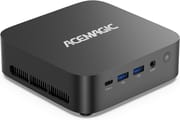 ACEMAGIC K1 | ACEMAGIC K1 | ACEMAGIC K1 | ACEMAGIC K1 | |
| Price | List Price: $329.99 Amazon Prices: | List Price: $408.49 Amazon Prices: | List Price: $238 Amazon Prices: | List Price: $279 Amazon Prices: |
| Version | --- | --- | 16GB/256GB/Ryzen 3 4300U | 16GB/1TB/Ryzen 3 4300U |
| Performance Rating | 4.2 | 4.6 | 3.2 | 3.2 |
| Operating System | Windows 11 Pro | Windows 11 Pro | Windows 11 Pro | Windows 11 Pro |
| Processor | Octa-core 1.80 Ghz (max 4.30 Ghz) AMD Ryzen 7 5700U | Octa-core 1.80 Ghz (max 4.30 Ghz) AMD Ryzen 7 5700U | Quad-core 2.70 Ghz (max 3.70 Ghz) AMD Ryzen 3 4300U | Quad-core 2.70 Ghz (max 3.70 Ghz) AMD Ryzen 3 4300U |
| GPU | Integrated Radeon RX Vega8 Graphics | Integrated Radeon RX Vega8 Graphics | Integrated Radeon RX Vega8 Graphics | Integrated Radeon RX Vega8 Graphics |
| RAM | 16 GB DDR4 | 32 GB DDR4 | 16 GB DDR4 | 16 GB DDR4 |
| Internal Storage | 512 GB SSD | 1 TB SSD | 256 GB SSD | 1 TB SSD |
| Dimensions width x length x thickness | 5.04 x 5.04 x 1.66 inches (128.02 x 128.02 x 42.16 mm) | 5.04 x 5.04 x 1.66 inches (128.02 x 128.02 x 42.16 mm) | 5.04 x 5.04 x 1.66 inches (128.02 x 128.02 x 42.16 mm) | 5.04 x 5.04 x 1.66 inches (128.02 x 128.02 x 42.16 mm) |
| Weight | 0.87 lbs (0.4 kg) | 0.87 lbs (0.4 kg) | 0.87 lbs (0.4 kg) | 0.87 lbs (0.4 kg) |
| WiFi | Wi-Fi 6 (802.11ax) | Wi-Fi 6 (802.11ax) | Wi-Fi 6 (802.11ax) | Wi-Fi 6 (802.11ax) |
| Bluetooth | Bluetooth 5.2 | Bluetooth 5.2 | Bluetooth 5.2 | Bluetooth 5.2 |
| Ethernet | 1 Ethernet port at 1 Gbps | 1 Ethernet port at 1 Gbps | 1 Ethernet port at 1 Gbps | 1 Ethernet port at 1 Gbps |
| HDMI | 1 Full-Size HDMI Port | 1 Full-Size HDMI Port | 1 Full-Size HDMI Port | 1 Full-Size HDMI Port |
| DisplayPort | 1 DisplayPort (DisplayPort 1.4b) | 1 DisplayPort (DisplayPort 1.4b) | 1 DisplayPort (DisplayPort 1.4b) | 1 DisplayPort (DisplayPort 1.4b) |
| VGA | No VGA Ports | No VGA Ports | No VGA Ports | No VGA Ports |
| USB Ports | 6 USB 3, 1 USB-C Front: 2x USB-A 3.2 Gen2, 1x USB-C (video); rear: 4x USB-A 3.2 Gen1 | 6 USB 3, 1 USB-C Front: 2x USB-A 3.2 Gen2, 1x USB-C (video); rear: 4x USB-A 3.2 Gen1 | 6 USB 3, 1 USB-C Front: 2x USB-A 3.2 Gen2, 1x USB-C (video); rear: 4x USB-A 3.2 Gen1 | 6 USB 3, 1 USB-C Front: 2x USB-A 3.2 Gen2, 1x USB-C (video); rear: 4x USB-A 3.2 Gen1 |
| Thunderbolt Ports | No | No | No | No |
| OCuLink | No | No | No | No |
| Internal SATA Ports | No SATA ports | No SATA ports | No SATA ports | No SATA ports |
| Card Reader | No Card Reader | No Card Reader | No Card Reader | No Card Reader |
| Headphone Jack | 3.5mm audio jack | 3.5mm audio jack | 3.5mm audio jack | 3.5mm audio jack |
| Fanless | No | No | No | No |
| VESA Mount | Yes | Yes | Yes | Yes |
| In the Box | Mini PC, power adapter (barrel connector), HDMI cable, VESA mount bracket with screws, user manual | Mini PC, power adapter (barrel connector), HDMI cable, VESA mount bracket with screws, user manual | Mini PC, power adapter (barrel connector), HDMI cable, VESA mount bracket with screws, user manual | Mini PC, power adapter (barrel connector), HDMI cable, VESA mount bracket with screws, user manual |
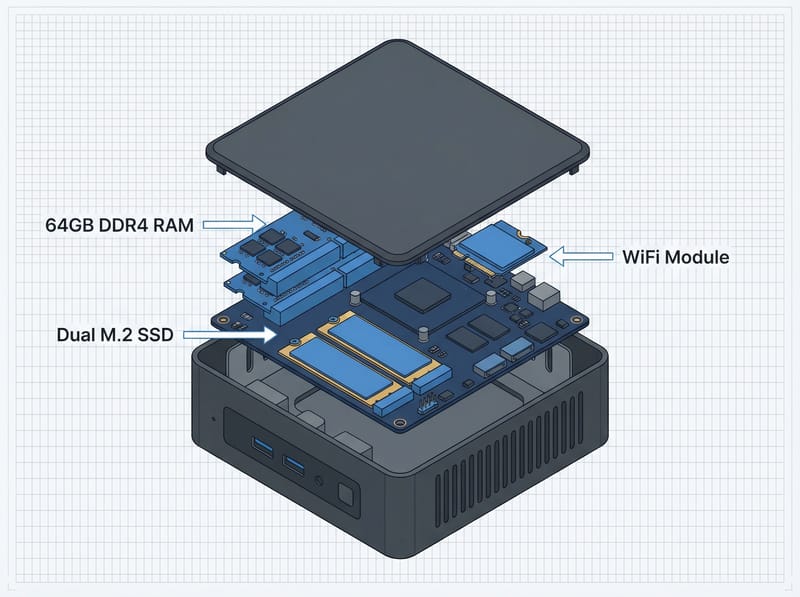
| Expandability | Supports up to 64GB DDR4 RAM (dual SO-DIMM slots), dual M.2 2280 slots for SSD expansion (NVMe and SATA compatible) | Supports up to 64GB DDR4 RAM (dual SO-DIMM slots), dual M.2 2280 slots for SSD expansion (NVMe and SATA compatible) | Supports up to 64GB DDR4 RAM (dual SO-DIMM slots), dual M.2 2280 slots for SSD expansion (NVMe and SATA compatible) | Supports up to 64GB DDR4 RAM (dual SO-DIMM slots), dual M.2 2280 slots for SSD expansion (NVMe and SATA compatible) |
Related Mini PCs
-
 ACEMAGIC K1 (Ryzen 7030 Series)The Ryzen 7030-series ACEMAGIC K1 puts a 6-core Ryzen 5 7530U or 4-core Ryzen 3 7330U in a 5-inch…
 -
 ACEMAGIC Kron K5A 0.67-litre desktop on Intel's Wildcat Lake platform. The Core 5 320 tier posts single-core scores…
 -
 GMKtec NucBox K17Quiet 0.7-litre Lunar Lake mini PC with the Core Ultra 5 226V, Arc 130V graphics, a spare PCIe Gen5…
 -
 KAMRUI E3BThe KAMRUI E3B is a 5-inch-square AMD mini PC sold in Ryzen 7 PRO 5875U, Ryzen 7 5825U, Ryzen 5…
 -
 GEEKOM A5 (2025 Edition)The GEEKOM A5 (2025 Edition) is a Ryzen 5 7430U mini PC with 16GB of DDR4, a 512GB or 1TB drive, a…
 -
 GEEKOM A5 ProThe GEEKOM A5 Pro packs an AMD Ryzen 5 7530U into a premium all-metal chassis measuring just 0.47…
Room for 64GB of RAM and two SSDs in a five-inch shell
The ACEMAGIC K1 is a matte black plastic cube measuring approximately 128mm x 128mm x 42mm (about 5 inches square). Multiple reviewers describe it as the “size of a grilled cheese sandwich” that can fit in your pocket. Finishing is well crafted, and the housing is plastic throughout. The unit weighs just under a pound, so it travels easily and tucks behind a monitor on the included VESA mount bracket.
The AMD Ryzen 7 5700U uses Zen 2 architecture and covers everyday computing and creative work. YouTube reviewer Technically Unsure ran stress tests showing the system caps at around 50 watts under full load while staying cool at 55-57 degrees Celsius. The reviewer measured 7,600 Bogo ops per second in stress-ng testing and contrasted it against a Raspberry Pi 5 in the same test, which he put at “a couple thousand times” lower on his run. The K1 boots into Windows in under 5 seconds thanks to the SSD, though the stock drive is SATA, so it does not reach NVMe speeds.
Six USB-A 3.2 ports and a video-capable USB-C port are spread across the front and rear panels. The front offers two USB-A 3.2 Gen2 ports and one USB-C with video capability, while the back provides four additional USB-A 3.2 Gen1 ports along with HDMI, DisplayPort, and Gigabit Ethernet. WiFi 6 and Bluetooth 5.2 handle wireless connectivity via a MediaTek MT7902 module. Storage expansion is supported through dual M.2 2280 slots that accept both NVMe and SATA drives, though Michael Noble notes that replacing the boot SATA drive with NVMe requires extra steps since you can’t simply clone between drive types.
Reviewer Insights
Technically Unsure’s Review
Technically Unsure provides an extensive unboxing and testing of the ACEMAGIC K1, calling it “the size of a grilled cheese sandwich.” The reviewer highlights the generous I/O with six USB 3.2 ports, Display Port, HDMI, and USB-C with video capability for triple 4K display support. During stress testing on Ubuntu, the system peaked at 50 watts while maintaining temperatures in the 55-57 degree range.
The reviewer tested both Windows and Linux, confirming excellent compatibility with Ubuntu 24. The first M.2 slot requires a SATA SSD for booting; regular NVMe drives showed up in BIOS but wouldn’t boot the OS. The RAM can be upgraded to 64GB, and there are two M.2 slots for storage expansion. He rates it a capable little machine for productivity, streaming, office work, and home lab setups, with casual gaming as a bonus, though not one for heavy 4K editing or high-end gaming.
OSReviews Hands-On Assessment
OSReviews positions the K1 as a cost-effective mid-ranger that delivers “roughly three times faster” performance compared to Intel Celeron N100 mini PCs. The reviewer notes the cube form factor has been used across multiple generations by various manufacturers, making the K1 “more subtle and minimalistic” compared to ACEMAGIC’s flashier AD08 and AX15 models.
Testing showed the cold boot into Windows takes about 5 seconds, and “general navigation around the UI is a very speedy and responsive experience” with a dozen browser tabs using only 3% CPU. The reviewer confirms the mini PC goes into nearly silent mode during light workloads, with the fan barely audible even during recording. The K1 earned a recommendation for anyone who finds entry-level mini PCs insufficient and wants to do “a little bit more of maybe Photoshop, video editing work casually.”
Michael Noble’s Creative Workflow Test
Michael Noble has used ACEMAGIC mini PCs for editing work for two years and tests the K1 as a creative workhorse. The review confirms excellent 4K video playback both locally and via streaming services like Netflix and YouTube. Heat dissipation is praised as “barely warm” even under intense workloads, and he describes the unit as “pretty quiet,” noting the fan rarely spins up during light use.
His upgrade walkthrough runs into a case that is “super annoying to deal with”: the power button can fall out, and two WiFi antenna wires require careful handling. Opening from the bottom exposes the CPU (avoid this), while the top gives access to two NVMe slots and socketed RAM. For creative work, the reviewer confirms it is “very usable for 4K video editing, Photoshop” and “very light work in After Effects,” and adds that he tried it for music production and found it “completely fine.” He signs off with “This is a workhorse PC, not a gaming PC.”
A quiet desktop for 4K editing and a three-monitor desk
Content creators, remote professionals, and home lab users get the most out of this machine. Reviewers put 4K video editing in DaVinci Resolve and Premiere Pro, Photoshop work, and music production with large sample libraries through it, and the AMD Ryzen 7 5700U holds up while staying cool and quiet under sustained load. The triple 4K display output covers a three-monitor desk.
The Ryzen platform and confirmed Ubuntu compatibility also make it a candidate for developers drawn to Linux mini PCs. Buyers who want serious gaming performance should look elsewhere.
At current pricing between $330-$410 depending on configuration, the K1 is a reasonable buy for the performance. Swapping the stock SATA SSD for NVMe gets faster storage, though that path needs a fresh Windows install because cloning between drive types does not work. Starry Hope’s Mini PC Comparison Chart sets the K1 beside similar offerings from GEEKOM, Beelink, and other manufacturers.
Frequently Asked Questions
What processor does the ACEMAGIC K1 use?
The chip is the AMD Ryzen 7 5700U, an 8-core, 16-thread Zen 2 part with a 1.8GHz base clock and a 4.3GHz boost. It has the headroom for productivity tasks and light gaming.
Can the ACEMAGIC K1 support triple monitor setups?
Yes. Three 4K@60Hz displays can run at once, one on the HDMI 2.0 port, one on the DisplayPort 1.4b, and one on the video-capable USB-C port.
Is the ACEMAGIC K1 good for gaming?
Casual and older titles like CS:GO and DOTA 2 run at moderate settings. The integrated Radeon RX Vega 8 GPU isn’t powerful enough for demanding AAA games, so gaming is a bonus on a productivity machine.
How quiet is the ACEMAGIC K1?
Reviewers report that the fan rarely spins up during light use and that the unit stays “pretty quiet” and “barely audible” even under heavier workloads, so it fits quiet environments like home offices and living rooms.
Can I upgrade the RAM and storage on the ACEMAGIC K1?
RAM goes up to 64GB DDR4, and the dual M.2 2280 slots take both NVMe and SATA drives. Reaching the internal components means removing the motherboard from the chassis.
Does the ACEMAGIC K1 include VESA mount support?
Yes. A VESA mount bracket is included, so the unit attaches to the back of a compatible monitor. That keeps the desk clear and hides the machine while the ports stay reachable.
What operating systems can run on the ACEMAGIC K1?
Windows 11 Pro comes pre-installed. Windows 10, Linux, and Ubuntu all run on it as well.