
KAMRUI Pinova P2 (Intel Core 3 304)
Published on

This build of the KAMRUI Pinova P2 is a small, quiet desktop for office work, schoolwork, video calls, and a desk with several monitors, sold ready to use with Windows installed. It keeps the name and case of the older KAMRUI Pinova P2, but the board inside is a newer Intel design with faster wired networking. The memory is soldered and cannot be upgraded, so buy it only if the amount it ships with will cover you for the life of the machine.
Pros and Cons
| Pros | Cons |
|---|---|
| Current Intel Core 3 304 with an NPU, ahead of the Intel N150 in PassMark | 12GB of LPDDR5 is soldered and cannot be upgraded |
| 2.5GbE wired networking, Wi-Fi 6, and Bluetooth 5.2 | Both M.2 slots run at PCIe 4.0 x2, so the bundled PCIe 3.0 x4 SSD reads at about half its rated speed |
| Three 4K@60Hz outputs: HDMI 2.0, DisplayPort 1.4, and USB-C | No USB4, Thunderbolt, or OCuLink port for an external graphics card |
| Two M.2 2280 slots for up to 4TB of storage | One Ethernet port, where the Minisforum M2 Air has two |
| Seven USB ports, including a 20Gbps USB-C with DisplayPort and power delivery | Ships with a 256GB SSD |
| Lid lifts off after one small screw, with a VESA bracket in the box | KAMRUI’s warranty runs one year |
KAMRUI Pinova P2 (Intel Core 3 304) Comparison Chart
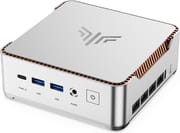 KAMRUI Pinova P2 (Intel Core 3 304) | |
| Price | List Price: $380.00 Amazon Prices: Loading prices... |
| Version | 12GB/256GB/Intel Core 3 304 |
| Performance Rating | 3.4 |
| Operating System | Windows 11 Pro |
| Processor | 5-core 1.50 Ghz (max 4.30 Ghz) Intel Core 3 304 |
| GPU | Integrated Intel Graphics |
| RAM | 12 GB LPDDR5 (Soldered; KAMRUI lists 5600 and 6400MT/s) |
| Internal Storage | 256 GB M.2 NVMe SSD (PCIe 3.0) |
| Dimensions width x length x thickness | 5.04 x 5.04 x 1.73 inches (128.02 x 128.02 x 43.94 mm) |
| Weight | 1.26 lbs (0.57 kg) |
| WiFi | Wi-Fi 6 (802.11ax) |
| Bluetooth | Bluetooth 5.2 |
| Ethernet | 1 Ethernet port at 2.5 Gbps |
| HDMI | 1 Full-Size HDMI Port |
| DisplayPort | 1 DisplayPort (DP 1.4, plus DP 1.4 over USB-C) |
| VGA | No VGA Ports |
| USB Ports | 6 USB 3, 1 USB-C Front: USB-C 20Gbps (DP, PD), 2x USB-A 10Gbps. Rear: 4x USB-A 5Gbps |
| Thunderbolt Ports | No |
| OCuLink | No |
| Internal SATA Ports | No SATA ports |
| Card Reader | No Card Reader |
| Headphone Jack | front |
| Fanless | No |
| VESA Mount | Yes |
| In the Box | Mini PC, 65W power adapter, short HDMI cable, VESA bracket with screws, manual |
| Expandability | 12GB LPDDR5 soldered (not upgradeable). Second M.2 2280 NVMe slot; SSD and Wi-Fi card replaceable. |
Related Mini PCs
-
 KAMRUI E3BThe KAMRUI E3B is a 5-inch-square AMD mini PC sold in Ryzen 7 PRO 5875U, Ryzen 7 5825U, Ryzen 5…
 -
 KAMRUI AM06PRO Mini PCThe KAMRUI AM06 Pro is a budget mini PC built on the AMD Ryzen 5 5500U (6 cores, 12 threads), with…
 -
 ACEMAGIC K1 (Ryzen 7030 Series)The Ryzen 7030-series ACEMAGIC K1 puts a 6-core Ryzen 5 7530U or 7430U, or a 4-core Ryzen 3 7330U,…
 -
 ACEMAGIC K1The ACEMAGIC K1 is a 5-inch mini PC built on the AMD Ryzen 7 5700U (a Ryzen 3 4300U variant also…
 -
 GMKtec NucBox K17Quiet 0.7-litre Lunar Lake mini PC with the Core Ultra 5 226V, Arc 130V graphics, a spare PCIe Gen5…
 -
 GEEKOM A5 (2027 Edition)The GEEKOM A5 2027 Edition puts a 15W eight-core Ryzen 7 7730U in the A5's NUC-sized case, with…
Ports and networking

The case measures about 5 x 5 x 1.7 inches and weighs about 1.3 pounds. The front holds a USB-C port, two USB-A 3.2 Gen 2 ports at 10Gbps, a 3.5mm audio jack, and the power button. KAMRUI rates the USB-C port at 20Gbps with DisplayPort 1.4 video and 100W power delivery. The back carries HDMI 2.0, DisplayPort 1.4, one 2.5GbE port, four USB-A 3.2 Gen 1 ports at 5Gbps, and the barrel power input. HDMI, DisplayPort, and USB-C each drive a 4K display at 60Hz, for three monitors at once. Wireless is Wi-Fi 6 with Bluetooth 5.2, and KAMRUI lists TPM 2.0 and scheduled power-on.
Processor, memory, and storage

The Intel Core 3 304 has one performance core and four efficient cores, five threads in total, and boosts to 4.3GHz. Intel rates it at 15W base power; KAMRUI runs it at 22W. Its PassMark multi-thread score of about 12,300 sits well above the Intel N150 (about 5,300) and above the Ryzen 3 4300U in the older Pinova P2 builds (about 7,300), and well below 12-core chips such as the Core 5 220H (about 21,900). The NPU is rated at 15 TOPS for on-device AI features.
Memory is 12GB of LPDDR5 soldered to the board. KAMRUI gives the memory speed as both 5600MT/s and 6400MT/s. The 256GB SSD is an M.2 NVMe drive rated for PCIe 3.0 x4, and KAMRUI rates both M.2 2280 slots at PCIe 4.0 x2 for up to 4TB in total. There is no 2.5-inch drive bay. The lid lifts off once one small screw and a switch on the back are moved, which exposes the SSD, the Wi-Fi card, and the second M.2 slot above the Wi-Fi card.
Reviewer Insights
Carey Holzman
Carey Holzman covered a pre-release engineering sample KAMRUI sent him across two live streams, Part 1 and Part 2, before the Core 3 304 build went on sale. His unit had 12GB of memory and a 512GB SSD, where the build sold now ships with 256GB. The box held a 19V, 65W power brick, a VESA bracket with screws, and a short HDMI cable meant for mounting the unit behind a monitor. He pointed out that the case is plastic, which keeps the Wi-Fi and Bluetooth antennas from sitting behind a metal shield, and that the copper trim is “just a piece of plastic painted copper.” Of the soldered memory he said: “You will not be able to upgrade this.”
During setup and Windows updates he found that “the machine’s really, really quiet.” The BIOS has no preset quiet or performance modes, and the defaults are “PL1 of 22 watts and PL2 is 35 watts,” which he advised leaving alone. CrystalDiskMark showed the bundled PCIe 3.0 x4 drive “running at half speed. It’s running at times two,” at about 1,700MB/s against roughly 3,600MB/s on four lanes, and moving the drive to the other slot gave the same result. He suspected a BIOS setting on the sample; KAMRUI’s own spec lists both slots as PCIe 4.0 x2, so the two-lane link is how the board is built.
In Part 2 he compared the P2 with the Minisforum M2 Air, which uses the same chip with socketed memory, USB4, two 2.5GbE ports, and one full-speed M.2 slot. He summed up the KAMRUI side as “12 gigs soldered on RAM, two NVMe slots, each one running at half speed,” and put the choice this way: “If you want the performance, you go with the Minisforum. If you want the capacity, you go with the Kamrui.” He also noted the warranty gap: “2-year warranty on the Minisforum, only a 1-year on the Kamrui.” His overall take in Part 1 was “I personally think it’s speced out really, really good as an entry-level computer.”
Our verdict
The Core 3 304 Pinova P2 suits someone who wants a Windows 11 Pro desktop that runs out of the box and is sure 12GB of memory will last for years. The M.2 slots run on two lanes each, so a PCIe 4.0 SSD is the drive to add; on two lanes it gets about the bandwidth a PCIe 3.0 drive gets on four.
Skip it if you game or edit video. Buyers who want faster networking can look at the Beelink EQi 304, which pairs the same chip with a 10GbE port and two Thunderbolt 4 ports. The ACEMAGIC Kron K5 and MINIX N304-AI are other Core 3 304 boxes to weigh.
Frequently Asked Questions
How is this Pinova P2 different from the older Pinova P2 models?
It uses the same 5-inch case and the same name, but the board is different. This build has the Intel Core 3 304, 12GB of soldered LPDDR5, and 2.5GbE. The older Pinova P2 builds use AMD Ryzen 3 4300U, Ryzen 3 7330U, or Ryzen Embedded R2544 chips, or an Intel Core i5-12600H, with LPDDR4 or DDR4 memory and gigabit Ethernet. The older Ryzen builds have Wi-Fi 5; the Core i5-12600H builds have Wi-Fi 6, like this one.
Can I upgrade the RAM in the KAMRUI Pinova P2 Core 3 304?
No. The 12GB of LPDDR5 is soldered to the board. Storage can be added: there is a second M.2 2280 NVMe slot, and KAMRUI rates the two slots for up to 4TB in total.
How fast are the M.2 slots?
Both run at PCIe 4.0 x2. In Carey Holzman’s CrystalDiskMark run, the bundled PCIe 3.0 drive read at about 1,700MB/s, against roughly 3,600MB/s on four lanes.
Can the KAMRUI Pinova P2 Core 3 304 run three monitors?
Yes. Each of the three video outputs drives its own display, so all three run at once.
Is the KAMRUI Pinova P2 Core 3 304 good for gaming?
Only for light, older, or casual games. The integrated Intel Graphics cannot run modern 3D games at playable settings, and there is no USB4, Thunderbolt, or OCuLink port for an external graphics card.
Is the KAMRUI Pinova P2 Core 3 304 loud?
It has a fan, but Carey Holzman found it very quiet during setup and Windows updates on a pre-release unit. KAMRUI runs the Core 3 304 at 22W sustained, with short bursts to 35W.