
MINIX N304-AI
Published on

The MINIX N304-AI is a small office and family desktop built on Intel’s Core 3 304, an entry-level “Wildcat Lake” chip positioned as the successor to the N100 class of low-power processors. It suits someone who wants a quiet box that draws about 3 watts at idle, drives three 4K monitors, and handles browsing, documents, and streaming. Team Pandory reported no issues in everyday Windows use and found it ahead of every N100-class chip it tested, and Robtech’s Cinebench single-core result matched the Ryzen 9 7940HS. Robtech’s charts put it last in multi-core, Team Pandory found it badly outclassed by mainstream chips in CPU and graphics tests, and both thought it costs too much for that performance. The 16GB of memory is soldered, so the configuration you buy is the one you keep.
Pros and Cons
| Pros | Cons |
|---|---|
| Very low power draw: Team Pandory measured about 3W at idle | Five cores with one performance core; multi-core and graphics trail mainstream mini PCs |
| Quiet at idle and under load in Team Pandory’s testing | 16GB LPDDR5X is soldered, with no memory slot |
| Three 4K60 outputs: HDMI, DisplayPort 1.4, and USB-C | The SSD ships in the slower PCIe 4.0 x1 slot, and the drive has no cooling |
| Two M.2 2280 PCIe 4.0 slots, up to 4TB | Gigabit Ethernet only, and Wi-Fi 6 rather than a newer standard |
| Dual gigabit Ethernet and a VESA mount in the box | The HDMI 2.1 TMDS port is limited to HDMI 2.0 bandwidth |
| Ran Batocera Linux with video, sound, Wi-Fi, and Bluetooth working | Plastic chassis, and reaching the M.2 slots means prying out the board |
Related Videos
MINIX N304-AI Comparison Chart
 MINIX N304-AI | |
| Price | List Price: $715.00 Amazon Prices: Loading prices... |
| Version | 16GB/512GB/Intel Core 3 304 |
| Performance Rating | 3.6 |
| Operating System | Windows 11 Pro |
| Processor | 5-core 1.50 Ghz (max 4.30 Ghz) Intel Core 3 304 |
| GPU | Integrated Intel Graphics |
| RAM | 16 GB LPDDR5X, single-channel (LPDDR5X-6400, soldered) |
| Internal Storage | 512 GB NVMe SSD |
| Dimensions width x length x thickness | 5 x 4.99 x 1.81 inches (127 x 126.75 x 45.97 mm) |
| Weight | 0.79 lbs (0.36 kg) |
| WiFi | Wi-Fi 6 (802.11ax) |
| Bluetooth | Bluetooth 5.3 |
| Ethernet | 2 Ethernet ports at 1 Gbps |
| HDMI | 1 Full-Size HDMI Port |
| DisplayPort | 1 DisplayPort (DP 1.4, plus DP Alt Mode on USB-C) |
| VGA | No VGA Ports |
| USB Ports | 2 USB 2.0, 2 USB 3, 1 USB-C Front: 2x USB-A 10Gbps, 1x USB-C 10Gbps. Rear: 2x USB 2.0 |
| Thunderbolt Ports | No |
| OCuLink | No |
| Internal SATA Ports | No SATA ports |
| Card Reader | No Card Reader |
| Headphone Jack | combo |
| Fanless | No |
| VESA Mount | Yes |
| In the Box | Mini PC, 65W adapter with US/EU/UK/JP plugs, HDMI cable, VESA mount, screws, user guide |
| Expandability | 16GB LPDDR5X soldered, no RAM slot. Two M.2 2280 PCIe 4.0 slots (x2 and x1) to 4TB. |
Related Mini PCs
-
 Beelink SER3The Beelink SER3 pairs an AMD Ryzen 7 3750H (Radeon Vega 10) with dual 4K HDMI output and extensive…
 -
 Beelink SER5 (5500U)The Beelink SER5 (5500U) is a Ryzen 5 5500U mini PC with 16GB of DDR4 in two slots (64GB max), a…
 -
 BOSGAME E5The BOSGAME E5 is a versatile mini PC powered by the AMD Ryzen 3 5300U processor. With dual 2.5GbE…
 -
 BOSGAME E7The BOSGAME E7 pairs a 6-core Intel Core 3 100U with two Gigabit Ethernet ports and triple 4K@60Hz…
 -
 Getorli GT103The Getorli GT103 is a Ryzen 5 7430U mini PC with two 2.5 Gigabit Ethernet ports, three display…
 -
 Getorli GT103 (Ryzen 5 6600H / Ryzen 7 6800H)The LPDDR5 version of Getorli's GT103 metal mini PC comes with a Ryzen 5 6600H and Radeon 660M or a…
Five cores, three displays, and two unequal M.2 slots

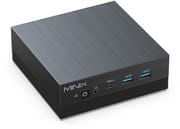
The N304-AI is a low square box about 5 inches on a side and 1.8 inches tall, and it weighs under a pound. MINIX lists the case material as plastic; the top has a brushed finish and the sides are ribbed. The front carries a BIOS reset pinhole, the power button, a 3.5mm combo audio jack, a USB-C 3.2 Gen 2 port, and two USB-A 3.2 Gen 2 ports. The rear holds two USB 2.0 ports, a DisplayPort 1.4 output, an HDMI port labeled 2.1 TMDS, two gigabit Ethernet jacks, and the DC power input. A 65W power adapter (19V, 3.42A) with interchangeable plugs comes in the box, and MINIX also lists USB-C power delivery input.
The Core 3 304 has one performance core running up to 4.3GHz and four low-power efficiency cores, with 6MB of cache and a 15W base power rating. MINIX rates the platform at 24 TOPS of AI throughput: 15 TOPS from the NPU and 9 TOPS from the single-core Intel graphics. Its PassMark CPU Mark is around 11,645, which puts it above N100-class chips and below mainstream Core i5 and Ryzen 5 mini PCs. Memory is 16GB of LPDDR5X-6400 soldered to the board, and the chip runs it on a single channel. The same processor powers the Beelink EQi 304, which adds 10GbE and Thunderbolt 4 but boots from slower onboard UFS flash instead of an NVMe drive.
All three video outputs drive a 4K display at 60Hz, so the N304-AI can run three monitors at once. Team Pandory pointed out that HDMI 2.1 TMDS is HDMI 2.0 bandwidth under a newer label. That covers 4K at 60Hz but not higher refresh rates at 4K. Wireless is Wi-Fi 6 with Bluetooth 5.3 on a replaceable M.2 2230 card. Storage is a 512GB NVMe drive in one of two M.2 2280 slots: one slot runs at PCIe 4.0 x2 and the other at PCIe 4.0 x1, with up to 4TB across both. Both reviewers found the factory drive in the slower x1 slot and got better results after moving it to the x2 slot. Reaching the slots means peeling off the glued rubber feet, removing the screws under them, and easing the board out of the case.
Reviewer Insights

Team Pandory
Team Pandory tested the N304-AI as a possible successor to the N100. The reviewer’s first impression of the case was that “it feels much cheaper than it looks.” On the HDMI port, the review says the 2.1 TMDS label is a rebrand of HDMI 2.0: “While this rebrand has become standard practice, we think it’s misleading and we’re hoping for a bit more transparency in the future.” The review unit booted with benchmark and optimizer tools already installed, and a Malwarebytes scan flagged ad-related items. The reviewer did not call it malware, but said: “I don’t want any of this benchmarking and optimizing software on a brand new mini PC.” The reviewer reinstalled Windows using drivers from the MINIX site plus a couple from the Microsoft catalog.
Against mainstream processors in Geekbench, Cinebench, Time Spy, and Fire Strike, the review says the N304-AI is badly outclassed. Against the N95, N100, N97, and N200 it beat all of them in Team Pandory’s testing. Rocket League ran at about 40 fps at 1080p on quality settings and above 60 fps in performance mode, Fortnite stayed above 60 fps at 720p with the performance renderer, and Counter-Strike 2 was unplayable. Under Batocera 43.1, video, sound, Wi-Fi, and Bluetooth all worked, PlayStation 2 games ran well, and God of War 2 ran at full speed at 720p.
At idle the machine sat around 35 degrees Celsius and drew about 3 watts from the wall. Gaming pushed it to 71 degrees in Fortnite and into the 80s in Counter-Strike 2, at just under 14 watts. The review’s summary: “It’s quiet, has a non-showy case ideal for an office, and the Wi-Fi signal is actually top tier.” The BIOS is basic, with a quiet mode that only lowers the sustained power limit and a manual fan option that offers no actual fan settings. On price, the reviewer judged the machine mid-tier rather than budget and thought hardware like this should sell for far less, concluding that “this is an all right family PC.”
Robtech
Robtech compared the N304-AI with the Core 5 320, a Wildcat Lake chip with two performance cores, and with a field of mid-range and high-end mini PCs. In Cinebench single-core, the one performance core matched the Ryzen 9 7940HS and trailed the Core 5 320 by 3.5 percent. In multi-core it came last on his chart, 10.5 percent behind the Core 5 320, and Geekbench single-core placed it near the Core i7-13620H. Graphics were the weakest area: the Core 5 320 led by 80.5 percent in Fire Strike and 86 percent in Time Spy. Video encoding stayed near the bottom of his chart even with Quick Sync enabled, code compiling was slow, and he notes that PS3 emulation spends a long time compiling shaders on the single performance core.
Inside, he found a Samsung NVMe drive in the PCIe 4.0 x1 slot with the empty x2 slot beside it: “Why the Samsung drive hasn’t been placed there is anyone’s guess.” Moving the drive raised the storage score modestly, though without any cooling the SSD gets warm and will run warmer in the other slot. He was also unhappy about the case screws: “Opening up this mini isn’t difficult, but the glued-on rubber feet cover the screws, which I hate.” His malware scan came back clean, and Windows ran with no missing drivers.
Idle draw was the lowest in his comparison, and peak draw reached only 33 watts, with the CPU staying under 90 degrees Celsius. On noise he said: “Fan noise is okay under load when compared to the rest of minis, but if you take into account how little heat it has to deal with, it’s not exactly impressive.” Wi-Fi held up at 39 feet from the router on 5GHz, and the BIOS covers wake on LAN, power mode selection, HDMI CEC, and AC power loss recovery. His checklist opens with “Build quality is nice.” He also credits MINIX for BIOS updates, driver downloads, and a two-year warranty. His verdict: “However, for the asking price, it can’t compete with the competition on features or performance.”
A low-power desktop for office work and three monitors
At about 3 watts at idle, the N304-AI can stay on all day as a family PC or a small Linux box, and Team Pandory’s Batocera testing shows it handles retro emulation through PlayStation 2. Browsing, documents, spreadsheets, video calls, and streaming are within its reach, spread across up to three 4K displays. Moving the SSD to the x2 slot is worth doing on day one, though the uncooled drive runs warmer there.
Look elsewhere if you compile code, encode video, or play modern 3D games: Robtech’s charts put it last in multi-core, and Team Pandory found it badly outclassed by mainstream chips in CPU and graphics tests. The soldered 16GB rules out memory upgrades, and the gigabit Ethernet ports will limit fast NAS transfers. Buyers who want the same chip with faster networking can compare the Beelink EQi 304, and MINIX’s fanless N300 option is the Z300-0dB. Starry Hope’s Mini PC Comparison Chart lays the specifications side by side.
Frequently Asked Questions
What processor does the MINIX N304-AI use?
It uses the Intel Core 3 304, an entry-level “Wildcat Lake” chip with five cores and five threads: one performance core running up to 4.3GHz and four low-power efficiency cores, with 6MB of cache and a 15W base power rating. Its PassMark CPU Mark is around 11,645. MINIX rates the platform at 24 TOPS of AI throughput, 15 from the NPU and 9 from the integrated graphics.
Can I upgrade the RAM in the MINIX N304-AI?
No. The 16GB of LPDDR5X-6400 memory is soldered to the board, and there is no memory slot. Storage is upgradeable through two M.2 2280 slots.
How much storage can the MINIX N304-AI hold?
It ships with a 512GB NVMe SSD, and its two M.2 2280 slots take up to 4TB in total. One slot runs at PCIe 4.0 x2 and the other at PCIe 4.0 x1. Both Team Pandory and Robtech found the factory drive in the slower x1 slot and saw better results after moving it to the x2 slot.
How many monitors can the MINIX N304-AI drive?
Three, each at 4K and 60Hz: one through HDMI, one through DisplayPort 1.4, and one through the front USB-C port. The HDMI port is labeled 2.1 TMDS, which carries HDMI 2.0 bandwidth.
How much power does the MINIX N304-AI draw?
Team Pandory measured about 3 watts at the wall at idle and just under 14 watts while gaming. Robtech recorded the lowest idle draw in his comparison and a peak of 33 watts. It ships with a 65W power adapter.
Is the MINIX N304-AI good for gaming?
Only for light games and emulation. Team Pandory saw about 40 fps in Rocket League at 1080p on quality settings and over 60 fps in Fortnite at 720p, but Counter-Strike 2 was unplayable. Older systems emulate well: PlayStation 2 titles ran smoothly under Batocera Linux.
Does the MINIX N304-AI run Linux?
Team Pandory booted Batocera 43.1, and video, sound, Wi-Fi, and Bluetooth all worked. Batocera is a gaming-focused distribution.
How does the MINIX N304-AI compare with the Beelink EQi 304?
Both use the Intel Core 3 304. The Beelink adds a 10GbE port, a 2.5GbE port, two Thunderbolt 4 ports, and an internal power supply, but boots from onboard UFS flash. The MINIX boots from an NVMe SSD, has a dedicated DisplayPort output, includes a VESA mount, and uses two gigabit Ethernet ports and an external power adapter.