
HP OmniDesk Mini PC
Published on

The HP OmniDesk Mini is a compact Windows desktop for office work, with a footprint close to a Mac mini. The Cashmere White Core 3 and Core 5 builds handle everyday work. The Smoke Silver Core Ultra builds add faster networking and ports, plus the only M.2 slot HP lists as available.
Pros and Cons
| Pros | Cons |
|---|---|
| Small footprint at about 5 x 5 x 2 inches and about one pound | LPDDR5X memory is onboard and cannot be upgraded |
| Powered by a USB-C GaN adapter instead of a barrel plug | Core 3 and Core 5 builds stop at Gigabit Ethernet |
| Core Ultra builds have 2.5GbE and one free M.2 slot | No Thunderbolt or USB4 on the Core 3 and Core 5 builds |
| Two USB-C ports on the front | Core 3 and Core 5 chips run a single memory channel |
| Core Ultra builds add two Thunderbolt 4 ports and eGPU support | The M05-0034 pairs UFS storage and DDR5-5600 with both M.2 slots occupied |
| Core Ultra 7 356H scores 34,413 in PassMark CPU Mark | Core Ultra builds use the smaller integrated GPU, not Arc B370 or B390 |
HP OmniDesk Mini PC Comparison Chart
6 configurations
| Configuration | Processor | RAM | Storage | Performance | List price | Amazon price | Compare |
|---|---|---|---|---|---|---|---|
| 8GB/128GB/Core 3 304 | Core 3 304CPU Mark 12,264 | 8 GB | 128 GB UFS | 3.2 | $589.99 | Details
| |
| 8GB/256GB/Core 3 304 | Core 3 304CPU Mark 12,264 | 8 GB | 256 GB SSD | 3.2 | $659.99 | Details
| |
| 8GB/512GB/Core 5 315 | Core 5 315CPU Mark 14,056 | 8 GB | 512 GB SSD | 3.4 | $869.99 | Details
| |
| 16GB/256GB/Core 5 320 | Core 5 320CPU Mark 15,421 | 16 GB | 256 GB SSD | 4.0 | $859.99 | Details
| |
| 16GB/512GB/Core Ultra 5 325 | Core Ultra 5 325CPU Mark 18,924 | 16 GB | 512 GB SSD | 4.4 | $1,269.99 | Details
| |
| 16GB/512GB/Core Ultra 7 356H | Core Ultra 7 356HCPU Mark 34,413 | 16 GB | 512 GB SSD | 5.9 | $1,509.99 | Details
|
Specs shared by every configuration
| Operating System | Windows 11 Home |
|---|---|
| GPU | Integrated Intel Graphics |
| Dimensions width x length x thickness | 5.12 x 5.12 x 1.89 inches (130.05 x 130.05 x 48.01 mm) |
| HDMI | 1 Full-Size HDMI Port |
| VGA | No VGA Ports |
| OCuLink | No |
| Internal SATA Ports | No SATA ports |
| Card Reader | No Card Reader |
| Headphone Jack | combo |
| Fanless | No |
| VESA Mount | No |
See every Intel Core 3 304 configuration in the chartSee every Intel Core Ultra 5 325 configuration in the chartSee every Intel Core Ultra 7 356H configuration in the chart
Related Mini PCs
-
 Lenovo Yoga Mini iLenovo's round 5-inch aluminum desktop puts Intel Panther Lake in a 1.3-pound chassis with dual…
-
 ACEMAGIC AD15The ACEMAGIC AD15 is an Intel mini PC sold with an 11th or 12th-gen Core i5 (or the 8-core Core…
-
 Beelink EQ mini (Core 3 304)The Beelink EQ mini pairs Intel's 5-core Core 3 304 with a 10GbE port, two Thunderbolt 4 ports, and…
-
 Beelink EQi 304The Beelink EQi 304 pairs Intel's 5-core Core 3 304 "Wildcat Lake" chip with a 10GbE port, a 2.5GbE…
-
 BOSGAME P4 PlusThe BOSGAME P4 Plus pairs an AMD Ryzen 7 5825U with dual 2.5GbE, Wi-Fi 6E, swappable DDR4, and one…
-
 BOSGAME E5 PlusThe BOSGAME E5 Plus pairs a four-core Ryzen 3 5400U with two 2.5GbE ports, two memory slots, and a…
A 5-inch case powered over USB-C

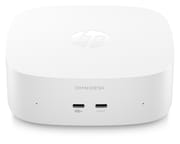
HP lists the case at 5.12 x 5.12 x 1.89 inches and about one pound. On the configurable M05-0000t, HP claims at least 50 percent post-consumer recycled plastic and EPEAT Gold registration; its spec sheets for the M05-0034 and M05-0054 say up to 50 percent. Two USB-C ports sit on the front, and the rest of the connections are on the back: two USB-A ports, HDMI, Ethernet, a third USB-C port, and a headphone and microphone combo jack. The configurable M05-0000t also has separate microphone-in and line-out jacks.
Power comes through USB-C rather than a barrel connector, from a 100W GaN adapter on the Core 3 and Core 5 builds or a 140W one on the Core Ultra builds. Each adapter has a removable two-meter cable.
Thunderbolt 4 at 40Gbps is on two of the three USB-C ports of the Core Ultra builds, which also have HDMI 2.1, Intel Wi-Fi 7, Bluetooth 6.0, and support for four 4K screens. HP’s support specs name a Realtek RTL8125BGH-CG 2.5GbE controller for them and a Realtek RTL8111HSH-CG Gigabit controller for the Core 3 and Core 5 builds. All three USB-C ports on the Core 3 and Core 5 builds run at 10Gbps, and two of them carry DisplayPort 2.1. Those builds have HDMI 2.0b, Wi-Fi 6, and Bluetooth 5.4, and they drive up to three displays. The configurable M05-0000t also offers an Intel Wi-Fi 6E card with Bluetooth 5.3.
Processor choices

All five chips are from Intel’s 2026 Core Series 3 family. The three Wildcat Lake parts are for office work and browsing, and they sit close together in PassMark CPU Mark: the five-core Core 3 304 scores 12,264, the six-core Core 5 315 scores 14,056, and the Core 5 320 reaches 15,421.
Panther Lake starts at 18,924 with the eight-core Core Ultra 5 325, and the 16-core Core Ultra 7 356H reaches 34,413, about 2.8 times the Core 3 304. Every build uses Intel’s integrated graphics. Notebookcheck reports that the Core Ultra 5 325 and Core Ultra 7 356H both use a 4-core Xe3 GPU rather than Arc B370 or B390, and it places that GPU behind the older Radeon 780M. Gaming on these machines is a poor fit without an eGPU, which the Thunderbolt 4 ports on the Core Ultra builds can support.
Memory and M.2 slots by build
The Core Ultra builds use 16GB of onboard LPDDR5X-8533 on two channels. The M05-0044 and the configurable M05-0000t use onboard LPDDR5X on one channel. HP names 8533 MT/s for them, but Intel rates the Core 3 304, Core 5 315, and Core 5 320 for LPDDR5X-7467 on one memory channel. LPDDR5X cannot be replaced, so an 8GB build of this type stays at 8GB.
The 128GB M05-0034 uses 8GB of DDR5-5600 on one channel, the slowest memory in the range. HP’s spec documents do not mark this memory as onboard, while Notebookcheck reports that HP’s promotional material does, so plan on 8GB for the life of that machine.
Three M.2 slots on the Core Ultra builds leave one free for another drive. The M05-0034 has two M.2 slots, and HP marks both as occupied without naming what fills them, even though its 128GB of storage is UFS rather than an SSD. Notebookcheck says owners can add an NVMe SSD, but with both slots marked occupied, do not count on it. The M05-0044 and M05-0000t have two M.2 slots, and HP does not say how many are free. On the configurable M05-0000t, the 256GB drive is PCIe Gen3 and the 512GB, 1TB, and 2TB options are Gen4.
Early coverage from Notebookcheck, Digital Trends, and The Gadgeteer
None of the three tested a finished unit, so they give no fan noise, temperature, or benchmark figures.
All three separate the base model from Apple’s desktop on performance. Notebookcheck writes: “So, while the form factor may make this HP mini PC rival the Mac mini, coming in at 5.12x5.12x1.89 inches, the two reside in different performance tiers.” Digital Trends says: “So, despite the Mac mini-like dimensions, this is better viewed as a compact Windows PC than a direct rival to Apple’s latest desktop.” Its writer would consider the machine mainly when Windows is required or Linux is planned, and The Gadgeteer also places it as a Windows productivity PC rather than a direct performance rival.
On upgrades, The Gadgeteer treats memory as the main limit: “The important catch is that the memory is onboard.” Notebookcheck says of the Wildcat Lake model: “Although the RAM of this OmniDesk Mini isn’t upgradeable, there are two M.2 slots, each of which should be able to hold an 8TB SSD.” HP’s factory options stop at 2TB. The Gadgeteer’s view that “Being able to expand storage later makes the entry configuration less limiting” depends on a free slot, and HP does not confirm one on the 256GB M05-0000t.
For the Core Ultra builds, Notebookcheck’s Panther Lake article covers external GPU support: “On the bright side, both configurations bring eGPU support through the Thunderbolt 4 ports.”
Should you buy it?
Our pick is the Core Ultra 5 325 build. Memory on that build is onboard, so storage is the one thing an owner can add later, and only the Core Ultra builds have a slot HP lists as free. The Core Ultra 7 356H suits heavier multitasking, with twice the cores and a CPU Mark score about 1.8 times as high. Office work and browsing fit the Core 5 315 build and the configurable model, as long as the storage they ship with is enough, since HP does not confirm a free M.2 slot on either. Light use is the only fit for the 128GB M05-0034, with its UFS storage, 8GB of memory, and no M.2 slot HP lists as free.
Skip it if you need wired networking faster than 2.5GbE, or more than 16GB of memory. The Beelink EQi 304 uses the same Core 3 304 with a 10GbE port, a 2.5GbE port, and two Thunderbolt ports. The Lenovo Yoga Mini i reaches 32GB on its Core Ultra X7 358H build. If macOS works for you, look at the Mac mini (2026).
Frequently Asked Questions
Can I upgrade the RAM in the HP OmniDesk Mini?
Not on the LPDDR5X builds. The Core Ultra builds ship with 16GB, the M05-0044 with 8GB, and the configurable M05-0000t with 8GB, 12GB, or 16GB. The M05-0034 uses DDR5-5600. HP’s spec documents do not mark it as onboard, but Notebookcheck reports that HP’s promotional material does, so plan on keeping its 8GB.
How many M.2 slots does the HP OmniDesk Mini have?
Core Ultra builds have three, with one available. Core 3 and Core 5 builds have two. Both are occupied on the M05-0034, and HP does not say how many are free on the M05-0044 and M05-0000t.
Does the HP OmniDesk Mini have Thunderbolt?
Only the Core Ultra builds do, with two Thunderbolt 4 ports at 40Gbps and support for an external GPU. The Core 3 and Core 5 builds stop at 10Gbps on all five USB ports.
How many monitors can the HP OmniDesk Mini drive?
Core 3 and Core 5 builds support up to three displays through HDMI and USB-C. Core Ultra builds support up to four 4K displays.
What comes in the box with the HP OmniDesk Mini?
The PC, a USB-C GaN power adapter (100W on Core 3 and Core 5 builds, 140W on Core Ultra builds), a two-meter USB-C cable, and setup instructions. A keyboard and mouse are not included.
Is the HP OmniDesk Mini good for gaming?
Not on its own. Even the Core Ultra GPU trails the older Radeon 780M, per Notebookcheck, though those builds can connect an external GPU over Thunderbolt 4.