
KAMRUI Pinova P2 Mini PC
Updated on

The KAMRUI Pinova P2 Mini PC is a small desktop for home office work, schoolwork, and a two or three monitor desk, sold in low-cost AMD builds and faster Intel builds. The AMD Ryzen 3 4300U build, with four Zen 2 cores, covers everyday productivity, web browsing, and media playback, and a Ryzen 3 7330U build sits a step above it. Ryzen Embedded R2544 builds use DDR4 in two SO-DIMM slots. The Intel Core i5-12600H builds have 12 cores and 16 threads for heavier multitasking, and they cost more. Every build uses a chassis about five inches square.
Three independent 4K monitors can run at 60Hz off the HDMI 2.0, DisplayPort 1.4, and USB-C outputs at the same time. The silver chassis is light enough for the bundled VESA bracket to hang it off the back of a monitor, and small enough to sit beside a keyboard when it stays on the desk.
Pros and Cons
| Pros | Cons |
|---|---|
| Drives three 4K monitors at 60Hz from HDMI, DisplayPort, and USB-C | The Ryzen 3 4300U builds have 8GB or 16GB of soldered LPDDR4, with no room to add more |
| The Core i5-12600H builds have 12 cores, 16 threads, and two SO-DIMM slots for up to 64GB of DDR4 | The Ryzen 3 4300U has four cores with no SMT, so heavily threaded work backs up |
| USB 3.2 Gen2 ports on the Ryzen 3 and Core i5 builds move external drives at 10Gbps | Integrated graphics on every build rule out modern 3D titles |
| VESA bracket in the box keeps the desk clear | No Thunderbolt, and no OCuLink for an external GPU later |
| Buyers describe it as quiet under everyday load | The Ryzen 3 4300U and Ryzen Embedded R2544 builds have Bluetooth 4.2, older than the 5.2 on the Core i5-12600H builds |
| Two M.2 2280 slots on every build, for up to 4TB of storage | Wired networking tops out at gigabit |
Related Videos
KAMRUI Pinova P2 Mini PC Comparison Chart
7 configurations
| Configuration | Processor | RAM | Storage | OS | List price | Amazon price | Compare |
|---|---|---|---|---|---|---|---|
| 16GB/512GB/Ryzen 3 4300U | Ryzen 3 4300U | 16 GB | 512 GB | --- | $379.99 | Loading... | Details
|
| 16GB/256GB/Ryzen 3 7330U | Ryzen 3 7330U | 16 GB | 256 GB | --- | $349.99 | Details
| |
| 16GB/512GB/Intel Core i5-12600H | Core i5-12600H | 16 GB | 512 GB SSD | Windows 11 Pro | $599.99 | Loading... | Details
|
| 32GB/1TB/Intel Core i5-12600H | Core i5-12600H | 32 GB | 1 TB SSD | Windows 11 Pro | $799.99 | Loading... | Details
|
| 16GB/512GB/Ryzen Embedded R2544 | Ryzen Embedded R2544 | 16 GB | 512 GB SSD | --- | $269.00 | Details
| |
| 16GB/256GB/Ryzen Embedded R2544 | Ryzen Embedded R2544 | 16 GB | 256 GB SSD | --- | $499.99 | Loading... | Details
|
| 8GB/512GB/Ryzen 3 4300U | Ryzen 3 4300U | 8 GB | 512 GB | --- | --- | Loading... | Details
|
Specs shared by every configuration
| Ethernet | 1 Ethernet port at 1 Gbps |
|---|---|
| HDMI | 1 Full-Size HDMI Port |
| DisplayPort | 1 DisplayPort (DP 1.4) |
| VGA | No VGA Ports |
| Thunderbolt Ports | No |
| OCuLink | No |
| Internal SATA Ports | No SATA ports |
| Card Reader | No Card Reader |
| Headphone Jack | combo |
| Fanless | No |
| VESA Mount | Yes |
| In the Box | Mini PC, power adapter, HDMI cable, VESA mounting bracket, screws, user manual |
Related Mini PCs
-
 KAMRUI Pinova P1The KAMRUI Pinova P1 is a five-inch mini PC sold with an AMD Ryzen 3 PRO 7330U, Ryzen 3 4300U, or…
 -
 KAMRUI AK1PLUS (Intel N5030 / N5095)The N5030 and N5095 builds of the KAMRUI AK1PLUS pair an older Pentium Silver or Celeron chip with…
 -
 ASUS NUC 14 EssentialThe ASUS NUC 14 Essential is a 0.56-liter mini PC with an Intel N150 or N97, one DDR5 SODIMM slot,…
 -
 FIREBAT R3 Mini PCThe FIREBAT R3 is a 0.68-liter mini PC on AMD's Ryzen 3 4300U, with 16GB of soldered LPDDR4, two…
 -
 DreamQuest Q5The DreamQuest Q5 is a compact mini PC with an Intel N95 processor, DDR5 memory, WiFi 6, and an…
 -
 ACEMAGIC Kron K1The ACEMAGIC Kron K1 pairs the AMD Ryzen Embedded R2544 with a compact 5-inch aluminum chassis,…
Four processor builds in one small chassis
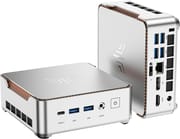
The silver chassis is about five inches square and under two inches tall, and it weighs under two pounds, so moving it between a desk and a living room is a one-hand job. USB 3.2 ports, the USB-C port, and the headphone jack sit on the front. The display outputs, the remaining USB ports, and gigabit Ethernet sit on the back, including four more USB-A ports for six in total. KAMRUI includes a VESA mounting bracket in the box, which lets the unit hang behind a compatible monitor instead of occupying desk space.
The AMD Ryzen 3 4300U runs four Zen 2 cores at up to 3.7GHz. It handles office applications, a browser full of tabs, video conferencing, and 4K media playback. The integrated AMD Radeon graphics with 5 compute units cover video acceleration and basic photo editing, while 3D games and video rendering need more capable hardware. Its PassMark score of approximately 7,335 sits above the Intel N100, N150, and N97 processors used in cheaper mini PCs. The Ryzen 3 7330U steps up to four Zen 3 cores and eight threads at up to 4.3GHz. The AMD Ryzen Embedded R2544 is an older Zen+ part with four cores and eight threads at up to 3.7GHz and Radeon Vega 8 graphics, with a PassMark score of about 7,851.
The Intel Core i5-12600H has 12 cores (4 performance and 8 efficiency) and 16 threads at up to 4.5GHz, with Intel Iris Xe graphics using 80 execution units. Its PassMark score of about 22,000 is roughly three times the 4300U’s. KAMRUI rates it at 45W. Ryan Mercer, who reviewed the 16GB/512GB build on his blog, reported that it finished extended OCCT stress testing with zero errors.
Every build has two M.2 2280 slots and no 2.5-inch drive bay. On the Ryzen 3 4300U build, one slot takes an NVMe (PCIe 3.0) or SATA drive and the other takes SATA, for up to 4TB combined. It ships with 8GB or 16GB of LPDDR4 at 3733MT/s, soldered in place, so the memory it ships with is the maximum. An earlier Ryzen 3 4300U build, which KAMRUI’s store first listed in February 2026, uses DDR4 in two SO-DIMM slots with a 64GB ceiling, so check the memory type before you buy one to upgrade. On the Core i5-12600H builds, one M.2 slot takes NVMe drives at PCIe 3.0 or 4.0 and the other takes NVMe or SATA, up to 2TB each, and their DDR4 runs at 3200MT/s in two SO-DIMM slots, up to 64GB. The Ryzen 3 7330U build also has two M.2 slots for up to 4TB, and KAMRUI lists its 16GB of LPDDR4X as the maximum. KAMRUI lists dual-band WiFi 5 on the Ryzen builds and WiFi 6 on the Core i5-12600H builds. The Ryzen 3 4300U build has Bluetooth 4.2, and every build has gigabit Ethernet. The Ryzen Embedded R2544 builds ship with 16GB of DDR4-2666 in two SO-DIMM slots that take up to 32GB, a 256GB or 512GB SATA SSD, one M.2 slot for SATA or NVMe (PCIe 3.0 x2) and one for NVMe (PCIe 3.0 x4), and six USB 3.2 Gen1 Type-A ports. KAMRUI lists Bluetooth 4.2 on them, though Juan Bagnell’s R2544 review unit (below) named Wi-Fi 6 and Bluetooth 4.
Reviewer Insights
Juan Bagnell
Juan Bagnell tested a review unit from KAMRUI with the Ryzen Embedded R2544, a single 16GB stick of DDR4, and a 512GB SSD, and said “I’m happy it’s one stick of 16 instead of two sticks of eight,” since that makes a 32GB upgrade cheaper. His spec rundown named Wi-Fi 6 and Bluetooth 4, while KAMRUI lists the R2544 builds with WiFi 5 and Bluetooth 4.2. Documents and larger spreadsheets ran well one program at a time, but the system got laggy during setup and updates, and “Editing 1080p video is really slow and a bit painful.” In Hades the frame rate drops were distracting, while 8-bit and 16-bit console emulation looked great. Bagnell put the chip roughly level with a 12th-gen Intel Core i3. Value was his main complaint: Core i5 mini PCs from about five years earlier cost about the same and were as fast or slightly faster, and spending 10 to 15% more today can buy a more capable system. That left him “a little torn on this,” because someone who bought an inexpensive system four or five years ago “might coast just fine on this.” His summary was “a computer that can do computer things”: a fit for driving several monitors with documents or video, but likely not for buyers with specific performance needs.
Customer Reviews
One verified Amazon buyer who uses it for web browsing, streaming, and light office work wrote that “Even under load, the fan makes minimal noise.”
Who the Pinova P2 suits
The Ryzen 3 4300U has more CPU headroom than the Intel Celeron, N100, and N150 chips in cheaper mini PCs. Quiet operation and the VESA bracket make any build workable in a living room or bedroom, where a noisy tower would not be.
Gamers chasing playable frame rates in modern titles, video editors, and 3D artists should look at something else. There is no OCuLink port, so adding an external GPU later is not an upgrade path; if graphics expansion is part of your plan, read up on which eGPU connectors work before picking a box. A mini PC with stronger integrated graphics, such as a Ryzen 7 with Radeon 780M, does that work better. To weigh those options side by side, check Starry Hope’s Mini PC Comparison Chart.
Frequently Asked Questions
Does the KAMRUI Pinova P2 come with Windows installed?
The Core i5-12600H builds ship with an operating system preinstalled, and Ryan Mercer’s 16GB/512GB review unit ran Windows 11 Pro. KAMRUI advertises the Ryzen 3 4300U build with Windows 11.
Can the KAMRUI Pinova P2 support three monitors at the same time?
Yes. The HDMI 2.0, DisplayPort 1.4, and USB-C outputs each drive a 4K display at 60Hz, and all three can run at once for a multi-monitor desk.
How much RAM and storage can I add to the KAMRUI Pinova P2?
On the Core i5-12600H builds, memory goes to 64GB of DDR4 across two SO-DIMM slots. The Ryzen 3 4300U builds come with 8GB or 16GB of soldered LPDDR4 that cannot be upgraded, and the Ryzen 3 7330U has 16GB of LPDDR4X, which KAMRUI lists as the maximum. The Ryzen Embedded R2544 builds take up to 32GB of DDR4 across two SO-DIMM slots. Storage runs to 4TB in total on every build, across two M.2 2280 slots; there is no 2.5-inch drive bay.
Is the KAMRUI Pinova P2 good for gaming?
Only for very light or older titles. The Ryzen builds use integrated AMD Radeon graphics, and the Core i5-12600H builds use Intel Iris Xe graphics with 80 execution units. Both run basic games and retro emulation, but modern 3D games will not play well. For gaming, a mini PC with stronger integrated graphics, such as a Ryzen 7 with Radeon 780M, is the better starting point.
Can I mount the KAMRUI Pinova P2 behind my monitor?
Yes. KAMRUI packs a VESA mounting bracket in the box, and at about 5 inches square and under 2 lbs the unit is light enough to hang off a VESA-compatible monitor with only the power and display cables visible.
How loud is the KAMRUI Pinova P2 during operation?
It has a fan, not a passive heatsink, but the noise stays low in typical use. One verified Amazon buyer wrote that “Even under load, the fan makes minimal noise.” On the Core i5-12600H builds, KAMRUI rates the chip at 45W.
What processor does the KAMRUI Pinova P2 use?
One of four processors. The original build uses the AMD Ryzen 3 4300U, a Zen 2 part with 4 cores and 4 threads and a boost clock up to 3.7GHz, with integrated AMD Radeon graphics using 5 compute units; that covers office work, web browsing, and media playback. A second build uses the AMD Ryzen 3 7330U, with 4 Zen 3 cores and 8 threads at up to 4.3GHz. A third uses the AMD Ryzen Embedded R2544, a Zen+ part with 4 cores and 8 threads at up to 3.7GHz and Radeon Vega 8 graphics. The top build uses the Intel Core i5-12600H, with 12 cores and 16 threads at up to 4.5GHz and Intel Iris Xe graphics.
Does the KAMRUI Pinova P2 support WiFi 6?
Yes on the Core i5-12600H builds, which KAMRUI lists with WiFi 6 (802.11ax). KAMRUI lists the Ryzen 3 4300U, Ryzen 3 7330U, and Ryzen Embedded R2544 builds with dual-band 802.11ac (WiFi 5), though a hands-on review of an R2544 unit named Wi-Fi 6 in its spec rundown. Every build also has Bluetooth and gigabit Ethernet.