
FIREBAT R3 Mini PC
Updated on

The FIREBAT R3 is a 0.68-liter Windows 11 mini PC measuring 5.04 by 5.08 by 1.61 inches and weighing 0.96 pounds. FIREBAT sells the chassis with two different AMD chips, and the two are far apart: the configuration listed on Amazon uses the Ryzen 3 4300U, a four-core, four-thread part AMD announced at CES on January 6, 2020, while the official R3 product page also lists a six-core, twelve-thread Ryzen 5 7430U version that has no Amazon listing. Both configurations carry 16GB of soldered LPDDR4, a 512GB M.2 drive with a second M.2 slot free, seven USB ports, gigabit Ethernet, Wi-Fi 6, and Bluetooth 5.2, and both can drive three 4K displays at 60Hz over HDMI 2.0, DisplayPort 1.4, and USB-C. FIREBAT’s packing list for the six-core build shows a VESA bracket, an HDMI cable, and a 19V/3.42A 65W adapter; the Amazon listing for the four-core configuration does not spell out what ships with it. Which chip is inside decides most of what this machine is worth, so read the configuration before anything else.
Pros and Cons
| Pros | Cons |
|---|---|
| Seven USB ports, six of them USB-A 3.x | Ryzen 3 4300U is a 4-core, 4-thread chip from early 2020 |
| Triple 4K at 60Hz over HDMI 2.0, DP 1.4, and USB-C | 16GB of LPDDR4 is soldered with no upgrade path |
| Two M.2 2280 slots, up to 2TB of storage total | One M.2 slot runs SATA only, so it cannot take a second NVMe drive |
| VESA mounting supported | Single gigabit Ethernet port, no 2.5GbE |
| 0.68 liters and under a pound | No USB4 or Thunderbolt, so no external GPU path |
| Wi-Fi 6 and Bluetooth 5.2 | Soldered 16GB LPDDR4 with no memory upgrade path |
Related Videos
FIREBAT R3 Mini PC Comparison Chart
 FIREBAT R3 Mini PC | FIREBAT R3 Mini PC | |
| Price | List Price: $369.00 Amazon Prices: Loading prices... | List Price: Amazon Prices: Loading prices... |
| Version | 16GB/512GB/Ryzen 3 4300U | 16GB/512GB/Ryzen 5 7430U |
| Performance Rating | 3.2 | 4.2 |
| Operating System | Windows 11 | Windows 11 |
| Processor | Quad-core 2.70 Ghz (max 3.70 Ghz) AMD Ryzen 3 4300U | Hexa-core 2.30 Ghz (max 4.30 Ghz) AMD Ryzen 5 7430U |
| GPU | Integrated AMD Radeon Graphics | Integrated Radeon RX Vega 7 Graphics |
| RAM | 16 GB LPDDR4 (16GB LPDDR4, soldered) | 16 GB LPDDR4 (16GB LPDDR4, soldered) |
| Internal Storage | 512 GB M.2 SSD | 512 GB M.2 SSD |
| Dimensions width x length x thickness | 5.04 x 5.08 x 1.61 inches (128.02 x 129.03 x 40.89 mm) | 5.04 x 5.08 x 1.61 inches (128.02 x 129.03 x 40.89 mm) |
| Weight | 0.96 lbs (0.44 kg) | 0.96 lbs (0.44 kg) |
| WiFi | Wi-Fi 6 (802.11ax) | Wi-Fi 6 (802.11ax) |
| Bluetooth | Bluetooth 5.2 | Bluetooth 5.2 |
| Ethernet | 1 Ethernet port at 1 Gbps | 1 Ethernet port at 1 Gbps |
| HDMI | 1 Full-Size HDMI Port | 1 Full-Size HDMI Port |
| DisplayPort | 1 DisplayPort (DP 1.4) | 1 DisplayPort (DP 1.4) |
| VGA | No VGA Ports | No VGA Ports |
| USB Ports | 6 USB 3, 1 USB-C 2x USB-A 3.2 Gen2, 4x USB-A 3.0, USB-C with video | 6 USB 3, 1 USB-C 2x USB-A 3.2 Gen2, 4x USB-A 3.0, USB-C with video |
| Thunderbolt Ports | No | No |
| OCuLink | No | No |
| Internal SATA Ports | No SATA ports | No SATA ports |
| Card Reader | No Card Reader | No Card Reader |
| Headphone Jack | combo | combo |
| Fanless | No | No |
| VESA Mount | Yes | Yes |
| In the Box | -- | Mini PC, 19V/3.42A 65W DC adapter and cable, VESA mount with screws, HDMI cable, user manual |
| Expandability | Storage only: two M.2 2280 slots (one SATA, one NVMe/SATA) up to 2TB total. Memory is soldered. | Storage only: two M.2 2280 slots (one SATA, one NVMe/SATA) up to 2TB total. Memory is soldered. |
Related Mini PCs
-
 ASUS NUC 14 EssentialThe ASUS NUC 14 Essential is a 0.56-liter mini PC with an Intel N150 or N97, one DDR5 SODIMM slot,…
 -
 KAMRUI Pinova P1The KAMRUI Pinova P1 is a five-inch mini PC sold with an AMD Ryzen 3 PRO 7330U, Ryzen 3 4300U, or…
 -
 KAMRUI Pinova P2 Mini PCThe KAMRUI Pinova P2 is a VESA-mountable mini PC sold with an AMD Ryzen 3 4300U, an AMD Ryzen 3…
 -
 DreamQuest Q5The DreamQuest Q5 is a compact mini PC with an Intel N95 processor, DDR5 memory, WiFi 6, and an…
 -
 FIREBAT AM02 (Ryzen 5 6600H)The FIREBAT AM02 is a compact Windows mini PC with a six-core AMD Ryzen 5 6600H, Radeon 660M…
 -
 ACEMAGIC Kron K1The ACEMAGIC Kron K1 pairs the AMD Ryzen Embedded R2544 with a compact 5-inch aluminum chassis,…
Seven USB ports and two M.2 slots around a four-thread 2020 chip

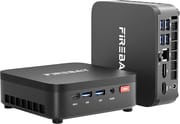
The chassis is a matte black square slab with ventilation slots down both sides and the FIREBAT wordmark printed on the top face. The front carries a USB-C 3.2 Gen2 port, two USB-A ports, a 3.5mm combo audio jack, and a power button. The rear holds four more USB-A ports, the gigabit RJ45 jack, DisplayPort 1.4, HDMI 2.0, and the barrel power input. FIREBAT counts the USB-A ports as two USB-A 3.2 Gen2 and four USB-A 3.0, which puts seven USB ports on a chassis with a footprint of about five inches square, with no USB 2.0 anywhere in the layout. The machine is fan-cooled and weighs 0.96 pounds.
The Amazon configuration ships the Ryzen 3 4300U. AMD’s own CES 2020 announcement lists it at four cores and four threads, a 15W cTDP, a 2.7 GHz base with a 3.7 GHz boost, and integrated Radeon graphics with five GPU cores. PassMark scores it at roughly 7,335 on CPU Mark. That is quicker than the Intel N150 at about 5,343 and the N100 at about 5,305, but it is a 2020 design competing in 2026, and it is less than half the roughly 15,985 that the Ryzen 5 7430U in the other R3 configuration scores. A background Windows update or a virus scan has nowhere to hide on four threads, so the thread count shapes daily use as much as the clock speed does.
FIREBAT’s bullet points claim the processor delivers 35 percent more CPU performance than the Ryzen 5 3500U, N150, N97, and N95 parts as a group. Against the Intel parts in that list it roughly holds, since the 4300U’s 7,335 CPU Mark is about 34 percent above the N150 and about 27 percent above the N97. Against the Ryzen 5 3500U, which PassMark scores at about 6,831, the gap is closer to 7 percent. The 35 percent figure is a best-case comparison against the slowest part in the list, and it does not apply across all four.
Memory is fixed for the life of the machine. The 16GB of LPDDR4 is soldered to the board, FIREBAT states plainly on both the retail listing and its own product page that it is not upgradeable, and the EVO Tech teardown of the six-core version confirms there is no SO-DIMM slot inside to work with. Storage is the one thing an owner can change. Two full-height M.2 2280 slots sit under the lid, one carrying the preinstalled 512GB drive. FIREBAT’s own product page rates the pair for 2TB of storage in total, though the Amazon listing claims up to 4TB combined, and both agree that one slot accepts NVMe or SATA drives while the other takes SATA only. A cheap SATA M.2 stick will work in the free slot, while a second NVMe drive may not, so check the slot before buying a drive.
Amazon’s specification table for this listing contradicts both the listing’s own bullet points and FIREBAT’s product page, so read the bullets instead. The table reports LPDDR5 memory in a SODIMM slot and a processor count of eight. The bullets on the same page, the Amazon title, and FIREBAT’s official R3 page all agree the memory is soldered LPDDR4 and the 4300U is a four-core, four-thread chip. AMD’s own launch specification settles it: four cores, four threads.
Reviewer Insights

EVO Tech
EVO Tech bought an R3 from AliExpress and tested it, but the unit he tested is the six-core configuration, not the four-core model listed on Amazon. His measurements and conclusions describe that build. “The processor that we have going on here is the Ryzen 5 7430U,” he says early on. “That is a 6 core, 12 thread Zen 3 part, essentially a 5600U.” He credits the thread count for how the machine held up during setup: “the difference between this and a system that has two cores and four threads is the fact that this is able to be used while the Windows update is running in the background,” which let him finish setting the system up without being bogged down.
On build, he was measured rather than enthusiastic: “it’s pretty much standard Firebat design in the sense that it is an all plastic design. There’s no metal or anything on the chassis, but it feels nice.” His teardown findings carry over to both configurations, since FIREBAT sells both chips in the same R3 shell. He opened it and reported that “you’ll notice that there are no RAM slots. It’s because the RAM is soldered on.” He was positive about the fan size: “this fan is big enough that the noise itself is actually not much of a problem at all, which is really something that cheaper, lower-end systems tend to struggle with.”
He made his verdict conditional on the price of the day. He noted mid-video that the market had shifted while he was filming and that a Ryzen 7 7735HS machine from the same brand had come down close enough to make the R3 a tougher sell, and he told viewers to compare the two live instead of taking his conclusion at face value. No independent hands-on test of the four-core Ryzen 3 4300U configuration has been published, so his measurements belong to the six-core build alone. For the Amazon build the specification fixes four threads, a soldered 16GB ceiling, one gigabit LAN port, and a SATA-only second M.2 slot.
A three-monitor desk box for browser and document work
The four-core version on Amazon fits a narrow job. If you want a small, quiet Windows box for a fixed desk, a classroom, a reception counter, or a media corner where the work is a browser, a document, and a video stream, it covers that, and the seven USB ports plus triple 4K output mean three monitors and a full set of peripherals attach without a hub. It takes a VESA bracket, so it can disappear behind a monitor, and the free M.2 slot means storage is not a dead end even though memory is.
Four threads is the ceiling here, so heavy multitasking, video work, and anything that keeps a background task running will feel it, and the soldered memory means a buyer cannot fix that later. The six-core R3 solves the thread problem but has no Amazon listing, which makes it awkward to buy and to return. Anyone who wants a 7430U with a normal retail buy path is better served by a machine built around it, such as the GEEKOM A5 (2025 Edition), and anyone who wants more graphics headroom from FIREBAT should look at the FIREBAT MI2, which runs a Ryzen 7 7735HS with replaceable DDR5 and a USB4 port. To weigh those against the rest of the field, use Starry Hope’s Mini PC Comparison Chart.
Frequently Asked Questions
What processor does the FIREBAT R3 use?
It depends on the configuration. The version sold on Amazon uses the AMD Ryzen 3 4300U, a four-core, four-thread chip AMD announced in January 2020 with a 2.7 GHz base, a 3.7 GHz boost, a 15W cTDP, and integrated Radeon graphics with five GPU cores. It scores roughly 7,335 on PassMark’s CPU Mark. FIREBAT also sells the same chassis with the six-core, twelve-thread Ryzen 5 7430U, which scores about 15,985, but that build is not listed on Amazon.
Can the RAM in the FIREBAT R3 be upgraded?
No. The 16GB of LPDDR4 is soldered to the board, and FIREBAT states on both the retail listing and its own product page that the memory is not removable. A teardown of the six-core version confirms there is no memory slot inside the chassis.
How much storage can the FIREBAT R3 hold?
FIREBAT’s own product page rates the two M.2 2280 slots for 2TB of storage in total, while the Amazon listing claims up to 4TB combined. A 512GB drive is preinstalled and the second slot is empty. The slots are not identical: one accepts either NVMe or SATA drives, while the other supports SATA only. Check which slot is free before buying a replacement drive.
Can the FIREBAT R3 run three monitors?
Yes. FIREBAT specifies independent output on three displays at 4K 60Hz using the HDMI 2.0 port, the DisplayPort 1.4 port, and the USB-C port together. All three video outputs are rated for 4K at 60Hz.
What ports does the FIREBAT R3 have?
The front has a USB-C 3.2 Gen2 port, two USB-A ports, a 3.5mm combo audio jack, and the power button. The rear has four more USB-A ports, a gigabit Ethernet jack, DisplayPort 1.4, HDMI 2.0, and the barrel power input. FIREBAT lists the USB-A ports as two USB-A 3.2 Gen2 and four USB-A 3.0, for seven USB ports in total. There is no USB4, no Thunderbolt, and no card reader.
Does the FIREBAT R3 have 2.5G Ethernet?
No. It has a single gigabit Ethernet port. There is no second LAN port and no 2.5GbE option, which rules it out as a router or firewall appliance. Wireless is Wi-Fi 6 with Bluetooth 5.2.
Is the FIREBAT R3 fanless?
No, it uses an active fan. In his teardown of the six-core version, EVO Tech noted that the fan is physically large for a machine this size and said the noise was not much of a problem, which he contrasted with the smaller, noisier fans in cheaper systems.
What comes in the box with the FIREBAT R3?
FIREBAT’s packing list is printed for the six-core Ryzen 5 7430U build, and it shows the mini PC, a 19V/3.42A 65W DC adapter with its cable, a user manual, a VESA mount with screws, and an HDMI cable. The Amazon listing for the four-core configuration does not itemize its accessories, so treat that list as the six-core build’s rather than a guarantee for the Amazon box.