
ASUS NUC 14 Essential
Updated on

The ASUS NUC 14 Essential is an Intel N150 mini PC in a chassis of 5.3 x 4.5 x 1.4 inches; ASUS also builds the same kit with the older Intel N97. The N150’s 6W TDP (12W for the N97) suits it to basic productivity, digital signage, and light home office work rather than throughput. A VESA bracket ships in the box, so the machine can hang behind a monitor instead of taking up desk space.
Pros and Cons
| Pros | Cons |
|---|---|
| 0.56L chassis mounts behind a monitor on the included VESA bracket | Limited to single SO-DIMM slot (max 16GB RAM) |
| Energy-efficient Intel N150 with 6W TDP | Low 3D graphics performance |
| Triple 4K output from HDMI 2.1, DisplayPort 1.4, and USB-C | Only one M.2 storage slot |
| 2.5G wired networking without a USB adapter | No SD card reader |
| Wi-Fi 6E and Bluetooth 5.3 on board, no add-in card needed | Not suitable for gaming or heavy workloads |
| 3-year warranty included | High DPC latencies flagged by NotebookCheck |
ASUS NUC 14 Essential Comparison Chart
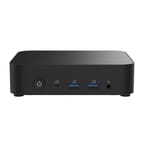 ASUS NUC 14 Essential | ASUS NUC 14 Essential | |
| Price | List Price: Amazon Prices: Loading prices... | List Price: $550.00 Amazon Prices: Loading prices... |
| Version | 16GB/512GB/Intel N150 | 8GB/256GB/Intel N97 |
| Performance Rating | 3.1 | 2.7 |
| Operating System | Windows 11 Pro | Windows 11 Pro |
| Processor | Quad-core 3.60 Ghz Intel Processor N150 | Quad-core 3.60 Ghz (max 3.60 Ghz) Intel Processor N97 |
| GPU | Integrated Intel UHD Graphics | Integrated Intel UHD Graphics |
| RAM | 16 GB DDR5 SO-DIMM | 8 GB DDR5 SO-DIMM |
| Internal Storage | 512 GB | 256 GB |
| Dimensions width x length x thickness | 4.53 x 5.31 x 1.42 inches (115.06 x 134.87 x 36.07 mm) | 4.53 x 5.31 x 1.42 inches (115.06 x 134.87 x 36.07 mm) |
| Weight | 1.04 lbs (0.47 kg) | 1.04 lbs (0.47 kg) |
| WiFi | Wi-Fi 6E (802.11ax) | Wi-Fi 6E (802.11ax) |
| Bluetooth | Bluetooth 5.3 | Bluetooth 5.3 |
| Ethernet | 1 Ethernet port at 2.5 Gbps | 1 Ethernet port at 2.5 Gbps |
| HDMI | 1 HDMI Port | 1 HDMI Port |
| DisplayPort | 1 DisplayPort (1x DP 1.4 port, plus 1x USB-C with DP 1.4 support) | 1 DisplayPort (1x DP 1.4 port, plus 1x USB-C with DP 1.4 support) |
| VGA | No VGA Ports | No VGA Ports |
| USB Ports | 1 USB 2.0, 4 USB 3, 2 USB-C 4x USB 3.2 Gen2 Type-A, 1x USB 2.0 Type-A, 2x USB 3.2 Gen2 Type-C (one with DisplayPort 1.4) | 1 USB 2.0, 4 USB 3, 2 USB-C 4x USB 3.2 Gen2 Type-A, 1x USB 2.0 Type-A, 2x USB 3.2 Gen2 Type-C (one with DisplayPort 1.4) |
| Thunderbolt Ports | No | No |
| OCuLink | No | No |
| Internal SATA Ports | No SATA ports | No SATA ports |
| Card Reader | No Card Reader | No Card Reader |
| Headphone Jack | combo | combo |
| Fanless | No | No |
| VESA Mount | Yes | Yes |
| In the Box | 65W AC Adapter with power cord, VESA bracket with screws, safety/regulatory documentation, warranty card | 65W AC Adapter with power cord, VESA bracket with screws, safety/regulatory documentation, warranty card |
| Expandability | 1x SO-DIMM DDR5-4800 slot (max 16GB), 1x M.2 2280/2242 slot (NVMe PCIe 3.0 x4 or SATA) | 1x SO-DIMM DDR5-4800 slot (max 16GB), 1x M.2 2280/2242 slot (NVMe PCIe 3.0 x4 or SATA) |
Related Mini PCs
-
 FIREBAT R3 Mini PCThe FIREBAT R3 is a 0.68-liter mini PC on AMD's Ryzen 3 4300U, with 16GB of soldered LPDDR4, two…
 -
 KAMRUI Pinova P1The KAMRUI Pinova P1 is a five-inch mini PC sold with an AMD Ryzen 3 PRO 7330U, Ryzen 3 4300U, or…
 -
 KAMRUI Pinova P2 Mini PCThe KAMRUI Pinova P2 is a VESA-mountable mini PC sold with an AMD Ryzen 3 4300U, an AMD Ryzen 3…
 -
 DreamQuest Q5The DreamQuest Q5 is a compact mini PC with an Intel N95 processor, DDR5 memory, WiFi 6, and an…
 -
 ACEMAGIC Kron K1The ACEMAGIC Kron K1 pairs the AMD Ryzen Embedded R2544 with a compact 5-inch aluminum chassis,…
 -
 Bmax B4 Plus 2025 (Intel N95)The 2025 Bmax B4 Plus is a palm-sized Windows 11 Pro desktop with an Intel N95, 12GB of soldered…
One RAM Slot, One M.2, and Seven USB Ports

At just over a pound (470 grams), the all-black chassis sits in one hand, and the bundled VESA bracket attaches it directly behind a monitor for an all-in-one-style setup. The case opens for access to the RAM and storage slots, though there is only one SO-DIMM slot and one M.2 slot inside. The ceiling is 16GB of DDR5-4800 RAM and up to 2TB of NVMe storage, which covers most office and home productivity work.
The Intel N150 runs at up to 3.6GHz across four cores with integrated Intel UHD Graphics. That covers web browsing, document editing, video streaming, and light photo editing, and it stops short of sustained rendering or game workloads. The 6W TDP keeps power draw and heat output low, which is what lets the small cooler stay on top of the chip.
Seven USB ports ring the chassis: four USB 3.2 Gen2 Type-A, one USB 2.0 Type-A, and two USB-C, one of which carries DisplayPort output. The dedicated HDMI 2.1 port and DisplayPort 1.4 port work alongside that USB-C video output for triple 4K display setups. Wired networking runs over a 2.5G port driven by a Realtek RTL8125BG-CG controller, and Intel Wi-Fi 6E AX211 with Bluetooth 5.3 handles wireless.
Reviewer Insights

Stable Case and Easy Upgrades, Held Back by DPC Latency
NotebookCheck tested the higher-end Core 3 N355 variant and rated the case construction, the upgrade access, and the quiet operation under load as its strengths, and the review came away with a positive overall verdict. NotebookCheck noted that “the Asus NUC 14 Essential offers a good total package for anyone looking for a small, quiet and energy-saving computer.” The same review flagged high DPC latencies, which could be a concern for audio production work, alongside the expected low 3D performance. NotebookCheck called the 36-month warranty a significant value-add compared to typical one-year warranties.
Barebones Value for Home Offices and Kiosks
Gadgets Middle East awarded the system an 8.5/10, praised the “great port selection” and “triple 4K display support,” and noted that “it’s a practical solution for home offices, schools, retail kiosks, and digital signage.” They rate the system perfectly capable for streaming, media consumption, and basic graphics tasks. Their caveats are that this isn’t suitable for heavy workloads or gaming, and that buyers need to be comfortable installing their own RAM and SSD in barebone versions.
Customer Reviews
Amazon buyer reviews are mixed. Mandy X, a verified buyer, wrote “Perfectly quiet, good build quality and easily upgraded to 32GB RAM and 1TB M.2 NVME” and reported running Home Assistant plus other VMs and containers “with no issues.” Several other verified reviewers echoed the size-and-quiet theme for office and home use, including one who called it “Super leise und flott für Büro und Internet” (very quiet and quick for office and internet).
Reliability complaints drive the low ratings. Verified buyer D. Wade Mayfield gave it four stars but flagged a hardware failure, writing “Started out nice but it started overheating and shutting down. It turns out the fan went bad the first month I had it.” A one-star verified review from GLOBAL SETUP reported “2 meses y ya no va, se reinicia constantemente” (two months and it no longer works, it restarts constantly), and another verified owner, JT, noted “Minor problems” with USB compatibility and hibernation. The sample behind those complaints is small at 13 ratings.
Low-Power Duty for Offices, Signage, and Always-On Services
A 6W TDP makes the N150 a practical candidate for a home server or self-hosted services around the clock without the electricity bill that a full desktop would carry, and the 2.5G Ethernet, Wi-Fi 6E, and triple 4K output give it more connectivity than the chassis size suggests.
The single RAM slot and modest processor hit their limits under heavy multitasking, video editing, or games. The pre-configured 16GB/512GB model ships with Windows 11 Pro installed.
Starry Hope’s Mini PC Comparison Chart puts its specs next to other compact systems.
Frequently Asked Questions
What is the difference between the ASUS NUC 14 Essential and NUC 14 Pro?
The Essential is the entry-level model, built around Intel N-series processors (N150, N250, N355, N97) for basic productivity and digital signage. The NUC 14 Pro carries Intel Core Ultra processors and Thunderbolt 4 connectivity for power users and professionals.
Can I upgrade the RAM in the ASUS NUC 14 Essential?
Yes, within one SO-DIMM slot that takes DDR5-4800 memory to a maximum of 16GB. The case opens easily for access to that slot, so a barebone unit is straightforward to populate. Pre-configured models typically come with 16GB already installed.
How many monitors can I connect to the ASUS NUC 14 Essential?
Three at once, from one HDMI 2.1 port, one DisplayPort 1.4 port, and one USB-C port with DisplayPort 1.4 support. All three outputs can drive 4K resolution displays.
Is the ASUS NUC 14 Essential fanless?
No, it includes an active cooling fan. NotebookCheck found it quiet under load, so it fits noise-sensitive rooms such as home offices and living rooms.
What operating systems does the ASUS NUC 14 Essential support?
Pre-configured models come with Windows 11 Pro installed. Barebone and kit versions support Windows 11, Red Hat Enterprise Linux, and Ubuntu 24.04 LTS. The system uses standard DDR5 SO-DIMM memory and M.2 NVMe storage, which the mainstream Linux kernels support.
Can I mount the ASUS NUC 14 Essential behind a monitor?
Yes, ASUS includes a VESA mounting bracket and screws in the box. At 5.3 x 4.5 x 1.4 inches (135 x 115 x 36mm) and just over a pound (470g), the case hangs off a VESA-compatible monitor and keeps the desk clear.
What is the warranty on the ASUS NUC 14 Essential?
Authorized sellers typically provide a 3-year global warranty, longer than the 1-year term that ships with many competing mini PCs.