
KAMRUI Pinova P1
Updated on

The KAMRUI Pinova P1 is a 5-inch-square office desktop that drives three displays, and the 16GB build with the AMD Ryzen 3 PRO 7330U is the one to buy. KAMRUI sells the same chassis with three chips. The Ryzen 3 PRO 7330U has Zen 3 cores and comes in 8GB/256GB and 16GB/256GB configurations. The Ryzen 3 4300U (Zen 2, four cores without SMT) and the Ryzen Embedded R2544 (Zen+) are older, and the 7330U has roughly 30 to 60 percent more multi-core throughput than either. Every build runs Office, browsing, and video calls, and plays 4K video on up to three monitors.
Pros and Cons
| Pros | Cons |
|---|---|
| Triple 4K 60Hz display output via HDMI, DP, and USB-C | The R2544 build uses the older Zen+ architecture |
| Ryzen 3 PRO 7330U build scores about 12,006 on PassMark CPU Mark, against about 7,851 for the R2544 | WiFi 5 and Bluetooth 4.2 are dated wireless standards |
| Dual M.2 2280 storage slots with up to 4TB capacity | The R2544 build ships with one memory stick, so it runs single-channel until a second is added |
| Included VESA bracket hides the 5-inch chassis behind a monitor | Not suitable for gaming beyond very light or older titles |
| Seven USB ports, with a display-capable USB-C on the front | The 8GB 7330U build has half the memory of the other configurations |
| Gigabit Ethernet alongside dual-band WiFi 5 | Most builds ship with 256GB or 512GB, so a large library needs a second SSD |
Related Videos
KAMRUI Pinova P1 Comparison Chart
7 configurations
| Configuration | Processor | RAM | Storage | GPU | List price | Amazon price | Compare |
|---|---|---|---|---|---|---|---|
| 16GB/256GB/Ryzen Embedded R2544 | Ryzen Embedded R2544 | 16 GB | 256 GB SSD | Radeon RX Vega8 Graphics | $399.99 | Details
| |
| 16GB/512GB/Ryzen Embedded R2544 | Ryzen Embedded R2544 | 16 GB | 512 GB SSD | Radeon RX Vega8 Graphics | $499.99 | Details
| |
| 16GB/256GB/Ryzen 3 PRO 7330U | Ryzen 3 PRO 7330U | 16 GB | 256 GB SSD | AMD Radeon Graphics | $380.00 | Loading... | Details
|
| 8GB/256GB/Ryzen 3 PRO 7330U | Ryzen 3 PRO 7330U | 8 GB | 256 GB SSD | AMD Radeon Graphics | $430.00 | Loading... | Details
|
| 16GB/256GB/Ryzen 3 4300U | Ryzen 3 4300U | 16 GB | 256 GB SSD | AMD Radeon Graphics | $359.99 | Details
| |
| 16GB/512GB/Ryzen 3 4300U | Ryzen 3 4300U | 16 GB | 512 GB SSD | AMD Radeon Graphics | $499.99 | Loading... | Details
|
| 16GB/1TB/Ryzen 3 4300U | Ryzen 3 4300U | 16 GB | 1 TB SSD | AMD Radeon Graphics | $379.99 | Details
|
Specs shared by every configuration
| Operating System | Windows 11 Pro |
|---|---|
| Dimensions width x length x thickness | 5.04 x 5.04 x 2 inches (128.02 x 128.02 x 50.8 mm) |
| Weight | 1.79 lbs (0.81 kg) |
| WiFi | Wi-Fi 5 (802.11ac) |
| Bluetooth | Bluetooth 4.2 |
| Ethernet | 1 Ethernet port at 1 Gbps |
| HDMI | 1 Full-Size HDMI Port |
| DisplayPort | 1 DisplayPort |
| VGA | No VGA Ports |
| Thunderbolt Ports | No |
| OCuLink | No |
| Internal SATA Ports | No SATA ports |
| Card Reader | No Card Reader |
| Headphone Jack | combo |
| Fanless | No |
| VESA Mount | Yes |
| In the Box | KAMRUI Pinova P1 Mini PC, power adapter, HDMI cable, VESA mounting bracket with screws, user manual |
Related Mini PCs
-
 KAMRUI Pinova P2 Mini PCThe KAMRUI Pinova P2 is a VESA-mountable mini PC sold with an AMD Ryzen 3 4300U, an AMD Ryzen 3…
 -
 KAMRUI AK1PLUS (Intel N5030 / N5095)The N5030 and N5095 builds of the KAMRUI AK1PLUS pair an older Pentium Silver or Celeron chip with…
 -
 ASUS NUC 14 EssentialThe ASUS NUC 14 Essential is a 0.56-liter mini PC with an Intel N150 or N97, one DDR5 SODIMM slot,…
 -
 FIREBAT R3 Mini PCThe FIREBAT R3 is a 0.68-liter mini PC on AMD's Ryzen 3 4300U, with 16GB of soldered LPDDR4, two…
 -
 DreamQuest Q5The DreamQuest Q5 is a compact mini PC with an Intel N95 processor, DDR5 memory, WiFi 6, and an…
 -
 ACEMAGIC Kron K1The ACEMAGIC Kron K1 pairs the AMD Ryzen Embedded R2544 with a compact 5-inch aluminum chassis,…
Seven USB ports and two M.2 slots in a 5-inch chassis

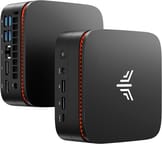
The KAMRUI Pinova P1 measures 5.04 x 5.04 x 2.0 inches and weighs 1.79 pounds, small enough to disappear behind a monitor on the included VESA bracket. The plastic chassis carries orange ventilation grilles. Two USB-A ports, one USB-C port with display output, a 3.5mm combo audio jack, and the power button sit on the front panel. The rear adds four more USB-A ports, HDMI 2.0, DisplayPort 1.4, Gigabit Ethernet, and the DC power input. On the R2544 build, four of the USB-A ports are USB 3.2 Gen 2 and two are USB 2.0; KAMRUI lists all six as USB 3.2 on the 7330U and 4300U builds.
The AMD Ryzen Embedded R2544 is a quad-core, eight-thread Zen+ processor with a base clock of 3.35 GHz and boost up to 3.7 GHz. Its PassMark CPU Mark score of approximately 7,851 gives it enough throughput for web browsing, Microsoft Office, email, and video streaming. The integrated Radeon Vega 8 graphics decode 4K video in hardware, so Netflix and YouTube play back smoothly at high resolutions. A dozen browser tabs alongside a few office applications stay workable, while video editing or very large spreadsheets run into the limits of the chip.
The Ryzen 3 PRO 7330U is also a quad-core, eight-thread chip, but on Zen 3 cores with an 8MB L3 cache, a 2.3 GHz base clock, and a 4.3 GHz boost. PassMark scores it at about 12,006, roughly 30 to 50 percent above the R2544’s multi-core result depending on the sample, and the higher boost clock helps single-threaded work such as page loads and spreadsheet recalculation. AMD rates it for dual-channel DDR4-3200 and up to 64GB of memory. The 8GB configuration is the one to skip for a heavy browser and Office workload; the 16GB configuration leaves room for the same multitasking the R2544 build handles, with more processor headroom behind it.
The Ryzen 3 4300U is a four-core, four-thread Zen 2 chip that boosts to 3.7 GHz and scores about 7,335 on PassMark, close to the R2544. It lacks simultaneous multithreading, so it has half the threads of the other two chips. KAMRUI sells it in 16GB/256GB, 16GB/512GB, and 16GB/1TB configurations, and the 1TB configuration is the largest SSD any P1 build ships with.
Wireless is dual-band WiFi 5 (802.11ac) on 2.4 GHz and 5 GHz; with no WiFi 6, a newer router’s extra headroom goes unused. Bluetooth 4.2 connects keyboards, mice, and headphones, and a single Gigabit Ethernet port covers wired networking. Storage expands through the two M.2 2280 slots on the R2544 model, which take NVMe or SATA drives. Mini PC Review’s hands-on with this R2544 model lists up to 4TB total across the pair, with a drive of up to 2TB in each slot.
Which P1 build to buy
The 16GB Ryzen 3 PRO 7330U build has the most processor headroom. The 4300U and R2544 builds trail it by a wide margin on multi-core work, so they make sense only at a clearly lower price. Every build has WiFi 5 and Bluetooth 4.2; for WiFi 6 and Bluetooth 5.2 in a similar small box, compare the Intel N100 Beelink Mini S12 Pro. Our guide to Wildcat Lake mini PCs covers the newer Intel chips in the budget tier.
Our Mini PC Comparison Chart lists it next to other models.
Reviewer Insights
Tech Guy Beau
Tech Guy Beau opened up the Ryzen Embedded R2544 build of the Pinova P1 and tested it for noise, power draw, and storage speed. With a decibel meter next to the running machine, he said, “It’s supposed to be a quiet, cool, silent, low power machine. Not actually sure why I’m showing you the DB meter. There is no sound.” He traced the airflow in through the perimeter grille and out the top, noting the bottom vents are decorative, and measured idle power under 10 watts. He noted two configuration limits without treating either as a problem: the populated M.2 slot holds a SATA drive that tops out near 500 MB/s (“SATA totally fine. Still an SSD”), and the machine ships with a single removable memory stick, which he said leaves CPU performance on the table until a second stick makes it dual-channel. He placed it in the low-demand tier rather than the workstation tier: “You’re not going to be ripping Geekbench 5 or something on here, obviously… it’s a little box that you use to put under the TV.”
Frequently Asked Questions
What processor does the KAMRUI Pinova P1 use?
Three chips share the chassis. The R2544 build has the AMD Ryzen Embedded R2544 (four Zen+ cores, eight threads, 3.35 GHz base, 3.7 GHz boost, Radeon Vega 8 graphics), which PassMark scores at approximately 7,851. The 7330U build has the AMD Ryzen 3 PRO 7330U (four Zen 3 cores, eight threads, up to 4.3 GHz, Radeon Graphics) at about 12,006. The 4300U build has the AMD Ryzen 3 4300U (four Zen 2 cores, four threads, up to 3.7 GHz, Radeon Graphics) at about 7,335. Each handles office work, web browsing, and 4K playback.
Can I upgrade the RAM in the KAMRUI Pinova P1?
Yes. On the R2544 build, the 16GB of DDR4 ships as a single SO-DIMM with a second slot free, so a second stick adds capacity and dual-channel bandwidth. The Ryzen 3 PRO 7330U build ships with 8GB or 16GB of DDR4, and AMD rates that chip for up to 64GB. The Ryzen 3 4300U builds ship with 16GB.
What ports does the KAMRUI Pinova P1 have?
Seven USB ports: six Type-A and one USB-C with display capability. On the R2544 build, four of the Type-A ports are USB 3.2 Gen 2 and two are USB 2.0; the 7330U and 4300U builds list all six as USB 3.2. Video output runs over HDMI 2.0, DisplayPort 1.4, and that same USB-C port for triple 4K 60Hz monitor support. Gigabit Ethernet, a 3.5mm combo audio jack, and a DC power input are also present.
Can I add more storage to the KAMRUI Pinova P1?
Yes. Two M.2 2280 slots take NVMe or SATA SSDs up to a combined 4TB, according to Mini PC Review’s hands-on with the R2544 model. The shipped SSD (256GB, 512GB, or 1TB, depending on the build) sits in one slot, leaving the second free for whatever you add later.
How many monitors can the KAMRUI Pinova P1 support?
Three monitors run simultaneously at 4K 60Hz. The outputs are HDMI 2.0, DisplayPort 1.4, and the front USB-C port with display output capability.
Is the KAMRUI Pinova P1 good for gaming?
Only lightly. The integrated graphics on every build, Radeon Vega 8 with the R2544 or Radeon Graphics with the 4300U and 7330U, manage very light or older titles and will struggle with modern games. Buyers who want to game should look at a mini PC with a Ryzen 5 or Intel Core i5 instead. For a sense of what the other end of the mini PC gaming spectrum looks like, see our coverage of the NZXT H2 Mini PC.
What’s included in the box with the KAMRUI Pinova P1?
The box holds the mini PC, a power adapter, an HDMI cable, a VESA mounting bracket with screws, and a user manual. The bracket attaches the unit to the back of a compatible monitor for a space-saving setup.