
DreamQuest Q5
Updated on

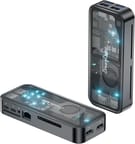
The DreamQuest Q5 is a budget mini PC built around Intel’s 12th Gen N95, with 12GB of LPDDR5 memory and a 512GB M.2 SSD inside a compact chassis with a glass top and an aluminum body. It is aimed at office work, media streaming, and light productivity. The memory is soldered, so the configuration you buy is the one you keep for the life of the machine.
Pros and cons
| Pros | Cons |
|---|---|
| DDR5 memory for improved performance | Soldered RAM is non-upgradeable |
| WiFi 6 and Bluetooth 5.3 connectivity | Single Ethernet port |
| Premium glass and aluminum construction | Fan noise can be noticeable under load |
| Dual HDMI 4K@60Hz output | SATA SSD may ship instead of advertised NVMe |
| Compact 5.45” x 5.45” footprint | Limited to 4 cores for heavy multitasking |
| VESA mount included | Not suitable for gaming or intensive work |
Related Videos
DreamQuest Q5 Comparison Chart
4 configurations
| Configuration | Storage | List price | Amazon price | Compare |
|---|---|---|---|---|
| 12GB/512GB Windows | 512 GB | $219.99 | Details
| |
| 12GB/1TB Windows | 1 TB | $299.99 | Details
| |
| 12GB/512GB Linux | 512 GB | $199 | Details
| |
| 12GB/1TB Linux | 1 TB | $299.99 | Details
|
Specs shared by every configuration
| Performance Rating | 2.8 |
|---|---|
| Operating System | Windows 11 Pro |
| Processor | Quad-core 3.40 Ghz (max 3.40 Ghz) Intel Processor N95 |
| GPU | Integrated Intel UHD Graphics |
| RAM | 12 GB |
| Dimensions width x length x thickness | 5.45 x 5.45 x 1.45 inches (138.43 x 138.43 x 36.83 mm) |
| Weight | 1.1 lbs (0.5 kg) |
| WiFi | Wi-Fi 6 (802.11ax) |
| Bluetooth | Bluetooth 5.3 |
| Ethernet | 1 Ethernet port at 1 Gbps |
| HDMI | 2 HDMI Ports |
| DisplayPort | No DisplayPort |
| VGA | No VGA Ports |
| USB Ports | 4 USB 3, 2 USB-C |
| Thunderbolt Ports | No |
| OCuLink | No |
| Internal SATA Ports | No SATA ports |
| Card Reader | microSD Card Reader |
| Headphone Jack | combo |
| Fanless | No |
| VESA Mount | Yes |
| In the Box | Mini PC, USB-C power adapter, HDMI cable, VESA mounting bracket, user manual |
| Expandability | 12GB LPDDR5 RAM (soldered, non-upgradeable), 1x M.2 2280 slot (NVMe supported) |
Related Mini PCs
-
 DreamQuest Mini PlusThe DreamQuest Mini Plus is a pocket-sized Intel N95 mini PC with 12GB of soldered DDR5, two…
 -
 ASUS NUC 14 EssentialThe ASUS NUC 14 Essential is a 0.56-liter mini PC with an Intel N150 or N97, one DDR5 SODIMM slot,…
 -
 Bmax B4 Plus 2025 (Intel N95)The 2025 Bmax B4 Plus is a palm-sized Windows 11 Pro desktop with an Intel N95, 12GB of soldered…
 -
 Bmax B4 PlusThe BMAX B4 Plus is an Intel N100 mini PC with a 2.5-inch SATA drive bay next to its M.2 slot, so a…
 -
 BOSGAME B100The BOSGAME B100 is a budget Intel N100 mini PC with 16GB of DDR4, a 512GB NVMe SSD, dual HDMI plus…
 -
 BOSGAME B95The BOSGAME B95 is a low-cost Intel N95 mini PC with 16GB of DDR4, a 512GB M.2 SSD, 2.5Gb Ethernet,…
Glass top, N95 silicon, and soldered memory

A transparent glass panel sits on top of the aluminum chassis. At 5.45 by 5.45 inches and under 1.5 inches thick, the box mounts behind a monitor on the included VESA bracket or tucks into a corner of a desk, and the build holds up well for a sub-$250 machine. The glass costs it in cooling, and Geek DK measured fan noise of 45-47 dB under load.
The Intel N95 handles web browsing, office applications, and 4K video playback, running up to 3.4GHz with Intel UHD graphics. Its 15W TDP puts video editing, 3D rendering, and anything past very casual games out of reach. The 12GB of LPDDR5 leaves room for a stack of browser tabs alongside a couple of open applications.
Ports run to two USB-C (one of them carries power), four USB 3.2 Type-A, two HDMI outputs at 4K 60Hz, and a microSD card reader. Wireless is WiFi 6 and Bluetooth 5.3. The single Gigabit Ethernet port covers a normal desk setup, though a home server build would want two. Storage expansion stops at the one M.2 2280 slot, and with the RAM soldered, what you buy is what you get.
Reviewer Insights

Geek DK’s Perspective
Geek DK offered a more critical assessment, focusing on the Q5’s premium aesthetics versus real-world performance. “The only reason I picked this up was due to its rather unique style. I don’t like everything else about it,” he stated. His teardown revealed concerning details including a SATA SSD installed in the NVMe slot and S.M.A.R.T. data suggesting the included drive may have been previously used. He measured fan noise at 45-47 dB under load, which he found intrusive. While acknowledging the 2.5G Ethernet and DDR5 RAM as positives, his verdict was that “there isn’t really a compelling reason to get this unless you are absolutely smitten by its design.”
LinuxLinks Analysis
According to LinuxLinks, the DreamQuest N95 series performs admirably as a Linux machine for home server or desktop use. Their Phoronix Test Suite benchmarks demonstrated that “the DreamQuest N95 puts in an admirable performance given that its CPU is a mere 15W TDP whereas the Xeon and HP i5-6500T machines are 105W TDP and 35W TDP respectively.” They particularly praised the system’s idle power consumption, noting it “draws the least power when idling” among all systems tested.
Must Have with Robert’s Perspective
Must Have with Robert took a more positive stance in their multi-product review and highlighted the Q5’s affordability for students and remote workers. “The DreamQuest Q5 Mini PC proves that you don’t have to spend a fortune to get reliable modern computing,” they noted. The reviewer praised the minimal boot times, quiet operation, and compact design that saves desk space. They highlighted the support for 4K triple display setups via the dual HDMI and dual USB-C ports as a notable feature for productivity users. They called it “better suited for light work” and questioned whether intensive computing is “what most people need anyway.”
A light-duty desktop for office work and streaming
The N95 keeps up with everyday software, the two HDMI outputs drive a pair of 4K displays at 60Hz, and WiFi 6 with Bluetooth 5.3 handles the wireless side without an adapter.
Gaming, video editing, and any sustained CPU load are out of scope. The soldered memory closes off upgrades, and Geek DK found a SATA SSD in the NVMe slot of his unit rather than the faster drive the spec sheet describes. Buyers who care more about speed per dollar than about the glass top can weigh the Beelink and GMKtec alternatives.
At $219.99, the design, the LPDDR5 memory, and the WiFi 6 radio are what the money buys. Starry Hope’s Mini PC Comparison Chart lists machines with similar specs side by side.
Frequently Asked Questions
Can I upgrade the RAM in the Q5?
No. The 12GB of LPDDR5 is soldered to the motherboard and cannot be replaced, so the 12GB has to cover everything you plan to run. With DRAM prices climbing significantly, the fixed memory is unlikely to become cheaper in a replacement unit anytime soon.
What type of storage does the Q5 support?
The single M.2 2280 slot takes NVMe and SATA drives, and the 512GB SSD it ships with can be swapped for a drive of up to 2TB. Geek DK found a SATA drive fitted in that slot on his unit instead of the faster NVMe type.
How many monitors can the DreamQuest Q5 support?
Two, through the pair of HDMI ports, each running 4K at 60Hz.
Is the Q5 good for gaming?
No. The Intel N95 and its integrated UHD graphics can run older or very casual games at low settings, but modern titles are beyond them. Office work, media streaming, and light productivity are the workloads this machine is built for.
How loud is the Q5?
It stays quiet through web browsing, office work, and other light tasks. Sustained load spins the fan up: Geek DK measured 45-47 dB in that state and found it intrusive.
Does the Q5 support VESA mounting?
Yes. A VESA bracket comes in the box, so the machine can hang off the back of a compatible monitor and free up the desk under it.
What makes the Q5 different from other DreamQuest mini PCs?
Against models like the DreamQuest Pro Plus, it carries DDR5 memory instead of DDR4, WiFi 6 instead of WiFi 5, and Bluetooth 5.3 instead of 4.2, and it wears the glass top over an aluminum chassis.