
DreamQuest Mini Plus
Updated on

The DreamQuest Mini Plus is a palm-sized mini PC, sold with Windows 11 Pro, built around Intel’s N95, with 12GB of DDR5 memory soldered to the board and a single M.2 2280 SSD. At 5.7 by 2.4 by 0.87 inches it is closer in shape to a large phone than to the cube-shaped boxes most of this brand’s other models use, and the smoked translucent top panel leaves the board and the blower fan partly visible. DreamQuest is a white-label brand that sells the Mini Plus through its own online store. In a hands-on test by the YouTube channel jOhnZoid, older games ran well, recent 3D games ran at 9 to 13 frames per second on low settings, and the CPU reached 98C and shut down once.
Pros and cons
| Pros | Cons |
|---|---|
| Two full-function USB-C ports with DP Alt Mode and power in or out | 12GB of DDR5 is soldered at the maximum, with no upgrade path |
| Dual HDMI 2.0 plus USB-C video drives three 4K 60Hz displays | Weakest integrated graphics of the three Alder Lake-N chips DreamQuest ships |
| Four USB-A 3.2 ports at 10Gbps on a machine this size | Gigabit Ethernet only, no 2.5GbE |
| M.2 2280 slot takes a drive up to 2TB | Audible fan, and the CPU reached 98C and shut down once in a gaming test |
| Runs off a USB-C power adapter, so it travels easily | The touch power button is easy to brush, which shuts the machine off |
Related Videos
DreamQuest Mini Plus Comparison Chart
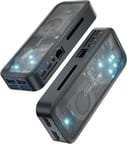 DreamQuest Mini Plus | DreamQuest Mini Plus | |
| Price | List Price: $269.99 Amazon Prices: | List Price: $339.99 Amazon Prices: |
| Version | 12GB/512GB | 12GB/1TB |
| Performance Rating | 2.8 | 2.8 |
| Operating System | Windows 11 Pro | Windows 11 Pro |
| Processor | Quad-core 3.40 Ghz (max 3.40 Ghz) Intel Processor N95 | Quad-core 3.40 Ghz (max 3.40 Ghz) Intel Processor N95 |
| GPU | Integrated Intel UHD Graphics | Integrated Intel UHD Graphics |
| RAM | 12 GB DDR5 (Soldered, 12GB maximum) | 12 GB DDR5 (Soldered, 12GB maximum) |
| Internal Storage | 512 GB M.2 NVMe SSD | 1 TB M.2 NVMe SSD |
| Dimensions width x length x thickness | 2.36 x 5.71 x 0.87 inches (59.94 x 145.03 x 22.1 mm) | 2.36 x 5.71 x 0.87 inches (59.94 x 145.03 x 22.1 mm) |
| Weight | unknown | unknown |
| WiFi | Wi-Fi 6 (802.11ax) | Wi-Fi 6 (802.11ax) |
| Bluetooth | Bluetooth 5.3 | Bluetooth 5.3 |
| Ethernet | 1 Ethernet port at 1 Gbps | 1 Ethernet port at 1 Gbps |
| HDMI | 2 HDMI 2.0 Ports | 2 HDMI 2.0 Ports |
| DisplayPort | DP Alt Mode via 2 USB-C (4K@60Hz) | DP Alt Mode via 2 USB-C (4K@60Hz) |
| VGA | No VGA Ports | No VGA Ports |
| USB Ports | 4 USB 3, 2 USB-C 4x USB-A 3.2 (10Gbps), 2x USB-C (10Gbps, DP Alt, power in/out) | 4 USB 3, 2 USB-C 4x USB-A 3.2 (10Gbps), 2x USB-C (10Gbps, DP Alt, power in/out) |
| Thunderbolt Ports | No | No |
| OCuLink | No | No |
| Internal SATA Ports | No SATA ports | No SATA ports |
| Card Reader | No Card Reader | No Card Reader |
| Headphone Jack | combo | combo |
| Fanless | No | No |
| VESA Mount | No | No |
| In the Box | Mini PC, USB-C power adapter, HDMI cable, user manual | Mini PC, USB-C power adapter, HDMI cable, user manual |
| Expandability | 12GB DDR5 soldered (no upgrade path), 1x M.2 2280 slot up to 2TB | 12GB DDR5 soldered (no upgrade path), 1x M.2 2280 slot up to 2TB |
Related Mini PCs
-
 DreamQuest Q5The DreamQuest Q5 is a compact mini PC with an Intel N95 processor, DDR5 memory, WiFi 6, and an…
 -
 DreamQuest Pro PlusThe DreamQuest Pro Plus is a budget Intel N100 mini PC with DDR4 (up to 32GB), two M.2 SSD slots…
 -
 Beelink EQ mini (Intel N150)A small Intel N150 desktop for office work and media, with 12GB of soldered LPDDR5, two M.2 slots,…
 -
 Beelink EQ14The Beelink EQ14 is a budget Intel N150 mini PC with 16GB of DDR4, two M.2 slots (up to 8TB), dual…
 -
 CHUWI LarkBox X (2023)The CHUWI LarkBox X (2023) is an ultra-compact Intel N100 mini PC with 12GB of soldered LPDDR5, a…
 -
 HIGOLE GOLE 2 PROThe HIGOLE GOLE 2 PRO is a Celeron N5095 mini PC with a built-in 5.5-inch touchscreen and battery,…
An N95 in a phone-sized slab
Four cores and four threads up to 3.4GHz in a 15W envelope, with Intel UHD graphics, is the entry-level Alder Lake-N specification. On CPU throughput the N95 is level with the two other Alder Lake-N chips DreamQuest ships: PassMark’s CPU Mark puts the N95 at 5,283, the N100 in the DreamQuest Pro Plus at 5,305, and the N150 in the DreamQuest Office Plus at 5,343. Graphics is where the N95 gives ground, with a G3D mark of 700 against 760 for the N100 and 850 for the N150. For web browsing, office documents, remote-desktop sessions and 4K video playback the three are interchangeable; for anything sustained, all three run out of headroom. The Pro Plus lists for less, so the two are worth comparing before ordering.
The 12GB of DDR5 is soldered, so the machine ships with all the memory it will ever have. Twelve gigabytes covers a browser with a stack of tabs plus a couple of applications; it does not leave room to grow into virtual machines or heavy multitasking later. The single M.2 2280 slot is the one part that can be changed, and it takes a replacement drive of up to 2TB in place of the shipped 512GB or 1TB.
Cooling is a small blower fan under the translucent panel. DreamQuest quotes a 25 to 40C operating range and 30 to 35dB of noise; those are the vendor’s figures, not measured ones. One Amazon buyer reported the fan running constantly and the chassis feeling warm in extended use.
Older games run well, newer 3D games struggle, and it runs hot
In his hands-on video, jOhnZoid bought the 512GB model and started with Unigine Heaven, which averaged 27 frames per second at 1920 by 1080 on low quality with tessellation off. The minimum was 7.7fps and the maximum 50.8fps. Half-Life 2 “runs really well on this mini PC at 50-plus frames per second,” and two 2D Steam games held 60fps at their default settings.
Steep managed “like 9 to 12 frames per second” on low settings, Shadow of the Tomb Raider was “barely getting by with like 13 frames per second” with “a huge lag” between input and screen, and Resident Evil 2 ran at “nine frames per second in low settings”. The older Mafia 2 “ran okay” at 20 to 30fps, though choppy in places, and Fortnite ran on its low preset. He came away “very surprised at what this mini PC could actually do considering it’s not a gaming PC at all.” He added: “I’m not making this video to tell anybody to go buy a mini PC as a gaming system,” though “if you need a workstation, it’s not a bad option.”
Left 4 Dead 2 took the CPU to 96C, and in Steep, “before I added the cooler, it was running at like 98 and it actually caused the computer just to shut down and restart.” He then ran it standing in a vertical laptop stand with a magnetic phone cooler attached, and noted that the extra cooling kept temperatures down but did not raise performance. The fan was audible once the machine was running: “you can definitely hear the fan purring pretty well.”
The power button is touch-sensitive, and he kept bumping it while filming and shutting the machine off. He called it “the design flaw of making the power button a touch control.” His advice is to place the box where it will not be touched by accident.
In his spec rundown he called the drive a 512GB SATA SSD. The box held a Windows 11 Pro recovery guide, and he called it Windows 11 Pro during setup, but in the same rundown he read out “64-bit Windows 11 IoT Enterprise,” so the edition on his unit is unclear.
Ports, displays and networking
The rear face carries the Gigabit Ethernet jack, a 3.5mm combo audio jack, and the two USB-C ports. Both USB-C ports are full-function: DreamQuest rates them at 10Gbps for data, with DisplayPort Alt Mode video and power in or out, so either one can take the supplied USB-C adapter and the other is free for a portable display. One short end of the chassis holds four USB-A 3.2 ports at 10Gbps, and the opposite end holds the two HDMI 2.0 outputs. Two HDMI plus one USB-C display gets to the advertised triple 4K 60Hz configuration.
Wireless is WiFi 6 and Bluetooth 5.3. Wired networking stops at a single Gigabit port, which is normal at this price but leaves the machine behind the 2.5GbE now common on N100 and N150 boxes. There is no microSD slot.
Customer Reviews
Buyers of the 1TB configuration praised the size and the port layout and complained about fan noise and price. Machi titled a review “Amazing little pocket sized PC” and travis wrote “Way better than expected!!!!”; Shane M. Roberts summed his up as “Perfect small pc”. Ryan Stockman was positive about the hardware itself and specific about the caveat: “Overall, the device is compact, functional, and easy to set up. The ports are well laid out, and the indicator lights aren’t too bright, which is a plus,” followed by “One thing to note is the cooling: the fan runs constantly, and you can feel some heat from the device, which might be a concern during long use.”
The buyer posting as Ray Ray called the N95 “pretty snappy little cpu for less than 25W computing power” but listed problems alongside it: “Seems lacking audio codec functionality even with K-Lite Codec?”, “HDMI out seems to have no volume control?” and “Bluetooth compatibility keyboard issues, alot of my newly purchased BT keyboard all failed.” His verdict on the price was blunt: “Seems too pricey, Im starting to regret this, maybe i bought this too soon.” Several N100 and N150 machines with upgradeable memory sell in the same price band.
Who this fits
At 0.87 inches thick and running entirely off a USB-C adapter, the Mini Plus packs easily, and two full-function Type-C ports is more than an N95 machine usually offers. It suits a travel desktop, a second machine for a spare monitor, or a small always-on box for remote work.
Twelve gigabytes of soldered DDR5 cannot be raised at all, which is the main argument against it, and the N95’s graphics are the weakest of the three Alder Lake-N chips in DreamQuest’s range. jOhnZoid’s test shows it handling older and 2D games but running hot under game loads. Buyers who want the same workloads with room to grow should compare the N150 and N100 boxes on Starry Hope’s Mini PC Comparison Chart before deciding.
Frequently Asked Questions
Can the RAM in the DreamQuest Mini Plus be upgraded?
No. The 12GB of DDR5 is soldered to the board, so the machine ships with all the memory it will ever have.
How many displays can the Mini Plus drive?
Three at 4K 60Hz, using the two HDMI 2.0 outputs plus DisplayPort Alt Mode over one of the USB-C ports.
Can the SSD be replaced?
Yes. There is a single M.2 2280 slot, and DreamQuest states it accepts a replacement drive of up to 2TB.
How is this different from the DreamQuest Q5?
Both use the Intel N95 with 12GB of memory, but they are different machines. The DreamQuest Q5 is a 5.45-inch aluminum cube with a glass top and an included VESA bracket. The Mini Plus is a 5.7 by 2.4 by 0.87 inch slab with a translucent panel, no VESA bracket, and USB-C power.
Can it run Linux?
DreamQuest says the machine supports Linux, Ubuntu and PXE boot alongside the Windows 11 Pro it ships with. jOhnZoid’s hands-on test covered Windows only.
Does the Mini Plus have a microSD slot?
No. The ports are Ethernet, audio, two USB-C, four USB-A and two HDMI.