
DreamQuest Pro Plus
Updated on

The DreamQuest Pro Plus is a budget mini PC built on Intel’s N100, a quad-core Alder Lake-N chip (up to 3.4 GHz) with Intel UHD graphics, pre-installed with Windows 11 Pro. It is aimed at home and office basics: web, documents, media playback, and home-server duty. At 5.45 x 5.45 x 1.53 inches and 1.1 pounds it takes little space, and it drives multiple monitors over its dual HDMI, DisplayPort, and USB-C outputs.
For a sub-$200 box its expansion is the draw: DDR4 upgradeable to 32GB, two M.2 SSD slots, and a 2.5-inch SATA bay, plus dual Gigabit Ethernet that makes it a reasonable home-server or firewall base. The N100’s limits are the obvious ones, so this is a light-workload machine, not a gaming or heavy-creative system.
| Pros | Cons |
|---|---|
| Compact and lightweight design, ideal for small spaces | Single-channel RAM configuration may limit performance for some tasks |
| Pre-installed Windows 11 Pro for out-of-the-box usability | Lacks a card reader for quick file transfers |
| Dual M.2 SSD slots and SATA support for extensive storage expandability | Limited to WiFi 5, which may not meet the needs of users requiring WiFi 6 |
| Multi-monitor support with 2x HDMI, 1x DisplayPort, and USB-C | Not fanless so that it may produce some noise during operation |
| Easy RAM upgrades up to 32GB | Requires technical knowledge for advanced Linux configurations |
| Multiple connectivity options, including 4 USB 3.0 ports and 2 Ethernet ports | No VESA mount support for attaching to monitors or walls |
| Reliable for everyday tasks and light workloads | Not designed for high-performance gaming or intensive applications |
DreamQuest Pro Plus Comparison Chart
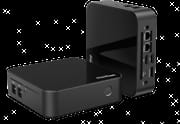 DreamQuest Pro Plus | |
| Price | List Price: $199.99 Amazon Prices: |
| Version | 16GB/512GB/Intel N100 |
| Performance Rating | 5.0 |
| Operating System | Windows 11 |
| Processor | Quad-core 3.40 Ghz (max 3.40 Ghz) Intel Processor N100 |
| GPU | Integrated Intel UHD Graphics |
| RAM | 16 GB |
| Internal Storage | 512 GB |
| Dimensions width x length x thickness | 5.45 x 5.45 x 1.53 inches (138.43 x 138.43 x 38.86 mm) |
| Weight | 1.1 lbs (0.5 kg) |
| WiFi | Wi-Fi 5 (802.11ac) |
| Bluetooth | Bluetooth 5.0 |
| Ethernet | 2 Ethernet ports at 1 Gbps |
| HDMI | 2 Full-Size HDMI Ports |
| DisplayPort | 1 DisplayPort |
| VGA | No VGA Ports |
| USB Ports | 4 USB 3, 1 USB-C |
| Thunderbolt Ports | No |
| OCuLink | No |
| Internal SATA Ports | 1 SATA port, includes 2.5" drive bay (Compatible with all 2.5" hard drives (SSD/HDD) not exceeding 7mm.) |
| Card Reader | No Card Reader |
| Headphone Jack | combo |
| Fanless | No |
| VESA Mount | No |
| In the Box | Mini PC, HDMI cable, power adapter, user manual. |
| Expandability | RAM expandable up to 32GB. Two M.2 SSD slots, each expandable up to 2TB. SATA interface supports 2.5" drives up to 2TB. |
Related Mini PCs
-
 DreamQuest Pro Mini PCThe DreamQuest Pro Mini PC is a budget Intel N95 box (16GB or 32GB RAM, 512GB or 1TB SSD) with dual…
 -
 Beelink EQ14The Beelink EQ14 is a budget Intel N150 mini PC with 16GB of DDR4, two M.2 slots (up to 8TB), dual…
 -
 BOSGAME E2The BOSGAME E2 is a budget mini PC with an AMD Ryzen 5 3550H (Radeon Vega 8), 16GB of DDR4 (to…
 -
 CHUWI LarkBox X (2023)The CHUWI LarkBox X (2023) is an ultra-compact Intel N100 mini PC with 12GB of soldered LPDDR5, a…
 -
 FREAPP M6GE
 -
 ACEMAGIC S1 Mini PCThe ACEMAGIC S1 is a compact Intel N95 mini PC with 16GB of DDR4, dual M.2 slots, dual gigabit…
Detailed features of the DreamQuest Pro Plus
Storage and networking are where the Pro Plus stands apart from cheaper N100 boxes. It has two M.2 SSD slots (each up to 2TB) plus a 2.5-inch SATA bay for an extra drive, so you can run a small NVMe boot drive alongside bulk storage. Pair that with the dual Gigabit Ethernet ports and it makes a credible home-server, NAS, or firewall base at the price.
The rest is standard entry-level N100 fare: DDR4 in a single SO-DIMM slot (upgradeable to 32GB), four USB 3.0 ports, a USB-C, dual HDMI, and a DisplayPort for multi-monitor work. Wireless is Wi-Fi 5 and Bluetooth 5.0, a step behind the Wi-Fi 6 found on many newer minis. It is not fanless; the active cooler keeps the 6W chip in check and stays quiet in normal use.
Reviewer Insights on the DreamQuest Pro Plus
The mainstream tech press has not put the DreamQuest Pro Plus through a test bench. As of mid-2026 there is no TechRadar, Tom’s Hardware, or NotebookCheck review of it; DreamQuest is a small white-label brand and its independent coverage is thin. The one substantive hands-on test comes from LinuxLinks, whose three-part series on the N100 unit links the exact US Amazon listing this page tracks. The reviewer ran the machine under Ubuntu 24.10 rather than the bundled Windows 11 Pro.
LinuxLinks measured the things that matter for a low-power box: heat, sustained clocks, and power draw. Under a full s-tui stress load they recorded the four cores “running at 52C,” crediting a revised heatsink and noting they were “testing a second version of the N100 machine which sports a vastly improved cooling system.” Clocks held up: with the balanced or performance profile enabled, the cores “run at 2900 MHz” under stress, dropping to 1600 MHz only in the power-saver profile. On the power side, the verdict was that both DreamQuest units tested were “extremely frugal even when they are pushed to their limits,” which fits the N100’s 6W design.
Performance landed where an N100 should. In a Linux kernel compile the reviewer called the result “mighty impressive for a CPU with a mere 6W TDP,” with the N100 beating an older HP i5-6500T desktop “by a significant margin,” and concluded the machine “will make a fine home server or as a desktop machine.” The weak spot was storage: the bundled drive was a slower SATA-class part sitting in an M.2 slot rather than a fast NVMe drive, well behind the storage in many other mini PCs. The reviewer also highlighted the dual gigabit ethernet as a real plus for anyone building a home server or firewall.
One thing to weigh in 2026: the Intel N100 is no longer new silicon. It launched in early 2023 in the Alder Lake-N family (four Gracemont efficiency cores, no hyperthreading), so the figures above describe a mature, heavily benchmarked budget chip rather than a current one. DreamQuest now also sells an N150 (Twin Lake) refresh built on the same chassis, so if you are choosing between configurations, the unit on this page is the older and cheaper N100 variant.
Customer Reviews of the DreamQuest Pro Plus
Across 39 ratings on Amazon, the DreamQuest Pro Plus averages 4.5 stars. The distribution is positive but not uniform: 79 percent of reviewers gave it five stars, while 10 percent left one star, so the experience splits between owners who got a solid unit and a few who hit hardware problems early. The recurring praise is value, size, and connectivity. Steve, a verified buyer, wrote that “it does everything that my old tower computer did, 5X faster, and 1/8 of the original cost,” and several owners single out the port selection (dual HDMI, DisplayPort, USB-C) and the upgradeable, non-soldered RAM. Ken, another verified buyer, ran Linux Mint across a multi-monitor setup and noted the two M.2 SATA slots plus an extra SATA mount as an upgrade over earlier models. A common minor gripe is port count for some workflows; Ellen P liked the machine but said it “does not have enough USB slots for my use.”
The negative reviews are worth taking seriously. Christopher M Boblitt, a verified buyer, reported a dead-on-arrival unit: “I opened the package and plugged the device in and it did not start.” A reviewer named mama bear started at one star after her first device failed to connect to a network roughly four and a half months in, then raised her rating to four stars after the seller worked with her almost daily and shipped a replacement, which she set up easily. So the sample includes both early hardware failures and a case where seller support resolved the problem.
Read more owner reviews on Amazon.
Who should consider the DreamQuest Pro Plus?
The Pro Plus fits a tight budget and light workloads: web, office, media, and home-server or NAS duty where the dual M.2 slots, SATA bay, and dual Gigabit Ethernet earn their keep. At around $200 it is a cheap way to replace a bulky tower for everyday tasks, and the non-soldered RAM and multiple drive slots leave room to grow.
It is the wrong machine for gaming beyond older titles, demanding creative work, or anyone who wants Wi-Fi 6 or fanless operation. Linux runs, but expect some manual setup for things like multi-monitor output. Note that DreamQuest is a small white-label brand and the listing is often out of stock; it also sells an N150 refresh on the same chassis. To compare other models, see Starry Hope’s Mini PC Comparison Tool.
Frequently Asked Questions
Can the RAM be upgraded on the DreamQuest Pro Plus?
The DreamQuest Pro Plus comes with 16GB of DDR4 RAM, but it is expandable up to 32 GB. The device uses a single-channel SODIMM slot, so you can easily swap out the existing module for a higher-capacity one if needed.
What kind of storage options does this Mini PC support?
The DreamQuest Pro Plus offers extensive storage expandability. It has two M.2 SSD slots, each capable of supporting up to 2TB of storage. Additionally, it includes a SATA interface that supports 2.5-inch drives (SSD or HDD) up to 2TB, provided they do not exceed 7mm in thickness. This makes it highly flexible for users with varying storage needs.
Does the DreamQuest Pro Plus support multiple monitors?
Yes, this Mini PC is designed for multi-monitor setups. It features two HDMI ports, one DisplayPort, and a USB-C port that can also be used for video output. This lets you connect up to four monitors simultaneously, making it a great choice for productivity or multitasking.
Is the DreamQuest Pro Plus compatible with Linux?
The DreamQuest Pro Plus is compatible with Linux, but some advanced configurations may be required for optimal performance. For example, users have reported upgrading the Linux kernel to resolve multi-monitor output issues. If you’re unfamiliar with Linux troubleshooting, stick with the pre-installed Windows 11 Pro.
Does the Mini PC come with a VESA mount?
No, the DreamQuest Pro Plus does not include VESA mount support. If you need to attach it to the back of a monitor or a wall, you may need to look for third-party mounting solutions or consider other Mini PCs with built-in VESA compatibility.
What’s included in the box?
The DreamQuest Pro Plus package includes the Mini PC, an HDMI cable, a power adapter, and a user manual.
Is the DreamQuest Pro Plus suitable for gaming?
While the DreamQuest Pro Plus is not designed for high-performance gaming, it can handle light gaming thanks to its Intel UHD Graphics. It’s best suited for older or less demanding games. For more intensive gaming, consider a Mini PC with a dedicated GPU.
Does the device have a fan, and is it noisy?
Yes, the DreamQuest Pro Plus is not fanless and uses active cooling to maintain performance. While it may produce some noise during operation, most users find it minimal and not disruptive during everyday use.